
Kindle for Windows 10 is a free application developed by Amazon that brings the popular e-reading experience to your Windows PC. This review delves into the features, benefits, drawbacks, and alternatives of this software, helping you determine if it’s the right e-reading solution for your needs.
Accessing a Vast Digital Library
Kindle for Windows 10 provides seamless access to Amazon’s extensive digital library, offering millions of books across various genres. Whether you’re seeking the latest bestseller, an obscure indie title, or a classic work of literature, the Kindle store offers a vast selection. The app’s intuitive search function allows you to quickly find books by author, title, genre, or keyword, making navigation effortless. For those seeking new reading material, the app offers personalized recommendations based on your reading history and preferences, suggesting titles you might enjoy. This personalized approach ensures a continuous stream of engaging reading material readily available.
One of the most attractive aspects of Kindle for Windows 10 is its affordability. E-books are often cheaper than their physical counterparts, and Amazon frequently offers free books and deals, making the platform even more accessible to readers. This makes it a cost-effective alternative to buying physical books, especially for avid readers who consume a large number of titles. The ability to borrow eligible Kindle books from friends further enhances the value proposition. The process is straightforward: simply send an invitation to your friend’s email address, granting them seven days to accept and fourteen days to read the book.

Features and Functionality
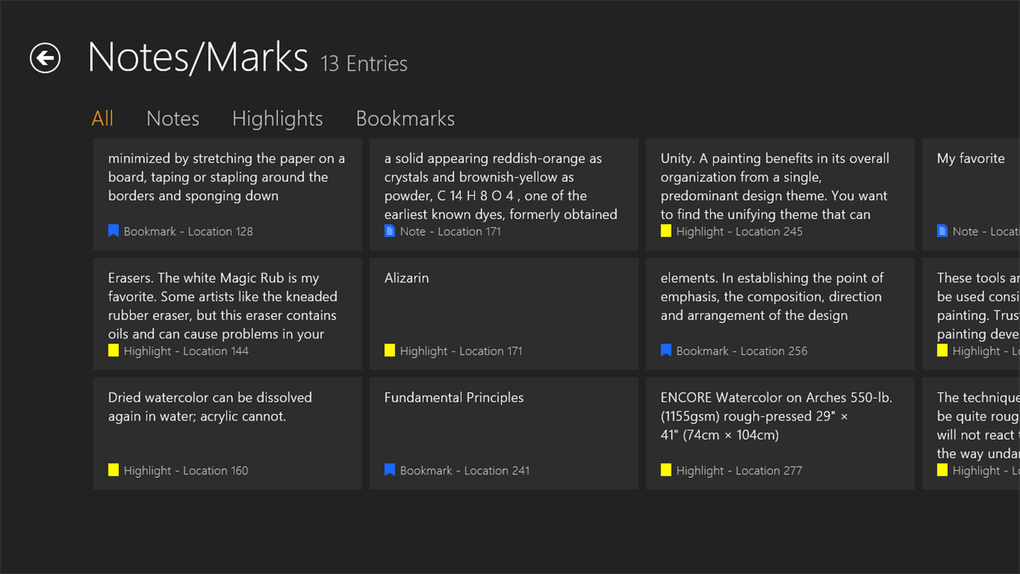
Kindle for Windows 10 offers a range of features designed to enhance the reading experience. Users can easily add bookmarks, highlight passages, and add notes directly within the text, facilitating easy referencing and review. These annotations sync seamlessly across all your devices, ensuring that your progress and notes are always accessible, regardless of the device you’re using. This seamless synchronization allows for uninterrupted reading, whether you’re switching between your PC, tablet, or dedicated Kindle reader. This synchronization is a significant advantage, preserving your reading position and annotations across multiple platforms.
The app’s interface is designed for ease of use. Navigation is intuitive, allowing users to quickly locate books within their library and adjust font sizes, brightness, and other reading settings. Customizable settings ensure a personalized reading experience. This accessibility feature is commendable, catering to diverse reading preferences and visual needs. Furthermore, the app’s clean and uncluttered interface minimizes distractions, allowing readers to fully immerse themselves in their chosen books. The focus on minimalist design prioritizes readability and user comfort, allowing a more enjoyable reading experience.
Offline Limitations and Portability
While Kindle for Windows 10 offers a comprehensive digital library and user-friendly features, it has some limitations. The app’s primary drawback is its lack of offline functionality. Users require a consistent internet connection to access their library, annotate their e-books, and download new titles. This reliance on an active internet connection limits its use in areas with poor connectivity or when offline reading is necessary. For readers who often travel or work in areas with limited or no internet access, this can be a significant limitation.
Portability is another area where Kindle for Windows 10 falls short. Unlike dedicated e-readers or mobile apps, the software is specifically designed for desktop PCs. While the seamless synchronization ensures your reading progress and annotations are accessible across devices, transferring your digital library directly to other platforms is less seamless. This restriction on portability contrasts with the flexibility offered by dedicated e-readers or mobile applications, which offer a more adaptable reading experience. This limitation in portability restricts the versatility of the Kindle for Windows 10 application.
Alternatives to Kindle for Windows 10
If the limitations of Kindle for Windows 10 are deal-breakers, several alternatives exist, each with its own set of strengths and weaknesses. Calibre, a free, open-source e-book reader, offers excellent offline capabilities and cross-platform compatibility. Its robust features allow users to manage and organize their e-book collections with ease, and it’s compatible with a wide range of e-book formats. Calibre stands out for its offline functionality and broader format support, providing a useful alternative for users seeking greater control over their digital library.
Other notable alternatives include Kobo and Nook, which offer dedicated e-reading applications with user-friendly interfaces. These applications often provide a more tailored experience, focusing solely on e-book reading and offering additional features like improved text rendering and personalized recommendations. These alternatives cater to those who prefer a more focused, dedicated e-reading experience. The choice between these alternatives and Kindle for Windows 10 ultimately depends on individual priorities and reading preferences.
User Reviews and Feedback
User reviews for Kindle for Windows 10 present a mixed bag. Some praise the app’s intuitive interface, seamless synchronization with other devices, and competitive pricing of e-books. Many appreciate the vast selection of titles available within the Amazon Kindle store. Positive feedback consistently highlights the ease of use and extensive library. These features make Kindle for Windows 10 a convenient and efficient e-reading platform for a significant number of users.
However, others criticize the app’s dependence on an internet connection and limited offline functionality. Some users also express frustration with the lack of advanced features and limitations in managing downloaded files. Negative feedback centers around the offline limitations and the relative lack of advanced features compared to some competing platforms. This negative feedback indicates areas for improvement and highlights the importance of offline functionality for some users.

The absence of offline capabilities and limitations in managing downloaded books are recurrent themes. These limitations significantly affect the convenience and flexibility of the application, diminishing the overall user experience. The negative reviews reveal a notable gap between user expectations and the software’s current limitations. These issues underscore the necessity for addressing these shortcomings in future updates.
Conclusion
Kindle for Windows 10 offers a convenient way to access Amazon’s vast e-book library on your PC. Its intuitive interface and seamless synchronization are attractive features. However, the lack of offline functionality and limited portability significantly restrict its appeal. Potential users should carefully weigh the benefits against the limitations before adopting it as their primary e-reading solution. If offline reading and cross-platform compatibility are priorities, exploring alternative e-book readers may be more suitable. Ultimately, the best choice depends on individual needs and preferences. Amazon’s commitment to improving its software could significantly enhance user experience in future versions.
File Information
- License: “Free”
- Version: “2.1.0.2”
- Latest update: “July 15, 2022”
- Platform: “Windows”
- OS: “Windows 8.1”
- Language: “English”
- Downloads: “198.5K”


