
The Microsoft Kinect for Windows SDK (Software Development Kit) stands as a pivotal tool in the history of human-computer interaction, representing a bold leap towards a more intuitive and immersive digital experience. Released commercially on February 1st, 2012, this SDK wasn’t just another piece of software; it was an invitation for developers to explore the frontiers of natural user interfaces, leveraging the revolutionary motion-sensing technology that had already captivated millions on the Xbox platform. At its core, the Kinect for Windows SDK transformed a gaming peripheral into a powerful development instrument, enabling a new generation of applications capable of understanding human movement, gestures, and voice.
Unlike typical consumer software, the Kinect for Windows SDK was designed exclusively for developers. Its primary purpose was to integrate Microsoft’s cutting-edge tracking technology into applications built using environments like Microsoft’s Visual Studio. Supporting C++, C#, and Visual Basic, the SDK provided unprecedented access to the raw data streams emanating from the Kinect’s array of sensors. This included depth data, color video, and audio inputs, alongside sophisticated skeletal tracking capabilities that could identify and follow the movements of up to two people simultaneously. This rich data opened up a world of possibilities, from creating entirely new gaming experiences to developing innovative tools for business, education, and accessibility.
The immediate success of Kinect on the Xbox, where users effortlessly navigated menus and controlled games with gestures and voice commands, hinted at its immense potential on the Windows operating system. Indeed, elements of the Windows 8 ‘Metro’ interface were conceived with Kinect-like interaction in mind, envisioning a future where users could interact with their PCs as naturally as they spoke or moved. The SDK provided the bridge for developers to make this vision a reality, offering sample code ‘walkthroughs’ and comprehensive documentation to guide them in implementing Kinect features into their applications. For anyone eager to experiment with and develop for Microsoft’s exciting movement tracking technology, the Kinect for Windows SDK became an indispensable resource, freely available for download and boasting regular updates to enhance its capabilities, as noted on platforms like PhanMemFree.org.
Development & IT: The Foundation for Innovation
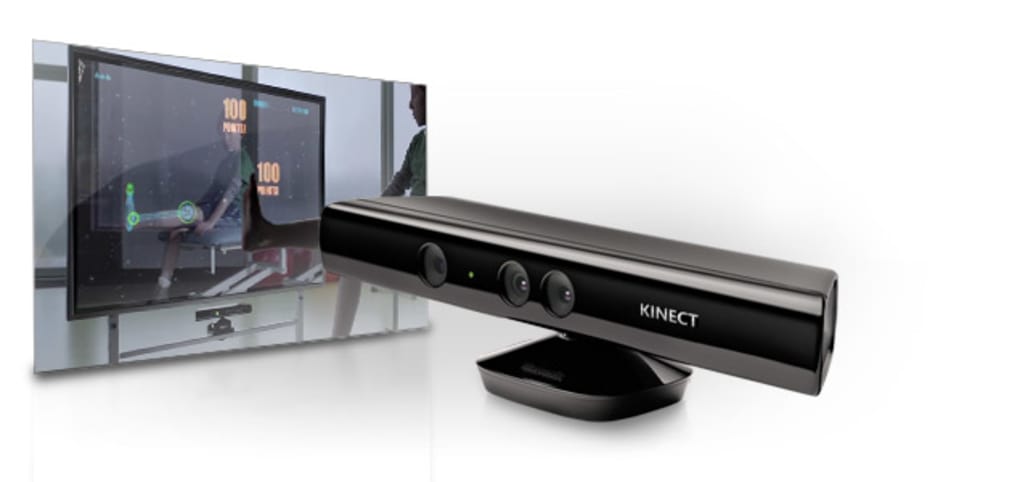
The Kinect for Windows SDK was a remarkable addition to the toolkit of any developer interested in natural user interfaces (NUI) and computer vision. Positioned firmly within the “Development & IT” category, it provided the essential bridge between the sophisticated hardware of the Kinect sensor and the creative potential of software applications. Its existence underscored Microsoft’s commitment to pushing the boundaries of how humans interact with technology, moving beyond the traditional mouse and keyboard paradigm.
Programming with the SDK
For developers, the SDK was a carefully crafted suite of libraries, APIs (Application Programming Interfaces), and documentation designed to make the complex task of integrating real-time human motion and voice recognition as straightforward as possible. The choice of supporting C++, C#, and Visual Basic was strategic, encompassing a wide array of Windows developers already familiar with the Microsoft ecosystem. This inclusivity meant that a broad community, from seasoned professionals to academic researchers, could readily dive into Kinect development.
The SDK was typically integrated with Microsoft Visual Studio, a comprehensive IDE (Integrated Development Environment) that provided all the necessary tools for coding, debugging, and deploying applications. Within this environment, developers could reference the Kinect SDK libraries, allowing their programs to communicate directly with the Kinect sensor. The SDK abstracted away much of the low-level hardware interaction, presenting developers with higher-level, more manageable data streams and functions. This design philosophy allowed developers to focus on the application logic and user experience rather than getting bogged down in intricate sensor physics.

A crucial aspect of the SDK’s developer-friendliness was the inclusion of extensive sample code and ‘walkthroughs.’ These practical examples demonstrated how to access different sensor streams, implement skeletal tracking, or integrate voice commands into an application. For instance, a sample might show how to display the depth map, capture a color image, or draw stick figures representing detected human skeletons on screen. Such resources were invaluable for quickly understanding the core concepts and jumpstarting development, significantly lowering the barrier to entry for a technology that was, at the time, quite novel. The fact that it was offered as a free license, version 2.0, with ongoing updates (the latest noted as March 19, 2024, by PhanMemFree) further democratized access to this powerful development platform.
Core Features and Capabilities
The power of the Kinect for Windows SDK lay in its ability to expose the rich data captured by the Kinect sensor in an accessible format. The sensor itself was a marvel of engineering, combining multiple components to perceive the world in three dimensions and understand human actions:
- Depth Sensor: This infrared emitter and CMOS sensor captured a 3D depth map of the environment, measuring the distance of objects from the sensor. The SDK provided access to this raw depth data, allowing applications to understand spatial relationships, detect obstacles, and segment the user from the background. This was fundamental for creating augmented reality experiences or interacting with virtual objects.
- RGB Camera: A traditional color camera provided a standard 2D video feed, enabling applications to display the user’s likeness, capture images, or integrate with conventional computer vision algorithms for tasks like facial recognition or object identification.
- Multi-Array Microphone: Equipped with multiple microphones, the Kinect could accurately localize sound sources and perform advanced audio processing, including noise suppression and echo cancellation. The SDK offered capabilities for speech recognition, allowing applications to respond to voice commands, and audio source localization, which could be used to direct attention to a speaking user.
- Skeletal Tracking: Perhaps the most iconic feature, skeletal tracking allowed the SDK to identify human figures and map 20 (or more, depending on the SDK version) distinct joints in real-time. This virtual “skeleton” provided precise data on body position, orientation, and movement, enabling applications to understand gestures, postures, and even complex actions. The ability to track up to two people simultaneously was a game-changer, fostering multi-user interactive experiences.
- Infrared Emitter: Beyond depth sensing, the IR emitter could also be used for advanced computer vision tasks, even in low-light conditions, by projecting an IR pattern.
The SDK provided robust APIs to access and manipulate all these data streams. Developers could subscribe to specific data feeds, process them in real-time, and build custom logic based on the detected human input. Whether it was programming a gesture-controlled menu, creating a virtual fitness trainer that monitored exercise form, or developing an interactive exhibit that responded to audience movement, the Kinect for Windows SDK provided the granular control and high-fidelity data necessary for truly innovative applications. Its relatively small size (289.21 MB) and compatibility with Windows 7 and newer systems made it a highly practical and accessible tool for a wide range of projects.
Diverse Applications: From Games to Business
The versatility of the Kinect for Windows SDK extended its influence far beyond its initial gaming roots. While the Xbox’s success showcased the entertainment potential, the SDK empowered developers to envision and create entirely new categories of applications, transforming industries and everyday interactions. The capabilities offered by Kinect—natural gesture control, voice recognition, and skeletal tracking—proved to be incredibly adaptable, finding homes in areas such as “Games,” “Productivity,” “Multimedia,” and even specialized “Education & Reference” tools.
Revolutionizing Games and Interactive Entertainment
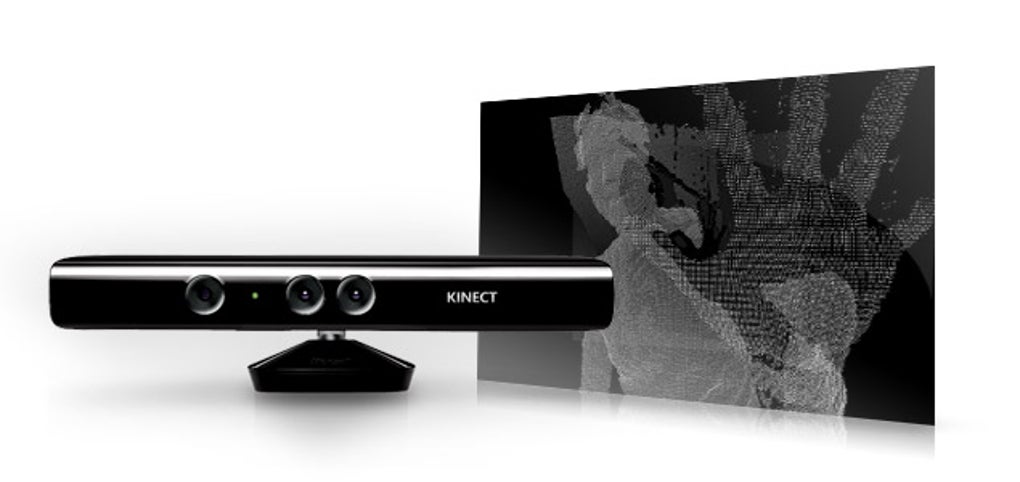
The most prominent and widely recognized application of Kinect technology was undoubtedly in gaming. On the Xbox, it offered a controller-free experience that opened up gaming to a broader audience, encouraging physical activity and social interaction. With the Kinect for Windows SDK, PC developers could tap into this revolutionary paradigm, bringing similar immersive and physically engaging experiences to the desktop:
- Gesture-Controlled PC Games: Imagine playing an action game where your character mimics your actual punches, kicks, or dodges, or an adventure game where you navigate virtual worlds by walking in place. The SDK enabled developers to map specific gestures to in-game actions, creating a deeply immersive layer of interaction. This went beyond simple button presses, demanding physical engagement and transforming gameplay into a full-body experience.
- Fitness and Sports Simulations: Kinect was a natural fit for fitness applications. The skeletal tracking capabilities allowed software to monitor a user’s exercise form, count repetitions, and provide real-time feedback, making virtual personal trainers a tangible reality. Sports simulations could become more realistic, with users performing actual swings or throws, enhancing both fun and physical benefits.
- Interactive Storytelling and Art Installations: Beyond traditional games, the SDK facilitated the creation of interactive narratives and digital art. Users could become part of the story, with their movements influencing plot progression or generating dynamic visual and audio effects. Public art installations could become responsive to passersby, creating unique, engaging experiences that blur the lines between observer and participant.
The gaming potential was a significant driver for many developers initially, eager to replicate the Xbox’s success on a more open and customizable platform. The “Games” category, as seen on many software repositories including PhanMemFree.org, would likely have included numerous titles and prototypes born from the Kinect for Windows SDK, spanning genres like “Action,” “Adventure,” “Arcade,” and “Sports.”
Enhancing Productivity and Business Operations
While gaming captured public imagination, the true long-term impact of the Kinect for Windows SDK in many ways lay in its ability to enhance “Productivity” and streamline “Business” operations. The concept of hands-free interaction held immense promise in environments where touch or traditional input devices were impractical or unhygienic:
- Touchless Interfaces for Healthcare: In operating rooms or sterile environments, doctors and nurses could navigate medical images, patient records, or surgical tools using gestures, without needing to touch contaminated keyboards or mice. This improved hygiene and efficiency. The SDK allowed for the creation of interfaces that responded to subtle hand movements, minimizing the need for physical contact.
- Industrial and Manufacturing Control: Workers on assembly lines or in heavy industry could control machinery, access schematics, or interact with digital checklists using gestures, keeping their hands free for tools or materials. This could significantly improve safety and operational flow, especially when wearing gloves that prevent fine motor interaction with touchscreens.
- Interactive Presentations and Retail Displays: Imagine a presenter controlling slides and engaging with 3D models using natural gestures, without being tethered to a podium. In retail, interactive displays could respond to customer movements, providing information or product demonstrations dynamically, creating a more engaging shopping experience.
- Accessibility Solutions: For individuals with limited mobility, Kinect offered new avenues for computer control. Gestures, head movements, or even voice commands could replace traditional input methods, making PCs more accessible and empowering users to interact with software in ways previously impossible.
- Project Management and Collaboration: Gesture-based interfaces could facilitate more natural interaction with project management software during meetings, allowing teams to manipulate diagrams, charts, and virtual whiteboards collaboratively and intuitively.
The SDK transformed the way businesses could conceive of human-computer interaction, enabling more efficient, safer, and more inclusive workflows across a myriad of sectors.
Innovative Multimedia and Educational Possibilities
The Kinect for Windows SDK also unlocked a wealth of opportunities within “Multimedia” and “Education & Reference,” allowing for the creation of highly interactive and engaging experiences that transcend passive consumption:
- Gesture-Controlled Media Playback: Users could control music players, video streaming services, or photo galleries with simple hand gestures, mimicking the actions of reaching out and grabbing, swiping, or pinching. This offered a fluid and natural way to navigate digital content from across a room.
- Interactive Storytelling and Virtual Environments: Beyond gaming, the SDK facilitated the development of interactive narratives where users could influence the plot or character interactions through their movements. In virtual environments, users could explore and interact with 3D models of historical sites, scientific phenomena, or architectural designs, offering a deeply immersive learning experience.
- Augmented Reality (AR) Applications: By combining the real-time video feed with depth information, developers could create AR applications where virtual objects seamlessly integrate with the user’s physical surroundings. Users could “try on” virtual clothes, interact with virtual pets in their living room, or visualize architectural plans overlaid onto existing spaces.
- Educational Tools and Simulations: The educational sector greatly benefited from Kinect’s interactive capabilities. Learning scientific concepts through hands-on simulations where students manipulate virtual objects with their bodies, or learning sign language through real-time gesture feedback, became possible. “Teaching & Training” applications could leverage skeletal tracking to provide feedback on physical activities or simulations.
- Digital Signage and Kiosks: Interactive digital signage in museums, airports, or public spaces could respond to passersby, offering personalized information or engaging content based on their presence and movements, making public displays more dynamic and user-centric.
By making complex human sensing technology accessible, the Kinect for Windows SDK fueled a wave of creative multimedia projects and educational tools that pushed the boundaries of engagement and interactivity.
Advanced Capabilities and the Future of AI
The Kinect for Windows SDK was more than just a tool for motion control; it was a sophisticated sensor platform that generated rich data streams critical for advanced computational tasks. Its ability to capture depth, color, and audio information in real-time placed it at the forefront of “AI” and computer vision research and application, long before these fields became as mainstream as they are today. The SDK provided the raw materials and foundational APIs for developers to delve into truly intelligent systems.
Leveraging AI and Computer Vision with Kinect
The core of what made Kinect so revolutionary was its underlying computer vision capabilities. The SDK provided access to processed data that already performed initial tasks like background segmentation and skeletal tracking. However, developers could also access the raw sensor data to implement their own custom AI and computer vision algorithms, pushing the boundaries of what was possible:
- Advanced Gesture Recognition: While the SDK provided basic skeletal tracking, AI allowed for the recognition of more complex, nuanced, or personalized gestures. Machine learning models could be trained on user-specific movements to create highly accurate and context-aware gesture commands, going beyond predefined poses.
- Human Activity Recognition: Beyond simple gestures, AI could be used to recognize broader human activities such as sitting, standing, walking, running, or even more complex actions like cooking or performing maintenance tasks. This had profound implications for monitoring elderly individuals, providing assistance in smart homes, or analyzing human behavior in various environments.
- Facial and Emotion Recognition: Although not a primary feature, the RGB camera combined with AI could be used for advanced facial recognition, identifying individuals, or even attempting to infer emotional states based on facial expressions. This could personalize interactions or provide valuable data in user experience research.
- Robotics and Human-Robot Interaction: The depth sensing and skeletal tracking capabilities of Kinect made it an excellent sensor for robotics. Robots equipped with Kinect could perceive their environment in 3D, understand human presence, and even mimic human movements or respond to gestures, leading to more natural and safer human-robot collaboration. This moved beyond simple remote control to true situational awareness for autonomous systems.
- Environmental Understanding and Scene Analysis: The depth data, combined with AI algorithms, could enable applications to build detailed 3D maps of environments, identify objects, and understand scene composition. This was valuable for indoor navigation, augmented reality overlay accuracy, and even assistive technologies for the visually impaired.
- Speech Recognition and Natural Language Processing (NLP) Enhancement: While the SDK offered basic speech recognition, integrating it with more advanced AI-driven NLP models could allow for more fluid, conversational interactions with applications, moving towards truly intelligent virtual assistants and command systems. The multi-array microphone also allowed for better speaker separation and noise reduction, improving the accuracy of any AI speech model.
By providing direct access to the rich sensory input from the Kinect, the SDK became a powerful experimental platform for researchers and developers in “AI” and computer vision. It allowed them to collect high-quality data on human motion and interaction, develop novel algorithms, and build intelligent systems that could interpret and respond to the physical world in increasingly sophisticated ways. The Kinect’s contribution to the fields of activity recognition, gesture detection, and 3D perception has left an indelible mark, influencing subsequent developments in consumer electronics, industrial automation, and cutting-edge artificial intelligence applications.
The Kinect for Windows SDK, in its free version 2.0, with ongoing updates, represented a democratizing force in the realm of advanced technology. It allowed a broad range of developers to experiment with and implement features that, just a few years prior, seemed like science fiction. Its legacy continues to resonate in the sophisticated sensor arrays and AI algorithms found in modern devices, underscoring its pivotal role in advancing natural user interfaces and intelligent computing.
Conclusion
The Kinect for Windows SDK was more than just a software package; it was a gateway to a future where human-computer interaction became intuitive, natural, and deeply engaging. From its roots in revolutionizing gaming on the Xbox, the SDK successfully transitioned this groundbreaking motion-sensing technology to the Windows platform, opening up a universe of possibilities for developers. Whether in “Development & IT,” creating new “Games,” boosting “Productivity” in business, crafting rich “Multimedia” experiences, or pushing the boundaries of “AI” and computer vision, Kinect’s capabilities proved profoundly versatile.
As a free tool for developers using C++, C#, or Visual Basic, the SDK provided unprecedented access to raw data streams from the Kinect’s depth, color, and audio sensors, alongside robust skeletal tracking for up to two people. Its integration with Visual Studio and comprehensive sample code made it accessible for a wide range of creators eager to experiment with natural user interfaces. The insights gained from using the Kinect for Windows SDK have undoubtedly influenced subsequent developments in touchless control, augmented reality, and intelligent systems, demonstrating the lasting impact of this pioneering technology.
Although the Kinect sensor itself has evolved and in some forms been retired from consumer markets, the principles and technologies it championed live on. The advancements in 3D sensing, gesture recognition, and human pose estimation, heavily influenced by Kinect, are now commonplace in various industries, from healthcare and retail to robotics and smart environments. The Kinect for Windows SDK, proudly offered by Microsoft and available for download on platforms like PhanMemFree.org (then Softonic.com), served as a crucial catalyst, empowering developers to dream bigger and build the foundations for an interactive digital world that truly understands and responds to human presence. It remains a landmark in the journey towards a more intuitive and immersive technological future.
File Information
- License: “Free”
- Latest update: “March 19, 2024”
- Platform: “Windows”
- OS: “Windows 7”
- Language: “English”
- Downloads: “2.6K”
- Size: “289.21 MB”


