Kinovea stands as a pivotal free software designed to elevate athletic performance through detailed video analysis. Tailored specifically for sports professionals, coaches, and anyone committed to refining their movement, Kinovea transforms standard video footage into a rich source of kinematic data. In an era where marginal gains can dictate success, this robust tool offers an unprecedented opportunity to dissect, understand, and ultimately perfect sports movements, providing the insights necessary to push physical capabilities to their zenith.
Developed as a dedicated video player, Kinovea goes far beyond simple playback. It’s an analytical powerhouse, enabling users to upload recordings of various sporting activities and scrutinize every nuance of performance. Whether it’s the intricate footwork of a dancer, the precise swing of a golfer, the biomechanics of a runner’s stride, or the technique of a weightlifter, Kinovea provides the tools to slow down action, measure angles, track trajectories, and compare performances with an analytical depth previously reserved for high-end, expensive solutions. This accessibility to advanced sports science tools makes it an invaluable asset for anyone serious about improving athletic skill and preventing injury.
Unlocking Athletic Potential with Kinovea: Core Features for In-Depth Analysis
At the heart of Kinovea’s appeal lies its sophisticated suite of analytical features, meticulously crafted to transform raw video data into actionable insights. The software empowers users to move beyond subjective observation, providing objective metrics that illuminate the biomechanical realities of performance.
The fundamental capability of Kinovea is its advanced video playback and manipulation. Users can easily import video files recorded from various devices, from smartphones to high-speed cameras. Once uploaded, the software allows for granular control over playback speed, including frame-by-frame advancement and variable slow-motion. This capability is crucial for isolating specific moments of action that occur too quickly for the naked eye to process in real-time. By slowing down a golf swing or a tennis serve, for instance, users can identify critical points of impact, acceleration, or deceleration, understanding precisely when and how force is generated or lost.
One of Kinovea’s most powerful features is its dual-pane comparison functionality. This allows users to view two distinct video clips simultaneously, side-by-side. This could involve comparing an athlete’s current performance against a previous attempt, a successful technique against a failed one, or even an athlete’s movement against that of an elite professional. The ability to synchronize these videos—either by specific event markers or by a shared timeline—enables direct, immediate visual feedback on differences in form, timing, or execution. Coaches can use this to demonstrate desired mechanics, while athletes can self-assess their adherence to coaching cues.
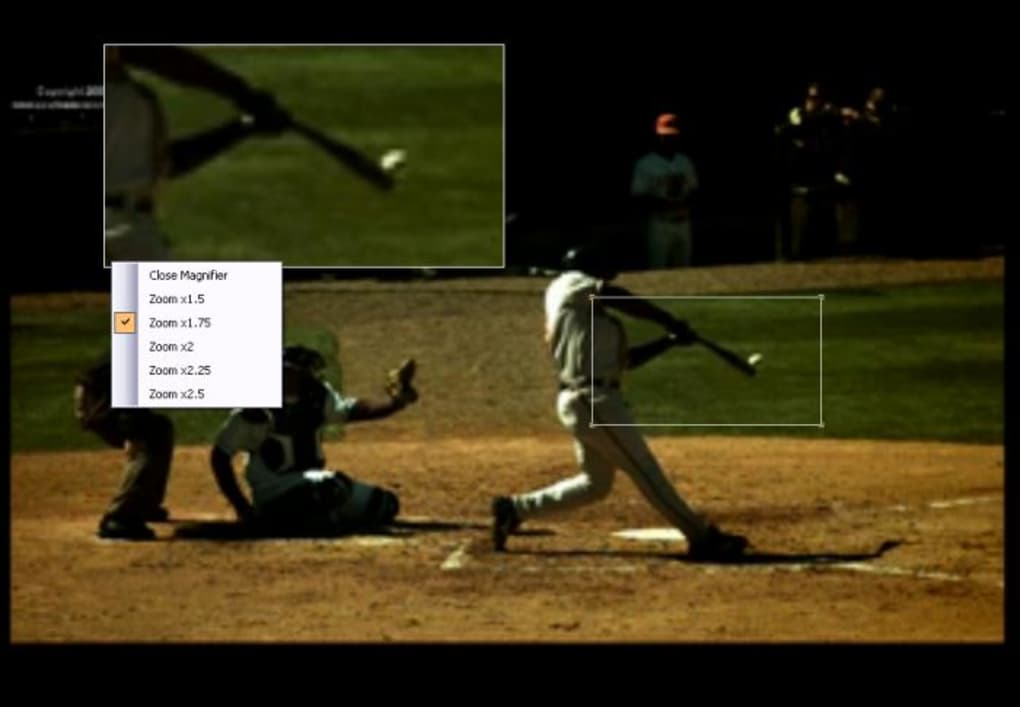
Beyond visual comparison, Kinovea truly shines in its quantitative analysis capabilities. The software offers a comprehensive array of graphical and tracking tools, transforming qualitative observations into empirical data. Users can draw lines, angles, and protractors directly onto the video frames to measure specific joint angles, body positions, or limb orientations at various stages of a movement. For example, a physiotherapist might measure the knee angle during a squat to ensure proper depth and technique, while a throwing coach could assess the elbow angle at ball release to optimize power.
The tracking feature is another cornerstone of Kinovea’s analytical power. By selecting a specific point on an athlete’s body or an object (like a ball), users can track its trajectory and movement over time. This generates kinematic data such as displacement, velocity, and acceleration graphs. Imagine tracking the center of gravity of a gymnast during a flip, or the speed of a sprinter’s foot contact. These graphs provide objective insights into momentum, force production, and efficiency, allowing for the identification of inconsistencies or areas for improvement that would be impossible to detect otherwise. The ability to overlay these graphs on the video or view them in a separate panel offers a multi-faceted approach to understanding movement dynamics.
Furthermore, Kinovea supports the addition of annotations, markers, and comments directly onto the video. This functionality is invaluable for creating detailed feedback loops. Coaches can highlight areas of concern, draw corrective lines, or add textual notes that guide the athlete toward better form. These annotated videos can then be saved and shared, serving as clear instructional aids or progress reports. The capacity to export both the raw data and the annotated videos means that the analysis can be integrated into broader training programs or shared with other specialists.
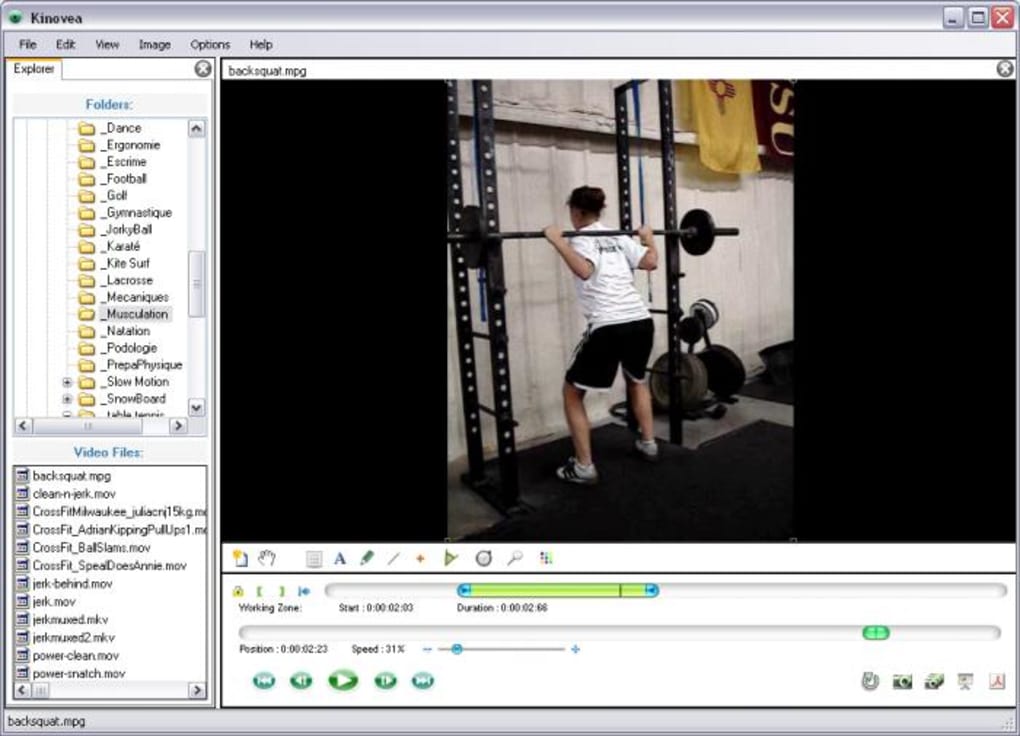
Kinovea also offers advanced timing features, allowing users to precisely measure the duration of specific phases within a movement, such as the contact time in running or the transition time between strokes in swimming. This level of temporal precision contributes significantly to understanding the rhythm and efficiency of complex actions. For athletes striving for micro-improvements, these timings can be a critical determinant of performance. By enabling users to dissect, quantify, and compare every aspect of athletic movement, Kinovea provides a powerful platform for continuous improvement, injury prevention, and the ultimate realization of an athlete’s full potential.
Kinovea in Practice: Who Benefits Most from This Free Software?
While its advanced features might suggest a niche audience, Kinovea’s utility spans a wide spectrum, catering to anyone with a vested interest in understanding and optimizing human movement. The phrase “Free Software for Sports Professionals” from its description accurately highlights its primary target, yet its accessibility makes it beneficial for many others.
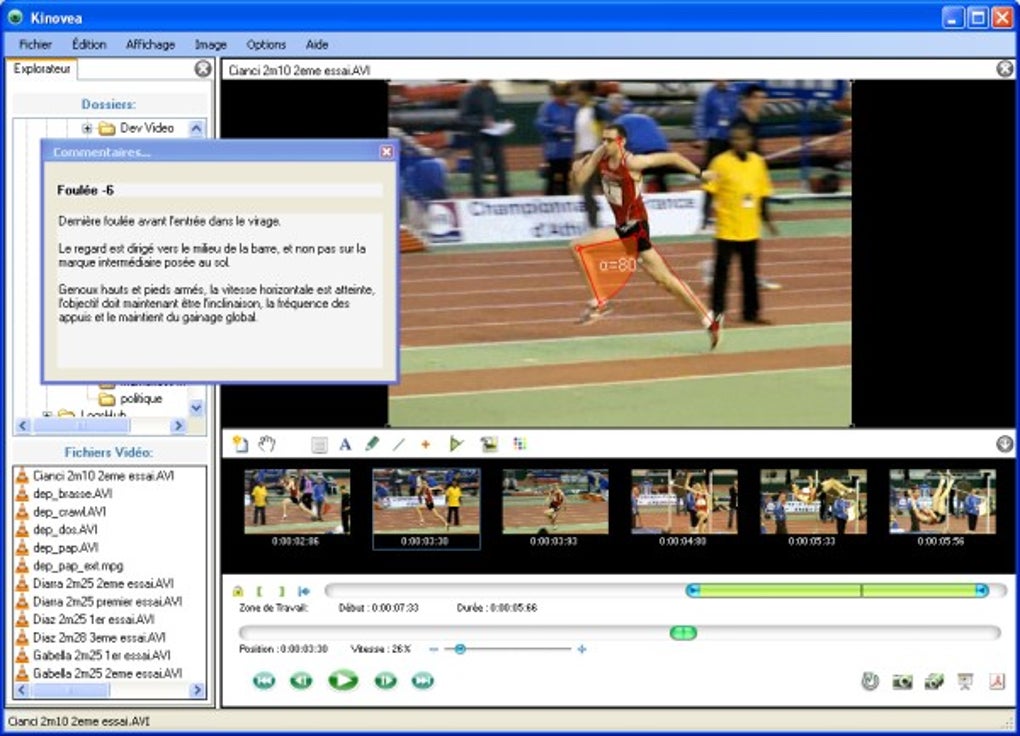
Sports Professionals and Coaches: This group forms the core demographic for Kinovea. Elite athletes, professional coaches, and sports scientists leverage the software to gain a competitive edge. A golf professional, as one user review points out, finds Kinovea invaluable for “client instructional feedback.” The ability to slow down a swing, analyze joint angles, and compare it to an ideal model provides concrete, visual evidence that resonates far more effectively than verbal instructions alone. Similarly, in sports like track and field, swimming, or gymnastics, coaches can pinpoint inefficiencies in technique, optimize force application, and refine execution by meticulously analyzing video footage. The graphical data on angles, velocities, and trajectories provides an objective basis for training adjustments, moving beyond subjective “feel” to data-driven improvement.
Physical Therapists and Rehabilitation Specialists: Beyond athletic performance, Kinovea is a powerful tool for analyzing human gait, posture, and movement patterns in a clinical context. Therapists can record patients performing exercises or daily activities and then analyze the biomechanics to identify compensatory movements, muscle imbalances, or restricted ranges of motion. The ability to measure specific joint angles and track movements helps in documenting progress, designing targeted rehabilitation programs, and providing patients with visual feedback on their recovery journey. It aids in ensuring proper form during therapeutic exercises, crucial for effective recovery and preventing re-injury.
Educators and Researchers: Sports science departments, biomechanics labs, and physical education programs can utilize Kinovea as an educational and research tool. Students can learn the principles of biomechanics by conducting their own analyses, while researchers can gather precise kinematic data for studies on athletic performance, injury mechanisms, or training efficacy. Its free nature makes it an ideal resource for institutions with limited budgets, offering powerful analytical capabilities without the financial barrier of proprietary software.
Amateur Athletes and Fitness Enthusiasts: While initially developed for professionals, the core functionality of Kinovea—uploading videos, slowing them down, and drawing on them—is intuitive enough for dedicated amateurs. A runner looking to improve their stride, a weightlifter wanting to check their form, or a yoga practitioner refining their poses can all benefit. By filming themselves and using Kinovea to self-assess, individuals can gain a deeper understanding of their body mechanics, leading to safer and more effective training. The learning curve for advanced features, particularly understanding the “special graphs,” can be “a little confusing at first,” as the description notes. However, for those willing to invest the time, the insights gained are substantial, transforming a casual approach to training into a more informed, analytical process.
Diverse Sporting Applications: The versatility of Kinovea extends across virtually any sport or activity involving movement.
- Golf: Analyzing swing plane, clubhead speed, body rotation, and weight transfer.
- Running/Cycling: Examining gait mechanics, pedal stroke efficiency, posture, and joint angles.
- Swimming: Breaking down stroke technique, body roll, hand entry, and kick mechanics.
- Team Sports (Basketball, Soccer, etc.): Assessing shooting form, passing technique, jumping mechanics, and agility drills.
- Gymnastics/Weightlifting: Scrutinizing complex movements for precision, balance, and optimal force application.
In essence, anyone seeking an objective, data-driven approach to understanding and improving physical performance, movement patterns, or rehabilitation progress will find Kinovea an exceptionally valuable, albeit initially challenging, free resource. Its power lies in democratizing access to high-level biomechanical analysis, making sophisticated performance insights available to a broader audience than ever before.
User Experience, Technical Specifications, and Community Insights
Understanding Kinovea from a practical standpoint involves looking at its operational details, its technical specifications, and, crucially, the feedback from its user community. While the software offers profound analytical capabilities, its implementation and overall user experience are critical factors for adoption and sustained use.
User Experience: Intuition vs. Complexity The general consensus regarding Kinovea’s user experience often balances its powerful features against a certain learning curve. On one hand, the software is lauded for being “quite intuitive to use” regarding its basic functions like video playback, slow-motion control, and even some graphic tools. For users primarily interested in visual comparison or simple measurements, getting started is relatively straightforward. The clean interface allows for easy navigation through video files and immediate access to primary analysis tools.
However, the advanced functionalities, particularly the “special graphs” for tracking and presenting progress, can indeed be “a little confusing at first,” as stated in the original description. These graphs represent complex kinematic data (velocity, acceleration, angles over time), which requires a foundational understanding of biomechanical principles to interpret accurately. New users might find themselves overwhelmed by the sheer volume of data and the specific terminology used in the graphs. This isn’t necessarily a flaw of the software but rather an inherent characteristic of sophisticated analytical tools. Overcoming this initial hurdle often requires dedicated effort, perhaps through online tutorials, documentation, or simply hands-on experimentation. Once mastered, however, these graphs unlock the software’s full potential, providing granular insights that simple visual observation cannot.
Technical Specifications and Availability Kinovea is developed specifically for the Windows operating system. As of the latest available information (Version 2023.1.23.9 or similar), it runs on Windows Vista and newer versions, making it compatible with a vast majority of active Windows computers. This Windows-only availability means users on macOS or Linux will need to explore virtualization options or alternative software.
The software is available in English as its primary language, but the PhanMemFree.org entry also indicates availability in numerous other languages, broadening its global reach and accessibility for non-English speakers. This localization effort is crucial for a tool that benefits from widespread adoption in diverse sports communities worldwide.
The download size for Kinovea is relatively small, approximately 19.77 MB, making it quick to download and install, even on slower internet connections. Its compact size also suggests that it is not overly demanding on system resources for basic operations, though processing high-resolution or high-frame-rate videos for extensive analysis will naturally require a more capable CPU and ample RAM.
Community Insights and Known Issues User reviews, while generally positive about Kinovea’s capabilities, highlight a few recurrent themes and potential pain points. The most significant, as noted by an anonymous user in February 2015, pertains to stability: “Would be great if it didn’t crash so easily during saving.. Nice tool but unfortunately it crashes easily when saving the end result vid.” The user offers a crucial tip: “after you hit save never go to another window before it’s done or it will crash, guaranteed!” This indicates a potential vulnerability during intensive operations like video rendering and saving, suggesting that users need to be “very mindful to avoid this.” While this feedback is dated, it underscores the importance of saving frequently and allowing the software to complete its tasks without interruption, especially when dealing with large or complex analysis projects. This type of feedback is invaluable for new users, offering practical advice to mitigate potential frustration.
Despite these occasional stability concerns, the overwhelming sentiment from users, particularly professionals like the golf instructor, is positive. They appreciate its power, its free nature, and its capacity to provide “excellent feedback support information.” The ability to observe athletes “in slow motion to check their form and posture under different shooting stages” remains a primary draw.
In summary, Kinovea offers a robust and feature-rich experience for video-based sports analysis on Windows. Its initial learning curve for advanced features is a worthwhile investment for the depth of insight it provides. While attention to operational details (like saving processes) might be necessary based on past user feedback, its overall value as a free, powerful analytical tool remains exceptionally high, fostering a dedicated community of users who leverage its capabilities to achieve higher standards in sports performance and rehabilitation.
The Verdict: Pros, Cons, and the Future of Performance Analysis
Kinovea has carved out a unique and indispensable niche in the world of sports science and athletic development. Its offering of sophisticated video analysis tools, traditionally confined to expensive proprietary software, as a free and accessible application, is a game-changer for coaches, athletes, and clinicians alike.
Pros:
- Free and Accessible: This is arguably Kinovea’s most compelling advantage. The fact that such a powerful suite of analytical tools comes at no financial cost democratizes access to high-level biomechanical analysis, enabling individuals and organizations with limited budgets to leverage cutting-edge technology for performance improvement.
- Feature-Rich and Powerful: Kinovea offers an extensive array of features for in-depth video analysis. From granular slow-motion playback and side-by-side video comparisons to advanced kinematic tracking, angle measurements, and graphical data representations, the software provides everything necessary for a comprehensive review of athletic movement. The ability to annotate, mark, and export analysis further enhances its utility.
- Ideal for Sports Professionals: As highlighted in its description, Kinovea is perfectly suited for sports professionals. Coaches can use it to provide objective feedback, identify technical flaws, and demonstrate optimal form. Athletes can employ it for self-assessment, tracking progress, and comparing their technique against benchmarks. Its utility extends across virtually all sports disciplines.
- Informed Insight: By quantifying movement, Kinovea moves beyond subjective observation. It provides objective data on angles, velocities, and trajectories, offering an “informed insight into the way that they perform and see how they could do even better in the future.” This data-driven approach is critical for effective training and injury prevention.
Cons:
- Steep Learning Curve for Advanced Features: While basic video manipulation is intuitive, the more advanced analytical tools, particularly the “special graphs” for kinematic data, can be challenging for beginners. Interpreting these graphs requires some understanding of biomechanics, which can initially be “a little confusing.” This means that users looking to extract the full potential of Kinovea will need to dedicate time to learning and practice.
- Potential Stability Issues (Saving): As indicated by user reviews, there have been instances of the software crashing, particularly “during saving” of processed videos. This can be frustrating, leading to lost work and requiring users to be extra vigilant during critical operations. While software stability can improve with updates, this remains a point of caution for users.
- Windows-Only Platform: Kinovea is exclusively available for Windows operating systems. This limits its direct use for individuals and organizations primarily operating on macOS or Linux, necessitating workarounds like virtual machines or dual-boot setups, which can add complexity.
The Future of Performance Analysis: Kinovea represents a significant step in making advanced sports analysis accessible. Its existence encourages a more analytical and data-driven approach to training and coaching at all levels. As video technology continues to evolve with higher frame rates and resolutions becoming standard in consumer devices, the potential for tools like Kinovea to extract even finer details from performance will only grow.
While alternatives exist, such as SportTracks (for activity tracking) and SportsTracker (for recording activities), Kinovea stands out for its specific focus on video biomechanical analysis. Its continued development, driven by a dedicated community, suggests a promising future where professional-grade performance insights are not a luxury but a fundamental component of athletic development. For anyone serious about optimizing human movement, Kinovea remains an unparalleled free resource, albeit one that rewards patience and a willingness to engage with its deeper analytical capabilities. It empowers users to literally “analyse their moves to perfection,” pushing the boundaries of what is achievable in sports and physical rehabilitation.
File Information
- License: “Free”
- Latest update: “June 26, 2025”
- Platform: “Windows”
- OS: “Windows Vista”
- Language: “English”
- Downloads: “53.4K”
- Size: “19.77 MB”