
In the vast landscape of software utilities designed for remote computer access and network management, certain tools rise to prominence due to their robustness, security, and versatility. Among these, PuTTY has long been recognized as an indispensable open-source SSH and Telnet client, serving countless system administrators, developers, and power users worldwide. However, even the most established tools can be enhanced, refined, and specialized to meet evolving demands and user preferences. This is precisely where KiTTY steps onto the scene—not as a replacement, but as a powerful, feature-rich fork of PuTTY, specifically building upon the solid foundation of its 0.67 version.
KiTTY inherits all the core functionalities that made PuTTY a legend, while introducing a suite of unique features and quality-of-life improvements that significantly elevate the remote access experience. For those who appreciate the reliability and security of PuTTY but crave additional layers of convenience, automation, and customization, KiTTY presents itself as an compelling and often superior alternative. It transforms a reliable terminal emulator into a more comprehensive toolkit, designed to streamline complex workflows and enhance productivity in various IT and development scenarios. This article delves deep into what makes KiTTY a standout application, exploring its origins, its expanded feature set, its advantages, and the considerations users should bear in mind when integrating it into their daily operations.
A Terminal Emulator with Unique Features and Functions
At its core, KiTTY is a terminal emulator—a software application that mimics the functions of a video terminal within a graphical user interface. For decades, terminal emulators have been the gateway to command-line interfaces on remote machines, enabling users to execute commands, manage files, and configure systems as if they were directly in front of the server. In today’s interconnected world, the ability to securely access and control remote computers is paramount for IT professionals, cloud engineers, and anyone managing networked systems.
KiTTY’s primary function, like its progenitor PuTTY, is to act as a secure shell (SSH) and Telnet client. SSH is a cryptographic network protocol that enables secure remote connections over unsecured networks, providing strong authentication and encrypted communication channels. Telnet, while older and less secure due to its lack of encryption, is still used in specific legacy environments. KiTTY seamlessly supports both, but its focus, and indeed the industry standard, heavily leans towards SSH for its inherent security benefits, including secure command-line login, remote command execution, and secure file transfers.
What sets KiTTY apart, even from the foundational PuTTY 0.67 from which it originated, are its distinct enhancements. While PuTTY provides a robust and minimalist environment for establishing connections, KiTTY layers on additional features that address common pain points and enhance operational efficiency. It’s built on the principle that while the core functionality should remain solid, the user experience can be significantly improved through thoughtful additions. These unique features transform KiTTY from a mere connection tool into a more comprehensive remote management utility.
For users who have grown accustomed to PuTTY’s straightforward interface and reliable performance, transitioning to KiTTY feels less like learning a new tool and more like discovering an upgraded version of a trusted favorite. It maintains the familiar layout and operational logic of PuTTY, ensuring a minimal learning curve, while unveiling a wealth of new capabilities waiting to be explored. This makes KiTTY particularly appealing to existing PuTTY users looking for more, without wanting to abandon the core experience they value.
A Fork: Enhancing the Foundation of PuTTY 0.67
The concept of a “software fork” is central to understanding KiTTY. In the open-source community, a fork occurs when developers take the source code of an existing project and start independent development on it, creating a new, distinct project. This often happens to introduce new features, fix bugs, or adapt the software for a different purpose, especially when the original project’s direction doesn’t align with the new developers’ vision, or simply to add specific functionalities. KiTTY is a prime example of a successful fork, branching off from PuTTY version 0.67. This means it inherits the stability and proven architecture of that specific PuTTY iteration, while adding its own distinct layer of innovation.
Crucially, KiTTY maintains the spirit of its open-source lineage. Just like the original PuTTY software, KiTTY is free and open-source. This commitment ensures transparency, allows for community contributions, and makes the powerful tool accessible to everyone without licensing costs. The open-source nature also fosters trust, as users can theoretically inspect the code, although most rely on the community’s collective scrutiny.
While its ancestor, PuTTY, is renowned for its cross-platform availability on Windows, Mac, and even certain mobile devices, KiTTY itself primarily targets the Windows ecosystem, delivering its enriched feature set to PC users. This focus allows its developers to optimize for Windows-specific interactions and integrations, providing a highly refined experience for its target platform.
KiTTY is not just about adding new features; it also preserves and extends the foundational capabilities of a secure terminal emulator. It supports the emulation of control sequences from various terminal types, including the widely recognized VT102 and ECMA-48 standards, as well as xterm terminal emulation. This broad compatibility ensures that users can connect to a diverse range of servers and applications without encountering display or control issues, making it a truly versatile tool for any remote environment.
Furthermore, KiTTY excels in its port forwarding capabilities, a critical feature for many network administrators and developers. It allows for dynamic port forwarding, which enables the client machine to act as a SOCKS proxy, channeling various applications securely through the SSH tunnel. In addition, it supports remote and local port forwarding, allowing specific ports on one machine to be forwarded to another, facilitating secure access to services that might otherwise be blocked by firewalls or exposed to unsecured networks. These features are fundamental for creating secure pathways between client and server, essential for tasks like database access, web application development, and internal network browsing.
For those interested in delving deeper into the origins and evolution of this tool, the KiTTY website provides comprehensive information, including details about the original PuTTY software from which KiTTY’s developers meticulously forked their project. This transparency is a testament to the open-source ethos that underpins both projects, fostering a knowledgeable and engaged user base.
Unlocking Enhanced Remote Access: KiTTY’s Extensive Feature Set
Where KiTTY truly distinguishes itself is in its expansive array of additional features—over 25 more than PuTTY 0.67, according to its developers. These aren’t merely superficial additions; they represent thoughtful enhancements designed to address real-world challenges faced by individuals who frequently interact with remote systems. By integrating these functionalities, KiTTY transforms the somewhat spartan PuTTY experience into a highly personalized and efficient remote access environment.
Beyond Basic SSH/Telnet Functionality
Let’s explore some of these standout features that elevate KiTTY beyond a simple SSH client:
- Session Filter: For users managing dozens or even hundreds of remote connections, navigating a cluttered session list in standard PuTTY can be a chore. KiTTY introduces a powerful session filter, allowing users to quickly search, categorize, and organize their saved sessions. This feature is invaluable for large-scale environments, enabling rapid access to specific servers based on names, tags, or other metadata, dramatically cutting down the time spent looking for the right connection.
- Automatic Logon Script: Repetitive login tasks, such as changing directories, running a specific command, or activating an environment, can be automated with KiTTY’s automatic logon script capability. Users can pre-define a sequence of commands to be executed immediately after a successful connection, saving precious time and ensuring consistency across sessions. This is particularly useful for setting up specific work environments or performing routine checks upon login.
- Session Launcher: Complementing the session filter, the session launcher provides quick access to frequently used sessions. It allows users to create shortcuts or direct launch methods for their most critical connections, enabling them to initiate remote sessions with minimal clicks or keystrokes. This feature significantly enhances productivity, especially for tasks requiring frequent switching between different servers.
- Automatic Password: While caution is always advised when automating password entry for security reasons, KiTTY offers an automatic password feature for scenarios where convenience and controlled environments take precedence. This can be particularly useful in private, air-gapped networks or for test environments where the risk is managed. It stores encrypted credentials, which can then be automatically provided upon connection, streamlining the login process. Users must, however, exercise extreme care in ensuring their local machine’s security when utilizing this feature.
- Hidden Chat Server: One of KiTTY’s more unexpected and delightful bonus features is a light chat server hidden within the application. This quirky addition allows users to establish simple, ad-hoc chat channels directly within their terminal environment, potentially facilitating quick communication between team members working on the same remote systems without needing a separate messaging application. It’s a testament to the developers’ creative approach to adding value.
- Hidden Text Editor: Another “bonus” feature is a built-in, hidden text editor. This can be incredibly useful for making quick edits to configuration files or scripts directly within the terminal context, without the need to switch to an external editor or rely on less intuitive command-line editors like Vi or Nano for simple tasks. It provides immediate utility, reducing context-switching and enhancing workflow continuity.
- Portability: KiTTY is designed to be highly portable. It can be run directly from a USB drive or cloud storage, making it an ideal tool for professionals who need to manage remote systems from various machines without leaving traces or requiring complex installations. This “zero-footprint” capability is a major advantage for field engineers or consultants.
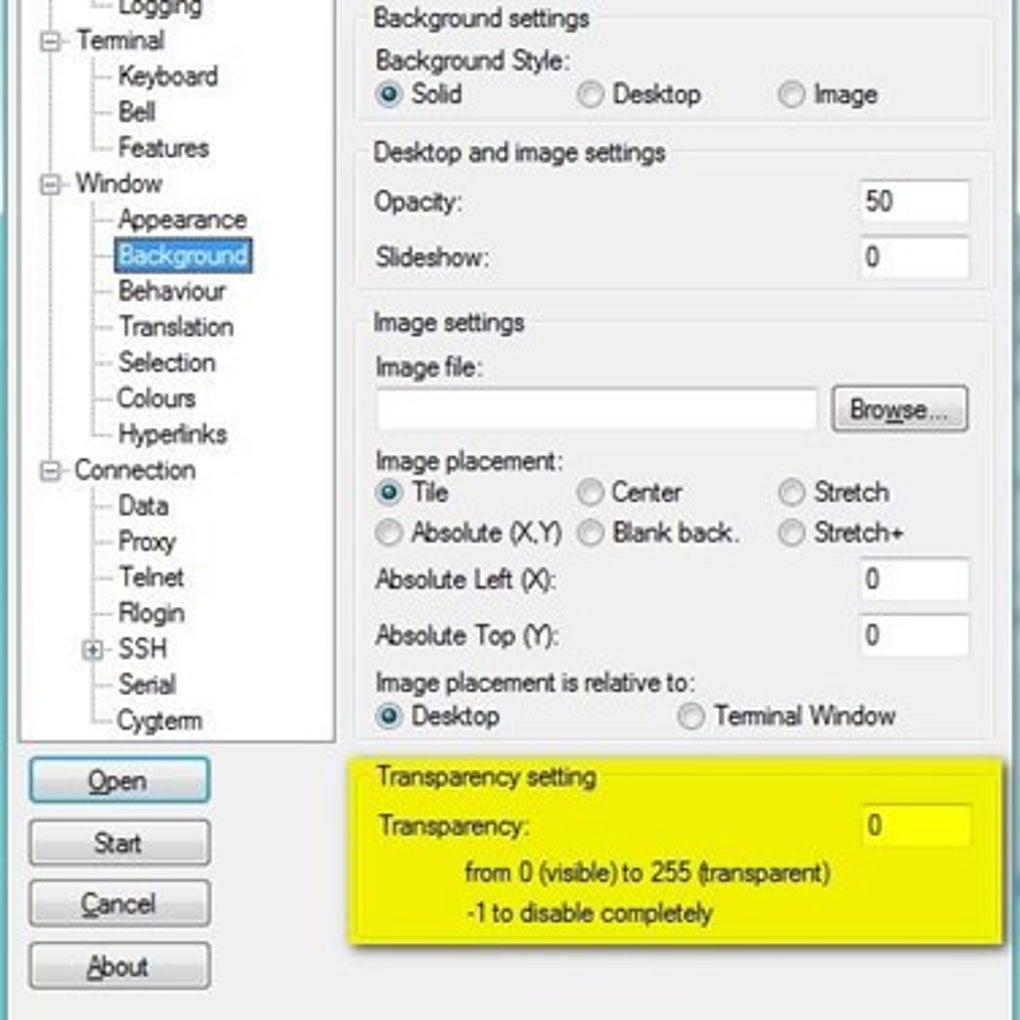
- Graphical Tweaks: Users can extensively customize the appearance of their terminal, including transparency settings, font styles and sizes, and an extensive color palette. This not only enhances aesthetics but also improves readability and user comfort during long working sessions.
- Copy/Paste Enhancements: KiTTY offers improved copy and paste functionalities, such as the ability to copy selected text to HTML format or to clear the selection automatically after copying. These small but significant improvements enhance interaction with the terminal output.
- URL Highlighting: Recognizing URLs within the terminal output and making them clickable is a simple yet incredibly useful feature, allowing users to quickly open relevant web pages in their default browser.
- Saved Command Sequences (Shortcuts): Beyond automatic login scripts, users can define and save specific command sequences that can be quickly triggered within a session using hotkeys or menu options, ideal for repetitive administrative tasks.
- Integration with Windows Explorer: KiTTY can be integrated into the Windows Explorer context menu, allowing users to right-click on a folder and open a KiTTY session directly to that path on a remote server, if configured.
- Configuration Management: The tool provides robust options for exporting and importing configuration profiles, making it easy to back up settings or transfer them between different installations. This is crucial for maintaining consistent working environments.
- Session Logging Improvements: KiTTY enhances session logging with options for automatic timestamping, configurable log file paths, and more granular control over what gets logged, which is invaluable for auditing and troubleshooting.
- Z-modem Integration: For those who still need to transfer files using older protocols in some specific network environments, KiTTY supports Z-modem file transfers.
- Direct Command-Line Execution: Users can launch KiTTY directly from the command line with specific session parameters or commands, facilitating scripting and automation from other tools.
- Enhanced Keyboard Shortcuts: A wide range of customizable keyboard shortcuts for common actions, further speeding up navigation and command execution within sessions.
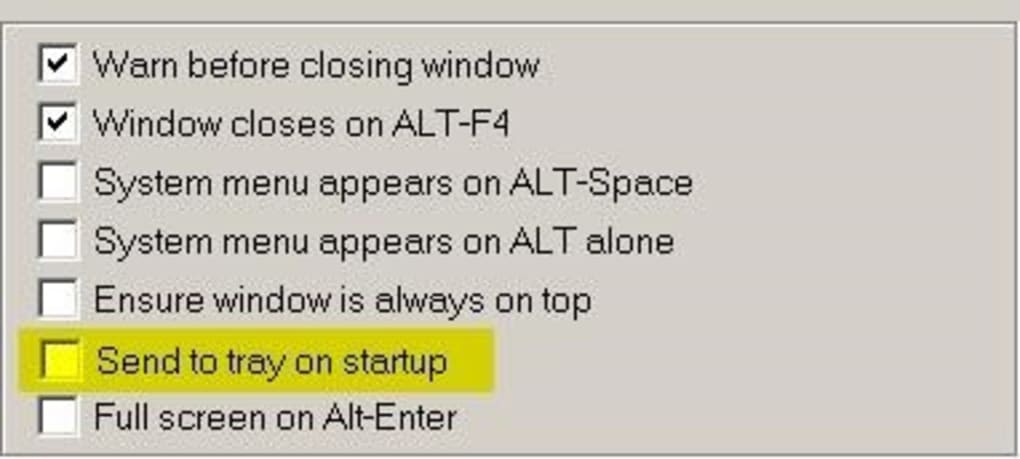
- Tray Icon Integration: KiTTY can minimize to the system tray, providing quick access to active sessions and connection options without cluttering the taskbar.
- Automatic Reconnection: For unstable network connections, KiTTY can be configured to automatically attempt reconnection to a session if the link drops, reducing manual intervention.
Security and Convenience in Tandem
The plethora of features in KiTTY is carefully balanced to enhance both security and convenience. Features like automatic logon scripts and automatic passwords significantly boost convenience by reducing repetitive manual inputs, but they are also designed with security considerations in mind. For instance, storing passwords requires robust encryption, and users are encouraged to understand the implications of such automation. The emphasis on SSH, dynamic port forwarding, and other secure tunneling methods reinforces KiTTY’s commitment to secure communication, which is the bedrock of remote access. The inclusion of features that promote organization and efficient session management indirectly contributes to security by reducing errors and ensuring that administrators can quickly identify and connect to the correct systems.
Advantages and Considerations for Adopting KiTTY
Deciding whether to incorporate KiTTY into your workflow involves weighing its extensive advantages against certain practical considerations. For many, the benefits far outweigh the minor challenges, especially for those who demand more from their terminal emulator.
The Pros: Why Choose KiTTY?
KiTTY stands out as a superior choice for a significant portion of the remote access user base, primarily due to its comprehensive approach to terminal emulation.
- More Than a Simple SSH Client: This is KiTTY’s most compelling advantage. While PuTTY provides the fundamental SSH connection, KiTTY transforms this basic utility into a full-fledged workstation for remote management. It’s not just about opening a shell; it’s about managing an ecosystem of connections, automating routine tasks, and customizing the environment to suit individual preferences. This holistic approach makes it an incredibly powerful tool for those who spend a considerable amount of time interacting with remote servers.
- Over 25 Features More Than PuTTY 0.67: This sheer volume of added functionalities is a game-changer. Features like the session filter allow for unparalleled organization of connections, especially in environments with numerous servers. Automatic logon scripts and the session launcher dramatically cut down on setup time and improve efficiency. The hidden chat server and text editor add unexpected but highly practical utilities directly within the terminal context, minimizing context switching. The portability aspect means users can carry their entire customized remote access environment on a USB stick, a huge boon for consultants and field technicians. These features cumulatively lead to a significant boost in productivity, saving users valuable time and reducing frustration.
- Enhanced Productivity for Power Users: System administrators, network engineers, software developers, and cloud professionals will find KiTTY’s feature set particularly beneficial. Its ability to automate repetitive tasks, manage a large number of sessions efficiently, and provide quick access to tools like an integrated text editor means less time spent on mundane operations and more time focused on actual problem-solving and development.
- Customization and Personalization Options: The extensive graphical tweaks, keyboard shortcut customization, and configuration management options allow users to tailor KiTTY precisely to their comfort and workflow needs. A personalized environment can significantly reduce cognitive load and improve the overall user experience, making long hours of remote work more manageable.
- Free and Open-Source Benefits: As a free and open-source application, KiTTY offers enterprise-grade functionality without any cost. This makes it accessible to individuals, small businesses, and large organizations alike. The open-source nature also ensures that the community can contribute to its improvement and security, fostering a resilient and evolving tool.
The Cons: Potential Challenges and Niche Applications
Despite its numerous advantages, KiTTY is not without its considerations, and in some scenarios, its enhanced feature set might even be a drawback for certain users.
- It can be confusing if you do not configure automatic saving correctly: The very power of KiTTY’s configuration and persistence features can be a double-edged sword. If users do not properly understand and configure automatic saving of sessions and settings, they might lose configurations or struggle to maintain a consistent environment. The additional complexity of managing more features means there’s a steeper learning curve for new users, potentially leading to initial confusion or misconfigurations. Proper attention to its configuration options is essential to harness its full potential without encountering unexpected behavior.
- Some people may never need or use the extra functions: For users who only occasionally need to establish a basic SSH connection to a single server, the extensive feature set of KiTTY might be overkill. The added options and menus could introduce unnecessary complexity for minimalist users who prefer the streamlined simplicity of standard PuTTY. In such cases, the overhead of KiTTY’s additional features, however slight, might not justify its adoption over a more basic client.
- Potential for Feature Bloat for Minimalists: While “feature-rich” is a pro for many, for absolute minimalists, it could be perceived as “feature bloat.” Users who prefer tools that do one thing exceptionally well and nothing more might find KiTTY’s additional utilities distracting or unnecessary.
- Ensuring Ongoing Compatibility with PuTTY’s Security Updates: As a fork, KiTTY relies on the underlying stability and security of its PuTTY codebase. While the developers of KiTTY are diligent, there’s always a slight time lag or potential for divergence in applying critical security patches that originate from the main PuTTY project. Users need to ensure they are using an up-to-date version of KiTTY to benefit from the latest security enhancements.
Navigating the Ecosystem of Terminal Emulators
The world of terminal emulators is diverse, offering various tools each with its own philosophy and feature set. Understanding where KiTTY fits into this ecosystem is key to making an informed choice.
KiTTY vs. PuTTY: This is the most direct comparison. For basic, occasional SSH/Telnet connections, PuTTY remains a perfectly viable, lightweight, and secure option. However, for any user who finds themselves wishing PuTTY had more features—more session management, more automation, better aesthetics, or unique utilities like the hidden chat—KiTTY is the clear winner. It’s PuTTY, but supercharged.
KiTTY vs. Tera Term: Tera Term is another popular, free, and open-source terminal emulator, particularly favored for its robust serial port support. While Tera Term is an excellent general-purpose emulator, KiTTY typically offers a more extensive array of quality-of-life improvements and specialized features for SSH/Telnet power users, particularly in the realm of session management and scripting.
KiTTY vs. PuTTY Tray: PuTTY Tray is another fork of PuTTY that focuses on usability enhancements, primarily integrating into the system tray and offering minor graphical tweaks. While it provides some improvements over standard PuTTY, KiTTY generally offers a far more extensive and impactful set of additional features, making it a more comprehensive upgrade.
When KiTTY is the Ideal Choice: KiTTY shines brightest for individuals and teams who:
- Regularly connect to multiple remote servers and need efficient session management.
- Perform repetitive tasks that can benefit from automation (e.g., login scripts).
- Desire a highly customizable and visually appealing terminal environment.
- Value portability and the ability to carry their entire setup on a flash drive.
- Are looking for a feature-rich, open-source, and free solution for Windows.
When Other Tools Might Be More Suitable:
- For users needing only a very basic, no-frills SSH client, PuTTY itself might suffice due to its simplicity.
- If the primary requirement is extensive serial port communication and less emphasis on SSH advanced features, Tera Term might be a stronger contender.
- For users on macOS or Linux, while KiTTY focuses on Windows, there are native and equally powerful terminal emulators available (e.g., iTerm2 for macOS, Terminator for Linux) that might offer platform-specific advantages.
- For enterprise environments requiring centralized management, auditing, and strict policy enforcement, commercial SSH clients with integrated enterprise features might be preferred, although KiTTY can certainly be used effectively in such settings with proper internal procedures.
Ultimately, the choice of a terminal emulator boils down to individual workflow, specific requirements, and personal preference. KiTTY positions itself as an excellent middle-ground, offering significantly more functionality than basic PuTTY without the potential complexities or costs of some commercial alternatives. Its continued development as an open-source project also promises ongoing improvements and responsiveness to user needs.
Conclusion
KiTTY stands as a testament to the power of open-source development and the continuous pursuit of improved user experience. By intelligently forking the venerable PuTTY 0.67, its developers have created a terminal emulator that not only preserves the rock-solid foundation of its predecessor but dramatically expands upon it with a wealth of practical and innovative features. From sophisticated session management tools like the session filter and launcher to automation capabilities such as automatic logon scripts and password handling, KiTTY empowers users to streamline their remote access workflows like never before. The inclusion of bonus utilities like a hidden chat server and text editor further underscores its commitment to comprehensive utility.
While its extensive feature set might present a slight learning curve for absolute beginners or seem superfluous for the most minimalist users, for anyone who regularly engages with remote systems—be it system administrators, developers, or advanced network users—KiTTY offers an unparalleled blend of security, efficiency, and customization. It transforms the act of connecting to a remote server from a basic command-line interaction into a highly personalized and productive experience.
As a free and open-source application primarily designed for Windows, KiTTY provides enterprise-grade capabilities without the associated cost, making it an accessible and attractive option across various user demographics. For those seeking to maximize their productivity and minimize the friction of remote system management, exploring KiTTY is not just recommended; it’s almost essential. It proves that with thoughtful enhancements, even the most established tools can be reimagined to meet and exceed the demands of the modern digital landscape. For the latest versions and further information, users are encouraged to visit Phanmemfree.org.
File Information
- License: “Free”
- Latest update: “February 4, 2025”
- Platform: “Windows”
- OS: “Windows 7”
- Language: “English”
- Downloads: “8K”
- Size: “5.99 MB”


