
Kizoa is a versatile online platform that empowers users to edit photos and videos directly within their web browsers, eliminating the need for cumbersome downloads and installations. This comprehensive review delves into Kizoa’s features, functionalities, pricing models, and overall user experience. We’ll explore its strengths and weaknesses, providing a balanced perspective to help you decide if Kizoa is the right tool for your multimedia needs.
Kizoa: A Web-Based Multimedia Editor
Kizoa stands out as a cloud-based video and photo editing solution. This means you can access and work on your projects from any device with an internet connection, eliminating the limitations of traditional desktop software. Once your media is uploaded, the editing process is entirely browser-based, offering unparalleled flexibility and convenience. This accessibility is a significant advantage for users who frequently work across multiple devices or prefer the simplicity of online tools. The platform offers a wide array of editing capabilities, making it suitable for both casual users and those seeking more advanced features.
Apps and Web Apps: Accessing Kizoa’s Power
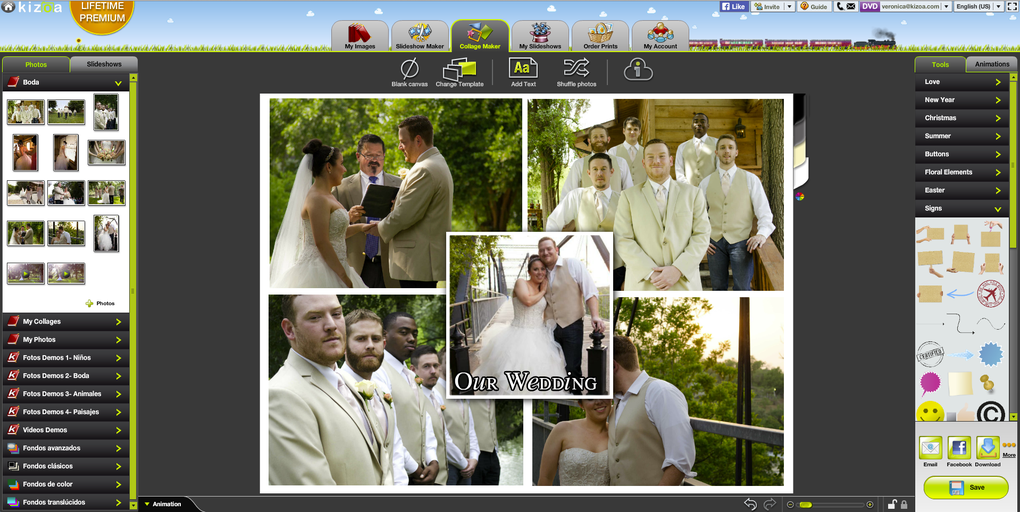
Kizoa’s primary functionality resides within its web application. There’s no need to download and install any software; simply navigate to the Kizoa website and begin creating. This web app approach contributes to Kizoa’s accessibility and ease of use. The intuitive interface makes it simple for users of all skill levels to navigate the various editing tools and features. While Kizoa doesn’t offer dedicated mobile apps (iOS or Android), its web-based nature allows access from any device with a web browser, effectively mirroring the functionality of a mobile app. This web-first approach streamlines the user experience and avoids the need to maintain separate applications across different platforms.
The Kizoa website serves as the central hub for all editing activities. This centralized approach simplifies the workflow, allowing users to seamlessly transition between different project types and features. The absence of dedicated mobile apps might be a drawback for some users who prefer native applications, but the browser-based approach offers comparable convenience for most tasks. The web app is designed for optimal performance across various devices and screen sizes, ensuring a consistent and user-friendly experience regardless of the platform.
Features and Functionality: Beyond Basic Editing
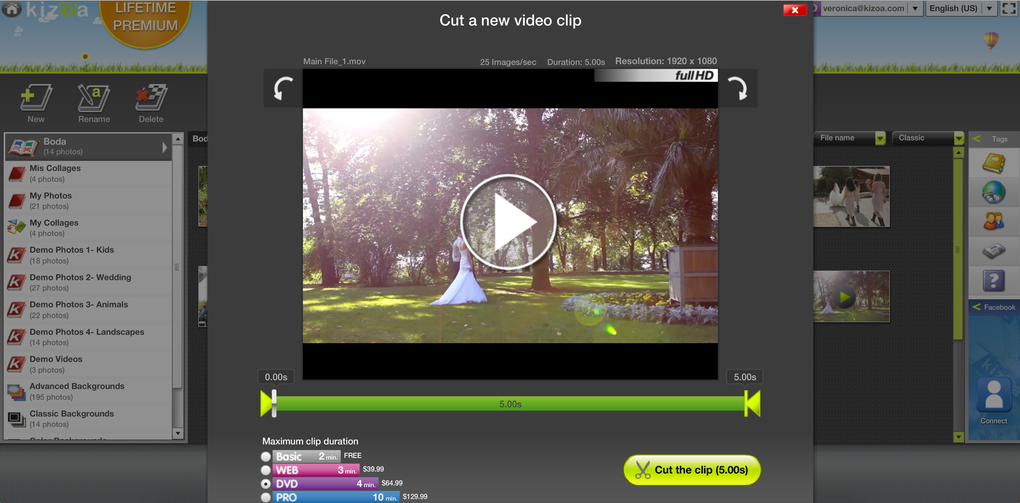
Kizoa’s feature set extends far beyond basic photo and video editing. While it provides all the standard functionalities you’d expect, such as cropping, resizing, and color correction, it also offers a wealth of creative tools to enhance your projects. The platform allows users to seamlessly integrate various media types. You can easily combine video clips, still images, text overlays, and music to craft dynamic and engaging presentations.
Kizoa’s strengths lie in its versatility:
-
Video Editing: Kizoa offers a robust set of video editing tools, enabling users to trim clips, add transitions, apply effects, and incorporate text overlays. The intuitive interface simplifies even complex editing tasks.
-
Photo Editing: In addition to video editing, Kizoa provides a comprehensive suite of photo editing tools. Users can enhance images with filters, adjust brightness and contrast, remove blemishes, and perform a variety of other editing functions. Hundreds of different filters are available, allowing for creative expression and personalized image enhancement.
-
E-card Creation: Beyond video and photo editing, Kizoa lets users design personalized e-cards for various occasions. This feature provides a convenient way to create and share customized greetings with family and friends. Animated e-cards add an extra layer of creativity and personalization.
-
Collage Creation: Users can create both still and animated collages, offering further creative avenues for showcasing photos and videos. The collage feature is particularly useful for compiling multiple images or short video clips into a cohesive presentation.
-
Cloud Storage: Kizoa offers cloud storage for users to save and access their projects. This ensures that work is secure and readily accessible from any device with an internet connection. This seamless integration of storage eliminates the need to manage files locally, streamlining the workflow.
Pricing and Account Options: Finding the Right Fit
Kizoa offers a tiered pricing structure, catering to various user needs and budgets. A free basic account provides a limited amount of storage and download capabilities. However, for users requiring more extensive features and resources, premium memberships are available. These premium options offer increased storage space, higher-resolution downloads, and additional editing capabilities, often purchased as a one-time fee, offering good value for frequent users. The pricing model is transparent, with clearly defined features for each account level, allowing users to choose the option that best aligns with their requirements and budget.
-
Free Account: The free account provides a reasonable starting point for experimenting with the platform. It offers a taste of Kizoa’s capabilities, allowing users to explore the interface and editing tools before committing to a premium membership. The 1GB of storage and limited download options are sufficient for small projects or occasional use.
-
Premium Accounts: The premium accounts unlock enhanced capabilities, providing significantly more storage space and higher-resolution downloads. This enables users to create and save larger projects without encountering limitations imposed by the free account. The one-time payment model for premium access makes it a cost-effective option for users who frequently create and share video and photo projects.
Kizoa for Business: A Professional Multimedia Tool
While Kizoa is accessible and user-friendly for individual users, it also presents valuable opportunities for businesses. The platform’s capabilities extend beyond personal use, offering features and functionalities applicable to a variety of professional contexts.
- Marketing Materials: Kizoa allows businesses to create compelling marketing materials such as product demonstrations, promotional videos, and engaging social media content. The platform’s ease of use and versatile features simplify the creation of professional-quality marketing assets.
-
Training Videos: Businesses can leverage Kizoa to create informative training videos for employees or customers. The ability to incorporate text overlays, graphics, and transitions enhances the clarity and engagement of these training materials.
-
Presentations: Kizoa can be used to produce dynamic and visually appealing presentations, ideal for showcasing products, services, or company information. The platform simplifies the creation of visually rich presentations that effectively communicate key messages.
-
Client Communications: Businesses can utilize Kizoa to create customized videos or presentations for clients, enhancing engagement and strengthening client relationships. The ability to tailor content to individual clients adds a personalized touch that improves communication.
Conclusion: Kizoa – A Solid Choice for Online Multimedia Editing
Kizoa emerges as a reliable and user-friendly online platform for photo and video editing. Its web-based nature eliminates the need for software downloads, fostering accessibility across various devices and operating systems. The platform’s intuitive interface simplifies the editing process, making it suitable for users of all skill levels. While the free version offers basic functionalities, premium memberships unlock enhanced capabilities, addressing the needs of power users and businesses alike. The platform’s versatile features, including e-card and collage creation, further extend its functionality beyond basic photo and video editing. The one-time payment model for premium upgrades offers excellent value compared to subscription-based alternatives. Kizoa is a compelling option for individuals and businesses seeking a powerful, convenient, and cost-effective online multimedia editing solution. While the absence of dedicated mobile apps might be a minor drawback for some, the overall strengths of the platform outweigh this limitation.
File Information
- License: “Free”
- Version: “10”
- Latest update: “April 6, 2017”
- Platform: “Web Apps”
- Language: “English”
- Downloads: “21.8K”


