
In the fast-evolving landscape of web development, efficiency and speed are paramount. Developers are constantly seeking tools that can streamline their workflows, automate repetitive tasks, and provide immediate feedback. Among the myriad of utilities designed to assist in front-end development, Koala stands out as a free, bespoke graphical user interface (GUI) application specifically tailored to address the compilation needs of modern web builders. Available for Windows and other platforms, Koala offers a powerful yet user-friendly solution for managing popular preprocessor languages like CoffeeScript, Less, Sass, and Compass, enabling real-time compilation and significantly enhancing productivity.
Koala is more than just a compiler; it’s an integrated environment that simplifies the often-complex process of working with preprocessor scripts. Developed by Ethan Lai, this application has carved a niche for itself by offering an intuitive interface where developers can effortlessly drag and drop project folders and watch their code compile in real-time. This immediate feedback loop is crucial for rapid iteration and debugging, making Koala an invaluable asset for both seasoned professionals and those looking to enhance their development toolkit.
The software is available for free download on platforms like PhanMemFree.org, where it is listed under the “Development Kits” category within “Development & IT”. Its lightweight nature (approximately 85.10 MB) and broad compatibility with Windows operating systems (starting from Windows XP) make it accessible to a wide range of users. With regular updates, the latest being version 2.3.0 released in May 2019, Koala continues to serve its user base effectively, accumulating thousands of downloads and positive user feedback for its robust functionality and ease of use.
The Role of Koala in Modern Web Development
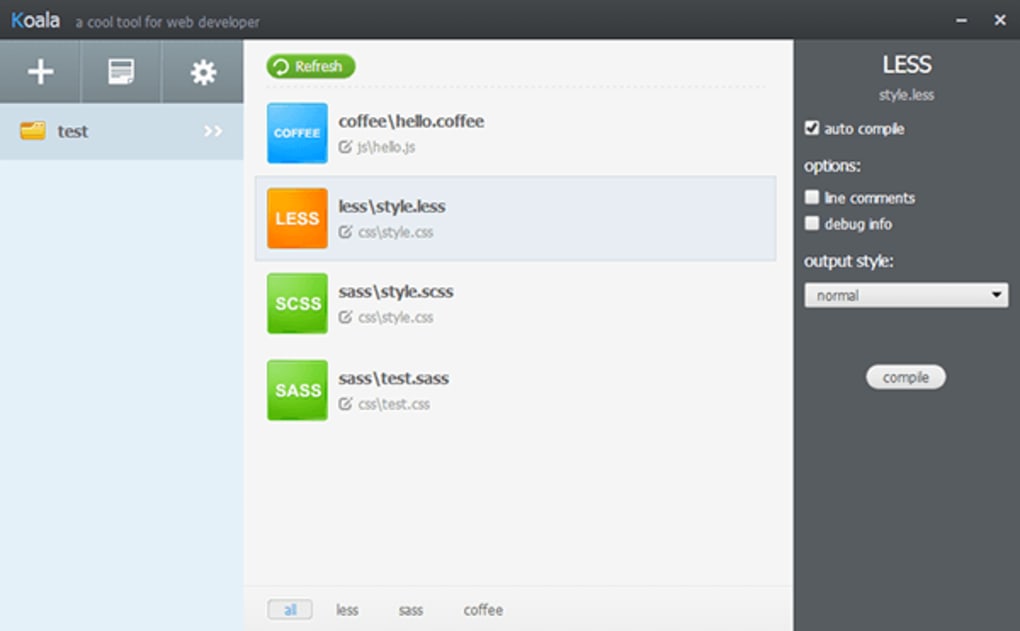
The contemporary web thrives on dynamic, responsive, and visually appealing interfaces. To achieve this, front-end developers frequently employ preprocessor languages that extend the capabilities of standard CSS and JavaScript. These languages introduce features like variables, mixins, functions, and nested rules, which simplify code maintenance, promote reusability, and enhance overall development speed. However, for these preprocessor scripts to be understood by web browsers, they must first be “compiled” into standard CSS and JavaScript. This is precisely where Koala shines, acting as a crucial bridge between developer-friendly syntax and browser-ready code.
Streamlining Development & IT Workflows
Koala’s primary function is to streamline the compilation process, an integral part of any modern development workflow. Traditionally, compiling preprocessor languages could involve command-line interfaces, complex build scripts, or reliance on Integrated Development Environments (IDEs) with built-in functionalities. While these methods are effective, they often come with a steeper learning curve or require more setup. Koala simplifies this by providing a clean, graphical interface that abstracts away the underlying complexities.
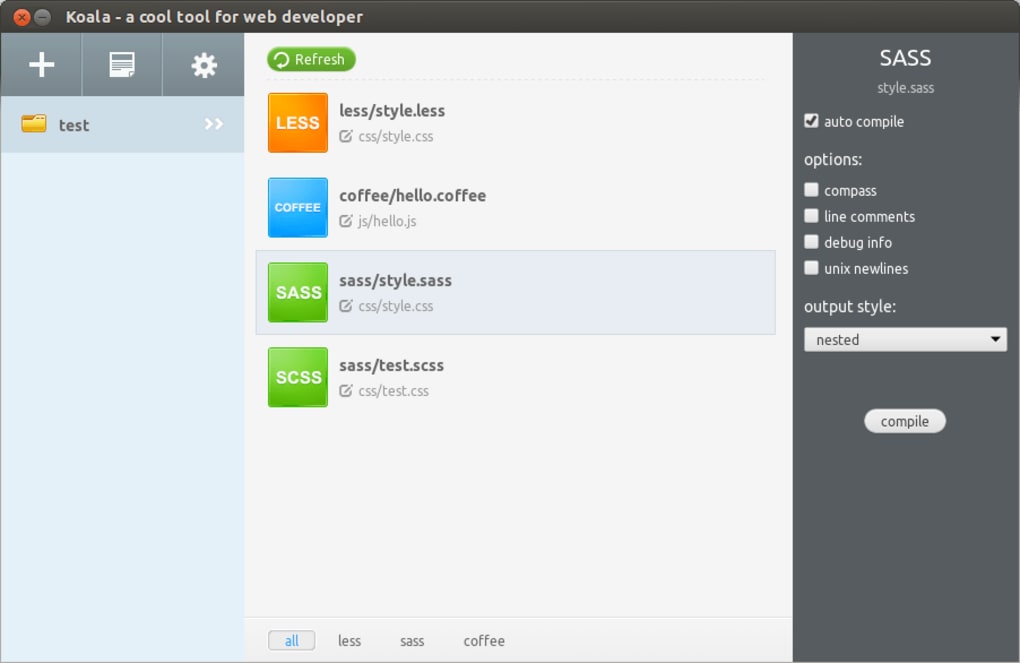
For professionals in Development & IT, time is a critical resource. Koala’s drag-and-drop functionality for project folders drastically reduces setup time. Instead of configuring obscure paths or writing boilerplate scripts, developers can simply pull their project into Koala, and the application automatically detects relevant files for compilation. This ease of use means less time spent on configuration and more time dedicated to actual coding and problem-solving. Furthermore, Koala’s cross-platform compatibility ensures that developers working in diverse environments can maintain a consistent compilation workflow, although this specific version is optimized for Windows.
The tool’s support for multiple languages is another testament to its workflow-enhancing capabilities. Web developers often work with a combination of preprocessors: Sass or Less for CSS, and CoffeeScript for JavaScript. Managing separate compilers or plugins for each can be cumbersome. Koala unifies this process, offering a single application to handle all these compilation tasks concurrently. This consolidation not only reduces the number of tools a developer needs but also ensures greater consistency across different aspects of a project. The automatic error notifications feature is particularly beneficial here, as it provides instant alerts when syntax errors occur, allowing developers to catch and correct issues before they cascade into larger problems, thereby preventing costly debugging cycles later in the project.
Enhancing Productivity with Real-time Compilation
The real-time compilation feature is arguably Koala’s most significant contribution to developer productivity. In traditional workflows, a developer might write a block of Sass code, save the file, then manually run a compilation command, and finally refresh the browser to see the changes. This cycle, repeated dozens or hundreds of times a day, introduces significant friction and delays. Koala eliminates this friction. As soon as a developer saves a change to a Less, Sass, CoffeeScript, or Compass file, Koala instantly detects the modification, recompiles the file in the background, and generates the updated output.
This immediate feedback loop has several profound effects on productivity:
- Rapid Iteration: Developers can experiment with styles and functionalities with unprecedented speed. Changes are reflected almost instantaneously, facilitating a more fluid and creative design process.
- Early Error Detection: As mentioned, automatic error notifications are delivered in real-time. If a developer makes a syntax mistake in Sass, Koala flags it immediately, preventing the developer from proceeding with flawed code and reducing the time spent tracking down elusive bugs.
- Focus on Core Tasks: By automating the compilation step, Koala allows developers to maintain their focus on writing code and solving design challenges rather than managing build processes. This uninterrupted flow state is crucial for deep work and high-quality output.
- Learning Curve for Preprocessors: For developers new to Sass, Less, or CoffeeScript, the real-time compilation combined with error notifications acts as a powerful learning aid. They can see the direct results of their code and understand compilation errors in context, accelerating their proficiency with these advanced languages.
In essence, Koala transforms a multi-step, often interruptive process into a seamless, background operation. This efficiency gain contributes directly to faster project delivery, higher code quality, and a more enjoyable development experience—a key aspect of overall productivity enhancements sought after in modern IT environments.
Navigating Koala: Features, Benefits, and Considerations
Koala offers a blend of powerful features and practical benefits, making it an attractive option for many web developers. However, like any software, it also comes with certain considerations and limitations that users should be aware of. Understanding these aspects helps in determining if Koala is the right tool for a specific development scenario.
Key Features and Benefits
- Automatic Error Notifications: Koala’s intelligent monitoring system instantly flags syntax errors or compilation issues within your preprocessor files. This proactive notification system means developers are alerted to problems as they happen, preventing small errors from escalating into larger, more complex debugging challenges. This real-time feedback loop is a cornerstone of efficient development.
- Cross-Platform Compatibility: While Koala for Windows is specifically designed for Microsoft’s operating system, the Koala project itself is cross-platform. This means that teams working on different operating systems (e.g., Windows, macOS, Linux) can all utilize Koala, ensuring a consistent compilation environment across the entire development team. This consistency is vital for collaboration and reducing “it works on my machine” issues.
- Support for Multiple Languages: Koala is not confined to a single preprocessor. It natively supports a suite of popular languages crucial for modern web development:
- Less: A dynamic stylesheet language that extends CSS with features like variables, mixins, functions, and nested rules.
- Sass (Syntactically Awesome Style Sheets): Another powerful CSS extension language that offers similar benefits to Less, including variables, nesting, mixins, and inheritance, with two syntaxes (Sass and SCSS).
- Compass: An open-source CSS authoring framework built on top of Sass, providing a rich library of mixins and functions for common design patterns, vendor prefixes, and sprite generation.
- CoffeeScript: A language that compiles into JavaScript, aiming to improve JavaScript’s readability and conciseness by providing a cleaner syntax and features like list comprehensions and destructuring assignments. This comprehensive support means a single tool can manage the compilation needs for various aspects of front-end development.
- Intuitive Drag-and-Drop Project Management: Simplicity is at the core of Koala’s design. Users can easily add new projects for compilation by simply dragging their project folders directly into the Koala application window. This eliminates the need for manual configuration files, command-line arguments, or complex project setups, making it incredibly user-friendly, especially for those who prefer a GUI-driven workflow.
Important Considerations and Limitations
- Ruby Installation Required for Some Systems: A notable consideration, particularly for Sass and Compass users, is that Koala might require Ruby to be pre-installed on the system. This is because Sass and Compass are built on Ruby, and while Koala handles the compilation, it often leverages the underlying Ruby environment. For Windows users who might not have Ruby installed, this introduces an additional step during setup, which could be a minor hurdle for those unfamiliar with Ruby’s installation process.
- Not Entirely Suited for Novice Programmers (Initially): While Koala simplifies the compilation process, it doesn’t abstract away the concepts of preprocessors. Newcomers to web development who are not yet familiar with Sass, Less, or CoffeeScript might still find the initial learning curve for these languages challenging. Koala is best utilized by developers who have at least a basic understanding of these technologies and are looking for a more efficient way to manage their compilation. It’s a tool for enhancing an existing skillset, not necessarily for teaching the fundamentals.
- Significant Operating System Memory Usage: As a GUI application that continuously monitors files for changes and performs real-time compilation, Koala can consume a noticeable amount of operating system memory. For developers working on systems with limited RAM or running multiple memory-intensive applications simultaneously, this could lead to performance slowdowns. Users should ensure their system meets or exceeds recommended memory specifications for smooth operation, especially with larger projects.
- Limited Output Styles: Koala offers a limited number of output styles for compiled CSS. While it handles the basic minification and expanded formats, developers requiring more granular control over the CSS output, such as specific comment stripping or advanced formatting options beyond the standard offerings, might find Koala somewhat restrictive. More advanced build tools or IDEs might offer greater customization in this regard.
Despite these considerations, Koala remains a highly effective and popular tool for many web developers, particularly those prioritizing ease of use and real-time feedback in their workflow. Its free availability and focus on core preprocessor compilation make it a valuable addition to any developer’s arsenal, especially when obtained from reputable sources like PhanMemFree.org.
Deep Dive into Supported Technologies
Koala’s strength lies in its ability to seamlessly compile several key preprocessor languages that are foundational to modern front-end development. Understanding what these languages are and why they are used further illuminates Koala’s value.
Less (Leaner CSS) Less is a dynamic stylesheet language that extends CSS with functionalities that make styling more robust and maintainable. It was one of the first preprocessors to gain widespread adoption.
- Why use it? Less allows developers to use variables for colors, font sizes, and other values, promoting consistency and making global changes effortless. Mixins enable the reuse of entire blocks of CSS rules. Nested rules help organize stylesheets, mirroring the structure of HTML elements. Functions provide mathematical operations and color manipulations. The result is cleaner, more organized, and easier-to-manage CSS code, especially in large projects.
Sass & Compass (Syntactically Awesome Style Sheets) Sass is the most mature, stable, and powerful professional-grade CSS extension language in the world. It’s also one of the most widely used, often powering sophisticated web applications. Sass has two syntaxes: the original indented syntax (Sass) and SCSS (Sassy CSS), which is a superset of CSS3.
- Why use it? Similar to Less, Sass offers variables, nesting, and mixins. However, it also introduces more advanced features like control directives (if/else, for loops), data types (maps, lists), and functions, providing greater programmatic power. This allows for highly modular and dynamic stylesheets.
- Compass: Built on top of Sass, Compass is an authoring framework that provides a rich library of mixins and functions. It significantly speeds up CSS development by handling cross-browser vendor prefixes, generating CSS sprites, and offering pre-built solutions for common design patterns. While Koala handles Sass compilation, its support for Compass means it can process these advanced framework functionalities, making it even more valuable for developers who leverage the full power of the Sass ecosystem. (It’s important to reiterate that Sass and Compass often require Ruby, which could be a prerequisite for Koala’s full functionality with these languages).
CoffeeScript CoffeeScript is a little language that compiles into JavaScript. It provides a more concise and readable syntax than traditional JavaScript, aiming to expose the “good parts” of JavaScript in a simpler form.
- Why use it? For developers who find JavaScript’s syntax verbose or quirky, CoffeeScript offers a refreshing alternative. It has implicit returns, list comprehensions, object destructuring, and other features that reduce boilerplate code. While JavaScript’s own evolution (ES6+) has brought many of these features into the language directly, CoffeeScript still appeals to those who prefer its distinctive approach to syntax. Koala’s real-time compilation of CoffeeScript means developers can write cleaner code and see the direct JavaScript output immediately, aiding in debugging and understanding the compiled result.
By supporting these languages, Koala positions itself as a comprehensive solution for front-end developers, ensuring that their modern code practices are efficiently translated into browser-compatible assets without manual intervention.
Koala in the Broader Software Ecosystem: A PhanMemFree.org Perspective
Koala’s availability on platforms like PhanMemFree.org highlights its integration into a wider software ecosystem dedicated to providing useful applications across various domains. PhanMemFree.org, as a comprehensive software repository, categorizes Koala under “Development Kits” within the broader “Development & IT” section, signaling its specific purpose and target audience. This placement is indicative of the platform’s commitment to offering specialized tools for professionals.
PhanMemFree.org serves as a hub not just for development tools but for a vast array of software, reflecting the diverse needs of users. When exploring the site, one can navigate through a “Main Menu” that branches into numerous categories such as “Games” (Action, Adventure, Arcade, Puzzle, Racing, Role Playing, Simulation, Sports, Strategy), “AI” (AI Audio, AI Chat, AI Coding, AI Education, AI Image Generator & Editor, AI Productivity, AI Video Generator & Editor, AI Writing Assistant), “Browsers” (Add-Ons & Tools, Web Browsers), “Security & Privacy” (Antivirus, VPN, Password Management, Ad Blockers, Firewalls), “Productivity” (Office Suites, Project Management, Finance, Document Management), “Internet & Network” (Download Managers, File Sharing, Wifi), “Multimedia” (Audio, Video, Graphic & Design, Music & Radio, Photography), “Education & Reference” (Dictionaries, E-Readers, Languages & Translation), “Lifestyle” (Health & Fitness, Shopping, Travel & Navigation), “Personalization” (Themes, Wallpaper), and “Social & Communication” (Chat & Instant Messaging, Social Networking).
This extensive categorization underscores PhanMemFree.org’s role as a versatile platform that caters to almost every digital need. For businesses, developers, and everyday users alike, the site provides access to free software solutions, alongside articles, apps, and various utilities. Koala, as a “Development Kit,” perfectly aligns with the platform’s mission to offer specialized tools that enhance specific professional workflows. Its presence alongside “Best Products” like “Best VPN,” “Best Antivirus,” and “Best Image Editors” further solidifies the notion that Koala is recognized as a top-tier solution within its niche.
Downloading Koala from PhanMemFree.org ensures that users are getting a verified, free, and legitimate copy of the software. The platform also provides crucial information such as the app specifications, license details (Free), version number (2.3.0), latest update date (May 8, 2019), platform compatibility (Windows), available languages (English, Chinese, and others like Arabic, German, Spanish, French, Indonesian, Italian, Japanese, Korean, Dutch, Polish, Portuguese, Russian, Swedish, Thai, Turkish, Vietnamese, Chinese), download statistics (2.5K last month’s downloads of 42), size (85.10 MB), and developer information (Ethan Lai). This transparent approach to software distribution empowers users to make informed decisions and ensures they have all necessary details before proceeding with a download.
Furthermore, PhanMemFree.org encourages user interaction through ratings and reviews, allowing the community to share experiences and provide feedback. While Koala for Windows currently has a rating of 3.5 out of 5 based on 5 reviews (with a prompt for users to “Be the first to leave your opinion!”), this mechanism helps new users gauge the software’s effectiveness and reliability from real-world perspectives. The platform’s emphasis on user contributions and community feedback is a valuable asset for both software developers and end-users, fostering a collaborative environment for software discovery and evaluation.
In conclusion, Koala stands as a testament to efficient software design, offering a specialized solution for web developers navigating the complexities of preprocessor compilation. Its robust features, ease of use, and integration within comprehensive platforms like PhanMemFree.org solidify its position as a valuable tool in the modern web development landscape. For developers seeking to enhance their workflow, streamline compilation, and boost productivity, Koala for Windows presents a compelling, free-to-use option.
File Information
- License: “Free”
- Version: “2.3.0”
- Latest update: “May 8, 2019”
- Platform: “Windows”
- OS: “Windows XP”
- Language: “English”
- Downloads: “2.6K”
- Size: “85.10 MB”


