
Komodo Edit, a free and open-source code editor, stands as a robust solution for developers across diverse platforms. Its design philosophy mirrors that of the popular Firefox web browser, emphasizing extensibility, customization, and a user-friendly experience. Built upon the Mozilla codebase and adhering to the same licensing as Firefox, Komodo Edit offers a compelling alternative to commercial code editors, particularly for those seeking a powerful yet free tool. This review delves into the capabilities, benefits, and potential drawbacks of Komodo Edit, exploring its suitability for various programming needs.
Multi-Language Support and Feature Richness
One of Komodo Edit’s most significant strengths is its broad support for numerous programming languages. Developers working with a range of technologies will find it a valuable asset. The editor provides comprehensive support for popular languages such as Perl, PHP, Python, Ruby, and Tcl, alongside essential web development languages like JavaScript, CSS, HTML, and XML. Furthermore, it handles template languages, including RHTML, Template-Toolkit, HTML-Smarty, and Django, making it suitable for a wide variety of web development projects.

Beyond language support, Komodo Edit boasts a rich array of built-in features that enhance developer productivity. Code completion (autocomplete) significantly speeds up coding, reducing the time spent typing repetitive code snippets. Syntax highlighting, a crucial feature for readability and error detection, is seamlessly integrated, providing clear visual distinctions between different code elements. The integrated syntax checking functionality proactively identifies potential errors, aiding in early bug detection and enhancing code quality. These features, combined with its multi-language support, position Komodo Edit as a versatile tool for developers working on complex projects involving multiple languages and technologies.
Extensibility through Add-ons and Plugins
Following the model of Firefox, Komodo Edit embraces extensibility through its support for extensions and plugins. This allows users to customize the editor to their specific workflows and preferences. The Komodo community has developed a substantial library of extensions, mirroring the vast ecosystem of Firefox add-ons. This empowers users to enhance the editor’s functionality, integrating new tools, features, and integrations, adapting the editor to fit individual needs and project requirements. This extensibility is a key factor in Komodo Edit’s appeal, providing a highly customizable development environment. However, as with any system reliant on extensions, caution is advised against overloading the editor with excessive add-ons, as conflicts may arise, potentially leading to performance degradation or even crashes.
Cross-Platform Compatibility and Ease of Use
Komodo Edit’s cross-platform compatibility is a significant advantage, allowing developers to work seamlessly across different operating systems without needing to learn a new interface or adjust their workflow. This consistency across platforms streamlines development, ensuring a unified experience regardless of the operating system in use. The consistent interface, regardless of platform, simplifies the transition between different machines and environments. This portability benefits developers who work on multiple machines or collaborate with others using different operating systems.
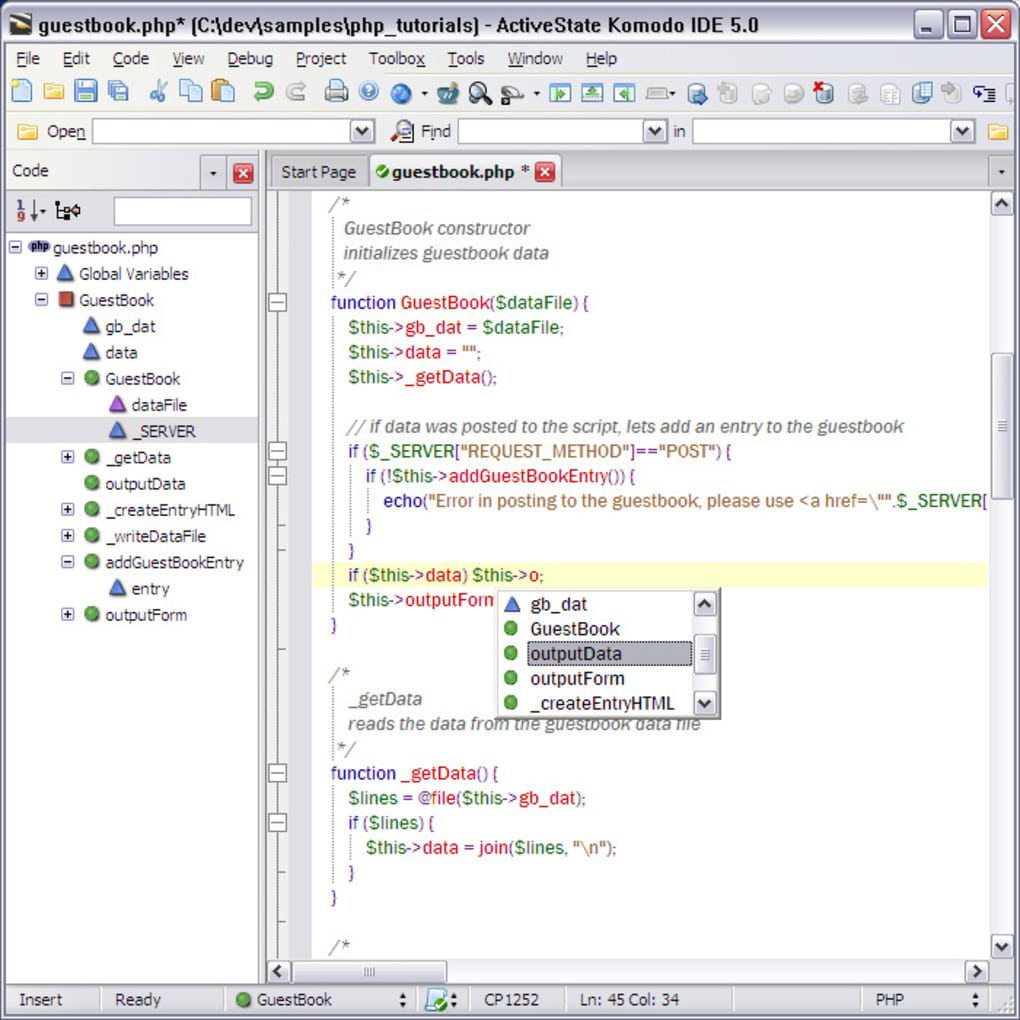
The editor’s design prioritizes ease of use, making it accessible to both novice and experienced programmers. Its intuitive interface reduces the learning curve, allowing developers to quickly become productive. The user-friendly design contributes to its wide appeal, making it suitable for a broad range of skill levels. This makes it an excellent option for beginners learning to code, as well as experienced programmers looking for a powerful yet accessible tool.
Comparison with Alternative Code Editors
Komodo Edit occupies a unique space among code editors, competing with both free and commercial alternatives. When comparing it to other free options, such as Bluefish, it often stands out due to its richer feature set and greater extensibility through its plugin system. While Bluefish provides a solid foundation, Komodo Edit’s support for a broader range of languages and its more advanced features, such as built-in syntax checking, make it a more comprehensive choice for many developers.
Compared to commercial editors like Sublime Text, Komodo Edit provides a compelling free alternative. While Sublime Text offers a highly polished and refined user experience, Komodo Edit’s features and functionality often rival those of its commercial counterparts, making it an attractive option for budget-conscious developers or those who prioritize open-source software. The choice between Komodo Edit and a commercial editor ultimately hinges on individual priorities, balancing the need for advanced features and a polished interface with budgetary constraints.
However, it’s important to note that Komodo Edit’s free status comes with certain trade-offs. While its feature set is extensive, it might not match the level of refinement or polish found in some commercial alternatives. Some developers might find specific features lacking or prefer the more polished user experience of commercial editors. This choice often comes down to individual preferences and project requirements.
Potential Drawbacks and Considerations
While Komodo Edit offers many advantages, certain aspects might be considered drawbacks. As mentioned previously, the use of excessive add-ons can lead to conflicts and performance issues. Careful selection and management of extensions are crucial to maintain optimal performance. Overloading the editor with numerous add-ons can result in instability and hinder its efficiency. Therefore, responsible add-on management is vital for a smooth and productive coding experience.
Although Komodo Edit supports a wide range of languages, it might not offer complete support for every niche or specialized language. While its coverage is extensive, some less commonly used languages might lack the same level of integration or feature support as more mainstream languages. This is a common limitation for any code editor, and developers working with highly specialized languages should verify Komodo Edit’s support before committing to its use.
Conclusion: A Strong Contender in the Code Editor Arena
Komodo Edit presents a compelling case as a powerful, free, and versatile code editor. Its extensive language support, coupled with its built-in features and plugin extensibility, makes it suitable for a wide range of programming tasks. The cross-platform compatibility ensures consistent workflows across various operating systems. While some limitations exist, such as potential add-on conflicts and incomplete support for certain niche languages, these drawbacks are often outweighed by its significant advantages, particularly its cost-effectiveness and feature richness. For developers seeking a free and powerful code editor, Komodo Edit deserves serious consideration, offering a feature-rich alternative to both free and commercial competitors. Its strength lies in its balance of power, flexibility, and accessibility, making it a valuable tool for developers of all skill levels.
File Information
- License: “Free”
- Latest update: “June 12, 2025”
- Platform: “Windows”
- OS: “Windows 10”
- Downloads: “56.7K”
- Size: “94.41 MB”


