
LabVIEW, a system-design platform and development environment from National Instruments, stands as a prominent tool in the engineering and scientific communities. Its graphical programming approach, distinct from traditional text-based languages, offers a unique and powerful way to design, develop, and deploy applications across diverse fields. This comprehensive guide delves into the intricacies of LabVIEW, exploring its capabilities, applications, licensing, advantages, and disadvantages.
Understanding LabVIEW’s Graphical Programming Paradigm
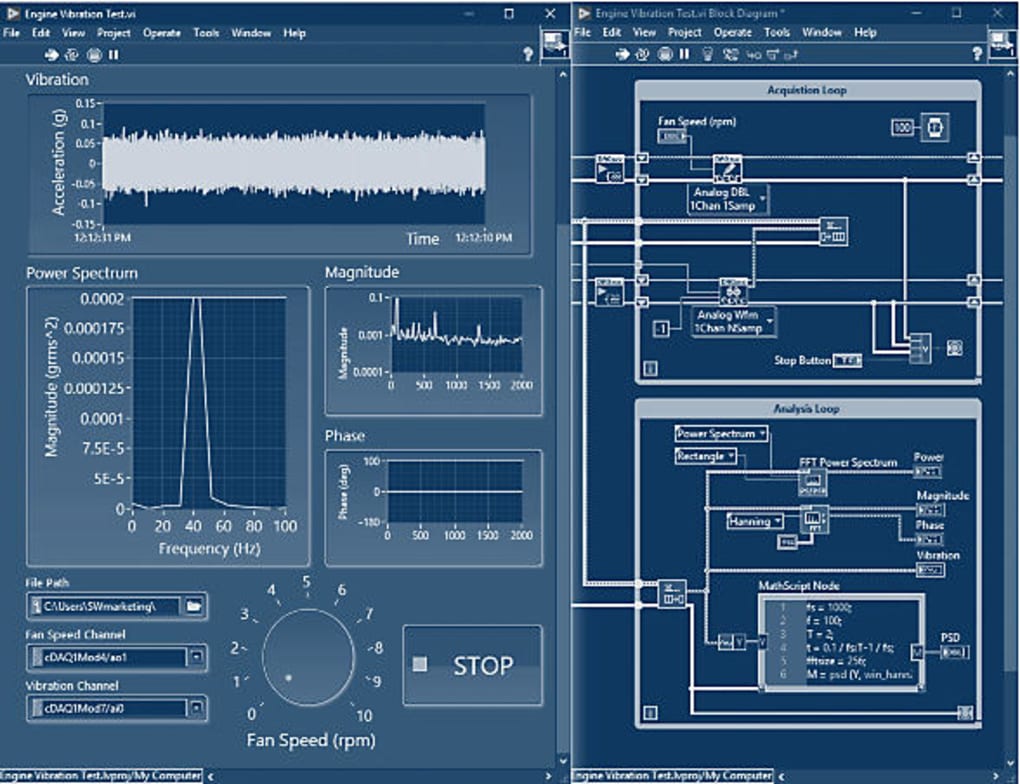
At its core, LabVIEW distinguishes itself through its graphical programming language known as G. Instead of writing lines of code, programmers construct programs visually using interconnected graphical icons representing functions and data flow. These icons, known as “nodes,” are arranged on a virtual diagram, forming a dataflow-based architecture. This visual approach facilitates a more intuitive understanding of the program’s logic and flow, streamlining the development process, particularly for complex systems.
The graphical nature of LabVIEW also significantly enhances the debugging and troubleshooting phases. Programmers can visually trace the flow of data, identify bottlenecks, and pinpoint errors with greater ease than in traditional text-based programming. This visual debugging environment makes LabVIEW particularly attractive to engineers and scientists who often deal with complex instrumentation and data acquisition processes. Furthermore, the intuitive interface allows for rapid prototyping and experimentation, accelerating the design cycle.
LabVIEW’s dataflow architecture operates on the principle of data dependency. Nodes execute only when the necessary data is available at their input terminals. This characteristic fosters concurrency and parallelism, allowing for efficient handling of multiple tasks simultaneously. This is particularly beneficial in applications involving real-time data acquisition and control, where responsiveness is critical.
Beyond its core graphical programming features, LabVIEW offers a rich ecosystem of tools and libraries, significantly expanding its capabilities. This includes extensive support for hardware integration, advanced analysis tools, and specialized libraries for various engineering disciplines. This readily available support significantly reduces development time and effort for many applications.
Key Applications of LabVIEW
The versatility of LabVIEW makes it applicable across a wide spectrum of engineering and scientific disciplines. Its use cases span from simple data acquisition and analysis to intricate control systems and complex simulations. Here are some notable areas where LabVIEW excels:
-
Data Acquisition and Instrumentation: LabVIEW is extensively used for acquiring, processing, and analyzing data from various instruments and sensors. Its seamless integration with National Instruments’ hardware platforms, like data acquisition (DAQ) devices, simplifies the process of connecting to and interacting with real-world devices.
-
Test and Measurement: In the field of test and measurement, LabVIEW aids in automating test procedures, analyzing results, and generating comprehensive reports. Its ability to handle large datasets and complex algorithms makes it an ideal choice for validating products and processes within rigorous quality control frameworks.
-
Control Systems Engineering: LabVIEW is a powerful tool for designing and implementing control systems, particularly in industrial automation. Its real-time capabilities and extensive libraries for control algorithms allow for precise and efficient control of processes, from robotics to manufacturing plants.
-
Robotics and Automation: In robotics and automation, LabVIEW’s ability to integrate various hardware components, manage complex control algorithms, and process sensor data makes it an effective solution for programming robotic systems.
-
Simulation and Modeling: LabVIEW’s simulation capabilities allow for the virtual testing and validation of systems before their physical implementation, reducing risks and saving costs associated with physical prototyping.
-
Biomedical Engineering: LabVIEW is used in biomedical engineering for tasks ranging from designing medical instruments to analyzing physiological data. Its real-time processing capabilities prove particularly useful in applications requiring immediate feedback and response.
LabVIEW Licensing and Editions
LabVIEW is a commercially licensed software, with different editions catering to varying needs and budgets. The availability of a free trial allows users to explore its features before committing to a purchase, but full functionality necessitates a paid license. The three main editions are:
-
LabVIEW Base: This edition serves as an entry-level option, providing core functionalities for desktop-based measurement and control applications. It includes essential features like basic data acquisition capabilities, mathematical functions, and basic signal processing tools. It’s suitable for those who need fundamental data acquisition and analysis tools.
-
LabVIEW Full: The LabVIEW Full edition builds upon the Base edition, incorporating more advanced features for sophisticated engineering tasks. This includes enhanced signal processing algorithms, advanced analysis tools, and more extensive hardware support. It’s a suitable choice for engineers working on larger or more intricate projects.
-
LabVIEW Professional: This edition is designed for professional engineers and developers requiring the most comprehensive set of tools. It adds features such as code validation tools, advanced debugging capabilities, and more specialized libraries. This is ideal for large-scale projects demanding a high level of reliability and quality assurance.
Choosing the appropriate edition depends on the specific requirements of the project. The cost-benefit analysis should consider the necessary features and functionalities against the budget and the complexity of the application.
Advantages and Disadvantages of Using LabVIEW
Like any software platform, LabVIEW presents both advantages and disadvantages. Understanding these trade-offs is critical for making an informed decision about its suitability for a given project.
Advantages:
-
Graphical Programming: The visual nature of the programming environment enhances understanding, debugging, and collaboration.
-
Hardware Integration: Seamless integration with various hardware platforms, particularly NI hardware, streamlines data acquisition and control.
-
Extensive Libraries: A rich ecosystem of libraries provides pre-built functions and tools for various engineering disciplines.
-
Real-time Capabilities: Its real-time functionalities are invaluable for time-critical applications like industrial control and data acquisition.
-
Strong Community Support: A large and active user community offers valuable support and resources.
Disadvantages:
-
Learning Curve: The graphical programming paradigm can pose a learning curve for users accustomed to traditional text-based programming languages.
-
Cost: The commercial licensing can be expensive, especially for the more advanced editions.
-
Platform Dependency: LabVIEW is primarily designed for the Windows operating system, although some limited support exists for other platforms.
-
Vendor Lock-in: Heavy reliance on National Instruments’ hardware and software may create vendor lock-in, limiting flexibility and potentially increasing costs in the long run.
-
Limited Portability: While code can be deployed to different targets, the original development environment is primarily Windows-based.
Alternatives to LabVIEW
While LabVIEW is a powerful tool, several alternative platforms offer similar functionalities, often with different strengths and weaknesses. The best choice depends on specific requirements, budgetary constraints, and familiarity with existing programming tools. Some notable alternatives include:
-
MATLAB: A widely used platform for mathematical computing, simulation, and modeling, offering extensive toolboxes for various engineering disciplines.
-
Python with Libraries: A versatile and open-source language, Python, combined with libraries like SciPy and NumPy, offers a powerful alternative for data analysis, signal processing, and scientific computing.
-
LabVIEW Alternatives: Other graphical programming environments, while not as extensive as LabVIEW, might provide sufficient capabilities for specific applications.
Ultimately, the choice of the appropriate software platform is crucial for ensuring project success. Careful consideration of the project requirements, budgetary limitations, the expertise of the development team, and the availability of suitable alternatives are essential factors in the decision-making process. LabVIEW remains a strong contender in many engineering and scientific domains, particularly where its graphical programming paradigm, hardware integration capabilities, and real-time performance prove invaluable.
File Information
- License: “Free”
- Latest update: “July 11, 2023”
- Platform: “Windows”
- OS: “Windows 7”
- Language: “English”
- Downloads: “33.3K”


