
In the vast and diverse world of mobile operating systems, Android and iOS stand as two titans, each with its devoted user base and distinct philosophy. Android, celebrated for its unparalleled customization, open ecosystem, and hardware variety, contrasts sharply with iOS, which is lauded for its elegant, streamlined user interface, robust security, and seamless integration across Apple’s hardware and software. Yet, for many Android users, there’s an undeniable allure to the polished aesthetic and intuitive design of Apple’s mobile operating system. This is where applications like “Launcher iOS 13” step in, offering a fascinating bridge between these two worlds.
While the name “Launcher iOS 13” might evoke memories of a specific past iteration of Apple’s OS, it serves as a conceptual banner for a category of Android launchers designed to meticulously replicate the look and feel of various iOS versions, including the more recent iOS 14, iOS 15, and even iOS 16. These launchers aren’t about transforming your Android into an iPhone in terms of core functionality or hardware capabilities; rather, they focus on skinning the user interface to mirror the iconic Apple experience. This extensive rewrite delves into the world of iOS launchers for Android, examining their appeal, functionality, user experience, and the intricate balance between emulation and practical utility.
Bridging the OS Divide: The Enduring Appeal of iOS on Android
The desire to meld the best of both Android and iOS isn’t new. Android users often appreciate the freedom to choose from a vast array of devices, its deep customization options, and its integration with Google’s services. However, the consistent, minimalist design language of iOS, coupled with its reputation for fluid animations and a cohesive user experience, remains highly attractive. It’s a desire for the “best of both worlds”—the hardware flexibility and underlying power of Android, draped in the sophisticated veneer of iOS.
The aesthetic charm of iOS is multifaceted. It begins with the iconic grid of uniformly shaped icons, the clean lines of its system fonts, and the distinctive approach to notifications and the Control Center. Over the years, Apple has refined its design, introducing features like the App Library in iOS 14, which intelligently organizes applications, and a highly customizable widget system that brings information directly to the home screen. These innovations, combined with subtle visual cues like parallax wallpapers and smooth transition animations, create an environment that many perceive as premium and user-friendly.
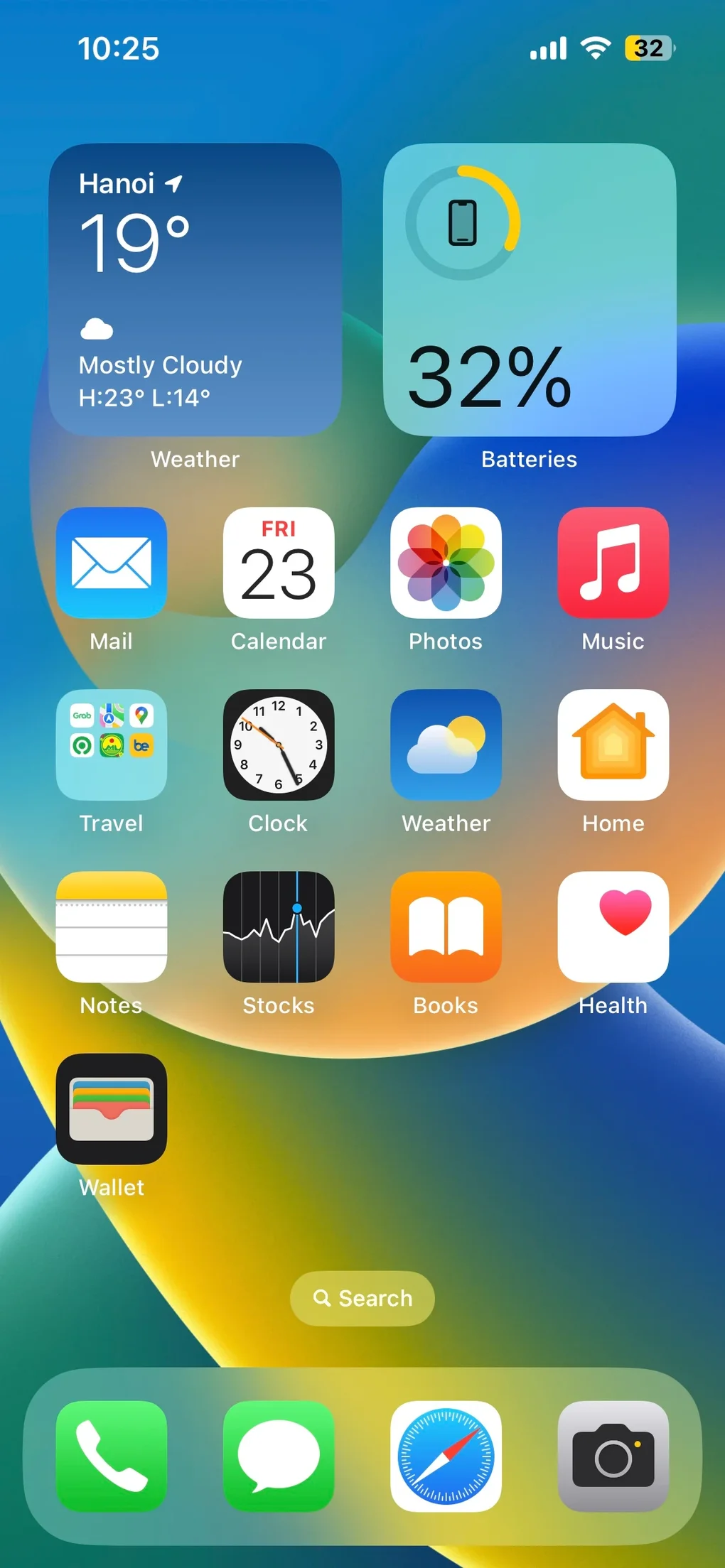
For Android users, installing an iOS launcher offers an opportunity to experiment with this visual paradigm without committing to an entirely new ecosystem or purchasing a new device. It allows them to retain their preferred Android device, access to Google Play Store apps, and familiar Android settings, while enjoying a superficial transformation that mimics their desired iOS look. This ability to “theme” an Android phone with an iOS skin is a testament to Android’s open nature and the ingenuity of app developers who cater to this specific niche. Whether it’s to satisfy a curiosity, to enjoy a fresh visual change, or simply because they genuinely prefer the iOS interface design, these launchers provide an accessible pathway to a different aesthetic experience.
Unpacking Launcher iOS 13: Features and Functionality
When we talk about “Launcher iOS 13” (or its contemporary iterations like Launcher iOS 14/16), we’re discussing a comprehensive personalization application. Its primary goal is to overhaul the Android home screen, app drawer, and several system-level visual elements to mimic iOS as closely as possible. Developed by teams like “Launcher OS 12 Team” (as referenced in the original content), these applications typically offer a suite of features designed to create a convincing iOS illusion.
Replicating the Iconic iOS Interface
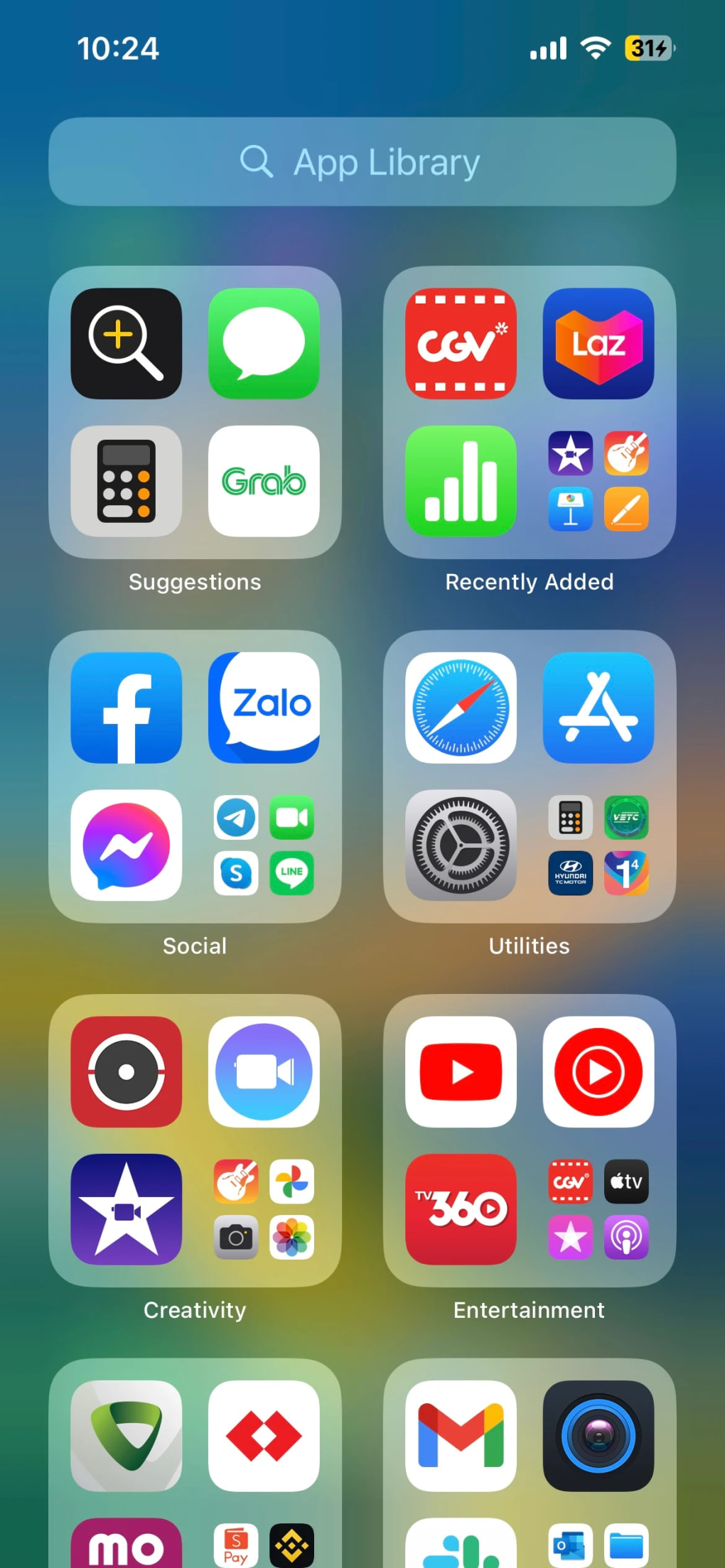
At the heart of any iOS launcher is the ambition to recreate the distinctive iOS home screen. This includes:
- Iconography: The most immediate visual change. Android app icons are replaced with iOS-style counterparts, often with rounded squares and a uniform appearance. Many launchers also attempt to apply dynamic icons where possible, such as for the clock or calendar, to further enhance the realism.
- Home Screen Layout: The strict grid layout of iOS, where apps are arranged without gaps, is replicated. This contrasts with Android’s more flexible system, which allows for empty spaces and custom icon placement.
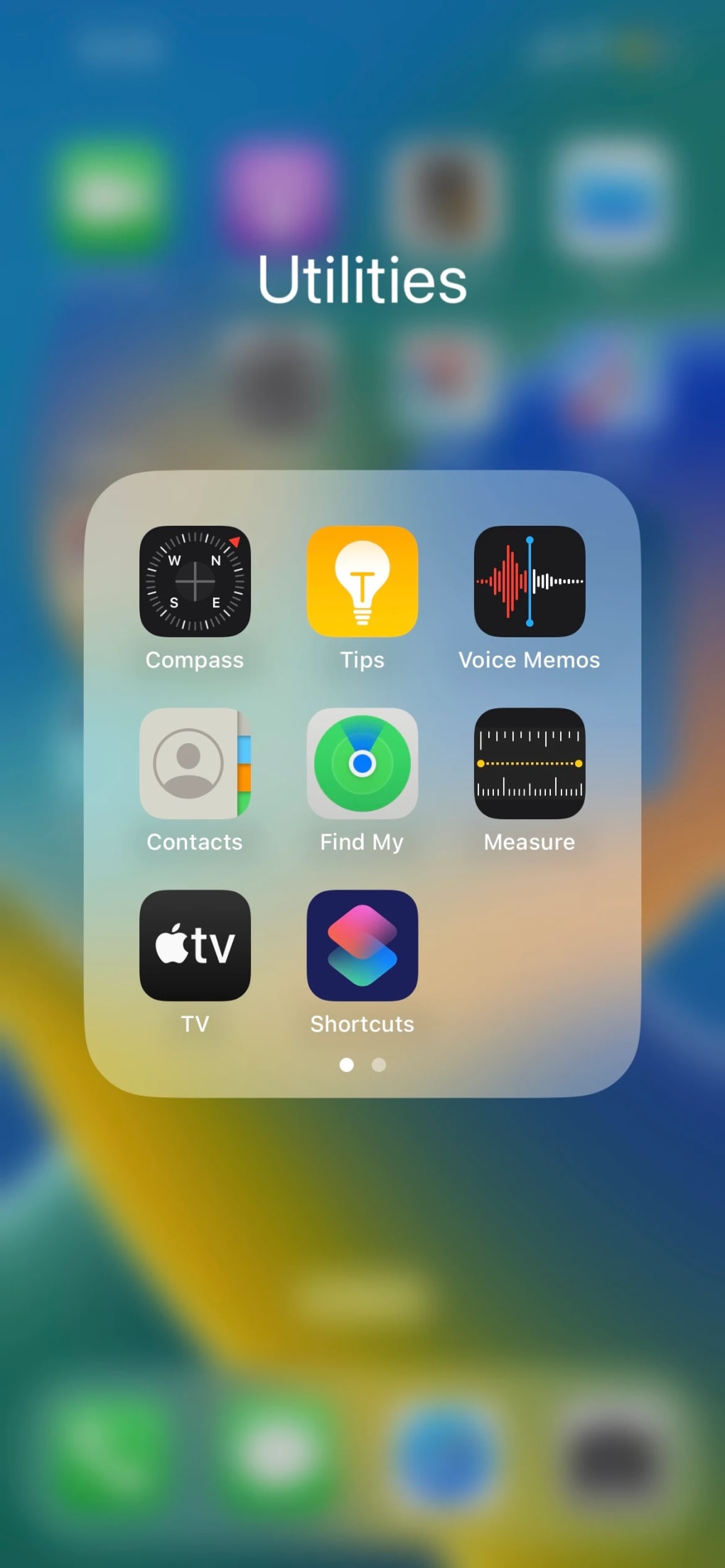
- App Library: A standout feature introduced in iOS 14, the App Library automatically categorizes apps into thematic folders (e.g., Social, Utilities, Entertainment). Launcher iOS applications often integrate a similar feature, aiming to organize your Android apps in the same intelligent, scrollable fashion, reducing clutter on the home screens. This helps in managing a large number of applications, mimicking the convenience offered by Apple.
- Dock: The bottom bar housing frequently used apps, visually distinct from the rest of the home screen, is also a staple.
- Search Functionality: A swipe down on the home screen typically invokes a search bar, reminiscent of iOS’s Spotlight Search, allowing users to quickly find apps, contacts, and perform web searches.
Beyond the home screen, these launchers often extend their mimicry to other critical UI elements, ensuring a consistent visual experience:
- Notification Center and Control Center: While full replication of these system-level features can be challenging on Android without deeper system permissions (which might be risky or require root access), many launchers provide visual overlays or shortcuts that look like the iOS Notification and Control Centers. This means quick toggles for Wi-Fi, Bluetooth, flashlight, and media controls appear with the signature iOS design language.
- Widgets: Modern iOS versions (starting with iOS 14) introduced highly customizable widgets that can be placed directly on the home screen. Launcher iOS 13 and its successors aim to replicate this. Users can often add weather widgets, suggestion widgets, and other informational panels that visually match their iOS counterparts, allowing for a personalized information-at-a-glance experience. This brings a dynamic element to the static home screen.
Deep Dive into Customization and Widgets
One of the strengths of Android is its flexibility, and ironically, iOS launchers leverage this to provide an iOS-like experience with an added layer of Android-style customization. While iOS itself offers a curated customization experience, these launchers sometimes go further in certain aspects:
- Wallpaper and Themes: Users can, of course, set iOS-inspired wallpapers. Many launchers come bundled with a selection of wallpapers that are either directly from iOS or designed to match its aesthetic. The ability to switch between dark and light modes, a popular feature in modern operating systems, is also commonly supported, ensuring visual comfort in different lighting conditions and personal preference.
- Gesture Shortcuts: To truly feel like iOS, navigation gestures are crucial. These launchers often allow users to configure gesture shortcuts—such as swiping up from the bottom to go home, swiping left or right to switch between apps, or swiping down for search/notifications—that are designed to mimic iOS gestures. This adds a layer of intuitive interaction that goes beyond just visual replication.
- Blurring Effects: The subtle yet elegant blurring effects seen in iOS, particularly behind control centers, notification shades, and folder backgrounds, are a hallmark of its sophisticated design. Advanced iOS launchers attempt to replicate these visual nuances, adding depth and polish to the user interface. These effects contribute significantly to the premium feel associated with Apple’s operating system.
- Customizable Icons and Names: Perhaps one of the most flexible aspects offered by these launchers is the ability to customize the icons and names of individual apps using any image from your gallery. This goes beyond what native iOS typically allows and taps into Android’s inherent openness. Users can download icon packs, create their own custom icons, or use photos, giving them granular control over the appearance of each app shortcut. This level of personalization can be a powerful draw for those who want a unique twist on the iOS look.
In essence, these launchers are not just static themes; they are dynamic applications attempting to provide a comprehensive iOS experience within the Android framework. They strive to capture the essence of iOS, from its layout and iconography to its interactive elements and modern features, all while running on a different operating system.
The User Journey: Setup, Performance, and Common Hurdles
While the promise of an iOS-like experience on Android is appealing, the practical implementation of these launchers can sometimes present a mixed bag of experiences. The user journey, from initial setup to daily usage, often comes with its own set of challenges and triumphs.
Navigating Setup and Organization
One of the common feedback points about these launchers, as highlighted in the provided text, is that “setting up alone is problematic” and “it can be confusing.” This isn’t entirely surprising given the nature of what these apps are trying to achieve. An iOS launcher needs to integrate deeply with the Android system to override its default UI. This often involves:
- Granting Permissions: The launcher will require various permissions, such as access to notifications, storage, and the ability to draw over other apps. Navigating these permission prompts can be daunting for less tech-savvy users.
- Setting as Default: For the launcher to function continuously, it must be set as the default home screen app. This often requires navigating Android’s system settings, which can vary slightly between device manufacturers.
- Initial Configuration: After installation, users might need to manually enable specific iOS-like features, customize gesture settings, or arrange their apps into folders if the automatic App Library isn’t perfect. The learning curve for optimizing the launcher to one’s preference can be steeper than with a native Android launcher.
Furthermore, the original text notes that “the apps are also difficult to organize” and “sometimes the changes do not reflect on the launcher.” This points to potential usability issues:
- Manual Organization: While features like the App Library aim for automatic categorization, they might not always align with a user’s personal logic, requiring tedious manual adjustments. Android users are accustomed to dragging and dropping icons with ease; if the launcher’s implementation is clunky, it can be frustrating.
- Inconsistent Application of Settings: Nothing is more annoying than spending time customizing an interface only for the changes not to save, or to revert after a device restart or app update. This could be due to bugs in the launcher’s code, conflicts with the underlying Android version, or aggressive memory management by the device’s operating system. This particular issue can significantly detract from the user’s satisfaction.
Performance Expectations and Limitations
Beyond setup, the day-to-day performance of an iOS launcher is crucial. The most significant concern raised is that the “app constantly freezes.” This is a critical flaw that can quickly sour the user experience. Constant freezing can stem from several factors:
- Resource Intensiveness: To render complex animations, blur effects, and manage a custom icon set, launchers can be resource-heavy. If not optimized well, they can consume significant RAM and CPU cycles, leading to lag, stutters, and outright freezes, especially on older or less powerful Android devices.
- Optimization Issues: The developers might struggle with optimizing the launcher for the vast array of Android devices and OS versions. What works perfectly on one phone might be buggy on another.
- Conflicts with Android System: Launchers are essentially skins operating on top of Android. There can be conflicts with Android’s native processes, other background apps, or manufacturer-specific UI overlays (like Samsung’s One UI or Xiaomi’s MIUI), leading to instability.
- Battery Drain: A resource-intensive launcher can also lead to increased battery consumption, as the processor and GPU work harder to maintain the custom UI.
It’s important to remember that an iOS launcher on Android is an emulation, not a native operating system. This inherently imposes limitations:
- No True iOS Features: While the launcher can mimic the appearance of an App Library or Control Center, it cannot provide the deep integration or specific functionalities of true iOS features like iMessage, FaceTime, AirDrop, or advanced Face ID/Touch ID features beyond standard Android biometric unlocks.
- Performance Compromises: Achieving a truly “buttery smooth” iOS experience on Android via a launcher is exceptionally difficult. The underlying Android system, with its different animation frameworks and resource management, will always be present, and it’s rare for an overlay to perfectly match the performance of a natively optimized OS.
- Updates: Keeping up with the latest iOS designs can be a constant battle for launcher developers. As Apple updates iOS annually, launchers must be continually updated to remain relevant, and there can be a delay between an iOS release and its perfect replication on an Android launcher.
Ultimately, while these launchers aim to deliver the iOS aesthetic, users must manage their expectations. They are getting a visual overhaul, not a complete operating system transplant, and the inherent differences between Android and iOS will always present themselves, especially in terms of deep functionality and system-level performance.
Weighing the Benefits Against the Drawbacks
Deciding whether to use an iOS launcher like Launcher iOS 13 (or its more recent versions) on your Android device involves a careful consideration of its advantages and disadvantages. For some, the benefits significantly outweigh the drawbacks, while for others, the compromises are too great.
The Advantages: Why Android Users Choose iOS Launchers
The allure of these launchers is strong, primarily driven by their capacity to deliver a specific aesthetic and user experience:
- Authentic iOS 14/16 System Mimicry: The primary benefit is the visual transformation. These launchers excel at recreating the look of modern iOS, from icons and home screen layout to widgets and general UI elements. For those who admire Apple’s design language but prefer Android’s flexibility or hardware, this is a perfect solution.
- Integration of Various iOS Features: Beyond just looks, the launchers often incorporate beloved functional aspects like the App Library for intelligent app organization and the elegant widget system (e.g., weather, suggestions) that bring dynamic information to the home screen. These features contribute significantly to the overall iOS “feel.”
- Support for Dark and Light Modes: Modern operating systems offer dark mode for reduced eye strain and aesthetic preference. The inclusion of both dark and light modes in these launchers ensures they keep pace with contemporary UI trends and offer users more control over their visual environment.
- Enhanced Customization of Icons: While iOS offers some customization, the ability to change individual app icons and names using any image, as often provided by these launchers, grants Android users a level of personalization that even native iOS doesn’t fully match. This allows for truly unique home screens.
- Cost-Effective iOS Experience: Perhaps the most compelling advantage is the ability to experience a significant portion of the iOS user interface without the financial investment of purchasing an iPhone. It’s a low-risk way to satisfy curiosity or simply enjoy a different aesthetic without changing hardware.
The Drawbacks: Understanding the Compromises
Despite their appeal, iOS launchers are not without their limitations and frustrations, as observed in user feedback:
- Tricky and Confusing Customization: As noted, the initial setup and ongoing customization can be unintuitive. Users might struggle with configuring gestures, organizing apps, or ensuring all desired settings are applied correctly and consistently. This can be a barrier for less technically inclined users.
- Difficulty in App Organization: While the App Library aims to simplify app management, its implementation in an Android launcher might not always be seamless. Users might find themselves battling the system to arrange apps to their liking, or discover that the automatic categorization isn’t always accurate or flexible enough.
- Inconsistent Application of Changes: The frustration of “changes sometimes do not reflect” is a significant usability issue. If wallpapers, icon changes, or other settings fail to stick or revert unexpectedly, it undermines the purpose of customization and leads to a disjointed user experience.
- Performance Issues: Constant Freezing and Lag: The “constantly freezes” issue is a major deterrent. A launcher that frequently stutters, lags, or crashes makes the entire phone experience unpleasant, regardless of how attractive the interface is. This often points to optimization challenges or resource constraints.
- Battery Consumption: Running a graphically intensive launcher in the background can lead to increased battery drain, impacting the device’s overall endurance throughout the day.
- Not a True iOS Replacement: Fundamentally, these are visual overlays. They cannot replicate the deep software-hardware integration, exclusive apps (like iMessage), or the security architecture of a real iPhone. Users must understand that it’s a skin, not a full operating system swap.
- Potential for Ads or Bloatware: Some free launchers, particularly those from less reputable developers, might include intrusive ads or bundled software, which can further degrade the user experience.
In summary, iOS launchers for Android like Launcher iOS 13 offer an intriguing proposition for those who admire Apple’s design. They provide a high degree of visual replication and integrate some key iOS features. However, users must be prepared for potential hurdles in setup, organization, and, critically, performance. The trade-off is often between a captivating aesthetic and the practical stability and efficiency of a native Android experience.
Conclusion
“Launcher iOS 13” and its more modern equivalents represent a fascinating phenomenon in the mobile world: the desire to hybridize distinct operating system experiences. For Android users captivated by the sleekness and perceived simplicity of iOS, these launchers offer an accessible, low-cost gateway to that aesthetic. They successfully mimic much of iOS’s visual charm, from its iconic iconography and structured home screen layout to the functionality of features like the App Library and customizable widgets, all while retaining the underlying flexibility of Android.
However, as with any emulation, perfection remains elusive. The journey with an iOS launcher can be fraught with challenges, including tricky setup processes, difficulties in consistent app organization, and the particularly aggravating issue of performance stability, where the application may “constantly freeze.” These drawbacks underscore the fundamental difference between a launcher—an overlay—and a native operating system. It’s a cosmetic change, not a fundamental architectural shift.
Ultimately, whether “Launcher iOS 13” or a similar application is the right choice depends on individual priorities. If the primary goal is a superficial aesthetic change, a taste of the iOS look without buying a new device, and you are willing to overlook potential performance hiccups and setup complexities, then these launchers can deliver on their promise. For those seeking a seamless, bug-free experience or a true replication of iOS’s deep functionality and security, the best solution remains an actual iPhone.
PhanMemFree, like other software repositories, lists these applications, providing users with options to explore mobile personalization. While “Launcher iOS 13” might not be a perfect solution for everyone, it unequivocally serves a significant niche, allowing Android users to experience a curated slice of Apple’s design philosophy on their devices. As technology evolves, perhaps the fidelity and stability of such cross-platform emulations will only continue to improve, blurring the lines between these mobile giants even further. Visit Phanmemfree.org to discover a wide array of personalization tools for your Android device.
File Information
- License: “Free”
- Latest update: “June 5, 2025”
- Platform: “Android”
- OS: “Android 11.0”
- Language: “English”
- Downloads: “88.9K”
- Download Options: “Google Play”


