
Lazarus is a free and open-source integrated development environment (IDE) and rapid application development (RAD) tool for the Free Pascal compiler. It’s designed to emulate the functionality of Delphi, a proprietary RAD environment known for its ease of use and powerful visual components. Unlike Delphi, however, Lazarus is completely cross-platform, meaning you can write code once and compile it for various operating systems like Windows, Linux, macOS, and even Android and iOS with some added effort. This cross-platform capability, along with its open-source nature, makes Lazarus an attractive alternative for developers seeking flexibility and cost-effectiveness.
Lazarus’s Core Functionality and Features
At its heart, Lazarus provides a rich set of class libraries that mimic Delphi’s functionality. These libraries offer a wide range of visual components – buttons, text fields, forms, and more – that developers can drag and drop onto forms to create graphical user interfaces (GUIs). This visual approach to development significantly speeds up the process of building applications. Lazarus’s strength lies in its ability to abstract away the complexities of different operating systems and windowing systems, allowing developers to focus on the logic of their application rather than the intricate details of platform-specific code.
The IDE itself is intuitive and user-friendly. It provides features such as code completion, syntax highlighting, debugging tools, and an integrated form designer. This comprehensive suite of tools simplifies the development workflow and improves productivity. Furthermore, Lazarus leverages the power of Free Pascal, a highly portable compiler that supports a wide variety of platforms and architectures. This combination of a powerful IDE and a versatile compiler makes Lazarus a compelling choice for developers across diverse platforms.
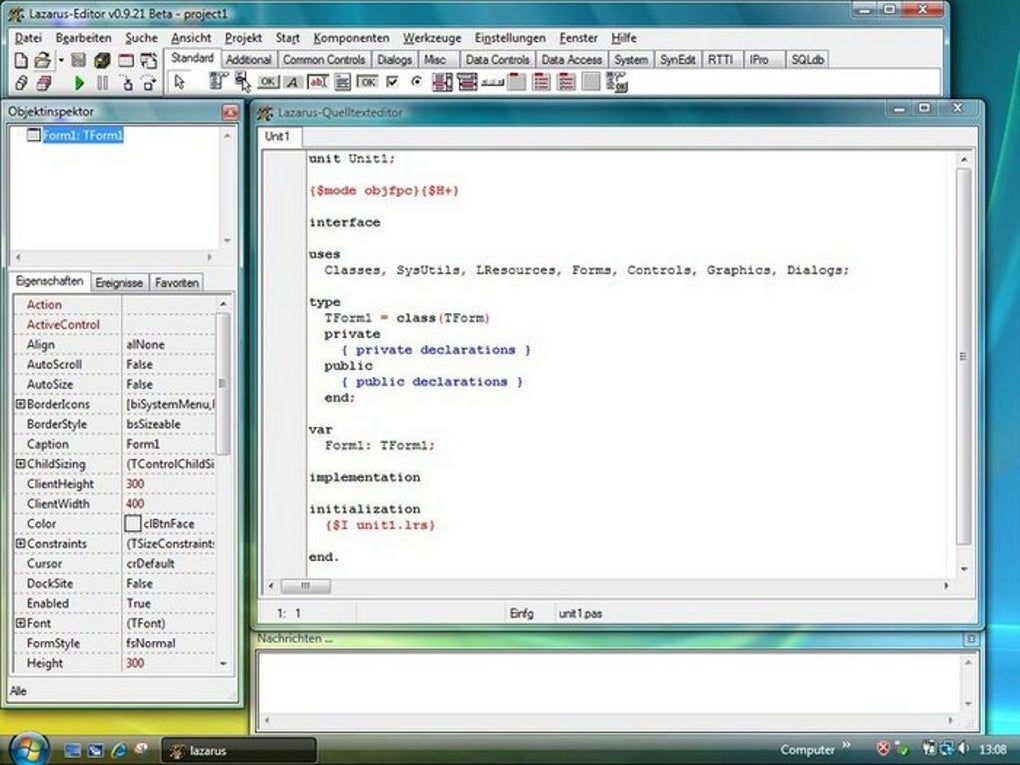
One of the key advantages of Lazarus is its API independence. This means that once you’ve written your application code, you can easily change the underlying widget set (the set of visual components used) without needing to rewrite significant portions of your code. For instance, you might initially develop your application using the native Windows widgets for a Windows build. Later, with minimal effort, you can switch to a cross-platform widget set like GTK+ to easily generate a Linux version of your application. This portability allows developers to efficiently create and maintain applications across multiple operating systems, eliminating the need for significant codebase rewrites for each platform.
Lazarus’s open-source nature ensures community support and continuous development. The vibrant Lazarus community actively contributes to the project, providing assistance, creating new components, and enhancing existing features. This ensures that the IDE and its associated libraries stay up-to-date and meet the evolving needs of developers. Access to the source code enables developers to customize and extend Lazarus according to their specific requirements. This fosters a collaborative environment where developers can share knowledge and contribute to the ongoing improvement of the tool.
Cross-Platform Development with Lazarus
The ability to create cross-platform applications is a significant selling point of Lazarus. Instead of maintaining separate codebases for Windows, Linux, macOS, and other systems, developers can write a single codebase and compile it for various targets. This dramatically reduces development time and effort while ensuring consistency across platforms.
The compilation process is straightforward. Once your application code is written, you select the target platform (e.g., Windows, Linux) within the Lazarus IDE, and the compiler compiles your code and links it with the appropriate libraries for that target system. The resulting executable is then ready to run on the chosen operating system. This write-once-compile-anywhere approach stands in contrast to approaches like Java’s “write once, run anywhere” which often requires additional runtime environments and sometimes results in platform-specific behaviors. Lazarus emphasizes compile-time portability, delivering native executables optimized for each platform’s architecture and providing improved performance.
Comparison with Other IDEs and Frameworks
Lazarus often draws comparison to other popular IDEs and frameworks, such as Delphi (its inspiration), C++, and Java. While each offers its own advantages, Lazarus distinguishes itself in several ways:
-
Cost: Lazarus is entirely free and open-source, eliminating licensing fees that can be substantial with proprietary IDEs like Delphi. This makes it an especially attractive option for individual developers, startups, and open-source projects with limited budgets.
-
Portability: Lazarus significantly surpasses Delphi in terms of cross-platform compatibility. While Delphi supports a relatively limited number of platforms, Lazarus boasts broader support, spanning major operating systems and architectures.
-
Community: The active and supportive Lazarus community provides a valuable resource for developers, offering assistance, tutorials, and extensions. This community-driven nature fosters a collaborative environment and ensures the ongoing development and improvement of the IDE.
- Flexibility: The open-source nature of Lazarus grants developers unparalleled flexibility. They can modify the source code, extend the functionalities, and tailor the IDE to their specific needs.
While C++ and Java offer strong cross-platform support, they often involve more complex coding and a steeper learning curve than Lazarus’s comparatively intuitive environment. Java, in particular, relies on a virtual machine (JVM), which may impact performance compared to Lazarus’s native executable approach. The visual components of Lazarus, similar to Delphi, provide a faster development cycle compared to the more manual UI construction often associated with C++.
Getting Started with Lazarus
Beginners can easily start using Lazarus. The official website offers comprehensive documentation, tutorials, and downloadable installers for various operating systems. The IDE’s intuitive interface and the abundance of online resources make it accessible to developers of varying skill levels.
Many online tutorials and courses guide users through the basic concepts of Lazarus programming, from creating simple GUIs to developing more complex applications. The extensive component library provides a wealth of pre-built components to speed up the development process. The active community forums are readily available for seeking assistance and exchanging knowledge with experienced Lazarus developers.
Limitations and Challenges
While Lazarus offers many advantages, it also has some limitations:
-
Smaller Community: Compared to more established platforms like C++ or Java, Lazarus boasts a smaller community. This may mean a slightly slower response time for support and fewer readily available third-party libraries.
-
Limited Mobile Support: Although Lazarus supports mobile platforms (Android and iOS), development in these environments can be more challenging compared to native mobile development tools.
-
Documentation: While improving, the documentation for certain aspects of Lazarus might not be as comprehensive or up-to-date as some other IDEs.
Conclusion
Lazarus presents a strong alternative to commercial RAD environments and other cross-platform development frameworks. Its open-source nature, cross-platform compatibility, and user-friendly IDE make it an attractive option for a wide range of developers, from hobbyists to professionals. Although it has certain limitations, its strengths outweigh these shortcomings, making it a valuable tool for many software development projects, especially those prioritizing cross-platform development, cost-effectiveness, and community support. As the project continues to evolve and its community grows, Lazarus’s capabilities and accessibility are bound to improve further, solidifying its place in the landscape of open-source software development.
File Information
- License: “Free”
- Version: “0.9.32”
- Latest update: “July 15, 2022”
- Platform: “Windows”
- OS: “Windows 2000”
- Language: “English”
- Downloads: “69.3K”
- Size: “64.58 MB”


