
LDPlayer is a free Android emulator designed for Windows computers, offering a seamless and efficient way to play mobile games and use Android apps on your PC. Its popularity stems from its lightweight nature, robust performance, and extensive feature set, making it a strong contender in the crowded emulator market. This guide delves into the capabilities, features, and overall user experience of LDPlayer, helping you determine if it’s the right Android emulator for your needs.
Installation and Interface
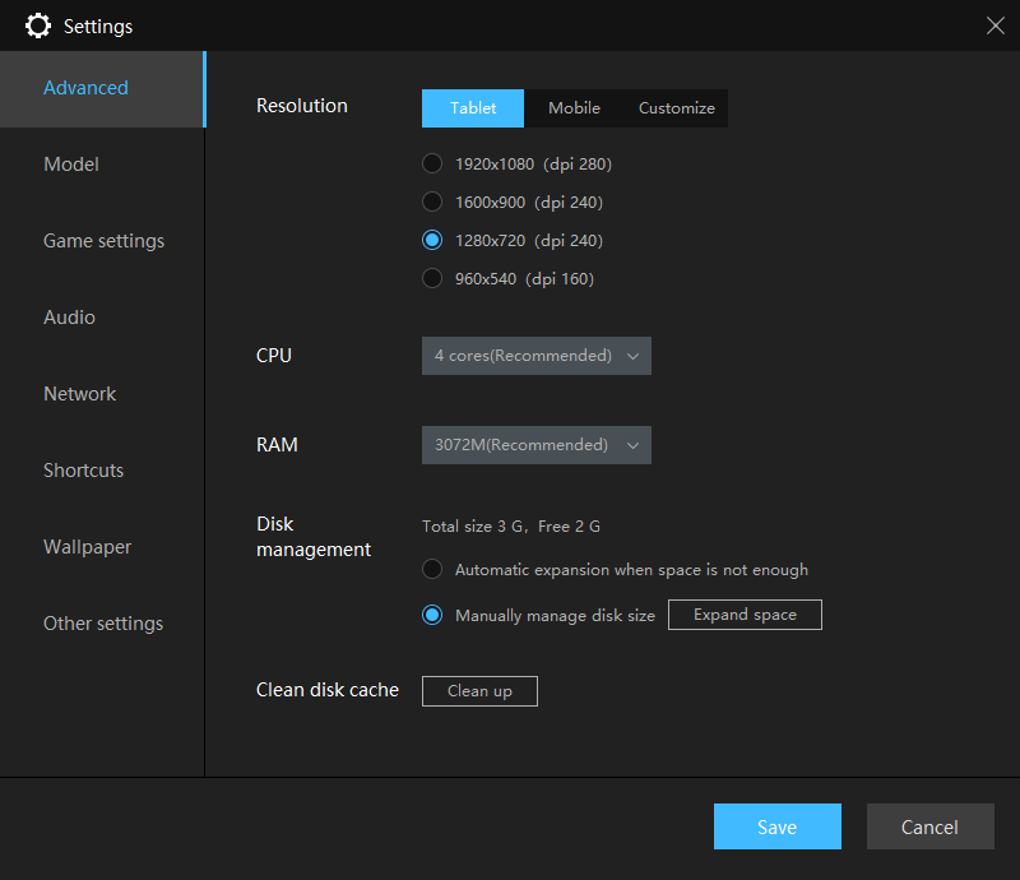
Downloading and installing LDPlayer is straightforward. A simple click of the download button initiates the transfer of the .exe file. Launching this file initiates the installation process, which is typically completed within a few minutes. The interface, upon launching, closely resembles the design of a standard Android phone, featuring familiar app icons and layouts. This familiarity reduces the learning curve for users already comfortable with Android devices. Access to the Google Play Store is readily available, allowing for the easy downloading and installation of apps directly from the official repository. Alternatively, LDPlayer provides its own LD Store, curated for a selection of games. A convenient search bar facilitates quick searches across both the Play Store and the LD Store. The program’s settings menu offers extensive customization options. Users can adjust resolution, CPU core allocation, RAM usage, keyboard shortcuts, and even fine-tune settings for individual games, enabling optimization for a specific game’s performance requirements.
Enhanced Gameplay and Control
One of LDPlayer’s key strengths is its enhanced gameplay experience compared to playing on a mobile device. The limitations of touchscreen controls are eliminated through the integration of keyboard and mouse support. LDPlayer’s intuitive keymapping tool empowers users to customize control schemes, assigning keyboard keys and mouse actions to specific in-game functions, such as movement, aiming, and skill activation. This customization allows for a much more precise and responsive gaming experience compared to using a touch screen. The process of setting up key mappings is remarkably simple. Users only need to launch the game, open the keymapping icon, and then drag and drop desired keys onto the on-screen controls. Saving the configuration finalizes the custom control setup. The keymapping system offers a wide array of functions, including support for simple and repeated touch actions, movement control, view control, right-click functionality, skill keys, cursor keys, fire keys, and free-look controls.
Gamepad support is another feature that enhances the gaming experience. LDPlayer automatically detects compatible gamepads connected to the computer and enables them, assuming the gamepad is set to Android mode (unless it’s exclusively Android-compatible). While the emulator automatically detects and enables supported gamepads, users can further customize the control layout by initiating the remapping process after launching the game.
Multi-Instancing and Scripting Capabilities
LDPlayer stands out through its robust support for multi-instancing, allowing users to run multiple instances of the emulator simultaneously. This feature proves extremely beneficial for players of games featuring gacha mechanics, loot boxes, or other randomized rewards. Multiple accounts can be run concurrently, maximizing the chances of acquiring desirable items or progressing more rapidly in the game. LDPlayer allows users to create new instances from scratch, clone an existing instance to replicate a setup, or utilize the synchronization tool to replicate actions across all active instances. This synchronization capability ensures that the same actions, such as farming materials or completing tasks, are performed simultaneously in all instances, significantly increasing efficiency.
Further boosting efficiency, LDPlayer offers a built-in script recorder. This functionality allows users to record a sequence of actions and replay them as a script, automating repetitive tasks. This automated process reduces manual intervention, freeing players to focus on other aspects of the game. The recorder enables the merging of multiple recorded actions into a comprehensive script. Advanced settings allow users to adjust script parameters, including loop counts, start conditions, interval timings, and playback speed, further enhancing control and optimization.
Recording and Sharing Gameplay
LDPlayer includes a convenient built-in video recorder. Unlike external recording software, the integrated recorder minimizes the impact on system resources, ensuring stable frame rates and smooth gameplay even during recording. The recorder can be initiated manually using the dedicated icon or through a simple keyboard shortcut (F8). Recorded gameplay can be easily shared with friends or uploaded to video-sharing platforms like YouTube, allowing users to share their achievements or create gaming content for online audiences. This built-in recorder is a considerable advantage, as it simplifies the recording process and avoids performance issues associated with running separate recording software.
System Requirements and Compatibility
LDPlayer maintains a relatively modest system requirement profile, ensuring accessibility for a wide range of computers. The minimum requirements include:
- OS: Windows XP SP3 / Win7 / Win8 / Win8.1 / Win10
- Processor: Intel or AMD Processor x86 / x64
- RAM: 2GB
- Hard disk space: 36GB
Recommended specifications, however, offer a more optimal gaming experience:
- Processor: Intel Core i5-7500
- RAM: 8GB
- Hard disk space: 100GB
- Graphics: NVIDIA GeForce GTX 750 Ti
While LDPlayer aims for broad compatibility, it’s important to note that not every Android game or app is guaranteed to function flawlessly. Some games or apps may have compatibility issues, although the emulator continuously updates to address such concerns.
Advantages and Disadvantages
Pros:
- Lightweight and efficient: LDPlayer doesn’t consume excessive system resources.
- Excellent video recording: The built-in recorder is efficient and high-quality.
- Multi-instancing and synchronization: Enables simultaneous gameplay across multiple accounts.
- Comprehensive scripting: Automates repetitive actions for enhanced efficiency.
- Intuitive keymapping: Provides precise and customizable keyboard and mouse controls.
Cons:
- Limited game/app compatibility: Not all Android games and apps are supported.
- Lack of built-in tutorial: Relies on an online guide for comprehensive instructions.
Conclusion
LDPlayer presents a compelling option for users seeking a free and efficient Android emulator for their Windows PCs. Its focus on gaming optimization, combined with its multi-instancing and scripting capabilities, caters to players seeking a more enhanced and efficient experience compared to playing on a mobile device. While minor limitations exist in terms of complete compatibility, the benefits of its powerful features and streamlined performance largely outweigh these minor drawbacks, making it a strong choice for many Android gamers and app users. The ease of use, coupled with its extensive customization options, solidifies LDPlayer’s position as a leading Android emulator in the market.
File Information
- License: “Free”
- Latest update: “December 30, 2024”
- Platform: “Windows”
- OS: “Windows 10”
- Language: “English”
- Downloads: “417.9K”
- Size: “772.27 MB”


