
Lenovo Vantage is a free utility software application developed by Lenovo designed to provide comprehensive management capabilities for Lenovo PCs. This powerful tool goes beyond basic system monitoring, offering a range of features aimed at optimizing performance, enhancing security, and personalizing the user experience. This guide delves into the functionalities of Lenovo Vantage, exploring its purpose, capabilities, limitations, and alternatives.
Understanding Lenovo Vantage: Purpose and Functionality
Lenovo Vantage serves as a centralized hub for managing various aspects of your Lenovo laptop or desktop. Its primary purpose is to provide a user-friendly interface for monitoring system health, diagnosing potential issues, and customizing settings to optimize performance and enhance the overall user experience. The application offers a holistic approach to device management, integrating several key functionalities into a single, easily accessible platform.
The core functionalities of Lenovo Vantage include:
-
System Health Monitoring: Vantage provides a real-time overview of your PC’s health, displaying key metrics such as CPU usage, memory utilization, storage capacity, and battery status. This allows users to proactively identify potential performance bottlenecks or hardware issues.
-
Driver and BIOS Updates: Keeping drivers and BIOS up-to-date is crucial for optimal performance and stability. Lenovo Vantage simplifies this process by automatically scanning for outdated drivers and BIOS versions and providing easy-to-use update options. This ensures that your system benefits from the latest performance enhancements and bug fixes.
-
Customization and Personalization: Lenovo Vantage empowers users to tailor their PC’s settings to their specific needs and preferences. This includes adjusting power settings for optimal battery life, modifying display settings for improved visual experience, configuring keyboard backlighting, and customizing audio settings. Users can personalize the system to achieve a more comfortable and efficient working environment.
-
Security Enhancements: The application integrates security features such as password management tools and access to Lenovo’s recommended antivirus solutions. This helps users strengthen their system’s security posture and protect sensitive data from unauthorized access.
-
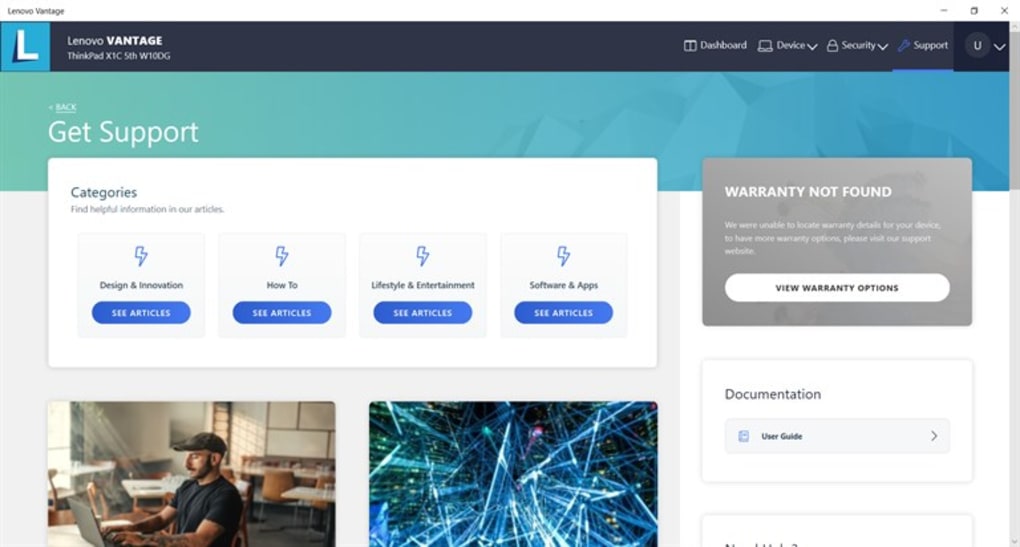
Access to Lenovo Services and Support: Lenovo Vantage provides a gateway to various Lenovo services, including access to support resources, user manuals, and information on compatible accessories. This streamlined access to support simplifies troubleshooting and allows users to find assistance quickly.
-
Lenovo Migration Assistant: This handy tool greatly simplifies the process of transferring data from an old PC to a new Lenovo device. Users can easily migrate their files, images, and other important data to their new Lenovo computer.
- Promotional Offers and Deals: Lenovo Vantage often features promotional offers and deals on Lenovo products and services, providing users with opportunities to purchase accessories or upgrades at discounted prices.
Lenovo Vantage: Customization and System Optimization
Lenovo Vantage excels at providing granular control over various aspects of your Lenovo PC’s configuration. The intuitive dashboard allows users to easily access and modify numerous settings, without needing to navigate complex system menus or third-party applications.
Hardware and Software Optimization: The application offers tools to diagnose and resolve potential system issues. It can pinpoint hardware or software conflicts that may impact performance and provide recommended solutions. This proactive approach helps users maintain a stable and highly functional system.
Power Management: Lenovo Vantage allows users to customize power plans, setting preferred power modes (High Performance, Balanced, Power Saver) and adjusting the charging threshold for the battery. This capability optimizes battery life and reduces power consumption, extending battery longevity and enhancing portability.
Display and Audio Settings: The application provides intuitive controls for adjusting display brightness, resolution, and color settings. Users can optimize screen settings to match their individual preferences and environmental conditions. Similar control over audio settings allows users to fine-tune the sound output based on their personal preferences and the type of media being consumed.
Keyboard, Mouse, and Camera Settings: Lenovo Vantage also extends its customization capabilities to peripheral devices. Users can adjust keyboard backlight brightness, configure mouse settings (pointer speed, scroll settings), and manage camera settings (resolution, brightness, exposure). This consolidated control offers a seamless experience for customizing the entire user environment.
Advanced Features and Access to Lenovo Resources
Beyond the basic system management features, Lenovo Vantage offers advanced capabilities that significantly enhance the user experience:
- Application Recommendations: The application suggests applications that may complement the user’s software environment and workflow. This is particularly beneficial for new users who may be unfamiliar with software options available for their Lenovo system.
-
Access to User Manuals: Quickly access your Lenovo device’s user manual directly through the application. This simplifies troubleshooting and ensures users have ready access to information on their system’s specifications and operational procedures.
-
Support Resources: Integrated access to Lenovo’s support resources and troubleshooting guides provides users with quick access to assistance when faced with technical issues or configuration problems.
-
Compatibility Information: Lenovo Vantage displays information on accessories and peripheral devices that are compatible with your specific Lenovo PC model. This ensures users select compatible accessories without needing to research compatibility manually.
System Requirements and Compatibility
Currently, Lenovo Vantage is primarily designed for Lenovo PCs running Windows 10 and Windows 11. Users with older Lenovo laptops or desktops running Windows 7 or 8 will not be able to utilize the application’s features. This limitation restricts its accessibility to a subset of Lenovo’s user base.
Limitations and Alternatives to Lenovo Vantage
While Lenovo Vantage offers a robust suite of features, it’s important to acknowledge some limitations:
-
Lenovo-Specific Compatibility: The most significant limitation is the exclusive compatibility with Lenovo devices running Windows 10 and 11. This excludes users of other hardware brands or older operating systems from benefiting from its features.
-
Potential Resource Consumption: Some users have reported that Lenovo Vantage may consume noticeable system resources, impacting performance, particularly on older or lower-specification devices.
-
Interface Complexity: While generally intuitive, the application’s numerous features and tabs can feel overwhelming for less technically proficient users. Navigating the application effectively might require some learning curve.
- Online Dependency: Several features rely on internet connectivity for updates and access to certain services. Offline functionality might be limited, potentially hindering the application’s utility in environments with limited or no internet access.
Given these limitations, several alternative applications offer similar or overlapping functionalities:
-
Driver Booster: A comprehensive driver updater compatible with various hardware brands and operating systems. This offers a broader compatibility range compared to the Lenovo-exclusive Vantage.
-
HWMonitor: Provides real-time hardware monitoring, offering detailed insights into temperature, voltage, and fan speeds. This is useful for performance monitoring and troubleshooting hardware-related issues.
-
CCleaner: A popular system optimization tool that cleans unnecessary files, optimizes registry settings, and improves overall system performance. While not directly a device management tool, it addresses system issues that can indirectly enhance performance.
-
Notebook BatteryInfo: Focuses specifically on battery health and performance monitoring for laptops. This tool provides detailed information on battery life, charge cycles, and overall health status.
Conclusion: Should You Download Lenovo Vantage?
The decision of whether to download Lenovo Vantage ultimately depends on your individual needs and the type of PC you own. If you own a Lenovo PC running Windows 10 or 11 and value a centralized platform for managing system health, updating drivers, customizing settings, and accessing Lenovo support resources, then Lenovo Vantage is a valuable tool. However, if you use a non-Lenovo PC or an older operating system, you’ll need to explore the alternative applications mentioned above, which offer broader compatibility and features. The potential resource consumption and interface complexity should also be considered when deciding whether Lenovo Vantage aligns with your personal preferences and technical proficiency. Weighing the pros and cons carefully will help determine if Lenovo Vantage is the right choice for your specific requirements.
File Information
- License: “Free”
- Latest update: “June 6, 2025”
- Platform: “Windows”
- OS: “Windows 11”
- Downloads: “84.8K”


