
The Lexilogos Arabic keyboard is a free, portable virtual keyboard application designed to facilitate Arabic typing for users who lack a physical keyboard with Arabic characters. This review will delve into its features, usability, pros, cons, and alternatives, providing a comprehensive assessment of its effectiveness as a typing tool for the Arabic language.
Functionality and Features
The Lexilogos Arabic keyboard offers a straightforward approach to typing in Arabic using a standard QWERTY or AZERTY keyboard. Its primary function is transliteration, converting English characters into their Arabic equivalents. This means you type using familiar English letters, and the software automatically translates them into the corresponding Arabic script. For instance, typing “b” might produce the Arabic letter ب, and “t” might become ت. This system simplifies the typing process significantly, making it accessible to users unfamiliar with the Arabic alphabet or those lacking the dexterity to input characters directly using a specialized keyboard layout.
The transliteration feature is highlighted as being “powerful and natural,” suggesting a relatively accurate and intuitive conversion process. However, the absence of detailed documentation or user guidance means the exact transliteration rules aren’t explicitly defined, leaving some room for potential ambiguities or unexpected results depending on the input.
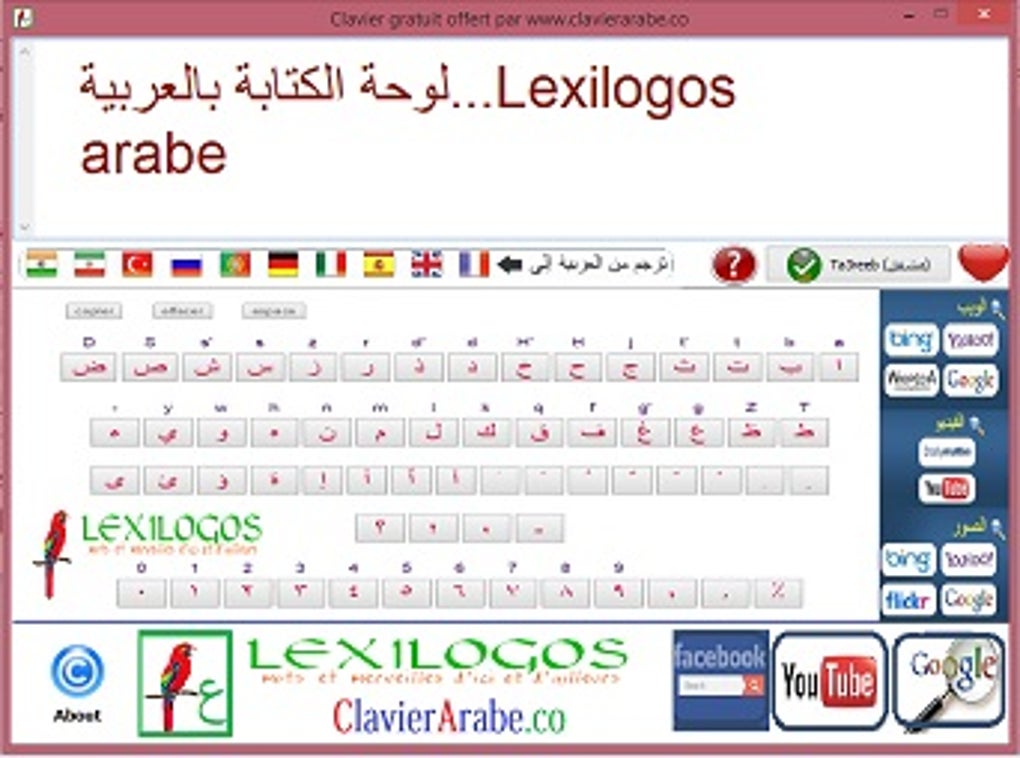
Beyond simple text input, the Lexilogos keyboard is promoted as usable within various online platforms like Google, YouTube, and Facebook. This suggests its compatibility with web browsers and online text fields, which is a crucial feature for many users. This multi-platform functionality significantly expands the software’s usefulness, allowing users to seamlessly integrate it into their everyday online activities.
However, a notable limitation is the lack of a built-in translation feature. While the keyboard facilitates Arabic typing, it doesn’t directly translate typed text into other languages. This functionality would have significantly enhanced its practicality, as users would be able to type in Arabic and instantly view the translation in their preferred language, eliminating the need for separate translation tools.
The software’s portability is another key advantage. As a portable application, it doesn’t require installation and can be run directly from a USB drive or other portable storage. This eliminates the need for administrative privileges or complex installation procedures, making it readily accessible across different computers without leaving any traces on the system after use. This ease of use is a significant factor for users who prefer a quick and simple solution without extensive setup.
User Interface and Experience
The software is lauded for its simplicity and ease of use. The interface is likely minimalistic, focusing solely on the keyboard layout and possibly a small set of basic options. This straightforward design is beneficial for users who prefer uncluttered interfaces and a quick learning curve. The absence of advanced features contributes to this simplicity, but it also represents a potential drawback for users who desire more customization or advanced options. The lack of a comprehensive help section or tutorials further impacts the user experience. While the transliteration may be “natural,” without clear guidelines, users might find themselves experimenting to understand the exact input-output relationships.
The absence of print options is a significant functional limitation. The inability to directly print the typed text from within the application necessitates the copying and pasting of the text into other applications like a word processor before printing. This extra step increases the workflow and reduces the overall efficiency of the tool.
Performance and Technical Aspects
The Lexilogos Arabic keyboard is a lightweight application, consuming minimal system resources. The relatively small file size (1.63 MB) further contributes to its portability and ease of use. This low resource usage is a significant advantage, especially on older or less powerful systems where resource-intensive applications might cause performance issues.
The software’s last update dates back to October 20, 2018, indicating a lack of recent development or updates. This raises concerns about potential compatibility issues with newer operating systems, and the absence of bug fixes or new features could detract from the user experience and overall performance.
The application’s security status is described as “clean,” indicating that it’s likely free from malicious software or viruses. However, downloading software from unofficial sources always carries a level of risk. It’s crucial to download from trusted sources and use a reputable antivirus program to minimize potential threats.
Comparison with Alternatives
Several alternative Arabic keyboard applications exist, offering potentially enhanced features or different approaches to Arabic input. These alternatives might incorporate features absent in the Lexilogos keyboard, such as built-in translation capabilities, more advanced transliteration options, on-screen keyboard displays, or richer customization settings. A thorough comparison with competitive software would be beneficial to assess the Lexilogos keyboard’s strengths and weaknesses against market standards. Some examples of such alternatives could be mentioned, along with a brief comparative analysis highlighting their key differentiators.
Conclusion
Lexilogos Arabic keyboard provides a simple and portable solution for typing in Arabic using a standard QWERTY keyboard. Its strength lies in its ease of use and minimal resource consumption. The transliteration system, while described as natural, lacks explicit documentation, which could impact the learning curve for some users. The absence of a built-in translation feature, print options, and infrequent updates represent significant limitations.
While suitable for basic Arabic typing needs in online environments, users seeking more comprehensive features, such as real-time translation, advanced customization options, or better support, may find more advanced alternatives better suited to their requirements. The choice of keyboard ultimately depends on individual needs and preferences, weighing the benefits of simplicity and portability against the limitations of a less feature-rich application. Potential users should carefully consider their specific needs before choosing this software.
File Information
- License: “Free”
- Version: “1”
- Latest update: “October 20, 2018”
- Platform: “Windows”
- OS: “Windows XP”
- Language: “English”
- Downloads: “34.5K”
- Size: “1.63 MB”


