
The Libby (Legacy) Audiobook Exporter is a Chrome browser extension designed to facilitate the downloading of audiobooks from the Libby app to your local device. While superseded by a newer, actively supported version, this legacy extension remains a viable option for users encountering compatibility issues with the updated version, especially those using mobile browsers. This guide delves into the functionality, limitations, and alternatives of this valuable tool.
Understanding the Libby (Legacy) Audiobook Exporter
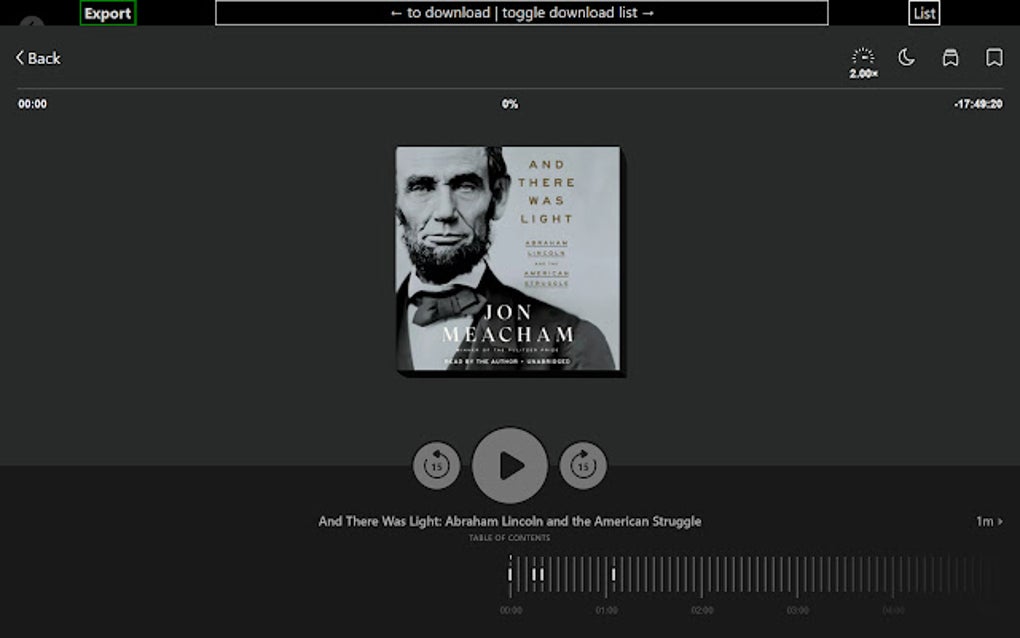
The Libby (Legacy) Audiobook Exporter offers a straightforward solution for users who need to download their Libby audiobooks offline. Unlike the updated version which utilizes a popup interface, this legacy extension employs a content script to integrate directly into the Libby player page. This method adds download controls to the top of the Libby audiobook player, allowing for seamless and convenient downloading directly to your local storage. The key advantage of this approach is its compatibility with systems and browsers that might struggle with the newer, popup-based extension.
The primary function is simple: download your borrowed audiobooks. The extension does not circumvent any copyright restrictions or allow illegal access to content. It simply provides a user-friendly method to download files you have legitimately borrowed through the Libby app. However, users should always adhere to the terms of service and copyright regulations associated with the Libby app and the borrowed audiobooks.
Why Use the Legacy Version?
The primary reason for using the legacy version of the Libby Audiobook Exporter is compatibility. If the newer Libby Audiobook Exporter extension fails to function correctly on your browser or device, particularly on mobile platforms, the legacy version offers a fallback solution. Its content script approach often proves more compatible with older browsers or operating systems which might lack the necessary support for modern extension functionalities. The legacy extension avoids potential conflicts caused by browser updates or conflicting extensions, making it a reliable choice for those experiencing problems with the newer version.
This compatibility advantage is particularly crucial for users on mobile devices, where browser inconsistencies can significantly impact the functionality of browser extensions. The legacy extension’s direct integration with the Libby player circumvents many of the common compatibility issues associated with popup-based extensions.
It’s important to note, however, that while the legacy extension provides a functional alternative, it is not actively developed or maintained. This means it may not receive security updates or bug fixes, posing a potential security risk over time. Using it is generally only recommended as a last resort, when the newer version proves unusable.
Limitations and Considerations
While offering a convenient solution for some users, the Libby (Legacy) Audiobook Exporter has several limitations:
-
Lack of Support: The most significant drawback is the absence of developer support. This means users won’t receive assistance with troubleshooting or bug fixes. Any problems encountered must be solved independently, making it less user-friendly than the supported alternative.
-
Security Risks: As an unsupported extension, it’s crucial to download it only from a trusted source, like the Chrome Web Store, to minimize the risk of malware or security vulnerabilities. Since it isn’t actively updated, potential security flaws might remain unaddressed, increasing security risks compared to actively maintained software.
-
Potential for Incompatibility: Although designed for compatibility issues, the legacy extension might still face unexpected conflicts with certain browsers, Libby app versions, or operating systems. It’s not a guaranteed solution for all compatibility problems.
- Functionality Compared to Updated Version: While the core functionality is similar, the updated version of the Libby Audiobook Exporter generally offers a more refined and user-friendly experience with potentially improved features and stability. If your system supports it, the updated extension is always the preferred option.
Alternatives and Recommendations
While the legacy extension provides a functional solution for users facing compatibility issues, it’s essential to consider alternatives and prioritize the supported version when possible.
The primary alternative is the updated “Libby Audiobook Exporter” extension found on the Chrome Web Store. This newer version benefits from ongoing support, security updates, and potentially improved features and a more user-friendly interface compared to its legacy counterpart. It should be the first choice for all users whose systems support its functionality. If the updated version isn’t functional, then the legacy version can be considered a secondary option only after thoroughly researching and understanding the potential risks.
Before installing either version, always verify the developer’s authenticity and check user reviews to gauge the extension’s reliability and potential issues. Carefully review the extension’s permissions and ensure you understand the data it accesses. Downloading extensions only from verified app stores like the Chrome Web Store is recommended to minimize the risks of malware or malicious code.
Installation and Usage (Legacy Version)
The installation process is straightforward. Download the extension from a trusted source (preferably the original source, if available). Then, open your Chrome browser, go to chrome://extensions/, and enable “Developer mode” in the top right corner. This allows you to install extensions from outside the Chrome Web Store. Once enabled, click “Load unpacked,” locate the downloaded extension folder, and select it. The extension will then be added to your browser.
To use the extension, simply open an audiobook in the Libby app. The legacy version will add controls to the top of the player page allowing you to download the audiobook file. Follow the on-screen instructions to start and complete the download process. Remember to save the downloaded files in a designated location for easy access.
Conclusion
The Libby (Legacy) Audiobook Exporter serves as a valuable tool for users encountering compatibility problems with the updated Libby Audiobook Exporter. It provides a workaround for downloading audiobooks locally, even on systems where the newer version struggles. However, its lack of support and potential security risks necessitate careful consideration. The updated version should always be the preferred choice when compatible. If the updated version fails, the legacy version provides a fallback option, but users should proceed with caution, understanding its limitations and potential risks. Always prioritize security and download extensions from reputable sources.
File Information
- License: “Free”
- Version: “1.2.2”
- Latest update: “May 2, 2024”
- Platform: “chrome”
- Downloads: “1.8K”


