
In the vast and often overwhelming landscape of digital photography, where professional-grade software demands steep learning curves and even steeper prices, LightBox Free Image Editor emerged as a refreshing alternative. Positioned as a professional-feeling image editor designed for basic to intermediate changes, it caters to a significant demographic: users who desire impressive results without the complexity or financial investment typically associated with industry giants like Adobe Photoshop. Developed by 9th Parallel, LightBox Free Image Editor, as the name suggests, offers a free solution, albeit a limited version of its more robust counterpart, Sagelight. For years, it stood as a testament to the idea that powerful photo optimization could be accessible, intuitive, and, most importantly, free.
The essence of LightBox Free Image Editor lies in its promise: to empower users to make substantial enhancements to their photos with minimum fuss. While Photoshop users might spend hours grappling with intricate filters and industry-standard enhancement tools, LightBox streamlines the process, focusing on key adjustments that yield visible improvements. It’s a tool built for practicality, for those moments when a photograph needs a quick but impactful touch-up, transforming an ordinary shot into something truly memorable. Its journey, particularly with the significant overhaul in version 2.0, reflects a commitment to a professional aesthetic and user-centric design, bridging the gap between amateur photo editing and a more sophisticated output.
Multimedia: Photography at Your Fingertips
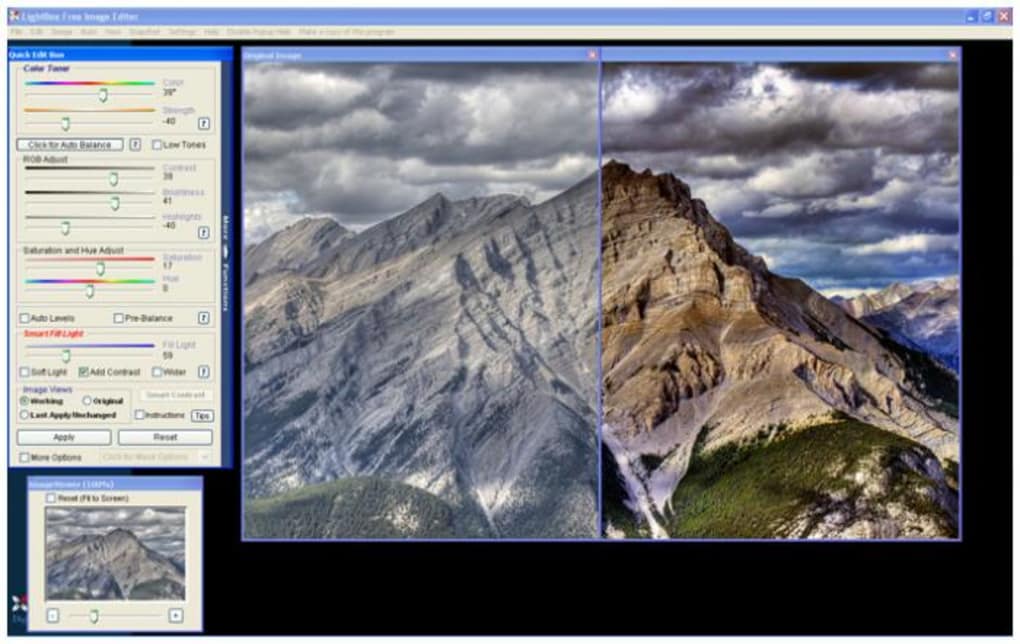
The world of digital multimedia thrives on visual content, and photography remains at its core. LightBox Free Image Editor places the power of photo enhancement directly at the user’s fingertips, simplifying complex processes into an accessible interface. For many, the desire to correct imperfections, balance lighting, or simply add a creative flair to their images is paramount, yet the tools required often seem daunting. LightBox sought to demystify this, offering a suite of features designed to tackle common photographic challenges with remarkable ease.
The Evolution of a User Interface and Core Capabilities
A pivotal moment in the LightBox Free Image Editor’s history was the release of version 2.0. Prior to this update, some users might have described its interface as somewhat utilitarian, perhaps even an “ugly duckling” in the realm of aesthetically pleasing software. However, version 2.0 ushered in a complete interface overhaul, transforming the application’s appearance and elevating its status to that of a “real professional retouching application.” This wasn’t merely a cosmetic change; the improved aesthetics contributed significantly to the overall user experience, making the software feel more intuitive and inspiring confidence in its capabilities. The clean layout and logical organization of tools meant that users could focus on their photos rather than struggling with navigation.
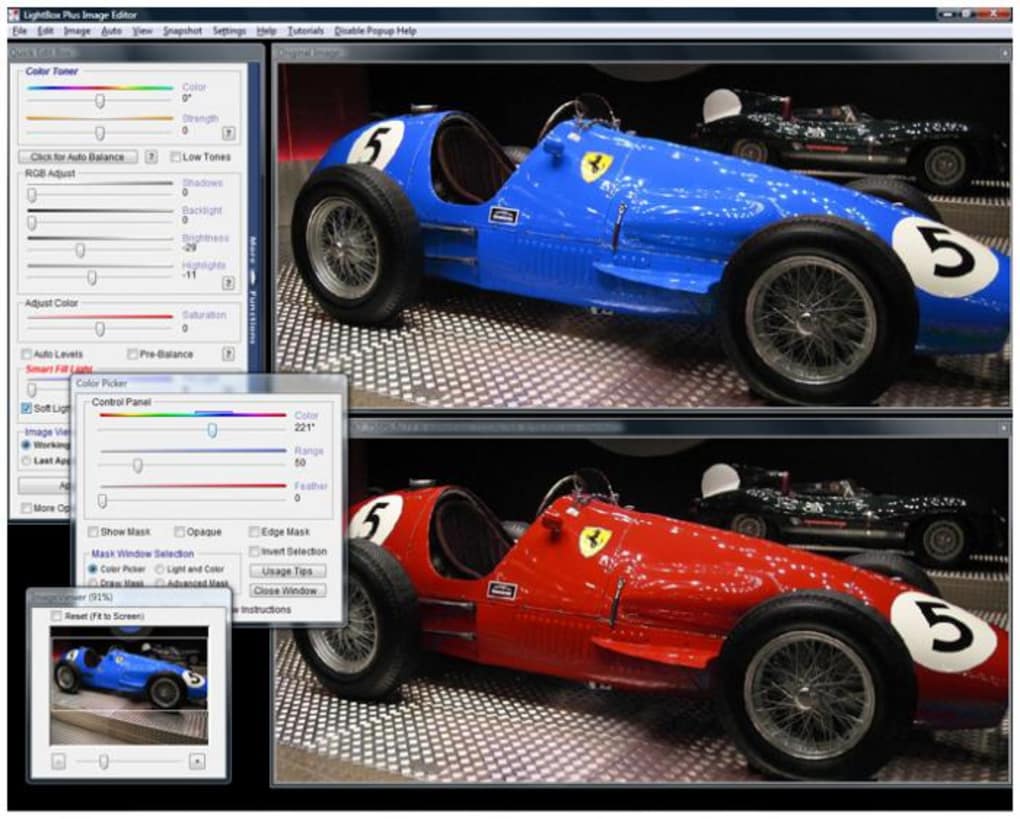
Beyond the visual upgrade, LightBox Free Image Editor boasted a collection of robust editing functions, carefully selected to address the most frequent photo imperfections. Among its standout automatic features were auto color balance and smart highlight shadow processing. These intelligent algorithms could analyze an image and apply corrections to color temperature and exposure inconsistencies, ensuring that colors appeared true-to-life and that details in both the brightest and darkest areas were preserved. For instance, a landscape photo taken under challenging light conditions, perhaps with harsh midday sun creating deep shadows, could be intelligently optimized, bringing out the nuances in the shaded foreground without blowing out the highlights in the sky.
Another universally appreciated automatic fix was the red-eye removal tool. Red-eye, a common affliction of flash photography, could instantly detract from an otherwise perfect portrait. LightBox’s ability to automatically detect and subtly correct this issue saved users considerable time and effort, ensuring that subjects’ eyes appeared natural and engaging. This subtle approach was crucial, as aggressive red-eye correction often leaves an unnatural, almost painted look. LightBox’s algorithm was designed to avoid this pitfall, delivering a more organic result.
For users seeking more nuanced control, LightBox Free Image Editor also included manual adjustment tools like dodge and burn. These classic photographic techniques, originating from darkroom processes, allow for selective lightening (dodge) or darkening (burn) of specific areas within an image. This capability proved invaluable for adding depth, emphasizing details, or drawing attention to particular elements in a photograph. For instance, a portrait photographer could use the dodge tool to brighten a subject’s eyes, making them sparkle, or the burn tool to deepen shadows around the jawline, enhancing definition.
The software further extended its utility by offering tools for refining image composition and presentation. Users could add borders to their images, providing a professional finish or a stylistic flair. Beyond aesthetics, practical tools were included to trim fuzzy edges or even remove “annoying objects” from the periphery of a shot. While not a full-fledged content-aware fill, these features allowed for quick clean-ups, ensuring that distractions did not detract from the main subject.
Enhanced Usability and Technical Underpinnings
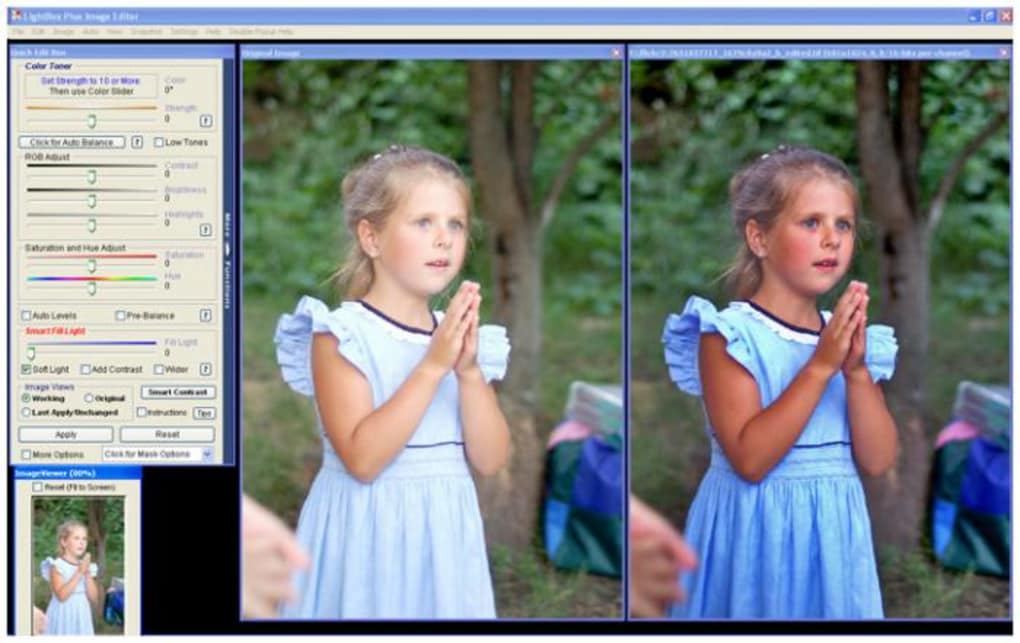
The improvements in version 2.0 weren’t limited to visual appeal and core editing functions; usability received a significant boost. The Help section was vastly expanded, transforming from a rudimentary guide into a comprehensive and integrated support system. This was crucial for new users navigating the software for the first time, offering clear explanations and guidance on each tool’s function and best practices. Even experienced users could benefit from the deeper insights provided, helping them to unlock the full potential of LightBox’s capabilities.
Adding to its professional feel was the introduction of a Photoshop-style Color Changer function. This tool provided a familiar and efficient way to manipulate hues, saturation, and lightness, allowing for precise color grading and creative stylistic adjustments. Whether aiming for a vintage sepia tone or a vibrant, modern look, the Color Changer offered accessible control. Furthermore, the masking features were made more intuitive and easy to use compared to previous versions. Masking, often considered an advanced technique, allows users to apply edits to specific areas of an image while protecting others. LightBox’s simplified approach meant that even those new to masking could effectively isolate subjects or backgrounds for targeted adjustments, significantly expanding the creative possibilities.
Under the hood, LightBox Free Image Editor demonstrated a commitment to broader technical compatibility and data integrity. It supported the writing of EXIF and IPTC information to JPEGs. EXIF (Exchangeable Image File Format) data includes crucial details about how a photo was taken, such as camera model, date, time, aperture, shutter speed, and ISO. IPTC (International Press Telecommunications Council) data, on the other hand, is more focused on descriptive metadata like captions, keywords, copyright information, and creator details. By preserving and allowing the writing of this data, LightBox ensured that the rich context of each image remained intact, which is vital for photographers, archivists, and anyone managing a large collection of digital photos. The software also added support for the .bmp format, expanding its compatibility beyond just common JPEG files. Finally, new JPEG quality-level interface controls were more fluid and faster, giving users precise yet quick control over the compression level of their output files, balancing file size with image quality effectively.
Utilities & Tools: Streamlining Your Digital Workflow
In the bustling digital age, utilities and tools are the unsung heroes that keep our workflows smooth and efficient. LightBox Free Image Editor fits perfectly into this category, acting as a powerful yet simple solution for optimizing photos. It’s designed for individuals and even small businesses who need professional-looking results without the steep learning curve or the substantial financial outlay associated with high-end professional programs. It serves as an essential utility for anyone looking to quickly enhance their visual content.
The “Pro” Feel Without the “Pro” Price Tag
One of the most compelling aspects of LightBox Free Image Editor is its ability to deliver a “pro” feel and “pro” results without the associated cost or complexity. This positions it as an invaluable utility for students, hobbyists, content creators, and small businesses alike. The developers understood that not everyone needs the full, intricate power of a Photoshop, but almost everyone needs to present their images in the best possible light. LightBox fills this niche by offering intelligent, automated fixes that mimic the results of manual, expert adjustments. For example, automatically balancing light problems can save a user from having to meticulously adjust curves and levels, a task that can be daunting for novices. The “subtly” effective red-eye removal is another highlight, ensuring professional-looking portraits without the tell-tale signs of over-processing.
The sheer accessibility of LightBox, being a free application, makes it a top-tier utility. Users can download it without hesitation, experiment with its features, and integrate it into their routine without financial commitment. Its relatively small size (approximately 10.22 MB) and compatibility with Windows (specifically noted for Windows Vista, but generally compatible with later versions) further enhance its utility, ensuring it doesn’t hog system resources or require complex installation procedures. PhanMemFree.org lists it as free and in English, which simplifies the decision-making process for millions of users worldwide seeking a straightforward solution.
Addressing Common Photo Woes and Limitations
LightBox Free Image Editor excels at addressing a range of common photographic problems that plague everyday users. Dark pictures, often a result of poor lighting or incorrect camera settings, can be swiftly lightened. The perennial problem of red-eye in flash photography is handled automatically and subtly, as noted by enthusiastic users. The software’s automatic processing for color balance and smart highlight/shadow adjustments means that even poorly exposed or poorly lit photos can often be salvaged and significantly improved with minimal user intervention. While finding the “right adjustments to make can be a case of trial and error” for more subjective creative enhancements, the presence of these auto-functions provides an excellent starting point and often, a complete solution for many.
However, as with any specialized tool, LightBox Free Image Editor comes with its limitations, which users must consider. One notable drawback mentioned in feedback is the “No adjuster for bad focus in photos.” This means that images suffering from blur due to camera shake or incorrect focus cannot be magically sharpened or brought into focus by LightBox. This is a fundamental limitation for image editors of its class, as focus issues are generally challenging to correct computationally without introducing significant artifacts.
Furthermore, its design as a “limited version of Sagelight” means it “offers limited editing functions” compared to comprehensive professional suites. Users accustomed to a vast array of layers, advanced selection tools, non-destructive editing, or specialized effects found in premium software might find LightBox restrictive. It focuses on optimization and correction rather than elaborate artistic manipulation.
Perhaps the most significant limitation in today’s fast-evolving software landscape is that LightBox Free Image Editor is “no longer updated.” The last update was December 2, 2008. While it remains functional on many Windows systems, the lack of ongoing development means it may not fully support newer file formats, modern camera RAW files, or the latest operating system features. Security patches and performance optimizations are also absent, which could pose issues for some users or systems over time. This status as an unmaintained piece of software is a critical consideration for prospective users, especially when numerous modern, actively developed free alternatives exist.
Despite these limitations, for its intended audience – those needing quick, effective fixes for common photo problems without the learning curve or financial outlay – LightBox Free Image Editor continues to offer a compelling package, particularly for older Windows systems or for users who prioritize simplicity above all else. Its strength lies in its focused approach to delivering professional-feeling results for specific, common photo challenges.
PhanMemFree.org’s Best Image Editors: Where LightBox Stands
PhanMemFree.org, a premier destination for software downloads, prides itself on curating a diverse range of applications, including a category specifically for “Best Image Editors.” Within this competitive landscape, LightBox Free Image Editor carved out a unique position, especially during its active development. To understand its value proposition, it’s essential to compare it against its peers and consider how it was perceived by the user community.
Benchmarking Against Industry Standards and Alternatives
When LightBox Free Image Editor is discussed, it’s almost inevitable that its name comes up in the same breath as Adobe Photoshop. The original description explicitly states, “If you make basic edits with Photoshop, expect a steep learning curve,” directly positioning LightBox as an antidote to Photoshop’s complexity for fundamental tasks. While Photoshop is the undisputed industry standard, its expansive feature set and intricate workflows can be overwhelming for casual users who simply want to correct a dark photo or remove red-eye. LightBox shines here, offering a streamlined, accessible pathway to achieving good results for these common issues without requiring users to navigate complex menus or master advanced techniques. It bypasses the “fiddling around for hours with filters and other industry standard enhancement tools” in favor of direct, impactful solutions.
PhanMemFree.org (formerly Softonic.com) also lists other popular free image editors, such as PhotoScape, Picasa (though discontinued, it left a legacy), and Adobe Photoshop Express for Windows 10. PhotoScape, known for its comprehensive feature set including batch editing, collage making, and GIF creation, often appeals to users looking for more versatility. Picasa, before its retirement, was beloved for its excellent photo organization capabilities alongside basic editing. Adobe Photoshop Express offers a lightweight, touch-friendly editing experience, particularly suited for quick edits on modern Windows 10 devices.
LightBox Free Image Editor’s niche, in comparison, lies in its focused automation and the “professional feel” it managed to achieve, especially after its interface overhaul. It wasn’t about providing the most features, but rather about executing a select few very well, with an emphasis on making the process as intuitive as possible. For users primarily concerned with correcting lighting, color, and red-eye with minimal fuss, LightBox offered a compelling, hassle-free option. It aimed for quality output for common problems, even if the range of inputs and manipulations was more limited. Its automatic capabilities, such as auto color balance and smart highlight shadow processing, were particularly noteworthy in a free package, mimicking features often found in more expensive software.
User Testimonials: A Mixed Bag
User reviews published on PhanMemFree.org provide invaluable insights into the real-world experience of LightBox Free Image Editor. The sentiment was largely positive regarding its core strengths, yet also highlighted areas for improvement and inherent limitations.
Many users lauded its simplicity and effectiveness for specific problems. An anonymous user on March 8, 2014, exclaimed, “Fantastic! I love it! I was having problems with dark pictures and red eye. This is a very easy Editor to use.” This review perfectly encapsulates LightBox’s target audience and its successful delivery on key promises. Another user on December 20, 2011, echoed this, stating, “I like it! I wanted a quick and easy way to lighten photos that are too dark and this does a good job. And it’s free. It may not be PhotoShop but it’s easy to learn and it serves me well.” These testimonials underscore the app’s strength as an approachable tool for common photo issues, serving as a viable alternative for those who don’t need or want the complexity of Photoshop. The consistent praise for its ease of use and ability to fix dark pictures and red-eye affirms its practical utility.
However, the reviews also revealed frustrations. An anonymous review on May 21, 2009, reported a critical bug: “Crashes Windows Explorer. Once LightBox is run, windows explorer gets locked up and won’t respond.” Such issues highlight potential stability problems, especially when software is no longer updated to maintain compatibility with evolving operating systems. This specific bug could be a significant deterrent for many users, disrupting their entire workflow. The same reviewer also pointed out a feature limitation: “There is no way to crop to a precise height to width ratio. I wanted to specify a 4x6 ratio for prints.” This detail is crucial for users who print their photos and need specific aspect ratios. While LightBox offers basic trimming, the absence of precise aspect ratio cropping indicates its focus on general optimization rather than detailed print preparation or compositional refinement that requires exact dimensions.
The “Free” Advantage and Developer Context
The “Free” license status of LightBox Free Image Editor is undeniably its most attractive feature, particularly for a tool that offers such polished results. In a market saturated with subscription models and one-time purchases, a genuinely free application that performs its intended functions well is a treasure. This accessibility allowed a wide range of users to benefit from professional-feeling photo edits without financial barriers.
The developer, 9th Parallel, created a commendable product that, for its time, balanced power with simplicity. However, the crucial piece of information, “No longer updated,” and the last update date of “December 2, 2008,” frame LightBox Free Image Editor as a legacy application. While it might still run and be useful on older Windows systems or for users with very specific needs, its lack of modern updates means it won’t address new hardware, software vulnerabilities, or emerging image formats. Users seeking cutting-edge features, ongoing support, or guaranteed compatibility with the latest operating systems would need to look towards actively developed alternatives available on PhanMemFree.org or elsewhere. Despite this, LightBox Free Image Editor stands as a testament to what a focused, free tool could achieve in making photo enhancement accessible to the masses.
Conclusion
LightBox Free Image Editor, as showcased on PhanMemFree.org, represents a compelling chapter in the history of accessible photo editing software. It masterfully delivered on its promise to provide “professional-feeling photo optimization” without the steep learning curve or prohibitive cost associated with premium tools. With its significant interface overhaul in version 2.0, a suite of intuitive automatic and manual adjustment features, and crucial technical support for EXIF/IPTC data, it empowered countless users to enhance their digital photographs with remarkable ease and effectiveness. Features like automatic red-eye removal, smart highlight/shadow processing, and a Photoshop-style Color Changer made it a formidable utility for tackling common photographic imperfections.
However, as with many pioneering free applications, LightBox Free Image Editor carries certain limitations that temper its otherwise strong appeal. The absence of an adjuster for bad focus and a restricted set of editing functions mean it cannot compete with the comprehensive capabilities of full-suite professional editors. More critically, its status as “no longer updated” since December 2, 2008, positions it as a legacy product. While it may continue to serve users on older Windows systems or those with very specific, fundamental editing needs, the lack of ongoing development implies potential compatibility issues with modern operating systems, new file formats, and evolving hardware, as well as an absence of security patches or new features.
Despite these caveats, user testimonials consistently praised its ease of use and its efficacy in resolving common issues like dark pictures and red-eye, underscoring its enduring value for a particular user segment. While some encountered stability issues or desired more precise controls like aspect ratio cropping, LightBox Free Image Editor undoubtedly fulfilled its primary mission for a significant user base. For anyone seeking a straightforward, free application for quick, effective photo fixes on a Windows platform, particularly if running an older OS or prioritizing extreme simplicity, LightBox Free Image Editor remains a noteworthy option. For those requiring a broader feature set, continuous updates, or support for the latest technologies, PhanMemFree.org offers a wealth of more modern and actively developed “Best Image Editors” to explore. Ultimately, LightBox Free Image Editor stands as a powerful reminder that sometimes, the best tools are those that do a few things exceptionally well, and make those few things available to everyone.
File Information
- License: “Free”
- Version: “2.0”
- Latest update: “December 2, 2008”
- Platform: “Windows”
- OS: “Windows Vista”
- Language: “English”
- Downloads: “94.3K”
- Size: “10.22 MB”


