
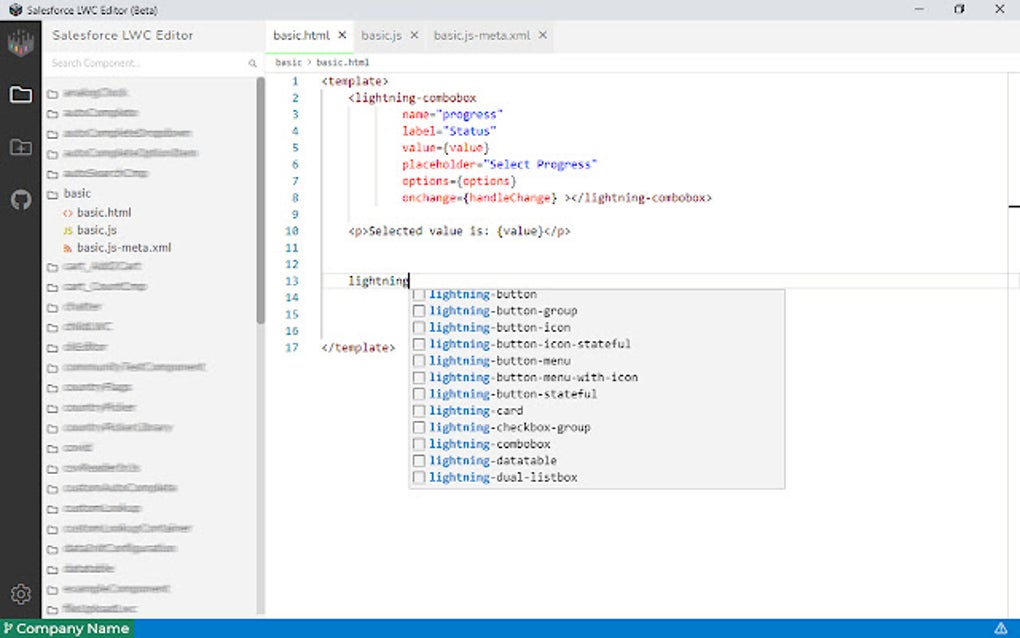
Lightning Studio is a free Chrome browser extension designed to significantly enhance the Salesforce Lightning Web Components (LWC) development workflow. Developed to accelerate the process of building LWCs, this tool provides a suite of features that simplify common development tasks. Its intuitive interface, resembling the popular Visual Studio Code editor, ensures a familiar and comfortable experience for developers. This comprehensive review delves into the capabilities and benefits of Lightning Studio, exploring its features, ease of use, and overall contribution to efficient Salesforce development.
Lightning Studio: Getting Started and Key Features
To begin utilizing Lightning Studio, simply log into your Salesforce account. Then, locate the Lightning Studio icon (the standard Chrome extension icon) in the top-right corner of your browser. Once you click the icon, it will turn blue, signaling that the extension is active and ready for use. This simple activation process ensures a seamless integration into your existing Salesforce development environment.
The core functionality of Lightning Studio revolves around simplifying various aspects of LWC development. Its key features include:
-
LWC Component Creation: Effortlessly create new LWC components directly within the extension. This eliminates the need for manual file creation and setup, streamlining the initial stages of component development.
-
Lightning Message Service Integration: Lightning Studio facilitates the implementation of the Lightning Message Service, simplifying communication and data exchange between LWC components. This feature promotes modularity and reusability in LWC development.
-
Apex Class Management: Create and update Apex classes, crucial for server-side logic within your Salesforce applications. This integrated functionality eliminates the need to switch between different tools during development.
-
File Management: Create new files specifically designed for individual components, fostering organized and maintainable project structures. This organized approach to file management contributes to improved code readability and maintainability.
-
Component Backup and Download: Easily back up and download your LWC components and related files. This essential feature ensures data security and provides a convenient way to manage versions and share your work.
-
Code Search: Quickly search across all your LWC components for specific code snippets or functionalities. This powerful search functionality significantly reduces development time and improves overall efficiency.
-
File Renaming and Deletion: Rename or delete files and components directly within the extension’s interface. These simple yet powerful actions ensure flexibility and control over your project’s structure.
The extension offers a streamlined experience, aiming to reduce context switching and enhance developer productivity by consolidating essential tasks into a single interface.
User Experience and Interface Design
Lightning Studio is designed with user experience in mind. Its interface closely mirrors the familiar layout of Visual Studio Code, a popular and widely-used code editor. This design choice minimizes the learning curve for developers already comfortable with VS Code’s environment. The intuitive navigation and familiar features contribute to a smooth and efficient development process.
The ability to apply VS Code themes further enhances the user experience. By allowing developers to personalize the editor’s appearance to their preference, Lightning Studio caters to individual working styles and preferences. This customization option significantly improves user comfort and overall satisfaction. The consistent visual cues and intuitive layout help in navigating complex LWC projects with ease. The goal is to make the development process as natural and intuitive as possible, allowing developers to focus on building and refining their applications rather than struggling with the development environment.
Lightning Studio: Applications and Use Cases
Lightning Studio’s capabilities extend to a wide array of Salesforce LWC development scenarios. Its versatile features make it an invaluable tool for both novice and experienced Salesforce developers. Here are some prominent use cases:
-
Rapid Prototyping: The streamlined creation of LWC components and integration with the Lightning Message Service make Lightning Studio perfect for rapid prototyping. This quick development cycle facilitates experimentation and iterative design.
-
Complex LWC Development: For more intricate LWC projects, the robust file management, code search, and Apex class management capabilities simplify the development process. These advanced features ensure organization and efficiency in managing large and complex projects.
-
Team Collaboration: The ease of backing up and downloading components facilitates seamless team collaboration. This enables smoother collaboration among developers and promotes a more efficient workflow.
-
Maintenance and Updates: Lightning Studio significantly streamlines maintenance and updates to existing LWC components. The integrated tools and intuitive interface make it easy to make changes and track updates effectively.
Essentially, Lightning Studio serves as a comprehensive solution for managing the entire lifecycle of Salesforce LWC development, from initial prototyping to ongoing maintenance.
Comparison with Other Salesforce LWC Development Tools
While several other tools aid in Salesforce LWC development, Lightning Studio distinguishes itself through its seamless integration within the Chrome browser, its lightweight nature, and its user-friendly interface. Many alternatives require more complex setups or involve switching between different applications. Lightning Studio’s direct integration into the Chrome browser eliminates this cumbersome process, ensuring a smooth and uninterrupted development experience. The focus on simplicity and ease of use makes it an accessible choice for developers of all skill levels.
Conclusion: Lightning Studio – A Powerful Asset for Salesforce Developers
Lightning Studio provides a significant boost to the efficiency and productivity of Salesforce LWC developers. Its intuitive interface, coupled with a comprehensive suite of features, streamlines the entire development lifecycle. The ability to create and manage LWC components, Apex classes, and related files directly within the Chrome browser eliminates the need for cumbersome context switching and streamlines the workflow. Whether you’re a seasoned Salesforce developer or just starting out, Lightning Studio’s focus on simplicity and ease of use makes it a valuable asset in your development toolkit. Its lightweight nature and seamless integration make it a powerful yet unobtrusive addition to your development environment, ensuring a smooth and efficient path to building high-quality Salesforce applications. The combination of familiar design elements and focused functionality makes Lightning Studio a strong contender in the field of Salesforce LWC development tools.
File Information
- License: “Free”
- Version: “3.0.21”
- Latest update: “August 9, 2025”
- Platform: “chrome”
- Language: “English”
- Downloads: “838”


