
Windows, despite its robust nature, can sometimes slow down due to accumulated clutter and outdated entries within its registry. While the efficacy of registry cleaning in boosting performance is a topic of ongoing debate, tools like Little Registry Cleaner offer a straightforward method for users to address this potential issue. This review examines Little Registry Cleaner’s features, ease of use, performance, and overall value, providing a comprehensive assessment of its capabilities.
Little Registry Cleaner: Functionality and User Experience
Little Registry Cleaner presents itself as a compact and user-friendly application designed for individuals who may not possess extensive technical expertise. The installation process is straightforward, and the program boasts a quick scanning mechanism. Its simplicity is a notable advantage, making it accessible even for less technically inclined users. The program’s interface is clean and intuitive, minimizing any potential confusion during operation.
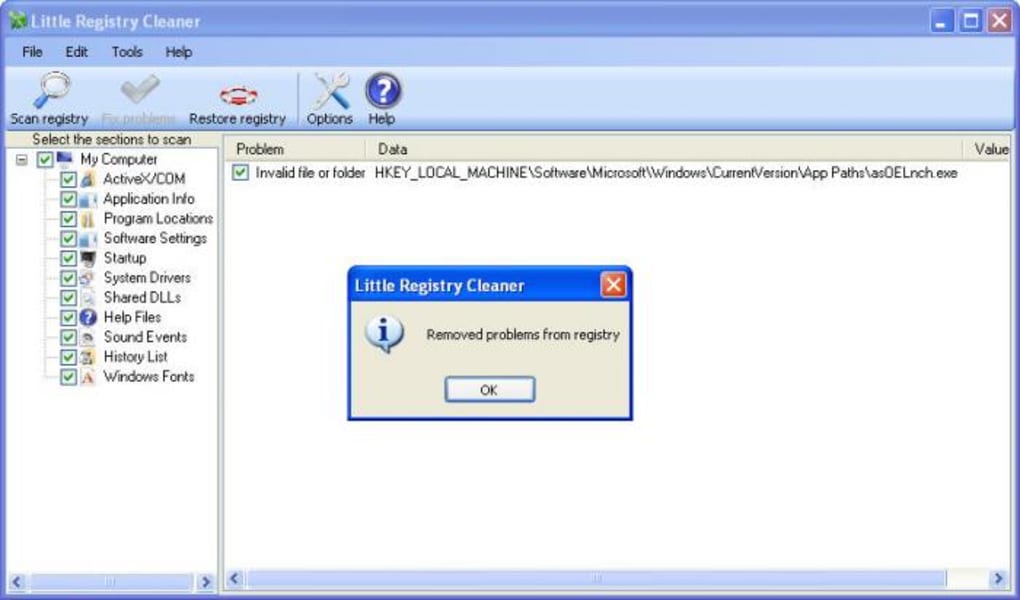
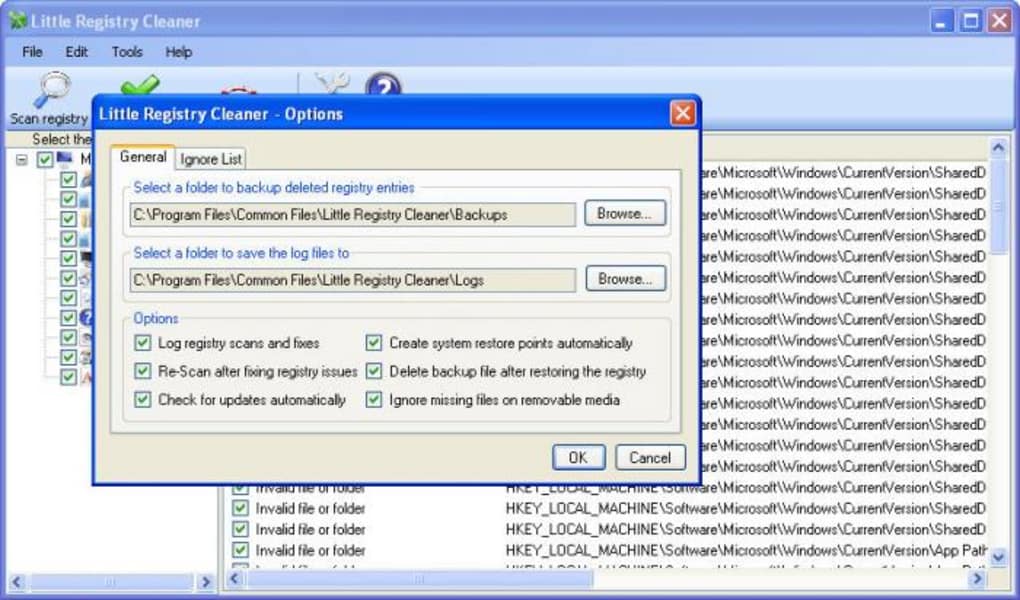
One of the program’s key features is its backup functionality. Before making any changes to the registry, Little Registry Cleaner creates a backup of the selected registry keys, ensuring that users can revert any unintended modifications. This safety net significantly reduces the risk of accidental data loss or system instability, a critical aspect for any registry cleaning tool.
The program allows users to select specific registry areas for scanning. This selective approach grants users a degree of control over the cleaning process, although the software doesn’t offer detailed explanations of each registry section, leaving some users uncertain about the optimal scanning strategy. The lack of comprehensive guidance on which areas to prioritize could be a drawback for novice users. It presents a clear dichotomy: the simplicity of use is balanced against a lack of nuanced detail for advanced users seeking more granular control.
Performance and Efficiency: Assessing Little Registry Cleaner’s Effectiveness
During testing, Little Registry Cleaner demonstrated efficiency in identifying and addressing most registry issues. However, like many similar programs, it occasionally encountered a problem file or two that it couldn’t resolve. This isn’t necessarily a significant flaw, as even more comprehensive registry cleaners sometimes face similar challenges with particularly stubborn or deeply embedded issues. The ability to consistently resolve a large majority of the detected problems indicates the program’s effectiveness in the majority of scenarios.
The program’s speed is another positive aspect, with scans completing relatively quickly compared to some other, more feature-rich competitors. This fast scanning process is particularly valuable for users who prioritize efficiency and prefer a quicker cleanup process. For users facing significant performance bottlenecks, the speedy scan and subsequent cleanup could make a noticeable, if potentially temporary, improvement to their system’s responsiveness.
Comparison to Alternative Registry Cleaners: Little Registry Cleaner’s Niche
While Little Registry Cleaner effectively performs its primary function of registry cleaning, it’s essential to compare it with other available options, such as CCleaner. While CCleaner offers a wider array of features, including disk cleanup and browser history management, Little Registry Cleaner focuses exclusively on registry maintenance. This specialized focus allows Little Registry Cleaner to excel in its core function, providing a streamlined and targeted approach.
The choice between Little Registry Cleaner and a more comprehensive tool like CCleaner depends on individual needs and preferences. Users requiring a robust and all-encompassing cleaning solution might prefer CCleaner’s broader functionality. However, those seeking a dedicated, simple, and easy-to-use registry cleaner will find Little Registry Cleaner a valuable and efficient tool. The simplicity of Little Registry Cleaner caters specifically to users who want a focused approach, prioritizing ease of use over extensive additional features. This targeted functionality makes it a strong contender for users who simply need a quick and effective way to clean their registry without being overwhelmed by numerous additional tools and settings.
Little Registry Cleaner: Pros and Cons Summarized
To provide a concise overview of the program’s strengths and weaknesses, the following list summarizes the key pros and cons:
Pros:
- Ease of Use: Little Registry Cleaner is designed for simplicity, making it exceptionally user-friendly, even for users with minimal technical expertise. The straightforward interface and intuitive design minimize the learning curve, ensuring a smooth and hassle-free experience.
- Speed and Efficiency: The program performs scans quickly and effectively identifies and resolves registry issues, contributing to a shorter overall cleanup process. This rapid performance is beneficial for users who need a fast and efficient solution.
- Backup Functionality: A critical safety feature, the program diligently backs up registry keys before any modifications, mitigating the risk of data loss or system instability. This robust backup system instills confidence in the cleaning process.
- Free Software: The program is available as freeware, eliminating any cost barrier to accessing and utilizing its registry cleaning functionality. This free availability makes it an attractive option for users on a budget.
Cons:
- Limited Explanations: The software lacks detailed explanations of various registry areas, potentially leaving users unsure about which areas to prioritize during the scanning process. This lack of guidance may prove problematic for less experienced users who are unfamiliar with the registry’s inner workings.
- Fewer Features: Compared to more comprehensive cleaning utilities, Little Registry Cleaner offers a more limited feature set. This focused approach is a double-edged sword; while it streamlines the user experience, it may limit its functionality for users seeking broader cleaning options beyond registry maintenance.
- Occasional Failure to Resolve Issues: While generally effective, the program might not always resolve every registry problem it encounters. This is common among registry cleaners, but it’s worth noting that not every issue is guaranteed to be resolved.
Conclusion: Is Little Registry Cleaner Right for You?
Little Registry Cleaner is a practical and user-friendly registry cleaning tool that effectively addresses registry issues for the average user. Its simplicity and speed are significant advantages, making it a valuable option for those who prioritize ease of use and rapid performance. While it lacks the extensive features of some competitors, its targeted focus on registry cleaning makes it an efficient and reliable solution for individuals seeking a straightforward approach to maintaining their Windows registry.
The lack of detailed explanations regarding registry sections might deter technically less proficient users, and its occasional inability to resolve all registry problems should be considered. However, the overall ease of use, efficient performance, and the critical safety net of the backup functionality make Little Registry Cleaner a worthy contender for users who prioritize simplicity and a quick, effective registry cleaning process. The ultimate decision of whether to use Little Registry Cleaner depends on individual needs and preferences. However, for users looking for a simple, free, and effective registry cleaner, Little Registry Cleaner stands as a solid and reliable choice.

File Information
- License: “Free”
- Latest update: “September 7, 2015”
- Platform: “Windows”
- OS: “Windows XP”
- Language: “English”
- Downloads: “20.6K”
- Size: “4.61 MB”


