
LockmyDrive FreeLocker is a portable data security application designed to protect your files and folders from unauthorized access. This review delves into its features, ease of use, strengths, and weaknesses, providing a comprehensive assessment of its effectiveness as a file security solution. The software, developed by SoftVit, offers a straightforward approach to protecting sensitive data on various storage devices, including internal and external hard drives, USB flash drives, and memory cards. While its interface may appear somewhat dated, its functionality remains relevant for users seeking a simple and portable solution for data protection.
Easy-to-Use Interface and Portable Functionality
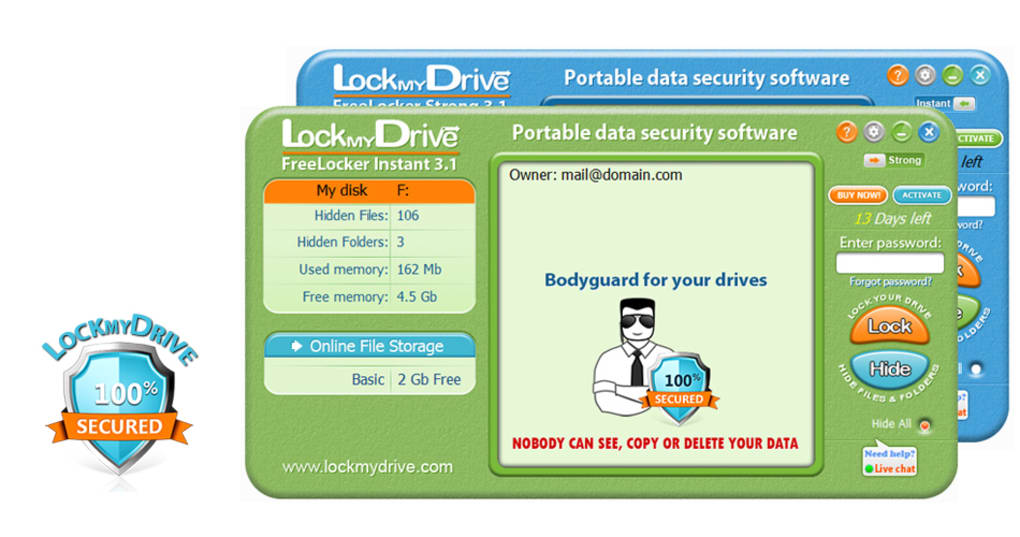
One of LockmyDrive FreeLocker’s most significant advantages is its user-friendly interface and portable nature. Unlike many data security applications requiring lengthy installation processes, LockmyDrive is entirely portable. This means you can run it directly from a USB drive or other portable storage without needing to install it on each computer you use. This portability enhances convenience, especially for users who frequently work on multiple machines or need to quickly secure data on the go. The application’s interface is designed for simplicity, with clearly labeled buttons and straightforward instructions. Users can easily navigate through the options to lock, hide, or protect their files and folders. The intuitive design eliminates the learning curve often associated with more complex security software. This ease of use makes LockmyDrive FreeLocker accessible to a broad range of users, regardless of their technical expertise.
The process of securing your drives is remarkably streamlined. To lock a drive, simply select it from the list within the application, enter your chosen password, and click “Lock.” The same simplicity applies to hiding files; highlighting the desired files and clicking the “Hide” button renders them inaccessible without the password. Unlocking and unhiding files is just as simple, requiring only the correct password. This straightforward functionality prioritizes speed and user-friendliness without compromising the security of your data. The application doesn’t overwhelm users with unnecessary settings or complex configurations, making it an ideal choice for those who prioritize ease of use above all else.
Robust File Security and Protection Features
LockmyDrive FreeLocker’s core function is to prevent unauthorized access to your files and folders. Once locked, folders cannot be opened, dragged, copied, or accessed without the correct password. This robust protection extends to preventing others from viewing the available storage space on your locked drives, ensuring complete data privacy. This feature is particularly useful for protecting sensitive personal documents, financial information, photographs, and videos from prying eyes. The application effectively shields your data from unauthorized viewing or modification, providing a reliable barrier against data theft or unauthorized access. The password protection mechanism acts as a strong deterrent, ensuring that only authorized individuals with the correct password can access your data.
Beyond basic locking, LockmyDrive offers the option to hide files and folders, making them effectively invisible to other users. This feature adds another layer of security, effectively obscuring the existence of sensitive files from casual observation. While the “hide” function might not be as strong a security measure as encryption for sophisticated threats, it provides an additional safeguard against accidental discovery or casual attempts to access the data. The combination of locking and hiding capabilities provides a layered approach to data security, catering to diverse security needs.
Integrated Online File Storage: A Convenient Backup Solution
LockmyDrive FreeLocker enhances its value proposition by integrating a free 2GB online file storage service. This feature acts as a valuable backup mechanism, providing an additional layer of protection against data loss. Should you accidentally delete or lose files on your computer, this online storage serves as a repository for your important data, minimizing the risk of permanent data loss. The convenience of this integrated backup solution simplifies the backup process, avoiding the need for separate cloud storage services. While the 2GB capacity might seem limited for extensive storage needs, it’s perfectly suitable for backing up crucial documents, vital personal files, or a selection of frequently accessed data. Users with larger storage requirements may need to consider supplemental cloud storage options, but for many users, the integrated 2GB of free storage is a welcome feature.
Limitations and Potential Drawbacks
While LockmyDrive FreeLocker offers substantial benefits, it also presents some limitations. The most notable criticism is the application’s relatively dated interface. The visual design may not appeal to all users, especially those accustomed to more modern and visually appealing software. The interface, while functional and easy to navigate, lacks the sleek aesthetics found in some contemporary security applications. However, this aesthetic shortcoming does not compromise the application’s functionality or security.
Another potential drawback is the limited 2GB of free online file storage. While useful for backing up essential files, it might prove insufficient for users with extensive data storage needs. The 2GB limit is a key differentiating factor between the free and paid versions of the software, with paid versions offering significantly increased storage capacity. Users with extensive data storage needs might find the free version’s storage limit restrictive, necessitating additional storage solutions.
Comparison with Alternative Applications
LockmyDrive FreeLocker competes with a wide range of other data security applications, each with its own strengths and weaknesses. Some competitors offer more advanced features like encryption, while others provide more robust online storage solutions. However, LockmyDrive’s simplicity and portability distinguish it from more complex options. Users prioritizing ease of use and portability might find LockmyDrive to be a better fit than sophisticated applications with more intricate features.
The choice between LockmyDrive and alternative applications ultimately depends on individual needs and preferences. Factors to consider include the required level of security, the amount of storage needed, and the desired level of ease of use. Users should carefully evaluate their specific requirements before selecting a data security application.
Conclusion: A Solid Choice for Simple and Portable Data Protection
LockmyDrive FreeLocker provides a straightforward and effective solution for securing files and folders on various storage devices. Its portable nature, user-friendly interface, and integrated online storage make it a convenient option for users seeking simple yet reliable data protection. While its dated interface and limited free storage might be drawbacks for some users, its strengths in ease of use and straightforward functionality make it a worthwhile consideration for individuals prioritizing simplicity and portability in their data security solution. The combination of password protection, file hiding, and integrated backup storage provides a reliable means to protect sensitive data from unauthorized access and accidental loss. Its ease of use makes it accessible to a broad range of users, regardless of their technical expertise. Overall, LockmyDrive FreeLocker remains a solid option for those who prioritize convenience and a streamlined data protection experience.
File Information
- License: “Free”
- Version: “4”
- Latest update: “September 8, 2018”
- Platform: “Windows”
- OS: “Windows Vista”
- Language: “English”
- Downloads: “120.1K”
- Size: “17.15 MB”


