
Logitech HD Webcam Software is a dedicated application designed to control and configure Logitech HD webcams. While many modern desktop computers include integrated cameras, the need for higher quality video or specific features often necessitates the use of external webcams. Logitech, a prominent manufacturer of computer peripherals, offers a range of HD webcams, each benefiting from the enhanced control and customization provided by its accompanying software. This software, previously known as QuickCam Express, streamlines the process of setting up and optimizing your webcam experience, offering features beyond those available through standard operating system controls.
Understanding the Need for Dedicated Webcam Software
Simply plugging a webcam into your computer doesn’t always guarantee optimal performance. Many webcams, especially those offering higher resolutions and advanced features, require dedicated software to unlock their full potential. This software acts as a bridge between the webcam’s hardware and your operating system, allowing fine-grained control over various settings that significantly impact the quality of your video and audio output. Without dedicated software, users may be limited to basic functionality and lack the ability to adjust crucial parameters such as brightness, contrast, color balance, and audio levels.
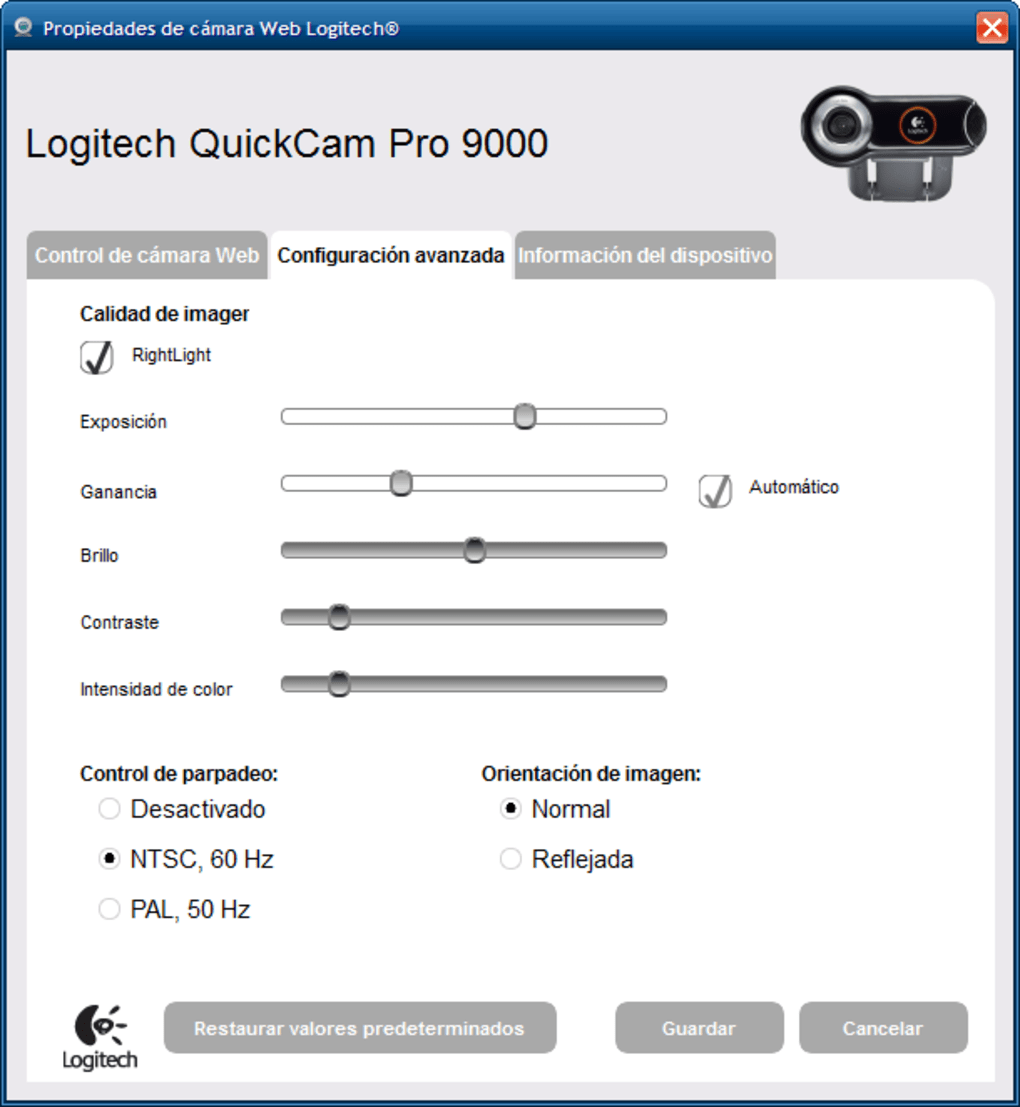
Logitech HD Webcam Software fills this critical gap for Logitech’s HD webcam line. It provides a user-friendly interface to access and modify these settings, eliminating the need to navigate complex operating system menus or rely on potentially less-optimized default settings. The software’s streamlined design ensures even less technically inclined users can easily adjust their webcam settings to meet their specific requirements. This is particularly beneficial for users engaging in video conferencing, live streaming, or video recording, where image and sound quality are paramount.
Key Features and Functionality of Logitech HD Webcam Software
The Logitech HD Webcam Software offers a comprehensive suite of features aimed at maximizing the performance and usability of Logitech HD webcams. Its functionality extends beyond basic camera control, integrating features that enhance the overall user experience:
-
Camera Activation and Control: The software provides a straightforward method for activating the webcam and accessing its core settings. This eliminates the need to navigate multiple menus within the operating system, simplifying the process of starting a video call or recording.
-
Photo Gallery Access: The software offers quick access to your computer’s photo gallery, allowing for easy sharing of images or quick integration into video calls or presentations. This integration streamlines the workflow for users who frequently need to share visuals.
-
Integrated Messaging App Support: Logitech HD Webcam Software often includes quick access to popular messaging applications such as Skype and Windows Live Messenger. This seamless integration ensures a smooth transition from software launch to initiating a video conversation.
-
Video Editing Software Integration: The software frequently provides convenient links to video editing programs like Logitech Vid HD and Windows Movie Maker. This feature is particularly useful for users who want to edit their webcam recordings directly after capture, enhancing the overall video production workflow.
-
Comprehensive Settings Adjustment: The software’s core strength lies in its ability to allow precise control over various webcam settings. Users can fine-tune:
- Brightness: Adjust the overall luminance of the video feed, optimizing it for different lighting conditions.
- Contrast: Control the difference between the darkest and lightest parts of the image, enhancing clarity and detail.
- Color: Fine-tune the color balance and saturation to achieve accurate and visually appealing video.
- Audio: Adjust microphone levels and potentially apply basic audio enhancements, ensuring clear and audible sound during video calls or recordings.
-
Real-time Preview and Testing: The software usually incorporates a real-time preview feature, allowing users to see how their webcam settings affect the video output before finalizing changes. This real-time feedback mechanism is invaluable for ensuring optimal video quality.
Compatibility and System Requirements
It’s crucial to note that Logitech HD Webcam Software is not universally compatible with all Logitech webcams. While designed primarily for Logitech’s HD webcam series, specific model compatibility needs to be verified before installation. Checking the software’s official documentation or the Logitech website is crucial to confirm compatibility with your particular webcam model.
The software’s system requirements will also vary depending on the version. Generally, it’s compatible with a wide range of Windows operating systems. However, checking the minimum system requirements is essential to ensure a smooth and stable experience. Older systems may experience performance issues if the system doesn’t meet the minimum specifications, potentially leading to lag or crashes.
Logitech HD Webcam Software: A Comparative Analysis
While other webcam software options exist, Logitech HD Webcam Software distinguishes itself by its close integration with Logitech hardware. This deep integration ensures optimal performance and functionality, often surpassing the capabilities of generic webcam software. Generic software may struggle to fully utilize the advanced features of Logitech HD webcams, resulting in a suboptimal user experience. Logitech’s software is specifically tailored to enhance the performance of their hardware, maximizing its capabilities.
Furthermore, the user-friendly interface of Logitech HD Webcam Software sets it apart. The software aims for simplicity and intuitive navigation, prioritizing accessibility for users of all technical backgrounds. Its features are logically organized, making adjustments and configurations easy to perform. This user-centric design minimizes the learning curve, allowing users to quickly become comfortable with the software and its many features.

Improvements and Updates to the Software
Over time, Logitech has released updates to its HD Webcam Software, addressing bugs, enhancing performance, and occasionally adding new features. These updates demonstrate Logitech’s commitment to maintaining and improving its software, addressing user feedback and integrating new technologies. Regularly checking for and installing updates ensures users have access to the most stable and feature-rich version of the software, maximizing their webcam’s capabilities.
Conclusion: Optimizing Your Logitech Webcam Experience
Logitech HD Webcam Software stands as a vital tool for users of Logitech HD webcams. It bridges the gap between hardware and operating system, enabling fine-grained control and advanced customization. Its intuitive interface, comprehensive settings adjustment capabilities, and integration with other applications contribute to a seamless and enhanced user experience. While not a universal solution for all webcams, for Logitech HD users, this software provides a significant advantage, maximizing the performance and versatility of their chosen device. By utilizing this dedicated software, users unlock the full potential of their Logitech HD webcam, ensuring high-quality video and audio for various applications, from video conferencing to live streaming and beyond. Regularly checking for updates ensures continuous optimization and access to the latest improvements.
File Information
- License: “Free”
- Latest update: “July 11, 2024”
- Platform: “Windows”
- OS: “Windows XP”
- Language: “English”
- Downloads: “244.6K”
- Size: “74.52 MB”


