
Logo Design Studio Pro is a software application designed to assist users in creating professional-looking logos, even without extensive graphic design experience. This review will delve into its features, ease of use, pros and cons, and compare it to user expectations and alternative options. We will also explore user reviews to gauge the overall user satisfaction with the software.
Ease of Use and Functionality
Logo Design Studio Pro boasts a library of thousands of pre-designed templates, providing a strong foundation for users to quickly create a logo. This feature significantly reduces the time and effort required for designing a logo from scratch. The software’s intuitive interface aims to simplify the design process, making it accessible to users with varying levels of design expertise. Users can easily modify existing templates or build logos from the ground up using the provided tools.
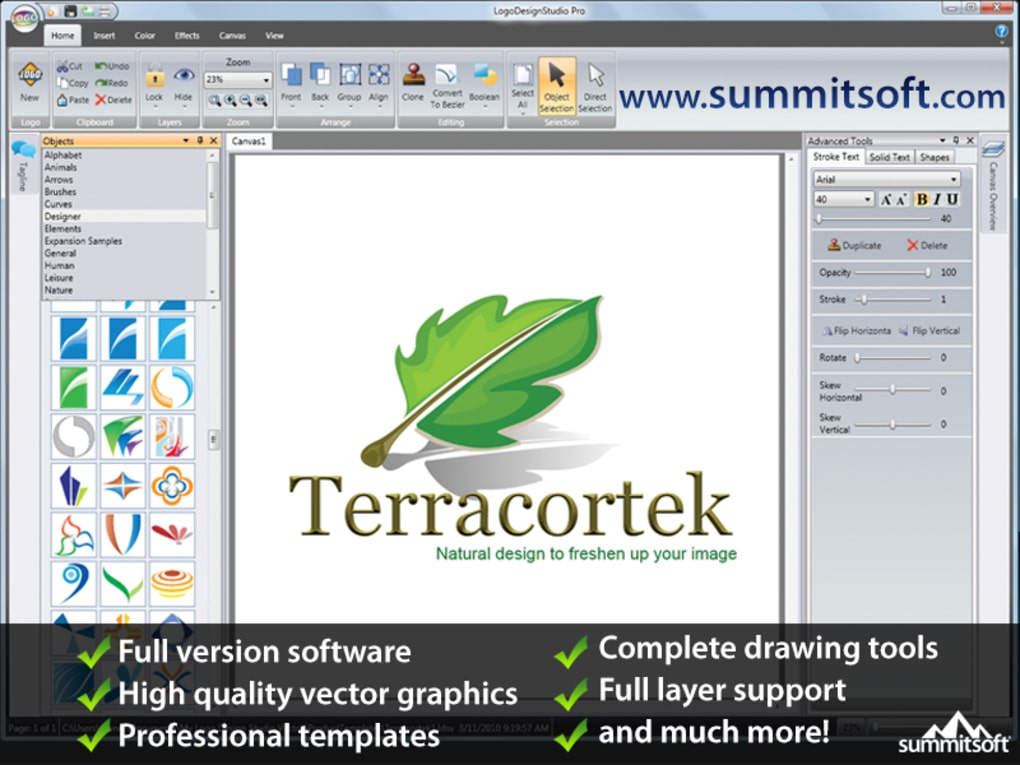
The software’s core strength lies in its accessibility. The numerous templates eliminate the need for advanced design skills, allowing even novice users to produce visually appealing logos. The tools are described as user-friendly and intuitive, focusing on a streamlined workflow. This ease of use is a significant advantage, particularly for small business owners or individuals without professional graphic design training. The ability to export logos in various formats and print directly from the software adds further convenience.
However, the “easy to use” aspect is juxtaposed with user feedback indicating an archaic and basic interface. While the templates may be helpful, the core design tools themselves might not offer the flexibility or sophistication expected by more experienced graphic designers. This suggests a trade-off between accessibility and advanced capabilities. The software’s suitability therefore depends heavily on the user’s skill level and specific needs. A novice user may find it perfectly adequate, while a professional might find its limitations frustrating.
Another user-reported issue relates to the grouping of elements. Apparently, grouping and manipulating design elements can lead to unexpected changes or loss of edits, potentially requiring considerable time to troubleshoot and rectify. This suggests potential usability problems within the software’s core functionality, affecting the overall user experience, particularly for larger and more complex designs.
Features and Capabilities
Beyond its template library, Logo Design Studio Pro offers a range of design tools. While specific details on these tools are limited in the provided information, the emphasis is consistently placed on their ease of use and intuitive nature. This suggests that the tools are designed for straightforward logo creation and manipulation, rather than intricate design tasks.
The software’s ability to export logos to multiple formats and print directly is a significant advantage. This streamlined workflow eliminates the need for additional software or steps in the logo creation process, increasing efficiency. However, user feedback suggests inconsistencies between the on-screen preview and the exported logo, which is a serious drawback. If the exported logo looks significantly different from the design within the software, this compromises the reliability and trustworthiness of the software.
The software’s focus on ease of use and quick logo creation seems to be its primary selling point, targeting users who value speed and simplicity over extensive customization options. This targeted approach effectively caters to a specific audience but may limit its appeal to those seeking a more versatile and feature-rich graphic design tool.
Comparison to Professional Graphic Design Software
Logo Design Studio Pro is clearly not a replacement for professional-grade graphic design software like Adobe Illustrator or CorelDRAW. Professional software provides a significantly wider range of tools, greater flexibility, and superior control over design elements. Logo Design Studio Pro serves as a quick and easy solution for basic logo design, particularly useful for users without design experience. Professional software, however, is geared towards experienced designers requiring precision and highly customized outcomes.
The software’s inexpensive pricing point is a strong selling proposition. This low cost significantly reduces the barrier to entry for users, especially small businesses or individuals with limited budgets. However, the trade-off is that the features and functionality will inevitably be more limited than in professional software which often commands a significantly higher price.
User Reviews and Feedback
User reviews present a mixed picture. While some users praise the software’s ease of use and effectiveness in creating simple logos, others express dissatisfaction with customer support and inconsistencies between the on-screen preview and the final exported logo. The criticisms regarding customer support are particularly concerning. The reported lack of assistance after a software reinstall or activation issue casts a shadow over the overall user experience. The inability to rectify a relatively simple problem like software activation after a reinstall is a serious flaw and significantly reduces the value proposition.
The issue of the exported logo looking different from the preview in the program is a critical flaw. The fact that users are unable to obtain a perfect replication of their on-screen design in the final exported product raises concerns about the software’s reliability and the accuracy of its rendering capabilities. Such issues dramatically impact the software’s usability and create a frustrating experience for the user.
Positive user feedback highlights the software’s value proposition for small businesses and individuals with limited graphic design expertise. These users value the software’s simplicity and speed, which allows them to quickly and easily produce visually acceptable logos. However, the negative reviews demonstrate critical shortcomings in customer support and output accuracy, which negatively impact the software’s overall quality.
Conclusion
Logo Design Studio Pro provides a user-friendly entry point for individuals needing to create basic logos quickly. Its pre-designed templates and intuitive interface greatly lower the barrier to entry for novice users. However, its limitations regarding advanced features, the archaic interface, and potential issues with element grouping and export accuracy, combined with reported shortcomings in customer support, suggest that it’s not a suitable solution for everyone. Those seeking sophisticated design tools or professional-level support should consider alternative, more robust graphic design software. For users needing a simple, quick, and affordable solution for basic logo creation, Logo Design Studio Pro might be sufficient, but they should be aware of the limitations and potential drawbacks before committing to its use. A careful assessment of individual needs and expectations is crucial before deciding whether this software meets those requirements.
File Information
- License: “Trial version”
- Latest update: “July 11, 2023”
- Platform: “Windows”
- OS: “Windows 7”
- Language: “English”
- Downloads: “24.6K”
- Size: “948.21 MB”


