
LoiLo Game Recorder is a free screen recording software designed specifically for capturing gameplay footage on Windows PCs. Its lightweight nature and straightforward interface make it an accessible option for both novice and experienced gamers looking to share their gaming experiences online, particularly on platforms like YouTube. While not as feature-rich as some paid alternatives, its ease of use and free price point make it a compelling choice for those starting their content creation journey.
Getting Started with LoiLo Game Recorder: Simplicity and Ease of Use
The primary strength of LoiLo Game Recorder lies in its simplicity. The installation process is quick and hassle-free, and the software’s user interface is intuitive, requiring minimal technical expertise to operate. Users can immediately begin recording gameplay with default settings, making it ideal for those who want to start capturing footage without delving into complex configurations. The core functionality focuses on capturing gameplay, making the process straightforward and user-friendly, even for beginners unfamiliar with screen recording software. This eliminates the steep learning curve often associated with more complex applications, allowing users to focus on their gameplay rather than navigating a convoluted interface.
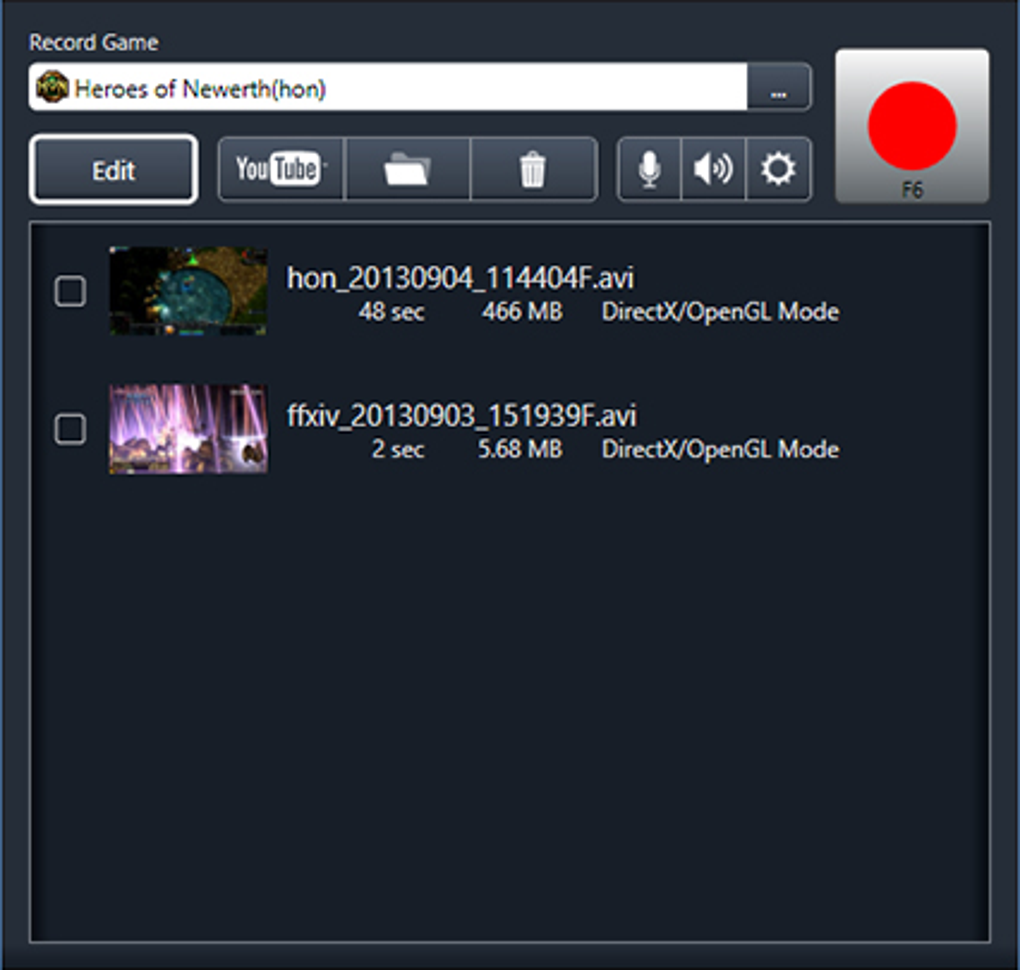
Upon launching the program, users are presented with a clear and uncluttered interface. The main controls are prominently displayed, enabling users to easily start and stop recording, adjust basic settings, and add live commentary. The minimalistic design ensures a streamlined workflow, preventing distractions and allowing users to concentrate on the recording process. The intuitive layout allows for quick access to essential functions, making it easy to adapt to the software even for those with limited prior experience in screen recording.
The recording process itself is initiated with a single click, ensuring a smooth and seamless experience. Users can immediately start capturing their gameplay sessions, eliminating unnecessary delays and complex preparations. This straightforward workflow contributes to the overall ease of use, allowing users to effortlessly record their gaming sessions without needing to navigate multiple menus or complex settings.
Comprehensive Capture Options: Customization and Control
Despite its simplicity, LoiLo Game Recorder offers a range of customizable options that allow users to fine-tune their recordings. Users have control over several key settings, including frame rate, resolution, and video quality. This flexibility allows users to optimize their recordings based on their system’s capabilities and their desired output quality. Adjusting these settings allows users to balance between high-quality recordings and the potential impact on system performance. For instance, users with lower-end systems might opt for a lower resolution and frame rate to maintain smooth performance during recording. Conversely, users with more powerful systems can take advantage of higher settings to achieve higher-quality videos.
The ability to adjust frame rate is particularly beneficial. Higher frame rates result in smoother and more fluid recordings, enhancing the viewing experience. However, higher frame rates also demand more system resources, meaning users need to find a balance between visual quality and system performance. The option to adjust resolution allows users to tailor the recording to their specific needs. Recording at higher resolutions will result in sharper and more detailed videos, but this requires more storage space and processing power. Users can choose a resolution that strikes the right balance between quality and efficiency.
The ability to adjust video quality allows users to balance file size with video clarity. Higher quality settings result in larger file sizes, but also produce clearer and more detailed videos. Lower quality settings produce smaller file sizes, but at the cost of some visual fidelity. Users can adjust this setting based on their storage limitations and the level of detail they desire in their final videos.
Enhanced Features: Commentary and YouTube Integration
LoiLo Game Recorder goes beyond basic screen recording by enabling the inclusion of live commentary. This feature is crucial for creating engaging “Let’s Play” videos, allowing users to add their voice and personality to the recorded gameplay. The option to incorporate a live audio track directly into the recording streamlines the post-production process, eliminating the need for separate audio editing. This simplifies the workflow and allows users to easily create polished and entertaining videos. The quality of the audio recording is generally good, ensuring that the commentary is clear and easily understood.
The software also includes a feature to facilitate direct uploads to YouTube. This simplifies the process of sharing gameplay recordings online, eliminating the need for additional software or complex upload procedures. Users can quickly share their recordings with a wider audience, maximizing reach and engagement with their gaming content. This integrated functionality simplifies the post-production and sharing process, making the entire experience smoother and more efficient.
LoiLo Game Recorder Compared to Alternatives: A Free Contender
While not as feature-packed as some paid alternatives like FRAPS or Bandicam, LoiLo Game Recorder holds its own as a free option. These paid alternatives often provide more advanced features such as hardware acceleration, specialized editing tools, and more extensive customization options. However, the simplicity and ease of use of LoiLo Game Recorder make it a viable option, especially for users who don’t need these advanced features. Its free nature makes it accessible to a broader audience, allowing more users to experiment with screen recording and create their own gaming content.
The decision between LoiLo Game Recorder and a paid alternative hinges on individual needs and priorities. For casual users or those just starting out, LoiLo Game Recorder’s free and user-friendly nature makes it a compelling choice. However, users who require more advanced features, such as hardware encoding for smoother performance or specialized editing tools, might find a paid alternative more suitable. The key takeaway is that LoiLo Game Recorder provides a functional and accessible entry point to game recording without the cost barrier, allowing users to explore the world of content creation before investing in more advanced tools.
The fact that it’s free is a significant advantage. While some free screen recorders might come with limitations or intrusive advertising, LoiLo Game Recorder provides a clean and functional experience without these drawbacks. This makes it a valuable option for users on a budget or those hesitant to commit to a paid subscription. The free availability significantly broadens the accessibility of game recording, empowering more individuals to create and share their gaming experiences.
Limitations and Potential Drawbacks: Areas for Improvement
While LoiLo Game Recorder offers a solid set of features, it’s important to acknowledge its limitations. One potential drawback is the occasional inclusion of bundled software during installation. Users need to carefully review the installation process to avoid unintentionally installing unwanted programs. This bundled software can sometimes be problematic, adding extra applications that the user might not need or even want.
Another potential issue is the absence of some advanced features found in paid alternatives. For instance, some users might miss the ability to record specific regions of the screen, or the absence of more advanced encoding options which affect file sizes. For users with more demanding recording needs, these omissions could be significant limitations. Those seeking specific features like hardware acceleration or advanced video editing options might find LoiLo Game Recorder’s capabilities insufficient.
Finally, the software’s infrequent updates might cause compatibility issues with newer games or operating systems. While currently functional, there’s a risk that its compatibility might diminish over time without consistent updates. This potential for incompatibility should be considered by users who are committed to recording sessions for extended periods. The lack of frequent updates poses a potential risk for future compatibility, especially considering the rapid evolution of gaming technology.
Conclusion: A Worthy Entry Point into Gameplay Recording
Despite its limitations, LoiLo Game Recorder remains a valuable tool for anyone looking for a free and easy-to-use screen recorder for capturing gameplay. Its intuitive interface and streamlined workflow make it accessible to novice users, while the range of customizable options caters to those seeking more control over their recordings. The inclusion of live commentary and YouTube upload features further enhances its appeal for aspiring gaming content creators.
While more advanced features may be lacking compared to paid alternatives, the software’s free price point and user-friendly design make it a compelling choice for many. It provides an excellent entry point into the world of gameplay recording, allowing users to experiment and create content without any upfront investment. For those seeking a straightforward, free, and effective screen recorder, LoiLo Game Recorder stands as a worthy contender in the crowded market. It’s a valuable resource for casual gamers and budding content creators who value simplicity and ease of use above all else.
File Information
- License: “Free”
- Latest update: “July 12, 2023”
- Platform: “Windows”
- OS: “Windows 7”
- Language: “English”
- Downloads: “105.9K”
- Size: “74.71 MB”


