
LP Recorder is a Windows-based software application designed for a singular purpose: to effortlessly transfer audio from vinyl records (and other analog sources) to digital formats like WAV and, subsequently, MP3. Unlike many general-purpose audio recording programs burdened with complex settings and features, LP Recorder prioritizes simplicity and ease of use, making it an ideal tool for anyone looking to digitize their vinyl collection without the steep learning curve often associated with professional audio software.
Effortless Vinyl Digitization: A Streamlined Process
The core strength of LP Recorder lies in its user-friendly interface and intuitive workflow. The process of transferring your vinyl records to digital files is remarkably straightforward:
-
Connect your equipment: Connect the output of your turntable (or other analog source, such as a cassette player or even a radio) to the line-in input of your computer’s sound card. Ensure your audio levels are appropriately set to avoid distortion. This typically involves adjusting the volume on your turntable and potentially using a preamplifier if needed, depending on the output level of your turntable and the sensitivity of your sound card’s line input.
-
Launch LP Recorder and select input: Open the LP Recorder application. Select the correct input device from the program’s settings – this should correspond to the line-in input where your turntable is connected. The software should automatically detect available audio input devices, but double-checking is always recommended. Incorrectly selecting the input will result in silence or noise being recorded.
-
Set the output filename and location: Choose a descriptive filename for your recording, and select the desired output folder on your computer’s hard drive. Using a clearly organized file structure is crucial for easy retrieval of your digitized recordings later. Consider creating a dedicated folder for each album, or categorizing your recordings based on genre or artist.
-
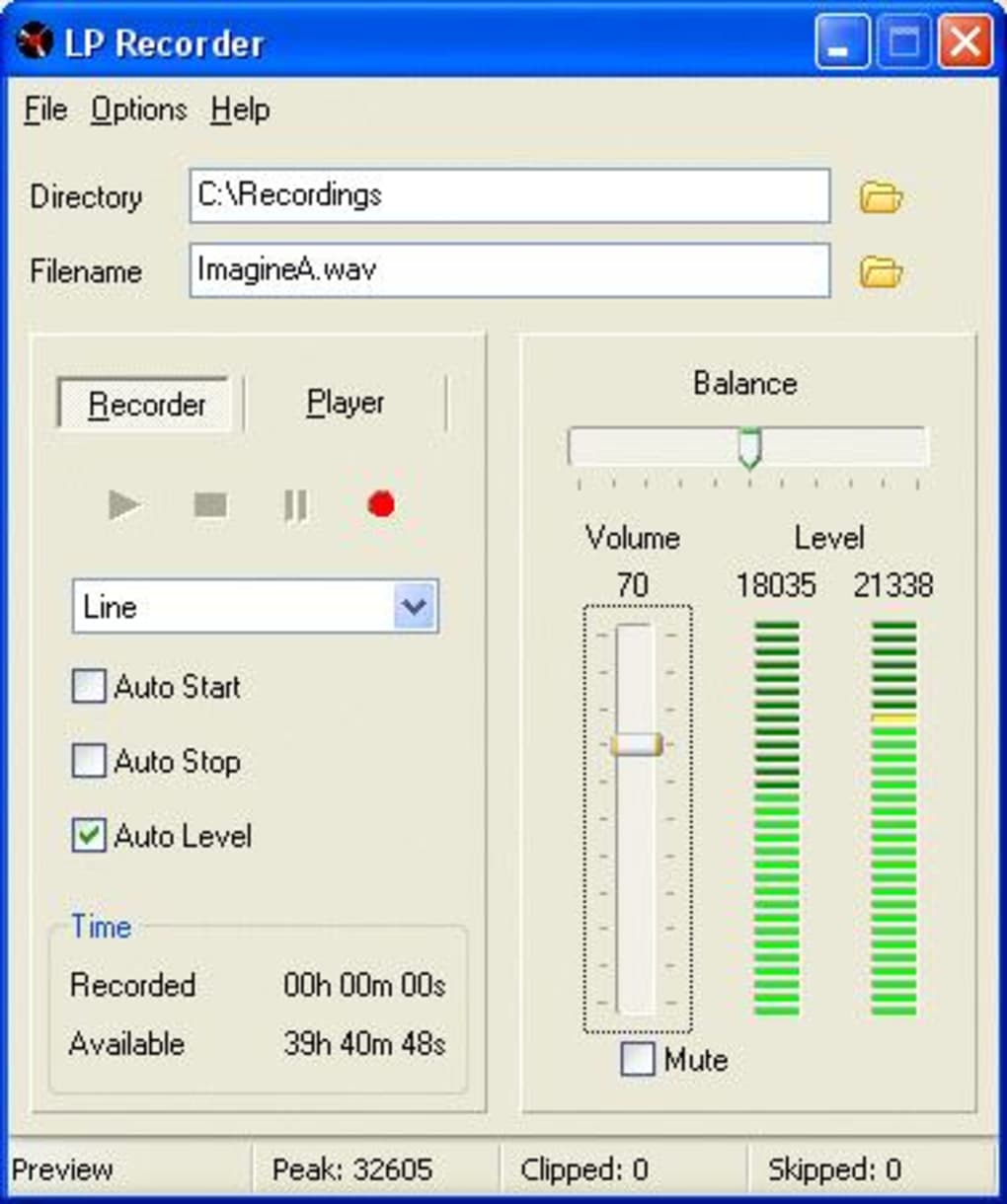
Start recording: Once you’ve confirmed your settings, simply press the record button. LP Recorder will begin capturing the audio signal from your selected input device. The program offers a real-time visual representation of the audio level, allowing you to monitor for potential clipping (distortion caused by excessively high audio levels). Adjust the input level if necessary to prevent clipping and ensure optimal recording quality.
-
Stop recording: When the side of the record is finished, press the stop button. The recorded audio will be saved as a WAV file in the specified location. WAV files are uncompressed, maintaining the highest audio fidelity.
-
Repeat for each side: Repeat steps 4 and 5 for each side of the vinyl record. Many users will then convert these WAV files into a more manageable and widely compatible format, such as MP3, using a separate audio conversion program. LP Recorder does not directly support MP3 encoding.
Beyond Vinyl: Adaptability for Various Analog Sources
While primarily marketed as a vinyl record digitizer, LP Recorder’s functionality extends beyond just LPs. Its versatility makes it a valuable tool for anyone seeking to preserve their collection of analog audio recordings. This includes:
-
Cassette Tapes: Similar to vinyl records, you can connect a cassette player’s output to your computer’s line-in and use LP Recorder to digitize your cassette recordings. This is especially valuable for preserving irreplaceable recordings that might otherwise deteriorate over time. Note that the quality of the resulting digital audio is highly dependent on the quality of the original cassette and the cassette player itself.
-
MiniDisc Players: MiniDisc players offer a higher audio quality compared to cassette tapes, but they are becoming increasingly rare. LP Recorder can help you preserve your MiniDisc collection by digitizing these recordings in a convenient and accessible format. Similar to cassettes, the quality of the source audio directly impacts the quality of the digitized file.
- Radio Broadcasts: While the legality of recording copyrighted radio broadcasts varies by region, LP Recorder can record audio from any source connected to your sound card’s line-in. This feature can be beneficial for capturing live performances or radio shows that are not readily available digitally. However, be sure to comply with copyright laws and only record content you are legally permitted to archive.
Simple User Interface: Focus on Functionality
The user interface of LP Recorder is intentionally minimalist. This deliberate design choice emphasizes ease of use and efficient workflow. The program avoids cluttering the screen with unnecessary features, focusing on the core functions of recording, saving, and managing audio files. This simplicity makes LP Recorder highly accessible to users with varying levels of technical expertise. There are minimal settings to configure, allowing users to focus on the task of transferring their audio rather than navigating complex menus or options.
WAV File Format: Preserving Audio Quality
LP Recorder exclusively records audio in the WAV file format, which is an uncompressed audio format. This choice ensures the highest possible audio fidelity during the conversion process. Uncompressed formats like WAV preserve all the nuances and details in the original audio signal, unlike compressed formats like MP3, which discard some audio data to achieve smaller file sizes. While WAV files are larger than MP3s, this trade-off is well worth it for those prioritizing the preservation of audio quality. Users can then convert these WAV files to MP3 or other compressed formats later using other software, if desired. The advantage of this approach is that any loss of audio quality is postponed until the final compression step.
Alternatives and Comparisons
Several alternative applications offer similar functionality, but LP Recorder differentiates itself through its dedication to simplicity. Many competing programs are feature-rich, incorporating tools for audio editing, mixing, and mastering. While such features are valuable to audio professionals, they add complexity for users simply aiming to digitize their analog recordings. LP Recorder’s strength lies in its targeted functionality: it does one thing exceptionally well, providing a streamlined workflow without unnecessary distractions.
While some other programs might offer additional features, LP Recorder’s focus on ease of use and a straightforward recording process makes it a strong choice for users prioritizing simplicity and speed. For individuals with extensive audio editing needs, more comprehensive software may be more suitable. However, for straightforward digitization of vinyl and other analog sources, LP Recorder’s simplicity and efficiency are significant advantages.
Conclusion: A Practical Solution for Analog Audio Preservation
LP Recorder offers a practical and straightforward solution for converting vinyl records, cassette tapes, and other analog audio sources into digital formats. Its user-friendly interface, minimalist design, and focus on WAV format recording ensure high-quality digital preservation of valuable audio memories. While more complex audio software may offer extensive features, LP Recorder’s simplicity makes it an excellent choice for those prioritizing ease of use and efficient workflow. For the average user seeking to digitize their analog recordings, LP Recorder provides an uncomplicated and effective solution for preserving their audio heritage in a convenient and accessible format.
File Information
- License: “Trial version”
- Latest update: “January 18, 2024”
- Platform: “Windows”
- OS: “Windows Vista”
- Language: “English”
- Downloads: “6.1K”
- Size: “1.42 MB”


