
Lynx is a text-based web browser, meaning it renders websites using only text characters, rather than graphical elements. This makes it incredibly lightweight, fast, and ideal for situations where bandwidth is limited or graphical capabilities are constrained. While it lacks the visual appeal of modern browsers, its simplicity and efficiency have made it a surprisingly enduring tool for accessing the internet. This article explores the Lynx browser, specifically its Windows version, detailing its features, strengths, weaknesses, and place within the broader landscape of internet browsing.
Understanding Lynx’s Functionality
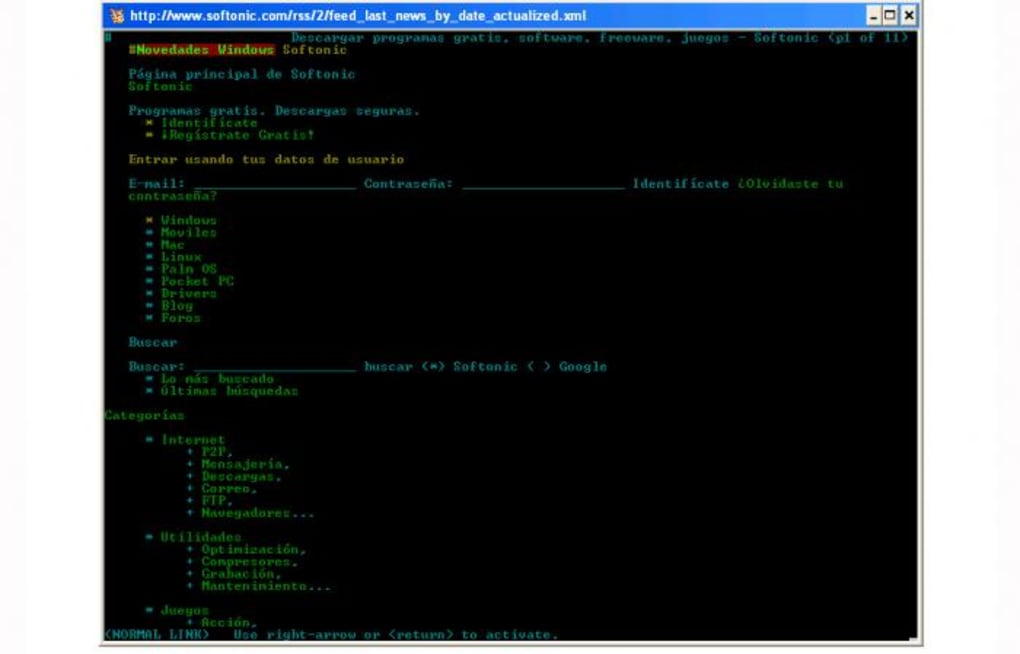
Lynx operates entirely within a command-line interface (CLI), offering a stark contrast to the visually rich user experience of graphical browsers like Chrome or Firefox. Instead of images, videos, and complex layouts, Lynx presents web pages as structured text, using ASCII characters to represent links, headings, and other elements. Navigation is accomplished through keyboard commands, allowing users to move between links, scroll through pages, and perform other actions without using a mouse.
This text-only approach provides several advantages:
-
Speed and Efficiency: Lynx loads pages significantly faster than graphical browsers because it doesn’t need to process and render images or other multimedia content. This makes it particularly useful in environments with slow internet connections or limited processing power.
-
Lightweight Nature: The minimal resource requirements of Lynx mean it can run on older, less powerful computers that may struggle to handle modern browsers. Its small installation size also contributes to its suitability for systems with limited storage space.
-
Accessibility: For users with visual impairments, Lynx’s text-based interface can be more accessible than graphical browsers, especially when combined with screen readers. The lack of distracting visual elements can simplify navigation and information processing.
-
Security: While no browser is perfectly secure, Lynx’s reliance on text minimizes the potential attack vectors present in graphical browsers that rely on complex rendering engines and plugins. This simplifies security management and reduces the risk of vulnerabilities related to image rendering and script execution.
-
Privacy: Because Lynx doesn’t render images or execute scripts, it generally collects less user data than graphical browsers. This is a significant advantage for users who prioritize privacy and want to limit their digital footprint.
Limitations and Considerations
Despite its advantages, Lynx’s text-based nature presents certain limitations:
-
Lack of Visual Appeal: The absence of images, videos, and other graphical elements significantly reduces the visual experience of browsing the web. Many modern websites heavily rely on visuals for their content and usability, and Lynx may not render them effectively or at all.
-
Steeper Learning Curve: Users accustomed to graphical browsers will need time to learn Lynx’s keyboard commands and navigation methods. The interface is entirely different, and mastering its intricacies requires some effort.
-
Limited Support for Modern Web Standards: Lynx may not fully support the latest web technologies, such as advanced JavaScript functionalities and certain CSS styles. This can lead to inconsistent rendering or broken features on many websites.
-
Difficulty with Complex Layouts: Modern websites often use intricate layouts and CSS styling to organize content. Lynx struggles with these complex layouts, often presenting content in a less organized and intuitive manner.
-
No Multimedia Support: Lynx doesn’t support videos, audio, or other multimedia content. This severely restricts its functionality for websites that rely heavily on multimedia.
Installing and Using Lynx on Windows
Installing Lynx on Windows is a straightforward process. The official Lynx website (or a reputable software repository like Phanmemfree) provides downloadable installation packages. The installation typically involves running an executable file and following the on-screen instructions.
Once installed, Lynx can be launched from the start menu or command prompt. The browser’s interface is entirely text-based, and navigation is accomplished using keyboard shortcuts. The commands generally involve pressing specific keys or combinations of keys to move between links, load pages, and manage the browser’s functionality. A detailed command reference is usually included with the software documentation or can be readily found online.
Lynx in the Modern Browsing Landscape
Lynx occupies a niche role in the modern web browsing environment. It’s not meant to replace modern, graphical browsers for everyday browsing. However, it remains a valuable tool for specific use cases. Its strengths lie in its speed, lightweight nature, accessibility, and relative simplicity for security-conscious users. While many websites will not render correctly, it’s highly effective when dealing with basic text-based websites and information retrieval.
For users with low-bandwidth connections, older hardware, or accessibility requirements, Lynx offers a functional alternative to resource-intensive graphical browsers. Its continued existence testifies to the enduring value of a simple, efficient approach to internet access. In an era of visually rich and increasingly complex websites, Lynx stands as a reminder of the core purpose of the web: access to information.
Alternative Text-Based Browsers
While Lynx is a prominent name in text-based browsing, there are other options available. However, many of these are either less actively maintained or offer fewer features compared to Lynx. The specific needs of a user will determine which browser suits them best, but Lynx often remains a top choice due to its long history, active community, and continued development. It’s worth researching alternatives, but understanding their features and comparing them to Lynx is important.
Conclusion
Lynx for Windows remains a viable option for specific user needs and scenarios. Its advantages in speed, efficiency, and accessibility should not be overlooked, especially when compared to the demands of modern, graphical browsers. Understanding its strengths and limitations is crucial in deciding if Lynx is the right tool for your particular internet browsing requirements. While not a suitable replacement for everyday browsing for most users, its continued relevance underscores its enduring value in specific niches.
File Information
- License: “Free”
- Version: “2.8.7”
- Latest update: “March 10, 2017”
- Platform: “Windows”
- OS: “Windows 2003”
- Language: “English”
- Downloads: “22.7K”
- Size: “1.20 MB”


