
Ma-Config is a free Windows utility designed to provide a detailed profile of your computer’s hardware and software components. It offers a powerful diagnostic capability, helping users identify potential issues, such as outdated drivers or hardware conflicts, that may be impacting system performance and stability. While seemingly discontinued in favor of a cloud-based successor from the same developer, Cybelsoft, Ma-Config remains a valuable tool for users seeking a comprehensive, offline system analysis. This detailed review explores its features, benefits, and limitations.
Understanding Ma-Config’s Functionality
Ma-Config’s primary function is to scan and analyze your system, creating a comprehensive report detailing your computer’s hardware and software configuration. This includes identifying specific components such as the CPU, RAM, graphics card, storage devices, and installed operating system. Beyond simply listing these components, Ma-Config goes further by checking for driver versions, comparing them against known databases (although the extent of these databases isn’t explicitly stated), and highlighting potential discrepancies or outdated components. This proactive approach allows users to address potential performance bottlenecks or instability before they become significant problems.
The software excels at providing a clear overview of your system’s state. This bird’s-eye view is crucial for troubleshooting. Instead of navigating multiple system settings and menus, Ma-Config consolidates vital information into a single, easily understandable report. This simplifies the process of identifying problematic components or software configurations. The detailed information provided facilitates quicker and more efficient problem-solving.
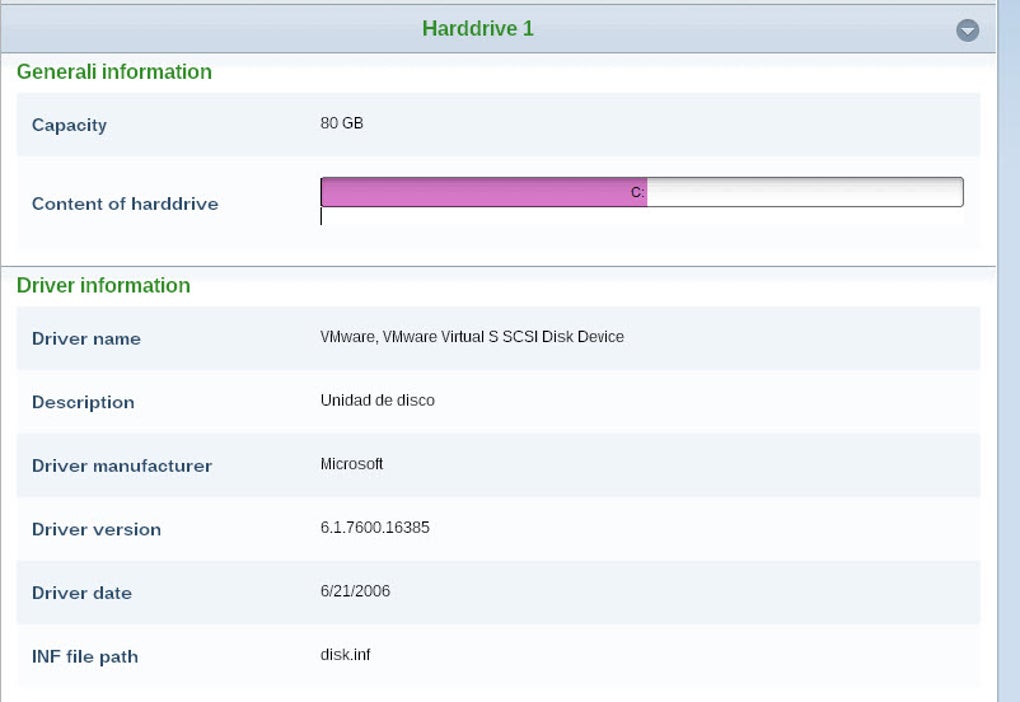
Moreover, Ma-Config extends beyond a simple snapshot of your system. It offers ongoing monitoring capabilities, tracking crucial hardware metrics such as temperature and voltage. This real-time monitoring can help users identify potential hardware issues before they lead to system failure or data loss. This proactive monitoring aspect enhances its value as a preventative maintenance tool.
Another critical feature of Ma-Config is its ability to analyze crash reports. By analyzing system logs, it assists in pinpointing the root causes of system crashes or freezes. This diagnostic functionality is particularly helpful in resolving complex technical problems that might otherwise require extensive manual investigation. The analysis of crash reports streamlines troubleshooting and significantly reduces the time needed to diagnose and resolve system issues.
Key Features and Benefits
Ma-Config boasts several features that make it a valuable tool for both novice and experienced computer users:
-
Comprehensive System Profiling: The software provides a detailed inventory of your hardware and software, including CPU, RAM, storage devices, operating system, installed applications, and drivers. This comprehensive overview forms the foundation for identifying potential conflicts or outdated components.
-
Driver Identification and Update Suggestions: Ma-Config actively checks driver versions and flags outdated or potentially problematic drivers. While it doesn’t automatically update drivers, it provides information that allows users to easily locate and download the correct updates from the manufacturer’s website or other reputable sources. This guidance is crucial for maintaining optimal system performance and stability.
-
Hardware Monitoring: Real-time monitoring of critical hardware parameters, such as temperature and voltage, allows users to proactively identify potential hardware issues before they escalate into major problems. This preventive measure can avoid costly repairs or data loss.
-
Crash Report Analysis: The ability to analyze system crash reports helps users pinpoint the causes of system instability. This feature significantly aids in troubleshooting and resolving complex technical issues that may otherwise be difficult to diagnose.
-
Configuration Saving and Restoration: This allows users to save a working configuration of their system. If future problems arise, restoring a previously saved configuration can significantly simplify the troubleshooting process, potentially saving time and preventing data loss. This is particularly beneficial for users who frequently make system changes or experience intermittent issues.
-
User-Friendly Interface: Despite its powerful functionality, Ma-Config maintains a user-friendly interface. The information is presented clearly and concisely, making it accessible even to users without advanced technical knowledge. This accessibility is a key factor in its appeal to a wider range of users.
Limitations and Considerations
While Ma-Config offers many advantages, it’s essential to acknowledge its limitations:
-
Development Status: The software appears to be no longer under active development. This means that future updates and support may be limited, potentially leaving users vulnerable to compatibility issues with newer hardware or software. The reliance on potentially outdated driver databases is also a significant concern.
-
Manual Driver Updates: The software doesn’t automatically update drivers. While it identifies outdated or problematic drivers, users must manually download and install the necessary updates. This requires some technical proficiency and can be time-consuming.
-
Limited Scope of Analysis: While the analysis is thorough in terms of hardware and software identification, it doesn’t delve into more advanced system diagnostics or performance optimization beyond driver updates. This limits its utility for users seeking more in-depth performance tuning.
-
Dependence on External Resources: Finding and downloading correct drivers relies on external resources. This introduces a level of dependence on the availability and reliability of these external sources. Incorrect driver installations can lead to further system issues.
- Absence of Cloud Integration: In contrast to many modern system monitoring tools, Ma-Config lacks cloud integration. This means that data cannot be automatically backed up or monitored remotely. This limitation may be a drawback for users accustomed to cloud-based solutions.
Comparison with Alternative Solutions
Numerous alternatives to Ma-Config exist, ranging from built-in Windows tools like System Information to comprehensive system monitoring and optimization suites. Many modern solutions offer cloud integration, automatic driver updates, and more advanced performance analysis. The choice of which tool to use will depend on individual needs and technical expertise. While Ma-Config offers a solid foundation for system diagnostics, users might find more advanced features and ongoing support in other, contemporary applications.
Conclusion
Ma-Config remains a useful tool for users seeking a detailed, offline overview of their system’s hardware and software. Its ability to identify outdated drivers and offer recommendations for updates is valuable for maintaining system stability. However, its status as an apparently discontinued project, lack of automatic driver updates, and absence of cloud integration are significant limitations. Users should weigh these factors carefully before deciding whether Ma-Config meets their needs. Those seeking a more comprehensive, actively maintained solution with advanced features might find greater benefit from modern alternatives offering broader functionality and ongoing development. Nonetheless, for users requiring a straightforward, offline system analysis, Ma-Config can still provide valuable insights and assistance in maintaining a healthy and efficient computer system.
File Information
- License: “Free”
- Version: “7.1.3”
- Latest update: “November 8, 2022”
- Platform: “Windows”
- OS: “Windows 8.1”
- Language: “English”
- Downloads: “99.1K”
- Size: “255.86 KB”


