
Mac Notepad, also known as iNotepad for Mac, is a free text editor designed specifically for Apple devices. While it might seem like a simple replacement for Microsoft’s Notepad, it offers a surprisingly robust feature set, focusing on organizational tools and leveraging Apple’s unique technological capabilities. This review delves into its strengths, weaknesses, and overall suitability for various user needs.
Feature-Rich Text Editing for Mac
Mac Notepad boasts an extensive array of features, going far beyond the basic functionality of a simple notepad application. It includes essential tools like spell checking, dictation, smart links, and text substitution, streamlining the writing process. One of its standout features is its ability to automatically or manually merge notes on related topics into a single, easily navigable document. This consolidation function is particularly beneficial for users managing large volumes of interconnected information.
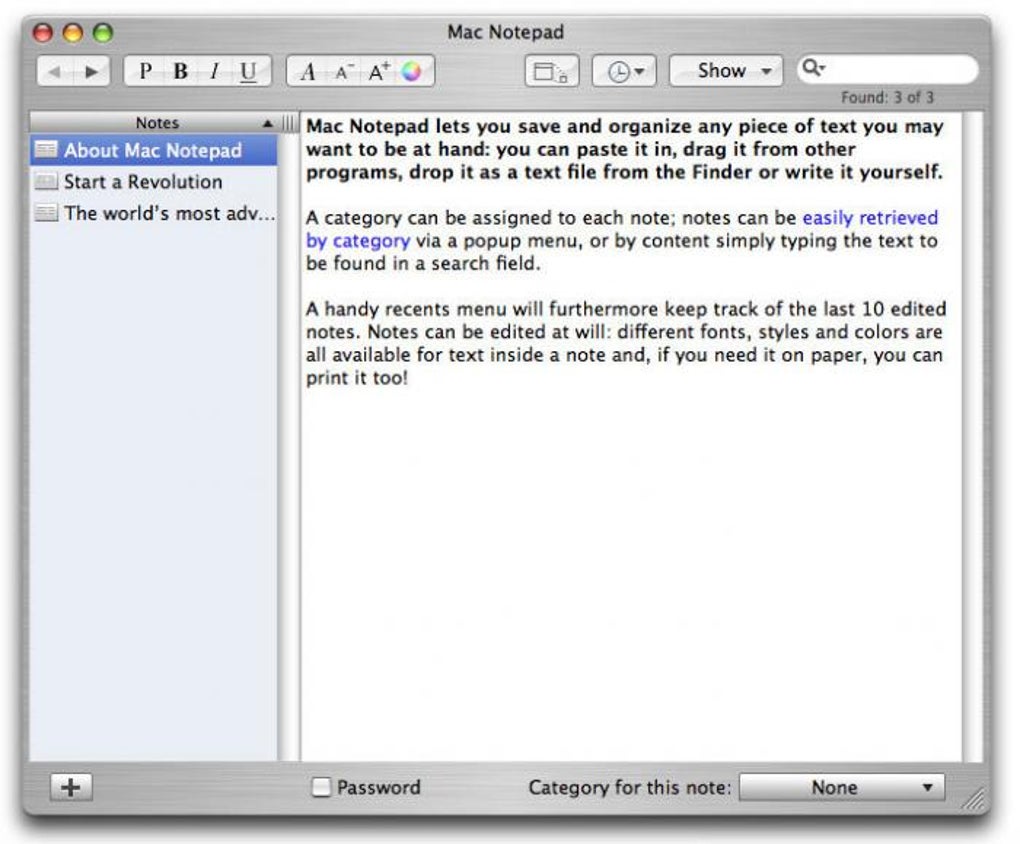
Beyond the core text editing capabilities, Mac Notepad offers surprisingly sophisticated formatting options. Users can manipulate text styles to a degree comparable to more substantial word processors, allowing for a high degree of control over document presentation. Furthermore, the application goes beyond text, allowing users to add images and perform basic image editing tasks directly within the application.
The user interface is clean and intuitive, employing a row-based design with a context-sensitive top bar. This arrangement ensures easy access to relevant tools and options, mirroring the familiar layouts of Finder, Mail, and other established macOS applications. The main document list is simple and user-friendly, ensuring a quick learning curve for most users familiar with Apple’s ecosystem.
Organization and Note Management Capabilities
Mac Notepad’s real strength lies in its organizational capabilities. It’s not designed for the quick jotting down of single pieces of information; for that, TextEdit or other simpler note-taking apps would be more suitable. However, if you regularly handle multiple lists, topics, and numerous notes, Mac Notepad’s organizational features become invaluable. It excels at taming complex information streams, making it a powerful tool for researchers, students, and anyone who needs to manage substantial amounts of text-based information. The merging functionality mentioned earlier is key here, preventing the user from becoming overwhelmed by numerous disparate files.
Strengths and Weaknesses of Mac Notepad
Pros:
- Excellent for Note Keeping: The application’s core function is note-taking, and it executes this function exceptionally well, particularly for users managing many notes across various topics. The automatic and manual merging of notes is a game changer for organization.
- Speed and Responsiveness: Mac Notepad is generally fast and responsive, ensuring a smooth user experience even when dealing with large files or numerous notes. This responsiveness is crucial for maintaining productivity.
- Well-Organized Interface: The clean, row-based interface and context-sensitive top bar make navigation and access to tools intuitive and efficient. This thoughtful design ensures that users aren’t bogged down by unnecessary complexity.
- Free to Use: The application’s free pricing model makes it accessible to a wider range of users, eliminating a significant barrier to entry for those exploring note-taking and organizational software.
- Leverages Apple Technologies: Mac Notepad is built from the ground up to take advantage of the latest Apple technologies, ensuring optimal performance and integration within the Apple ecosystem. This integration is a significant advantage for users deeply invested in Apple products.
Cons:
- Feature Overwhelm: While the extensive features are a strength, they can also be a weakness for users seeking a simpler note-taking experience. The sheer number of options might feel daunting to those who just need a basic text editor.
- Not Ideal for Single Notes: As mentioned, the application’s complexity makes it unsuitable for quickly jotting down brief pieces of information. Simpler applications are better suited to this purpose.
- Potential Security Concerns: Some user reviews mention issues with the application’s installation due to unidentified developer flags, highlighting a potential security concern. This should be carefully considered before downloading and installing. Users should be cautious and only download from trusted sources.
Alternatives to Mac Notepad
Several alternative applications offer similar functionality, each with its own strengths and weaknesses. These include:
- NotePad: A free productivity program for Mac offering basic note-taking capabilities. It lacks the advanced features of Mac Notepad but may be a suitable alternative for users who only need simple functionality.
- WordPad: Another free option, WordPad offers more advanced text formatting options than Notepad but still lacks the organizational features of Mac Notepad.
- gedit: A default GNOME editor available for Mac. It offers basic text editing capabilities but lacks the sophisticated organizational tools found in Mac Notepad.
- Tex-Edit Plus X: A simple and functional text editor with a paid trial version. It might be a suitable alternative for users seeking a more streamlined approach than Mac Notepad offers.
- Evernote: A widely-used note-taking application often cited as a superior alternative due to its extensive features, security, and cross-platform compatibility. However, Evernote is not a free application.
User Reviews and Feedback
User reviews reveal a mixed bag of opinions. Some users praise the application’s organizational features and ease of use, while others express frustration with installation issues and the potentially overwhelming number of features. Negative reviews often highlight difficulties related to security flags preventing installation, emphasizing the need for users to be cautious and verify the source of the downloaded software. This highlights the importance of downloading from reputable sources such as the official website or trusted app stores. The potential security concerns should not be dismissed lightly; users should carefully consider the risks before installing.
Conclusion
Mac Notepad is a powerful and versatile note-taking and organizational application, particularly well-suited for managing substantial volumes of interconnected information. Its extensive features and intuitive interface make it a valuable tool for researchers, students, and anyone who needs to efficiently handle complex text-based projects. However, its complexity might be overwhelming for users who only require basic note-taking functionality. Potential security concerns associated with installation should be considered, and users should always download from trustworthy sources. The application’s free status makes it an attractive option for users exploring organizational software, but alternatives like Evernote should be considered for users who prioritize security, cross-platform compatibility, and a broader range of features. Ultimately, the suitability of Mac Notepad depends on individual needs and preferences.
File Information
- License: “Trial version”
- Version: “9.0”
- Latest update: “September 19, 2022”
- Platform: “Mac”
- OS: “Mac OS X”
- Language: “English”
- Downloads: “273.6K”
- Size: “6.94 MB”


