
In the vast and ever-evolving landscape of computer software, certain utilities stand out for their specific functions, addressing niche needs that might not be covered by mainstream applications. One such program is MacMakeUp, a free and specialized tool designed for Windows users, primarily focused on the often-overlooked yet critical aspect of network identification: the MAC address. Developed by Marcello Gorlani, MacMakeUp carved out its own space within the realm of networking software, offering a straightforward solution for those looking to modify their network adapter’s MAC address.
First appearing in our selection of software and apps in 2011, MacMakeUp quickly gained traction, particularly in regions like India, Pakistan, and Vietnam, where its utility resonated with a significant user base. Despite its relatively small footprint—a mere 557.67 KB—and its last update dating back to June 8, 2011, to version 1.95d, its legacy persists. While its age and a cautionary note of “This file may have issues” necessitate a careful approach for modern users, understanding MacMakeUp’s functionality and its place in the history of network utilities offers valuable insight into the continuous quest for control over digital identities and network interactions. This article delves into the intricacies of MacMakeUp, exploring its features, its significance within the broader categories of Internet & Network, Security & Privacy, and Utilities & Tools, and considering its enduring relevance in today’s technologically advanced environment.
Delving into Network Utilities: The Role of MacMakeUp
The digital world is built upon layers of interconnected protocols and identifiers, each playing a crucial role in how devices communicate. At a fundamental level, every network-enabled device possesses a unique identifier known as the MAC (Media Access Control) address. Understanding this address and how tools like MacMakeUp interact with it is key to appreciating the software’s purpose and impact.
Understanding MAC Addresses and Their Significance
A MAC address is a hardware identification number that uniquely identifies a network interface card (NIC) on a local network segment. Unlike an IP address, which can change depending on network configuration, a MAC address is typically hard-coded into the device’s hardware by the manufacturer. It’s often referred to as the “physical address” or “hardware address.” This 48-bit identifier, usually displayed as six pairs of hexadecimal digits (e.g., 00:0A:95:9D:68:16), ensures that data packets are delivered to the correct device within a network.
The significance of a MAC address extends beyond mere identification. It plays a vital role in several network functions:
- Network Access Control: Many networks, especially in corporate or public environments, use MAC address filtering to restrict access to authorized devices. If a device’s MAC address isn’t on the approved list, it won’t be able to connect.
- DHCP Assignment: Dynamic Host Configuration Protocol (DHCP) servers often use MAC addresses to assign IP addresses to devices. In some cases, a DHCP server might “remember” a MAC address and assign the same IP address each time.
- Troubleshooting: Network administrators often use MAC addresses to diagnose network issues, trace devices, and identify bottlenecks.
- Privacy and Security: While not a primary security measure, a MAC address can be used to track a device’s movements within a local network or even across different public Wi-Fi hotspots, raising privacy concerns.
In scenarios where a user needs to bypass MAC address filtering, troubleshoot network issues related to a specific MAC, or simply enhance their privacy by obscuring their device’s true identity, the ability to change or “spoof” a MAC address becomes invaluable. This is precisely where MacMakeUp comes into play, offering a practical solution for a specific technical requirement.
MacMakeUp’s Core Functionality
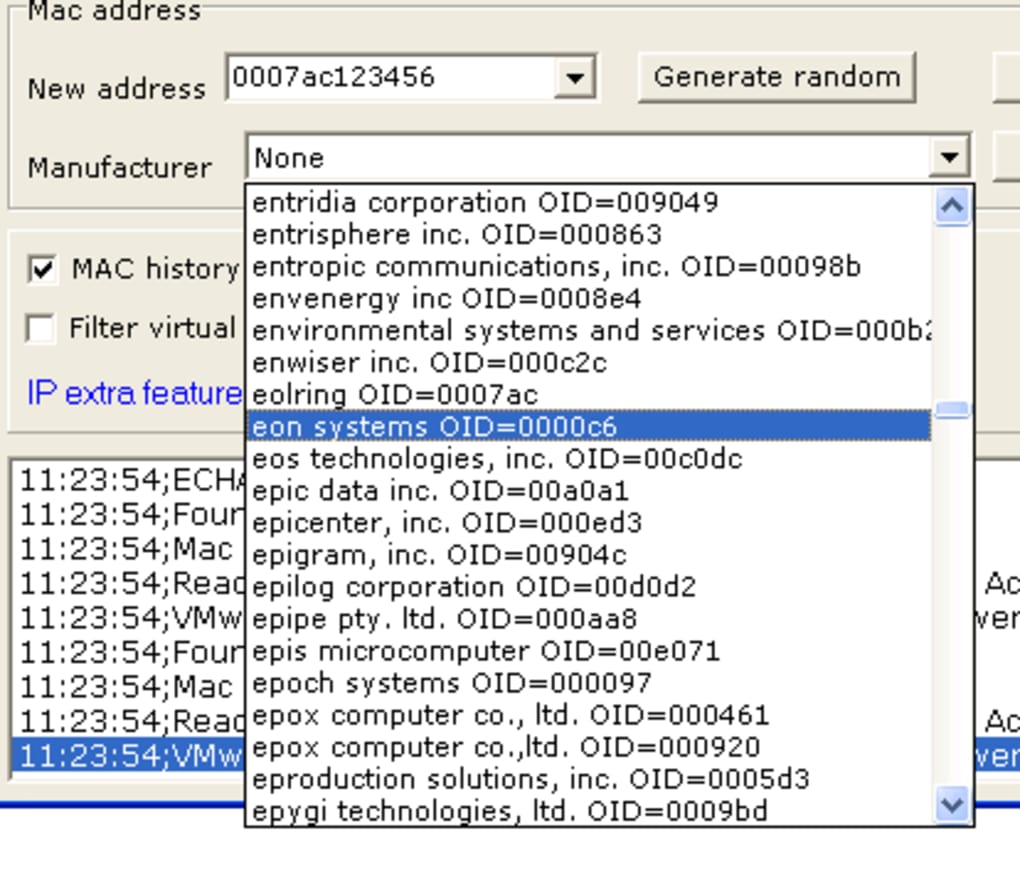
MacMakeUp’s central purpose is refreshingly straightforward: it allows Windows users to change the MAC address of their network adapter. This process, often referred to as MAC spoofing, involves overriding the hardware-assigned MAC address with a new, user-defined one. The software is designed for simplicity, making what could be a complex command-line task accessible to a broader audience.
Upon launching MacMakeUp, users are typically presented with a clear interface that lists their available network adapters. From there, they can select the adapter whose MAC address they wish to modify. The program then provides an option to input a new MAC address, either by manually typing it in or, in some cases, offering a function to generate a random one. Once the new address is applied, the network adapter will temporarily or permanently (depending on the implementation and OS version) report this new MAC address to the network.
The utility’s design as a “relatively light program” suggests an emphasis on efficiency and minimal system resource consumption. This characteristic aligns with its role as a specialized tool, focusing on its core function without unnecessary bloat. For users operating on older Windows systems or those with limited system resources, this lightweight nature would have been a significant advantage. The fact that it doesn’t “need as much space than most software in the section Networking software” further underscores its lean operational profile.
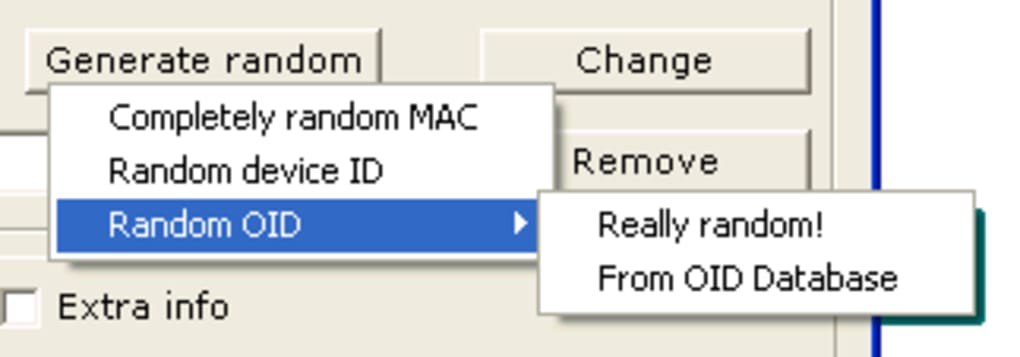
The intuitive nature of MacMakeUp’s interface, combined with its direct approach to MAC address modification, explains its popularity among users who require this specific functionality without the need for intricate technical knowledge or command-line scripting. While the concept of MAC spoofing can be technical, MacMakeUp aimed to make the execution as simple as possible.
MacMakeUp within the Internet & Network Landscape
The category of “Internet & Network” software is broad, encompassing everything from web browsers and email clients to complex server management tools. MacMakeUp occupies a unique, albeit specialized, corner within this extensive ecosystem, specifically under “Networking software” with a subcategory of “Analysis” (more precisely, “Administration”). Its presence highlights a distinct need for tools that offer granular control over network parameters.
A Niche in Network Administration
MacMakeUp fits squarely into the “Administration” subcategory of networking software because it provides a direct means for users to administer or manage a specific aspect of their network interface. While it doesn’t offer a comprehensive suite of network analysis tools, its ability to alter a fundamental identifier like the MAC address positions it as a critical utility for specific administrative tasks.
For network administrators, developers, or even advanced home users, the ability to change a MAC address can be essential.
- Testing and Development: Developers might need to simulate different network environments by altering MAC addresses, especially when testing applications sensitive to network configurations or access controls.
- Network Troubleshooting: In complex network environments, changing a MAC address can sometimes resolve IP conflict issues or force a new DHCP lease, helping to diagnose or fix connectivity problems.
- Accessing Restricted Networks: Some public or private networks implement MAC address whitelisting, only allowing pre-approved devices to connect. MAC spoofing can, in certain circumstances, allow an unauthorized device to gain access, though this often comes with ethical and legal implications.
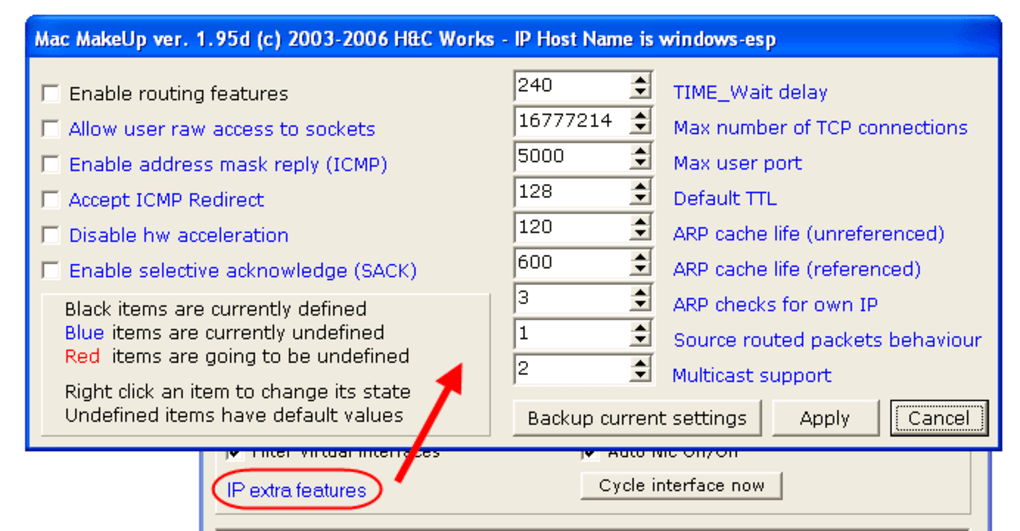
MacMakeUp’s focus on this single, potent function underscores its utility as a specialized instrument rather than a general-purpose network management suite. It exemplifies how niche software can address specific, critical needs that broader applications might overlook or not prioritize. Its simplicity is both its strength and, in some contexts, its limitation, as it doesn’t offer the wider range of features found in more comprehensive networking tools.
Popularity and Regional Impact
The provided data indicates that MacMakeUp was “very heavily used in countries such as India, Pakistan, and Vietnam.” This geographical concentration of usage is intriguing and likely points to a combination of factors:
- Internet Infrastructure and Access: In some developing regions, internet access might be more tightly controlled or subject to more restrictive policies, leading users to seek tools that can navigate these limitations. MAC spoofing could potentially be used to circumvent bandwidth caps tied to specific devices or to access networks with MAC-based authentication.
- Awareness and Digital Literacy: The prevalence of online communities and knowledge sharing in these countries might have led to greater awareness of tools like MacMakeUp and their practical applications.
- Cost-effectiveness and Availability: As a free tool, MacMakeUp would have been an attractive option for users seeking functionality without incurring costs, especially in regions where software budgets might be limited.
- Specific Local Use Cases: There might have been specific local challenges or common scenarios in these countries where MAC address modification proved particularly useful, leading to its widespread adoption.
The program’s achievement of “49,574 downloads” since 2011 and “61 installations” in a single week (before the data snapshot) further cements its status as a notable utility in its time. While these numbers might seem modest compared to modern apps, for a specialized tool like MacMakeUp, they indicate a strong, consistent demand within its target user base.
Technical Specifications and Legacy
MacMakeUp’s technical specifications paint a picture of a utility rooted in a specific era of Windows computing:
- License: Free
- Version: 1.95d
- Latest Update: June 8, 2011
- Platform: Windows OS, specifically compatible with Windows 2000 and former versions, with Windows 2003 also listed as a platform. This indicates its primary development and testing occurred during a period when these operating systems were prevalent.
- Languages: English, Italian. Reflects the developer’s origin (Marcello Gorlani) and likely initial target markets.
- Size: 557.67 KB. Underscores its lightweight nature.
The “This file may have issues” warning is a critical piece of information. Given the last update date of 2011, it’s highly probable that MacMakeUp was not designed for, and may not function reliably on, newer Windows operating systems (Windows Vista, 7, 8, 10, 11). Operating system security measures, driver models, and network stack implementations have evolved significantly since Windows 2003. An older utility attempting to directly manipulate low-level network adapter settings might encounter compatibility issues, cause system instability, or simply fail to work as intended.
The legacy of MacMakeUp, therefore, is one of a once-effective tool that has likely been superseded by technological advancements. While it served its purpose admirably for its target OS versions, modern users would need to approach it with caution, understanding the potential for incompatibility and the risks associated with running unmaintained software.
Enhancing Security & Privacy with MacMakeUp
The ability to change a MAC address is often associated with advanced network configurations and can have significant implications for both security and privacy. MacMakeUp, by providing an easy way to achieve this, touches upon these crucial aspects of digital interaction.
MAC Spoofing for Privacy
In an increasingly surveilled digital world, maintaining privacy is a growing concern. MAC addresses, while seemingly innocuous, can be used to track individual devices. When connected to public Wi-Fi networks (e.g., in cafes, airports, malls), your device’s MAC address can be recorded. If you connect to the same public network at different times or different public networks run by the same provider, your movements can potentially be correlated and tracked based on this persistent identifier.
MAC spoofing, facilitated by tools like MacMakeUp, offers a layer of protection against such tracking. By changing your MAC address to a new, random one each time you connect to a public network, you present yourself as a “new” device, making it significantly harder for network operators or third parties to build a profile of your activity based on your hardware identifier. This is a fundamental privacy technique, allowing users to anonymize their physical device identity on local networks.
However, it’s important to understand that MAC spoofing is just one component of a comprehensive privacy strategy. It protects against local MAC-based tracking but does not anonymize your IP address, browser fingerprint, or online activities which are managed at higher layers of the network stack. Nonetheless, for local network privacy, MacMakeUp provided a valuable utility in its operational context.
Addressing Network Access and Troubleshooting
Beyond privacy, changing a MAC address can also be a practical solution for specific network access and troubleshooting scenarios:
- Bypassing MAC Filtering: As mentioned, some networks employ MAC address filtering as a rudimentary security measure or access control mechanism. If your legitimate device is blocked, or if you need to gain temporary access with an unapproved device (e.g., a guest device in a home network that uses MAC filtering), spoofing a known, approved MAC address can bypass this restriction. This practice, however, can have ethical and legal implications depending on the network’s ownership and purpose.
- Obtaining a New IP Address: DHCP servers often lease IP addresses to devices based on their MAC address. If a device is experiencing network issues that seem related to its assigned IP address, changing its MAC address can force the DHCP server to treat it as a new device and assign a different IP address, potentially resolving the problem. This can be quicker than waiting for the DHCP lease to expire or manually releasing/renewing the IP.
- Device Replacement: If a network-dependent service or license is tied to a specific MAC address (common in older systems or specialized hardware), and the original network card fails, spoofing the old MAC address on a new network card can restore functionality without needing to reconfigure the entire system or service.
In these situations, MacMakeUp served as a straightforward tool to perform these technical manipulations, making it accessible even to those without deep networking expertise. Its utility in such specific, practical scenarios cemented its popularity in regions where such troubleshooting or access needs might have been more common or challenging to address through other means.
Ethical Considerations and Potential Risks
While MAC spoofing offers legitimate benefits for privacy and troubleshooting, it’s crucial to address the ethical considerations and potential risks associated with its use, especially with older software like MacMakeUp.
Ethical Concerns:
- Unauthorized Access: Using MAC spoofing to bypass network access controls without permission can be a violation of network usage policies and, in some cases, illegal.
- Impersonation: Spoofing another device’s MAC address on the same network can lead to network conflicts (e.g., IP address conflicts) and can be used for malicious purposes like impersonation or man-in-the-middle attacks, disrupting legitimate network traffic.
Potential Risks (especially with MacMakeUp’s age):
- System Instability: Older software designed for outdated operating systems might not interact correctly with modern drivers and network stacks. This could lead to system crashes, blue screens of death, or network connectivity issues. The “This file may have issues” warning from PhanMemFree.org is a direct red flag in this regard.
- Security Vulnerabilities: Unmaintained software doesn’t receive security patches. While MacMakeUp itself doesn’t connect to the internet, its low-level interactions with the network adapter could theoretically expose the system to vulnerabilities if a flaw were discovered in its code.
- Ineffectiveness: On newer Windows versions (Windows 7 and above), the methods MacMakeUp uses to change MAC addresses might no longer be effective, or they might be overwritten by system policies or driver updates. Modern Windows versions also offer built-in ways to randomize MAC addresses for Wi-Fi.
- Malware Concerns: Downloading old, unverified executables from third-party sites always carries the risk of malware. While PhanMemFree.org is a reputable download portal (formerly Softonic.com), the original developer’s site might be defunct, and independent copies could be compromised.
Therefore, while MacMakeUp provided a useful service in its prime, users today must weigh its historical utility against the very real risks of deploying an outdated and potentially unstable tool on a modern system.
MacMakeUp: A Look at Development, Maintenance, and Alternatives
The lifecycle of software, especially free utilities, often sees periods of active development followed by eventual stagnation. MacMakeUp, last updated in 2011, serves as a poignant example of this trajectory. Examining its developer’s vision, the implications of its lack of maintenance, and the emergence of modern alternatives provides a comprehensive understanding of its place in the software world.
The Developer’s Vision: Marcello Gorlani
Marcello Gorlani, the developer behind MacMakeUp, created a tool that efficiently addressed a specific technical requirement. His vision was likely to provide a simple, free, and effective way for Windows users to manage their network adapter’s MAC address. In an era where such low-level network configurations often required command-line expertise or complex third-party tools, MacMakeUp democratized this capability.
The choice to make it “Free” and available in “English” and “Italian” suggests a desire for accessibility and broad appeal, at least within a certain demographic. For many, a graphical user interface (GUI) tool that accomplishes a specific task is preferable to navigating system settings or memorizing commands. Gorlani’s contribution filled a clear gap, as evidenced by the program’s download figures and regional popularity. The fact that the program is “relatively light” and “doesn’t need as much space” also speaks to a design philosophy focused on efficiency and minimal system impact, which was highly valued, especially on older hardware.
Evolution and Stagnation
The last update to MacMakeUp, version 1.95d on June 8, 2011, marks a significant point in its history. From that date forward, the software has remained static while the underlying operating systems and networking technologies have continued to evolve rapidly. This stagnation has several implications:
- Compatibility Issues with Modern OS: As discussed, Windows 7, 8, 10, and 11 have introduced significant changes to their network stacks, driver models, and security protocols. MacMakeUp, designed for Windows 2000/2003, is highly unlikely to function flawlessly, if at all, on these newer versions. Drivers might conflict, or system APIs might have changed, rendering the program’s methods for MAC address manipulation ineffective.
- Security Vulnerabilities: Any software, especially one interacting at a low level with system hardware, benefits from ongoing security audits and updates. Without maintenance, potential vulnerabilities in MacMakeUp’s code remain unaddressed, posing a theoretical risk if exploited.
- “This file may have issues” Warning: The explicit warning accompanying the download on PhanMemFree.org is a direct acknowledgment of these concerns. It serves as a crucial disclaimer, informing users that while the software is available, its reliability and safety on current systems cannot be guaranteed. This warning implicitly advises caution and suggests that users proceed at their own risk.
- Loss of Support: With no active development, there is no official support channel for users encountering issues. This leaves users to rely on community forums or their own technical prowess to troubleshoot problems.
The phenomenon of software stagnation is common for free utilities developed by individuals or small teams. Often, the developer moves on to other projects, faces resource constraints, or deems the project complete. While MacMakeUp served its purpose well in its active period, its current state highlights the challenges of using legacy software in a dynamically changing technological environment.
Exploring Modern Utilities & Tools for MAC Address Management
Given MacMakeUp’s age and potential compatibility issues, users seeking to manage their MAC addresses today have several modern “Utilities & Tools” at their disposal. These alternatives often offer enhanced compatibility, more robust features, and active developer support:
- Built-in OS Features: Newer versions of Windows (since Windows 10) have incorporated features to randomize MAC addresses for Wi-Fi adapters. This can be found in the Wi-Fi settings, offering a convenient, built-in solution for privacy without needing third-party software.
- Network Adapter Driver Settings: Many modern network adapter drivers (especially for Ethernet cards) include an option within their advanced settings in Device Manager to manually override the MAC address. This is a system-level solution that doesn’t require separate software.
- Third-Party MAC Address Changers: Several actively maintained third-party tools specifically designed for modern Windows versions offer similar or enhanced functionality compared to MacMakeUp. These programs are typically updated regularly, ensuring compatibility and addressing security concerns. Examples include programs like Technitium MAC Address Changer, which offers a user-friendly interface and supports a wide range of network adapters and Windows versions.
- Command-Line Tools (e.g., PowerShell): For technically proficient users, Windows PowerShell provides powerful command-line capabilities to inspect and modify network adapter settings, including MAC addresses, offering ultimate control without graphical interfaces.
These modern alternatives provide more reliable, secure, and compatible ways to achieve the same goal that MacMakeUp once fulfilled. They represent the evolution of software development and the continuous adaptation to new operating system architectures and user needs.
Conclusion
MacMakeUp, developed by Marcello Gorlani and last updated in 2011, holds a distinct place in the history of Windows utility software. As a free, lightweight application designed to change the MAC address of a network adapter, it provided a valuable service for users on Windows 2000 and 2003, particularly those in regions like India, Pakistan, and Vietnam, where its specific functionality resonated strongly. Its simple interface democratized a technical process, offering solutions for network access, privacy concerns through MAC spoofing, and troubleshooting.
However, the passage of time has transformed MacMakeUp from a actively useful tool to a historical artifact. Its last update in 2011 means it predates significant advancements in Windows operating systems and network security protocols. The “This file may have issues” warning on PhanMemFree.org (formerly Softonic.com) serves as a critical advisory, underscoring the potential for incompatibility, instability, and security risks when attempting to run such legacy software on modern systems.
While MacMakeUp’s contribution to the Internet & Network and Security & Privacy categories of its era is undeniable, today’s users are strongly encouraged to explore modern alternatives. Built-in Windows features, updated network adapter driver options, and actively maintained third-party MAC address changers offer more reliable, secure, and compatible solutions for managing network identities. MacMakeUp stands as a testament to the specialized needs of computer users and the ingenuity of individual developers, but it also serves as a reminder of the dynamic nature of technology, where even the most effective tools eventually yield to progress and the demands of evolving digital landscapes.
File Information
- License: “Free”
- Version: “1.95d”
- Latest update: “June 8, 2011”
- Platform: “Windows”
- OS: “Windows 2003”
- Language: “English”
- Downloads: “27.5K”
- Size: “557.67 KB”


