
Mail Attachment Downloader is a Windows-based utility designed to streamline the process of downloading email attachments. As its name suggests, this software automates the retrieval of files attached to emails, saving users time and effort. This review will delve into its functionality, features, pros, cons, and overall user experience.
Functionality and Features
Mail Attachment Downloader simplifies the often tedious task of manually downloading multiple email attachments. Its core function centers on connecting to various email accounts – including popular webmail services like Gmail, Hotmail, and Yahoo! – and retrieving all attached files within specified parameters. This eliminates the need to individually download each attachment, particularly beneficial when dealing with numerous emails containing multiple files.
Beyond its basic downloading capability, Mail Attachment Downloader offers a range of sophisticated filtering options. Users can fine-tune the download process by specifying criteria such as:
-
File Size: Set minimum and maximum file sizes to exclude excessively large or small files from the download. This is crucial for managing storage space and filtering out unwanted files like spam attachments.
-
File Type: Users can specify file extensions (e.g., .pdf, .doc, .jpg) to download only specific file types, ignoring others. This allows focused downloads based on the user’s needs, for example, downloading only images or only spreadsheets.
-
Date Range: Download attachments received within a specified date range. This is extremely useful for archiving emails and attachments from a particular period, facilitating organized data management.
- Keywords: This advanced filtering option allows users to download attachments based on keywords appearing in the email subject, body, or sender’s address. This greatly enhances the precision of the download process, allowing for the efficient retrieval of relevant files only.
The software also supports scheduling downloads. This allows for automated downloads at specified times, fitting seamlessly into a user’s workflow. For instance, a user could schedule the download to occur overnight or during off-peak hours.
The compatibility of Mail Attachment Downloader extends beyond webmail services. It also supports POP and IMAP accounts, providing a versatile solution for various email configurations. However, using POP/IMAP accounts requires manual input of server addresses, a step that may present a slight hurdle for users less familiar with email server settings.
Ease of Use and User Interface
Despite a lack of comprehensive documentation, the software is designed with user-friendliness in mind. The interface is intuitive and straightforward, guiding users through the configuration process with minimal fuss. Users can easily navigate through the various settings tabs to adjust parameters according to their needs. Once configured, initiating the download is as simple as clicking a “Connect and Download” button. All downloaded files are saved to a user-specified location on their computer, offering complete control over file organization.
The simplicity of the software makes it an ideal choice for users of all technical skill levels. Even without extensive instructions, most users will likely find the program easy to navigate and use effectively. The absence of a detailed manual is the program’s most significant drawback; however, the intuitive design mitigates this issue to a large extent.
Performance and Efficiency
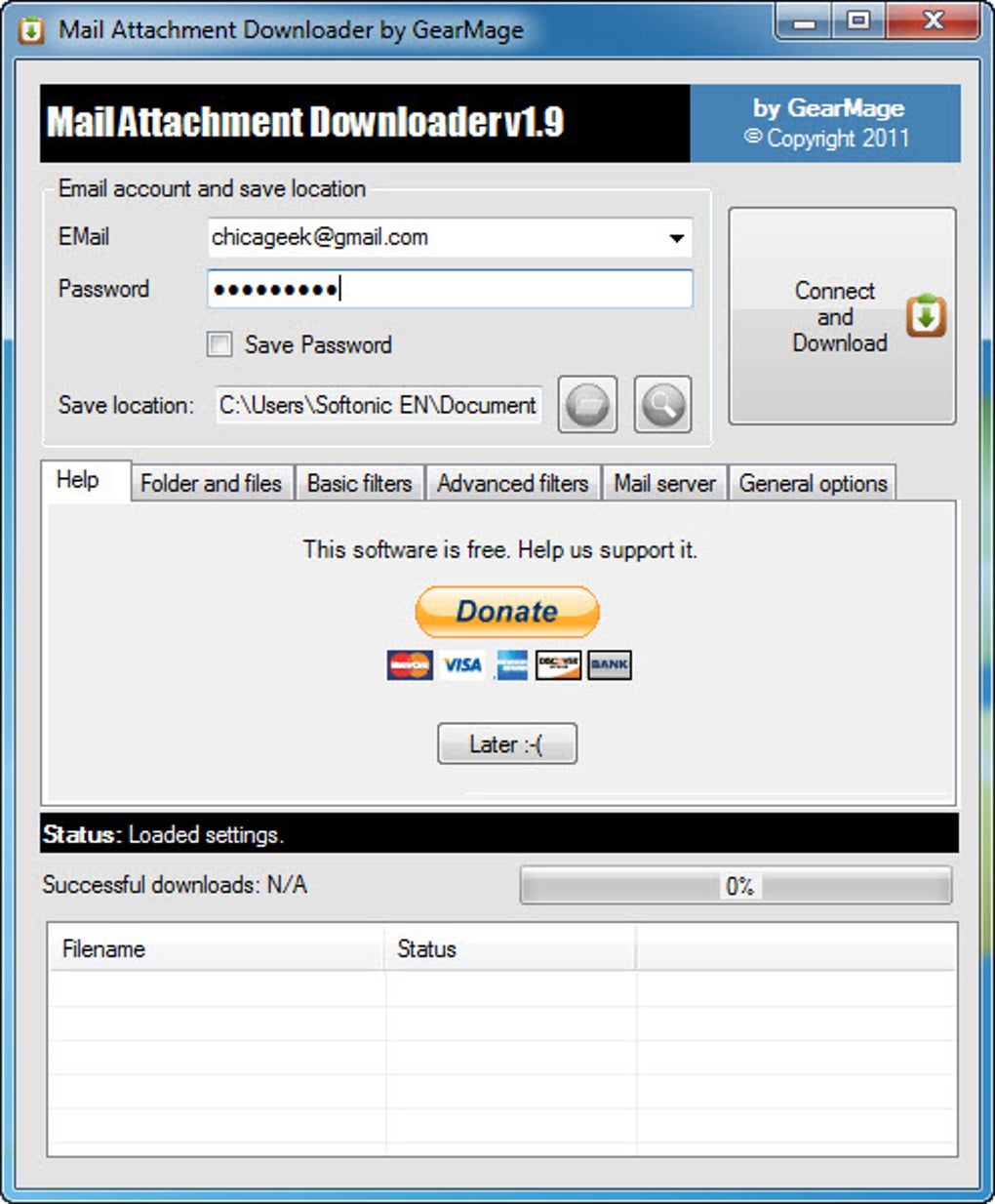
The software boasts speed and efficiency in downloading attachments. Its ability to handle multiple files simultaneously significantly reduces download times compared to manual downloads. The automated nature of the program saves substantial time, especially for users regularly handling a large volume of emails with attachments.
The program’s performance is generally stable and reliable. However, the effectiveness of the download process can be influenced by factors beyond the software’s control, such as internet connection speed and the size of the attachments. Large files or slow internet connections will naturally increase download times.
Pros and Cons
Pros:
- Automation: Automates the download of email attachments, saving significant time and effort.
- Filtering Options: Offers a wide range of filtering options to refine the download process, ensuring only relevant files are downloaded.
- Scheduling: Allows users to schedule downloads for optimal convenience.
- Compatibility: Supports various email services, including popular webmail platforms and POP/IMAP accounts.
- Simple Interface: Features an intuitive user interface that is easy to navigate and use.
- Speed and Efficiency: Downloads attachments quickly and efficiently.
Cons:
- Lack of Documentation: The absence of a comprehensive user manual could be challenging for some users.
- POP/IMAP Configuration: Requires manual configuration of server addresses for POP/IMAP accounts, which may be difficult for less tech-savvy users.
- Potential for Errors: While generally reliable, unexpected errors can occur due to internet connectivity issues or email server problems.
Alternatives and Comparison
Several alternative email attachment downloaders exist, each with its own strengths and weaknesses. The choice of the best program depends on individual needs and preferences. Some alternative options might offer more advanced features, such as integration with cloud storage services or more comprehensive reporting capabilities. However, Mail Attachment Downloader’s strength lies in its simplicity and ease of use, making it a suitable choice for users who prioritize straightforward functionality. A user comparison of different options might consider factors like features, price (if applicable), user interface design, and support provided.
Conclusion
Mail Attachment Downloader is a practical and effective tool for automating the download of email attachments. Its intuitive interface, robust filtering options, and scheduling capabilities make it a valuable asset for users dealing with large volumes of emails and attachments. While the lack of documentation is a drawback, the software’s ease of use compensates for this deficiency to a significant degree. Overall, Mail Attachment Downloader provides a streamlined and efficient solution for managing email attachments, offering a compelling choice for both novice and experienced users who require a simple yet powerful solution for downloading email attachments. The absence of a more detailed manual could be improved, but the software’s performance and intuitive design make it a solid choice for most users.

File Information
- License: “Free”
- Latest update: “April 20, 2016”
- Platform: “Windows”
- OS: “Windows 7”
- Language: “English”
- Downloads: “36.9K”
- Size: “2.07 MB”


