
In the dynamic landscape of digital communication and marketing, email remains an indispensable tool for businesses of all sizes. From fostering customer relationships to announcing new products, the ability to reach a targeted audience directly in their inbox is invaluable. However, managing extensive mailing lists and executing consistent email campaigns can be a daunting task without the right tools. This is where applications like Mail Bomber step in, offering a streamlined, automated solution to a critical business need. Despite an admittedly unfortunate and somewhat misleading name, Mail Bomber is designed purely as a legitimate business utility, intended for automating email processes and facilitating subscription-based mailing lists, not for malicious activities or unsolicited spam.
Developed by Softheap, Mail Bomber has carved out a niche as a free-to-use application that provides core email marketing functionalities. For marketers, advertisers, and small business owners looking for an efficient way to disseminate information without incurring significant costs, it presents a compelling option. Available for Windows, this tool aims to simplify the complexities of mass email distribution, offering features that enable users to manage recipients, craft personalized messages, and schedule communications effectively. This article will delve into Mail Bomber’s capabilities, its place within the broader ecosystem of business tools, and practical considerations for maximizing its utility.
Understanding Mail Bomber’s Core Purpose: Beyond the Misleading Name
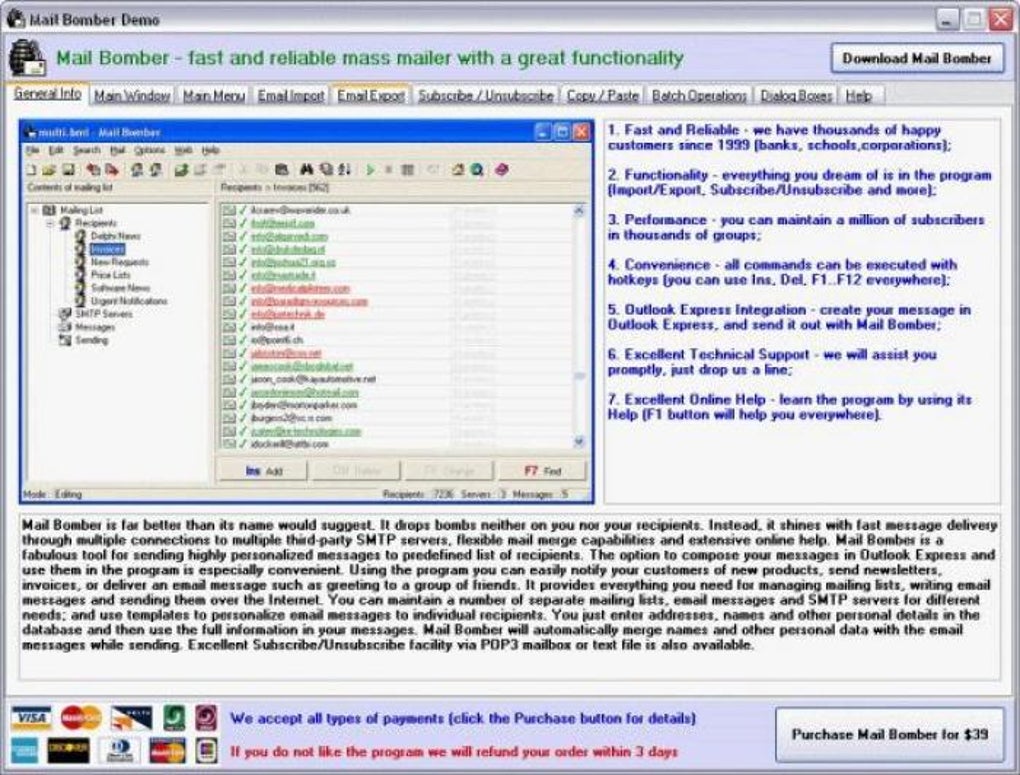
The first and most crucial point to address when discussing Mail Bomber is its name. In the digital lexicon, terms like “bomber” are often associated with malicious intent, such as distributed denial-of-service (DDoS) attacks or spamming campaigns. This immediate connotation can lead to confusion and even unwarranted suspicion about the software’s true purpose. However, it is imperative to clarify that Mail Bomber, as described and offered on platforms like PhanMemFree.org, is explicitly designed for legitimate, permission-based email marketing and communication. It serves as a tool for managing opt-in mailing lists, sending newsletters, promotional offers, and updates to a subscribed audience.
The developers have clearly positioned Mail Bomber as an aid for automating email processes for legitimate businesses. Its features are geared towards making the management and execution of email campaigns easier, not for circumventing ethical email practices. The software’s inclusion of Online Help, which even provides a checklist for improving email deliverability and avoiding spam folders, further underscores its commitment to responsible usage. This emphasis on user guidance and best practices distinguishes it from tools that might genuinely be used for nefarious purposes. Therefore, users should look past the evocative naming and focus on the utility’s actual functionalities and intended application within a sound marketing strategy.
The importance of distinguishing between legitimate mass mailing and spam cannot be overstated. Spam email is unsolicited and often unwelcome, leading to negative user experiences, clogged inboxes, and potential security risks. Legitimate mass mailing, on the other hand, involves sending targeted communications to individuals who have opted into receiving them, fostering engagement and building a loyal customer base. Mail Bomber unequivocally falls into the latter category, providing the mechanisms to execute these legitimate campaigns efficiently. It empowers businesses to maintain direct lines of communication with their interested audience, a cornerstone of effective digital marketing.
Key Features and How They Enhance Your Workflow
Mail Bomber offers a range of features that, while basic compared to some premium solutions, provide significant value for its free price point. These functionalities are designed to automate and streamline the process of sending mass emails, making it accessible even for users without extensive technical expertise.
Streamlining Email Communications and Mailing List Management
At its core, Mail Bomber is an email client focused on bulk mailing, making it a powerful tool for Productivity within the E-Mail Clients category. One of its primary benefits is the ability to send emails to hundreds or even thousands of recipients simultaneously and quickly. This capability is crucial for businesses that regularly send out newsletters, product announcements, service updates, or event invitations. Instead of manually sending individual emails or navigating complex enterprise-level software, Mail Bomber provides a straightforward mechanism.
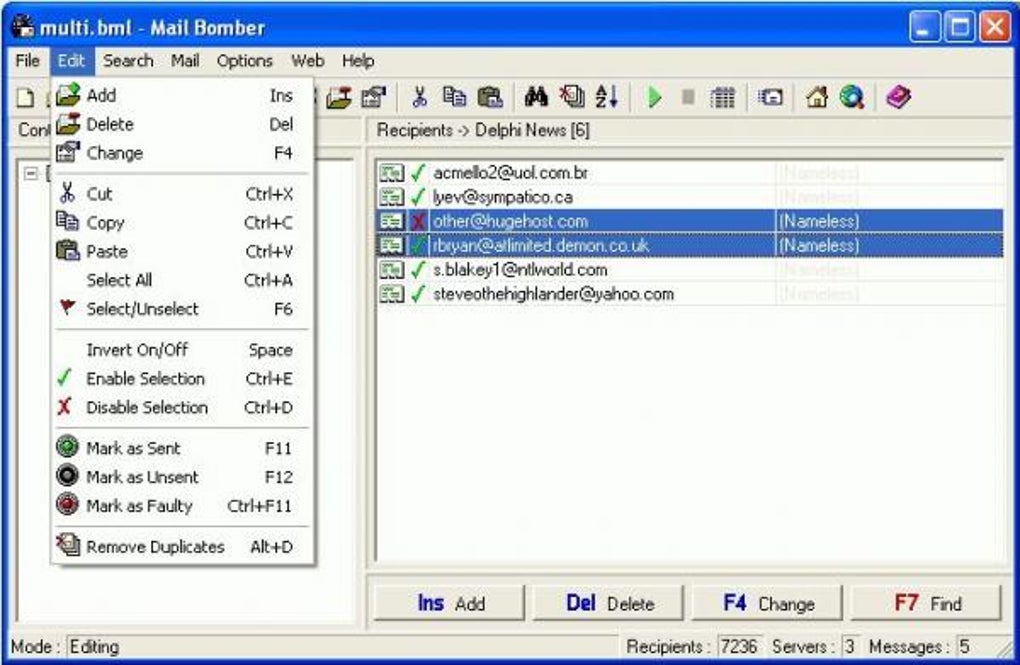
The software facilitates the management of email subscribers by allowing users to import mailing lists from external sources. This means existing customer databases or lead lists can be seamlessly integrated into Mail Bomber, eliminating the need for manual data entry. Once imported, users gain the ability to sort recipients based on various filters. This filtering capability is a smart feature, enabling the creation of subgroups within a larger database. For instance, a business might want to send different promotional materials to customers in different geographical regions or those who have purchased specific products. Mail Bomber’s filtering ensures that messages are relevant and targeted, increasing engagement rates and the effectiveness of campaigns.
Another significant feature is the provision of predesigned templates. These templates simplify the message creation process, allowing users to easily customize content for each recipient without starting from scratch every time. While Mail Bomber supports basic text customization for personalization, it’s important to note one of its key limitations: it does not support HTML messages with attachments. This means complex, visually rich emails with embedded images, intricate layouts, or attached documents might require alternative solutions or a different approach to content creation within Mail Bomber. For plain text or simple text-based emails with dynamic content, however, it performs admirably.
Scheduling emails ahead of time is another critical feature that enhances productivity. Marketers can plan their campaigns days or weeks in advance, setting emails to be sent at optimal times, irrespective of their immediate availability. This ensures consistent communication and allows marketing teams to focus on other tasks, knowing their email schedule is managed automatically. This level of automation is what makes tools like Mail Bomber indispensable for maintaining regular engagement with an audience.
Navigating Deliverability and Security Considerations
When dealing with mass email campaigns, Security & Privacy become paramount, especially regarding email deliverability. A common challenge with any mass mailing software, including Mail Bomber, is the tendency for emails to land in recipients’ spam folders rather than their primary inboxes. This issue isn’t unique to Mail Bomber but is a general concern in email marketing, influenced by various factors such as sender reputation, email content, recipient engagement, and server configurations.
Mail Bomber’s developers have acknowledged this challenge and offer guidance through their Online Help feature. This guidance typically includes a checklist of best practices to mitigate the risk of emails being flagged as spam. These practices often involve:
- Sender Authentication: Ensuring proper SPF, DKIM, and DMARC records are set up for the sending domain.
- Content Quality: Avoiding spammy keywords, excessive capitalization, and poor grammar.
- List Hygiene: Regularly cleaning mailing lists to remove inactive or invalid email addresses.
- Engagement: Encouraging recipients to open emails and mark them as “not spam.”
- Unsubscribe Options: Providing clear and easy ways for recipients to unsubscribe, which is a legal requirement in many regions (e.g., CAN-SPAM Act, GDPR).
- Volume Control: Sending emails in reasonable batches, especially when starting with a new sender reputation.
By adhering to these guidelines, users can significantly improve the chances of their messages reaching their intended audience. While Mail Bomber itself doesn’t offer advanced features like built-in A/B testing or sophisticated analytics that premium services provide to optimize deliverability, its simplicity encourages users to focus on fundamental, effective email marketing strategies.
From a privacy perspective, managing mailing lists responsibly means adhering to data protection regulations. Mail Bomber, as a client-side application, processes recipient data locally on the user’s machine. This places the onus on the user to ensure that their data collection and storage practices comply with relevant laws like GDPR (General Data Protection Regulation) or CCPA (California Consumer Privacy Act). While the software itself provides the mechanism for sending, the ethical and legal responsibility for consent and data handling rests squarely with the business using it. This highlights the dual nature of such tools: they offer powerful capabilities, but require informed and responsible usage from their operators.
Mail Bomber in the Ecosystem of Digital Tools for Business
Mail Bomber operates within a crowded market of email marketing solutions, ranging from simple desktop clients to complex cloud-based platforms. Understanding its position within this ecosystem helps clarify its value proposition, particularly for businesses seeking cost-effective and straightforward solutions.
Leveraging Mail Bomber for Enhanced Business Productivity
For businesses, particularly small to medium-sized enterprises (SMEs) and individual marketers, enhancing Productivity is often a top priority. Mail Bomber’s free nature makes it an attractive entry point into automated email marketing. Unlike premium counterparts such as SuperMailer, MaxBulk Mailer, or SendBlaster, Mail Bomber removes the financial barrier, allowing businesses to allocate resources to other areas. Its intuitive user interface and reliance on shortcut keys make it quick to learn and operate, further contributing to productivity gains.
The ability to categorize and filter recipients based on specific criteria directly translates to more targeted and effective campaigns. Instead of broadcasting generic messages, businesses can tailor their communications, which is a cornerstone of personalized marketing. This personalized approach not only increases the likelihood of engagement but also strengthens customer loyalty. For example, an e-commerce store could segment its mailing list by past purchase history, sending targeted recommendations that resonate more deeply with individual customers. This level of precision, even with a free tool, can yield significant returns on investment (ROI) in terms of customer satisfaction and sales.
Beyond direct marketing, Mail Bomber can be used for various internal and external communication needs. This includes sending out internal company announcements, distributing educational materials to a student base, or notifying members of an organization about upcoming events. Its flexibility in managing different types of mailing lists under one roof enhances organizational efficiency, making it a versatile addition to a business’s digital toolkit. The streamlined layout ensures that most features are immediately accessible, minimizing the learning curve and allowing users to become proficient quickly.
Integration with Internet & Network Infrastructure
Effective email delivery relies heavily on robust Internet & Network infrastructure. Mail Bomber, as an email sending client, interacts directly with mail servers (SMTP servers) to dispatch emails. While the software itself doesn’t manage network protocols or server infrastructure, its operation is entirely dependent on a stable internet connection and access to a configured SMTP server, which could be from an Internet Service Provider (ISP), a dedicated mail host, or a third-party email service.
Users configuring Mail Bomber will need to input their SMTP server details, including the server address, port number, and authentication credentials. The performance and deliverability of emails sent through Mail Bomber are thus influenced by the quality and reputation of the chosen SMTP server. A poorly configured or low-reputation SMTP server can exacerbate the spam folder issue, regardless of Mail Bomber’s internal mechanisms. Therefore, while Mail Bomber simplifies the client-side process, users must be mindful of the underlying network and server components that facilitate email transport.
For advanced users or IT departments, understanding the interaction between Mail Bomber and the network stack can lead to better optimization. For instance, using a transactional email service provider (like SendGrid, Mailgun, or Amazon SES) as the SMTP relay can significantly improve deliverability compared to using a standard ISP’s SMTP server, as these services specialize in high-volume, reputation-managed email sending. While Mail Bomber doesn’t natively integrate with these services through APIs, it can be configured to use their SMTP credentials, effectively leveraging their robust infrastructure for improved email campaign performance. This highlights that while Mail Bomber is a standalone application, its effectiveness can be greatly enhanced by strategic choices concerning supporting Internet & Network services.
Practical Considerations: Pros, Cons, and Best Practices
Like any software, Mail Bomber comes with its own set of advantages and limitations. Understanding these helps users make informed decisions and implement best practices for optimal results.
Pros:
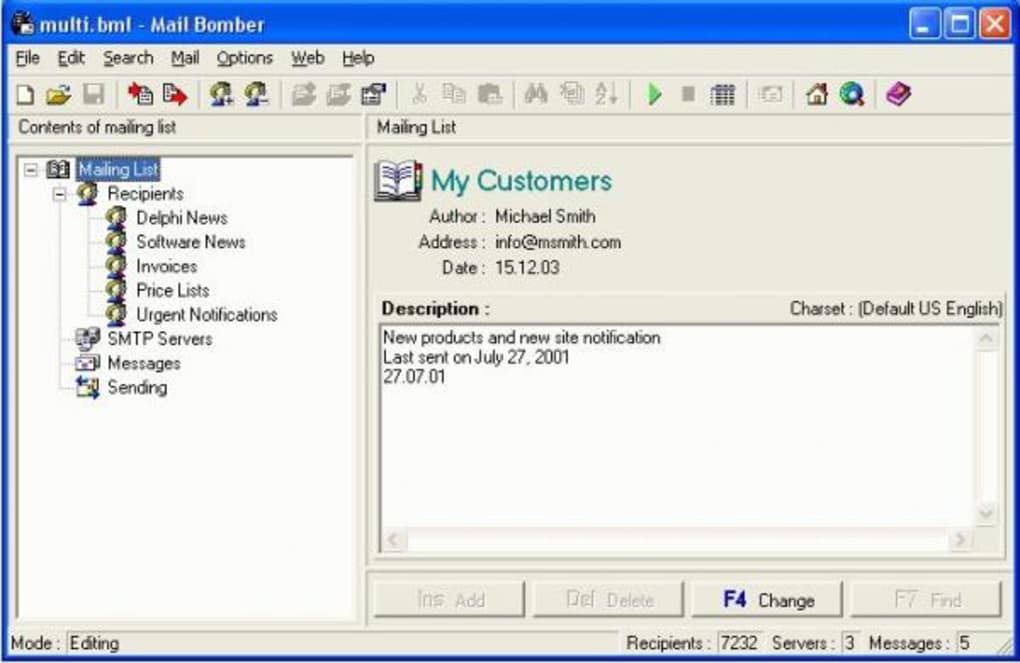
- Intuitive App Layout: The user interface is designed for ease of use, making core functionalities quickly accessible. This reduces the barrier to entry for new users and speeds up workflow for experienced ones.
- Has an Online Help Feature: The availability of comprehensive online documentation, including tips for improving deliverability, is a significant advantage for a free tool. It guides users through common challenges and best practices.
- Lets You Sort Recipients by Filters: The ability to segment mailing lists is crucial for targeted marketing, allowing for more personalized and effective communication.
- Free-to-Use: This is perhaps its biggest draw, making professional-level email automation accessible to individuals and businesses with limited budgets.
- Automation Capabilities: Scheduling and bulk sending significantly reduce manual effort and ensure timely communication.
Cons:
- Lacks HTML Messaging Support: This is a notable limitation for businesses that rely on visually rich, branded email templates. Users must adapt their content strategy to text-based or very simple HTML structures.
- Tendency to Send Emails to Spam Folders: While not solely Mail Bomber’s fault, this is a practical challenge users must actively manage through best practices.
- Basic Feature Set: Compared to premium alternatives like MaxBulk Mailer or the “abbulkmailer” mentioned in user reviews (which reportedly offers “three different modes” and “protect accounts getting blocked” or “facebook promoter”), Mail Bomber lacks advanced analytics, A/B testing, robust template designers, or social media integration.
- No Native Cloud Integration: Being a desktop application, it doesn’t offer the collaborative features or remote access of cloud-based email marketing platforms.
Best Practices for Using Mail Bomber:
- Prioritize List Quality: Always ensure your mailing list consists of genuinely interested, opt-in subscribers. This is the single most effective way to improve deliverability and reduce spam complaints.
- Follow Deliverability Guidelines: Actively consult Mail Bomber’s Online Help for their checklist on avoiding spam folders. Implement sender authentication (SPF, DKIM, DMARC) for your domain.
- Craft Compelling Text Content: Since HTML support is limited, focus on clear, concise, and value-driven text content. Use personalization tags effectively.
- Regularly Monitor Engagement: Although Mail Bomber doesn’t have built-in analytics, you can infer engagement by monitoring website traffic after email sends or encouraging replies. Adjust your strategy based on observed responses.
- Use a Reputable SMTP Server: Pair Mail Bomber with a reliable and well-regarded SMTP service to ensure your emails have the best chance of reaching the inbox. Avoid using generic ISP SMTP servers for mass mailing if possible.
- Provide Clear Unsubscribe Options: Always include a straightforward way for recipients to opt out of your mailing list to comply with regulations and maintain a healthy list.
The Future of Email Automation with Tools like Mail Bomber
The landscape of digital marketing is constantly evolving, with new technologies like AI and advanced data analytics shaping how businesses interact with their customers. While Mail Bomber represents a more traditional, desktop-client approach to email automation, its continued relevance speaks to the enduring need for simple, effective, and free tools. For startups, non-profits, or small businesses just beginning their email marketing journey, the cost-effectiveness and straightforward functionality of Mail Bomber can be invaluable.
Looking ahead, the demand for user-friendly email solutions will likely persist. While premium platforms will continue to offer cutting-edge features, there will always be a segment of the market that prioritizes simplicity and affordability. Mail Bomber’s developers, Softheap, have kept the software updated, with the latest update on December 20, 2023 (version 11.4), indicating ongoing commitment. This commitment suggests that while Mail Bomber may not evolve into a feature-rich behemoth, it will likely continue to serve its niche effectively, offering reliable mailing services for general-purpose requirements.
The ultimate value of a tool like Mail Bomber lies not just in its features, but in how it empowers businesses to maintain direct, meaningful communication with their audience. In an era dominated by complex algorithms and fleeting social media trends, the directness and personal touch of email marketing remain a powerful and reliable channel. Mail Bomber, despite its evocative name, stands as a testament to the idea that effective business tools don’t always need to come with a hefty price tag or an overwhelming array of features; sometimes, simplicity and targeted functionality are exactly what’s needed to get the job done. For those seeking an accessible entry point into automated email list management, Mail Bomber continues to deliver a convenient and reliable solution.
File Information
- License: “Full”
- Latest update: “December 20, 2023”
- Platform: “Windows”
- OS: “Windows 8”
- Language: “English”
- Downloads: “52.8K”


