
In today’s visually driven world, captivating an audience often hinges on dynamic and engaging content. From educational tutorials to compelling marketing presentations, the power of animated video is undeniable. However, creating high-quality animations has traditionally been a daunting task, requiring specialized skills, expensive software, and a significant time investment. Enter Mango Animation Maker, a revolutionary software solution designed to democratize animation creation, making it accessible to individuals and businesses alike. Available for free download on Phanmemfree.org, Mango Animation Maker stands out as a powerful yet user-friendly tool tailored for crafting animated videos swiftly and effortlessly on Windows platforms.
The core promise of Mango Animation Maker is to transform complex animation processes into an intuitive and enjoyable experience. Whether you’re a seasoned designer or a complete novice, this software provides all the necessary tools and resources to bring your ideas to life through vibrant animation. With a rich library of templates and an expansive collection of free resources, users can embark on their animation journey and produce professional-grade videos within minutes, not days or weeks. This accessibility is a game-changer, fostering creativity and enabling broader adoption of animated content across various domains.
Unlocking Creativity: A Comprehensive Overview
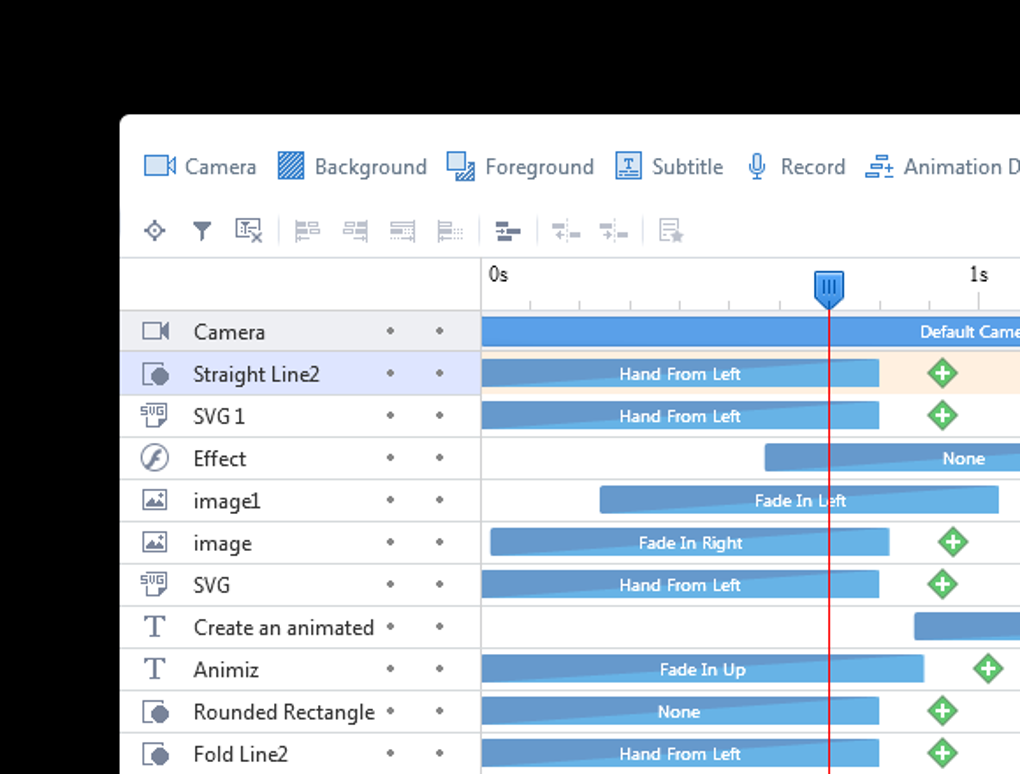
Mango Animation Maker isn’t just another animation tool; it’s a comprehensive ecosystem designed to empower users at every stage of the creative process. Its architecture is built upon the pillars of simplicity, versatility, and an abundance of resources, ensuring that users have everything they need at their fingertips. The software’s capabilities extend far beyond basic slide shows, allowing for intricate motion graphics, character animations, dynamic scene transitions, and much more, all without the steep learning curve typically associated with professional animation suites.
The Power of Simplicity: Intuitive Design and Workflow
One of Mango Animation Maker’s most compelling attributes is its commitment to user-friendliness. The interface is meticulously designed to be clean, logical, and easy to navigate, minimizing the time it takes for new users to become proficient. Upon launching the application, users are greeted with a well-organized workspace that intuitively guides them through the animation creation process. This seamless learning curve is further enhanced by a built-in tutorial system that provides step-by-step instructions and practical tips, ensuring that even absolute beginners can quickly grasp the fundamentals and start producing impressive animations.
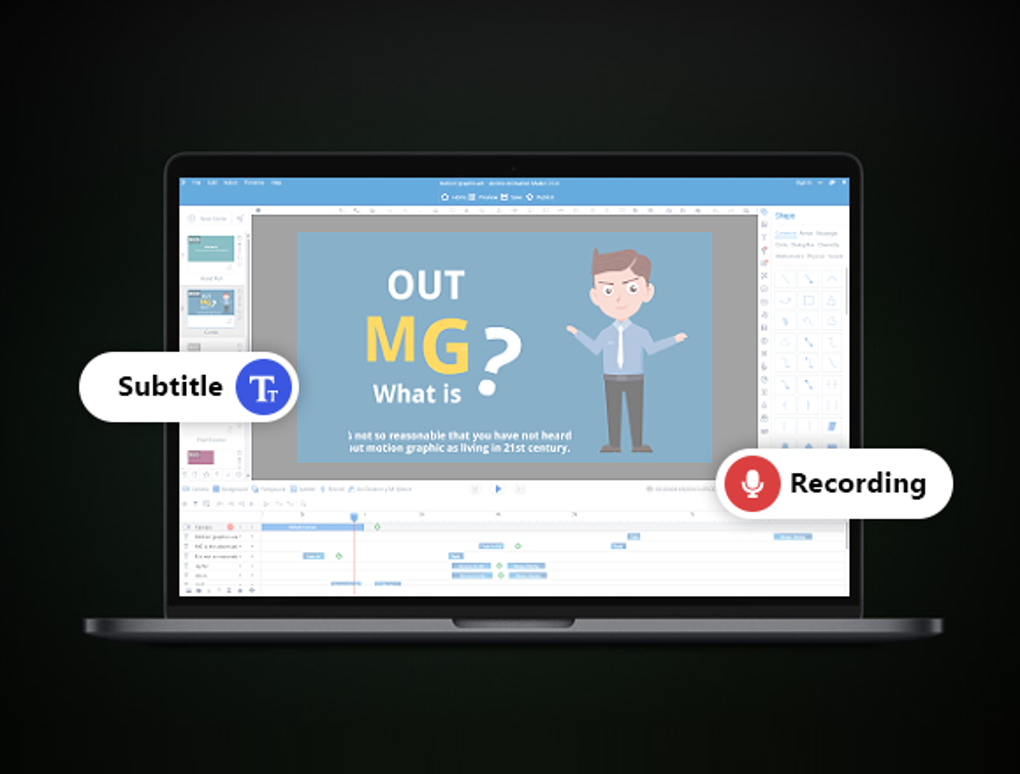
The workflow within Mango Animation Maker is streamlined and logical:
- Choose a Template: The software boasts a plethora of professionally designed templates catering to a wide array of themes and purposes, from business presentations and product showcases to educational explainers and personal storytelling. These templates serve as an excellent starting point, providing a pre-designed structure that users can easily adapt and customize. This eliminates the need to start from scratch, significantly accelerating the creation process.
- Customize with Multimedia Content: Once a template is selected, the real customization begins. Users can effortlessly replace placeholder content with their own multimedia elements. This includes importing images, videos, audio clips, and text. The drag-and-drop functionality simplifies the integration of these assets, allowing for quick adjustments and visual alignment. Whether it’s your brand logo, product photos, or a voiceover narration, Mango Animation Maker ensures seamless integration.
- Add Necessary Animations: This is where the magic happens. Mango Animation Maker provides a rich array of animation effects and transitions that can be applied to any element on the canvas. Users can define entry and exit animations, motion paths, scaling, rotation, and opacity changes. The timeline editor offers precise control over the timing and duration of each animation, enabling the synchronization of visual elements with audio tracks or narrative flow. The ability to preview animations in real-time allows for iterative refinement, ensuring every movement is exactly as intended.
- Share the Final Result: After perfecting the animation, Mango Animation Maker offers flexible export options. Users can render their creations as high-quality video files (e.g., MP4) suitable for platforms like YouTube, Vimeo, or social media. Additionally, the option to export as a GIF allows for short, looping animations perfect for web banners, email signatures, or quick reactions on messaging apps. This versatility in output ensures that your animated content can reach your target audience through the most effective medium.
This simplified workflow contrasts sharply with traditional animation software that often requires extensive training in complex keyframing, rigging, and rendering techniques. Mango Animation Maker abstracts away much of this complexity, allowing users to focus on the creative narrative rather than technical hurdles.

A Treasure Trove of Resources: Fueling Your Imagination
Beyond its intuitive interface, Mango Animation Maker provides an extensive collection of digital assets, effectively serving as a boundless wellspring for creative inspiration. The software is equipped with thousands of free resources, ensuring that users never run out of visual elements to enhance their animated videos. This vast library includes:
- Images: A wide range of stock images covering diverse categories, ready to be incorporated into any scene.
- SVGs (Scalable Vector Graphics): Vector graphics are crucial for animation as they can be scaled to any size without losing quality, making them ideal for crisp, professional-looking visuals.
- SWFs (Small Web Format): These allow for interactive and animated vector graphics, offering dynamic possibilities.
- Symbols: Pre-designed graphic elements and icons that can be reused and customized, saving time and ensuring consistency.
- Shapes: Basic geometric and custom shapes that can be manipulated, colored, and animated to form unique visual compositions.
- Graphics: A broad category encompassing various visual assets, including illustrations, backgrounds, and decorative elements.
This impressive repository of assets empowers users with unrestricted creativity. Instead of spending hours searching for royalty-free media online or creating assets from scratch, everything needed is integrated directly into the software. This not only saves time but also ensures that users adhere to licensing agreements, as all included resources are free for use within the application. The ability to mix and match these resources, customize their colors, sizes, and orientations, and apply various effects allows for endless possibilities, ensuring that each animation can be uniquely tailored to its purpose and brand identity.
Versatile Applications: Who Can Benefit?
Mango Animation Maker’s versatility makes it an invaluable tool for a wide spectrum of users and applications. Its capacity to simplify animation creation opens doors for various individuals and organizations to leverage the power of visual storytelling:
- Educators and Students: Ideal for creating engaging tutorials, explanatory videos for complex subjects, interactive lessons, and compelling presentations that capture student attention. Visual aids have been proven to enhance learning, and Mango Animation Maker provides an easy way to produce them.
- Marketers and Businesses: Perfect for developing product demos, promotional videos, explainer videos, social media ads, and brand storytelling. Animated content can significantly boost engagement rates, clarify complex offerings, and leave a lasting impression on potential customers. Small businesses, in particular, can benefit from creating professional-looking marketing content without a hefty budget.
- Content Creators and YouTubers: Offers a straightforward way to produce animated intros, outros, segment transitions, and even full-length animated videos for their channels, adding a professional polish to their content.
- HR and Training Departments: Can be used to create animated onboarding guides, training modules, safety videos, and corporate communications that are more engaging and easier to digest than static documents.
- Graphic Designers and Freelancers: While not a replacement for high-end professional tools, it serves as an excellent resource for quickly prototyping ideas, creating short animated sequences, or delivering client projects that require simple yet effective animations on a tight deadline.
- Individuals and Hobbyists: For personal projects, storytelling, animated invitations, holiday greetings, or simply expressing creative ideas in a dynamic format, Mango Animation Maker offers an accessible platform.
In essence, anyone looking to convey information, tell a story, or promote a concept in a visually dynamic and engaging manner can find immense value in Mango Animation Maker. It bridges the gap between the desire for animated content and the technical expertise often required to produce it.
Getting Started with Mango Animation Maker on PhanMemFree.org
Embarking on your animation journey with Mango Animation Maker is a straightforward process, thanks to its availability and the clear installation guidelines provided by platforms like PhanMemFree.org. The entire experience, from download to your first animation, is designed to be seamless and user-friendly.
Seamless Installation and Initial Setup
To begin, users simply need to visit Phanmemfree.org, where Mango Animation Maker is listed for free download. The download process is secure and typically quick, depending on internet speed. The software package is reasonably sized (e.g., around 290 MB for version 3.0.8024.9), ensuring it doesn’t consume excessive disk space.
Once the installer is downloaded, running it initiates a standard Windows installation wizard. Users are guided through a few simple steps, including agreeing to the terms and conditions, choosing an installation directory, and optionally creating desktop shortcuts. The installation is generally fast, and upon completion, Mango Animation Maker is ready for its inaugural launch.
Upon the first launch, users will find the built-in tutorial feature particularly helpful. This guided tour walks through the basic layout of the interface, explains the function of different panels (such as the canvas, timeline, and asset library), and demonstrates how to perform fundamental actions like adding elements and applying animations. This introductory experience minimizes the initial learning curve, allowing users to dive into creating rather than struggling with unfamiliar software mechanics. The software is compatible with various Windows operating systems, including Windows 11, ensuring broad accessibility for PC users.
Crafting Your First Animation: Step-by-Step
After the initial setup and perhaps a quick run-through of the tutorial, creating your first animation is an exciting and rewarding experience. Here’s a simplified breakdown of the practical steps:
- Project Initialization: Start by creating a new project. You can choose to begin with a blank canvas for complete creative freedom or select one of the many pre-designed templates to jumpstart your project. For beginners, templates are highly recommended as they provide a pre-set structure and design elements that can be easily modified.
- Scene Development: An animation is typically composed of multiple scenes. Each scene can represent a different point in your narrative or a different visual segment. Drag and drop elements from the extensive resource library onto your canvas. This could include characters, props, backgrounds, text boxes, and more. Arrange them visually to create your desired composition.
- Adding Interactivity and Motion: Select an element on the canvas and explore the animation panel. Here, you can apply various entrance effects (e.g., fade in, slide in), emphasis effects (e.g., pulse, bounce), and exit effects (e.g., fade out, fly out). You can also define custom motion paths, allowing objects to move across the screen in specific trajectories. The timeline editor at the bottom of the screen allows for precise control over the duration and sequence of these animations. You can adjust when each element appears, moves, or disappears, ensuring perfect timing.
- Incorporating Audio: To enhance the emotional impact and clarity of your animation, add background music, sound effects, or even a voiceover. Mango Animation Maker allows you to import audio files and synchronize them with your visual animations using the timeline.
- Preview and Refine: Throughout the creation process, regularly use the preview function to see how your animation looks in real-time. This iterative approach allows you to identify areas for improvement, adjust timings, refine movements, and ensure a cohesive flow.
- Export and Share: Once you are satisfied with your animation, proceed to export it. Choose your preferred format (e.g., MP4 video or GIF), specify the output quality, and render your final product. Your animated video is now ready to be shared with the world, whether through social media, presentations, or direct messaging.
The beauty of Mango Animation Maker lies in its ability to empower users to accomplish these steps efficiently. The visual feedback, combined with the intuitive controls, makes the animation creation process engaging and productive, transforming complex tasks into manageable and enjoyable activities.
Why Choose Mango Animation Maker? Advantages and Features
In a crowded market of software tools, Mango Animation Maker carves out a significant niche for itself by prioritizing ease of use without compromising on creative potential. Its distinct advantages make it a preferred choice for many seeking an efficient and effective animation solution.
Beyond the Basics: Advanced Customization and Sharing
While simplicity is a hallmark, Mango Animation Maker doesn’t shy away from offering robust features that allow for advanced customization and diverse sharing options. The software allows users to delve deeper into the nuances of animation, providing granular control over various aspects:
- Detailed Timeline Control: The multi-track timeline allows users to manage individual elements, audio tracks, and camera movements independently. This precision ensures perfect synchronization and complex layered animations. Users can easily zoom in and out of the timeline to adjust frames with accuracy, making professional-level timing accessible.
- Camera Effects: Simulate cinematic movements by adding camera pan, zoom, and rotate effects. This feature adds a dynamic layer to animations, guiding the viewer’s eye and enhancing visual storytelling, much like a professional video production.
- Character Animation: While the software provides various symbols and characters, it also supports applying specific movements and expressions, giving life to your animated subjects beyond simple entrance and exit effects. This can include lip-syncing (though perhaps not fully automated) or specific gesture animations.
- Rich Text Editor: Beyond basic text, users can customize fonts, colors, sizes, line spacing, and apply various text effects, ensuring that typography integrates perfectly with the visual style of the animation.
- Interactive Elements (Implied): While not explicitly stated, the ability to create “presentations” suggests some level of interactivity might be possible, such as setting up scene transitions based on user input or incorporating clickable elements if exporting to a web-based format.
- Diverse Export Formats: The software’s ability to export as both video (MP4) and GIF is a significant advantage. MP4 is ideal for high-quality, longer-form content for streaming platforms, while GIFs are perfect for short, looping, eye-catching animations on social media or messaging apps, maximizing reach and utility. The output quality options further allow users to tailor the file size and resolution to their specific needs, whether for web, mobile, or presentation screens.
- Cloud Integration (Potential): While not explicitly mentioned, many modern animation tools offer some form of cloud saving or project sharing. This would be a natural extension for collaboration and secure project storage.
These features, combined with the extensive asset library, enable users to move beyond simple templated videos to create truly unique and compelling animated content that resonates with their audience. The emphasis on practical, accessible tools means that advanced effects are within reach for anyone willing to explore the software’s capabilities.
The PhanMemFree.org Guarantee: Security and Support
When downloading software, especially free applications, security is paramount. PhanMemFree.org takes this concern seriously, offering a commitment to providing a safe and reliable download experience for Mango Animation Maker.
PhanMemFree.org ensures that all files hosted on its platform are meticulously scanned to assess and prevent any potential harm to users’ devices. Their team employs a comprehensive process that involves checking each new file upon upload and periodically reviewing existing files to confirm or update their security status. This rigorous screening means that when you download Mango Animation Maker from Phanmemfree.org, you can do so with confidence, knowing that the software is deemed “Clean.”
A “Clean” status signifies that PhanMemFree.org has scanned the file and associated URLs with more than 50 of the world’s leading antivirus services, detecting no possible threats. This stringent verification process helps to prevent the download of malicious software, unwanted bundled programs, or anything that could compromise your system’s integrity. In an era where cybersecurity threats are prevalent, the PhanMemFree.org guarantee provides peace of mind, allowing users to focus solely on their creative endeavors.
Furthermore, being listed on a reputable platform like Phanmemfree.org lends credibility to Mango Animation Maker itself. It suggests that the developer, Mango Animate Co. Ltd., produces legitimate and functional software. While PhanMemFree.org focuses on download security, a strong online presence and positive user reviews (like the implied rating of (1) for version 3.0.8024.9) further attest to the software’s reliability and user satisfaction. The availability of the program in multiple languages (e.g., German, Japanese, Spanish, French, etc.) also indicates a commitment to a global user base and ongoing development by Mango Animate Co. Ltd.
Choosing Mango Animation Maker from Phanmemfree.org is not just about getting free software; it’s about gaining access to a powerful creative tool within a secure and trustworthy ecosystem.
Conclusion: Your Gateway to Dynamic Visual Storytelling
Mango Animation Maker represents a significant leap forward in making animated content creation accessible to a broader audience. By combining an exceptionally user-friendly interface with an extensive library of free resources and powerful customization options, it effectively removes the traditional barriers to entry that have long constrained aspiring animators and content creators. Whether your goal is to produce engaging educational content, compelling marketing videos, or simply express your creativity through dynamic visuals, Mango Animation Maker provides the tools you need to succeed.
Its streamlined workflow, from template selection to final export, ensures that users can transform their ideas into captivating animated videos with unprecedented speed and ease. The dedication of Mango Animate Co. Ltd. to continually developing and enhancing this software, coupled with the rigorous security vetting by platforms like Phanmemfree.org, makes Mango Animation Maker a reliable and invaluable asset for anyone seeking to embrace the power of visual storytelling in the digital age. Download it today from Phanmemfree.org and unlock your potential to create animations that truly resonate and inspire.
File Information
- License: “Free”
- Latest update: “June 25, 2025”
- Platform: “Windows”
- OS: “Windows 11”
- Language: “English”
- Downloads: “888”
- Size: “289.87 MB”


