
ManicTime is a powerful and user-friendly application designed to provide detailed insights into how you spend your time while using your computer. Whether you’re a meticulous planner striving for optimal time management, a freelancer needing accurate work-hour tracking for billing purposes, or simply curious about your digital habits, ManicTime offers a comprehensive solution. It discreetly monitors your computer activity, providing a granular view of your digital life without intruding on your workflow.
Effortless Time Tracking and Detailed Analysis
ManicTime operates silently in your system tray, diligently tracking every aspect of your computer usage. This includes the applications you launch, the websites you visit, the emails you send, and the documents you work on. Importantly, ManicTime does not record the content of your work – it focuses solely on application usage and duration, respecting your privacy while providing valuable data. This unobtrusive monitoring allows for an accurate and comprehensive record of your digital day, free from the burden of manual time logging.
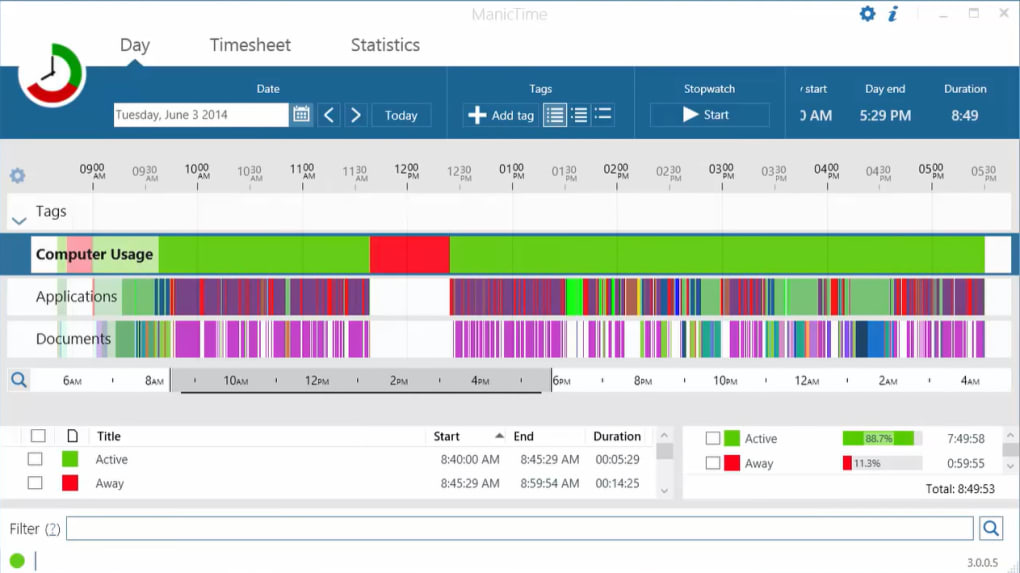
The collected data is then transformed into easily digestible visual representations. ManicTime generates visually appealing timelines and charts, offering a clear and insightful overview of your time allocation. These visual aids allow you to quickly identify time sinks, understand your productivity patterns, and make data-driven decisions to optimize your workflow and enhance productivity. Whether you’re aiming to improve your work-life balance, curtail procrastination, or simply gain a better understanding of your digital habits, ManicTime’s data visualizations provide the tools you need to achieve your goals.
Beyond simple data visualization, ManicTime provides robust filtering and tagging capabilities. You can easily browse through your activity logs, filtering by specific applications, websites, or even custom tags you create. This allows you to pinpoint specific areas for improvement or analyze particular projects or tasks. The tagging feature enhances organization, allowing you to categorize and analyze your activities based on relevant projects, clients, or personal interests. This level of granularity gives you complete control over how you interpret and utilize the collected data.
Features and Functionality: A Deep Dive
ManicTime offers a range of features designed to streamline your time management process and provide actionable insights:
-
Comprehensive Activity Tracking: ManicTime meticulously tracks all your computer activities, including application usage, website visits, email interactions, and document editing. This comprehensive data capture ensures a complete picture of your digital habits.
-
Intuitive Visualizations: The application presents the collected data through visually engaging timelines and charts, providing a clear and concise understanding of your time allocation. This visual representation simplifies complex data, making it easy to identify patterns and trends in your usage.
-
Flexible Filtering and Searching: Easily navigate your activity logs using sophisticated filtering options. Filter by application, website, tag, or date range to isolate specific periods or activities for detailed analysis.
-
Customizable Tagging: Enhance the organization of your data by assigning custom tags to different activities. This allows for detailed categorization and analysis, focusing on specific projects, clients, or personal goals.
-
Data Export Capabilities: While currently limited to CSV format, ManicTime’s data export function allows you to integrate your time usage data with other applications or analysis tools. Future updates may expand the range of supported export formats.
-
Regular Updates and Bug Fixes: ManicTime benefits from continuous development, with regular updates addressing bugs and introducing improvements based on user feedback. This commitment to ongoing development ensures that the application remains reliable and efficient.
-
Cross-Platform Compatibility: While primarily known for its Windows version, ManicTime is also available for other operating systems, including macOS, expanding its usability across diverse platforms.
ManicTime’s Impact on Productivity and Self-Awareness
ManicTime extends beyond a simple time-tracking tool; it becomes a valuable instrument for enhancing productivity and fostering self-awareness. By providing a clear and objective view of your daily computer usage, ManicTime empowers you to:
- Identify Time Wasters: Pinpoint applications, websites, or activities that consume excessive time without contributing to your goals. This awareness facilitates conscious choices to minimize unproductive activities.
-
Optimize Workflow: Analyze your data to identify peak productivity periods and adapt your schedule to maximize efficiency. Understanding your work patterns enables you to optimize your daily routine and enhance your productivity.
-
Improve Work-Life Balance: Gain a clearer perspective on your time allocation between work and personal activities. This self-assessment allows for adjustments to improve work-life balance and prevent burnout.
-
Track Project Progress: Utilize ManicTime to track the time spent on specific projects, providing accurate data for billing clients or assessing project timelines. This detailed time tracking improves project management and client relations.
-
Cultivate Self-Discipline: ManicTime’s data-driven insights can be a powerful tool for cultivating self-discipline and combating procrastination. The visualization of time spent on unproductive activities can serve as a motivating factor for positive change.
-
Enhance Goal Setting: By tracking your time allocation, you can gain a better understanding of your capacity and set realistic goals for your projects and personal endeavors. This data-driven approach to goal setting increases your chance of success.
Addressing Limitations and Future Enhancements
While ManicTime offers significant advantages, it’s essential to acknowledge its current limitations. The limited export format (currently only CSV) may pose challenges for users seeking integration with other applications requiring different formats. The absence of advanced reporting features, such as automatic report generation or custom report templates, could be improved upon in future versions. Addressing these limitations would enhance the application’s versatility and cater to a broader range of user needs.
Future enhancements could include:
-
Expanded Export Options: Adding support for additional export formats, such as HTML, PDF, or Excel, would significantly enhance interoperability with other applications and data analysis tools.
-
Advanced Reporting Features: Introducing automated report generation and customizable report templates would streamline the process of analyzing and sharing time usage data.
-
Integration with Other Applications: Seamless integration with popular productivity apps and project management software would further improve efficiency and workflow.
-
Enhanced Visualization Options: Adding more sophisticated visualization options, such as interactive dashboards or custom chart types, would allow for deeper data exploration and analysis.
-
Mobile App Development: Expanding the platform to include mobile apps would extend ManicTime’s usability beyond desktop environments.
Despite these limitations, ManicTime stands as a robust and valuable tool for personal time management. Its ease of use, comprehensive tracking capabilities, and informative visual representations make it an excellent choice for individuals seeking to understand and optimize their computer usage. With continued development and the incorporation of user feedback, ManicTime has the potential to become an even more powerful and versatile application, solidifying its place as a leading personal time manager.
File Information
- License: “Free”
- Latest update: “May 22, 2023”
- Platform: “Windows”
- OS: “Windows 8”
- Language: “English”
- Downloads: “6.8K”
- Size: “80.10 MB”


