
MapKeyboard is a free, lightweight utility designed to remap your keyboard’s functions. While seemingly simple in its core functionality, this tool offers a surprising level of customization for users who need to adapt their keyboard layout to specific needs or preferences. This review will delve into the capabilities, strengths, and limitations of MapKeyboard, providing a comprehensive understanding of its utility and comparing it to alternative keyboard remapping software.
Understanding Keyboard Remapping and the Need for MapKeyboard
Before delving into the specifics of MapKeyboard, it’s crucial to understand the concept of keyboard remapping. Essentially, it allows users to change the default function assigned to a specific key or combination of keys. This might seem like a niche feature, but the applications are surprisingly diverse and extend far beyond simple language switching.
Consider the following scenarios where keyboard remapping proves incredibly useful:
-
Multilingual Typing: For users frequently switching between languages with different keyboard layouts, remapping keys can streamline the process significantly. Instead of constantly changing system-wide keyboard layouts, users can assign specific keys or key combinations to activate specific language inputs seamlessly.
-
Gaming: Gamers often use keyboard remapping to optimize control schemes, assigning macros to complex actions or remapping keys for improved ergonomics and comfort during extended play sessions. This allows for more efficient and intuitive gameplay.
-
Accessibility: Individuals with disabilities may benefit from keyboard remapping to adapt their keyboard layouts to their specific needs. Reassigning keys can improve accessibility and make using a computer more comfortable.
-
Specialized Workflows: Professionals working with specific software or workflows might find that remapping certain keys improves efficiency and reduces repetitive strain injuries. This is particularly relevant in fields like programming, graphic design, or data entry.
MapKeyboard addresses these needs by providing a straightforward method for remapping keys without requiring extensive technical knowledge. Its simplicity and ease of use are its primary strengths.
MapKeyboard’s Features and Functionality
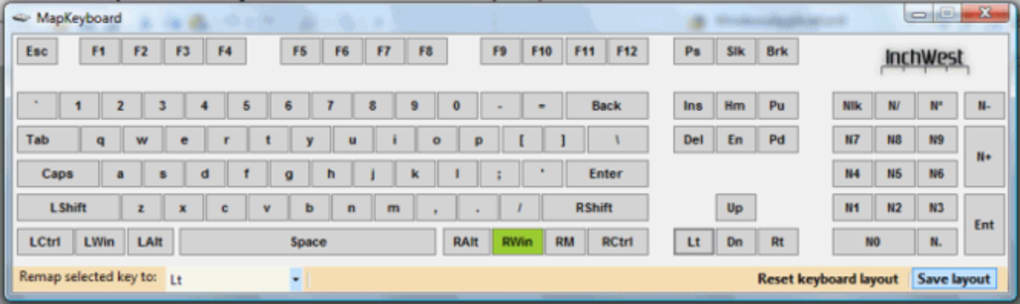
MapKeyboard’s primary strength is its user-friendly interface. The program is designed to be intuitive and easy to navigate, even for users with limited technical expertise. The core functionality revolves around creating key mappings, which involves selecting a source key (the key you’re currently pressing) and assigning it a target key or action. This process typically involves a graphical interface allowing users to select keys from a visual representation of the keyboard.
While the exact interface might vary depending on the version, most versions of MapKeyboard offer the following core features:
-
Simple Key Remapping: The most fundamental function is the ability to assign a new function to an existing key. This could involve swapping the functions of two keys or remapping a rarely used key to a more frequently needed action.
-
Macro Support (Potentially): While not explicitly stated in all documentation, some versions of MapKeyboard may include basic macro capabilities, allowing users to assign sequences of keystrokes to a single key. However, this is likely to be a limited functionality compared to dedicated macro software.
-
Profile Management: To accommodate different needs and workflows, MapKeyboard potentially allows users to create and save different profiles with individual key mappings. This allows users to quickly switch between different keyboard layouts optimized for various tasks.
-
Platform Compatibility: MapKeyboard’s initial description suggests it’s designed to be compatible with a wide range of platforms. However, user reviews and limited documentation raise questions about consistent platform support across different versions.
-
Ease of Installation: The installation process is generally straightforward and trouble-free, adding to the software’s appeal for novice users.
Limitations and Considerations
Despite its ease of use, MapKeyboard has some significant limitations that users should be aware of:
-
Outdated Software: The software hasn’t received updates in recent years, raising concerns about compatibility with modern operating systems and potential security vulnerabilities.
-
Lack of Advanced Features: Compared to more sophisticated keyboard remapping software, MapKeyboard lacks advanced features such as complex macro recording, scripting capabilities, or support for specialized input devices.
-
Limited Documentation: The documentation available for MapKeyboard is often sparse and may not adequately explain all features or troubleshoot potential problems. This lack of readily available support might deter some users.
-
Compatibility Issues: While advertised as cross-platform compatible, user reviews suggest potential inconsistencies in how the software functions across different operating systems and hardware configurations.
-
Security Concerns: The lack of recent updates raises security concerns. Older software might have unpatched vulnerabilities that could expose the user’s system to malware or other threats. This is a major concern, especially given the potential for user-created custom profiles that might be less secure.
Comparing MapKeyboard to Alternatives
Several alternative keyboard remapping applications offer more advanced features and better support than MapKeyboard. Some notable alternatives include:
-
SharpKeys: A free, open-source tool offering a similar level of simplicity to MapKeyboard but with potentially better support and more frequent updates.
-
KeyTweak: Another free option providing more extensive customization options, though possibly with a steeper learning curve compared to MapKeyboard.
-
AutoHotkey: A powerful and flexible scripting language capable of complex keyboard remapping, macro creation, and automation tasks. However, it requires a deeper understanding of scripting and programming.
The choice between MapKeyboard and these alternatives depends heavily on the user’s needs and technical skills. If simple key remapping is all that’s required, MapKeyboard might suffice, but for advanced features and reliable support, one of the alternative options would be preferable.
User Reviews and Feedback
User reviews regarding MapKeyboard are mixed. Some users praise its simplicity and ease of use, while others criticize the lack of updates, limited functionality, and potential compatibility issues. One particularly concerning review highlights a potential issue where the downloaded software is not the actual MapKeyboard but a malicious program. This highlights the importance of downloading software only from trusted sources and verifying the integrity of the downloaded file before execution.
The negative reviews highlight the risks associated with using outdated software. Security vulnerabilities in outdated software can be exploited by malicious actors to compromise a user’s system. Therefore, caution is advised when considering the use of MapKeyboard due to its lack of recent updates.
Conclusion: Is MapKeyboard Right for You?
MapKeyboard offers a basic but straightforward way to remap keyboard keys. Its simplicity might be appealing to users needing basic key remapping for tasks like language switching or minor customization. However, its outdated nature, limited functionality, and potential compatibility issues should be carefully considered.
Before using MapKeyboard, users should carefully evaluate their needs. If basic key remapping suffices, and security concerns related to outdated software are carefully addressed, MapKeyboard might be a viable option. However, for users requiring advanced features, better support, and greater security, one of the alternative programs mentioned above would be a significantly better choice. Remember to always prioritize downloading software from trusted sources and to regularly update your software to mitigate security risks. The convenience of MapKeyboard should not outweigh the potential security vulnerabilities it may introduce to your system.
File Information
- License: “Free”
- Version: “2.2”
- Latest update: “April 23, 2019”
- Platform: “Windows”
- OS: “Windows 10”
- Language: “English”
- Downloads: “16.7K”
- Size: “2.34 MB”


