
Mass Downloader is a Windows-based download manager designed to streamline the process of acquiring various files and media streams from the internet. Its core functionality revolves around accelerating download speeds and offering support for a broad spectrum of online resources. This review will delve into its features, performance, user experience, and compare it to alternative download managers available on the market.
Key Features and Functionality
Mass Downloader distinguishes itself through its robust feature set and efficient download management capabilities. At its heart, the software is built to maximize download speeds by employing multiple channels to concurrently retrieve data. This significantly reduces the overall download time compared to single-threaded download managers. The application isn’t limited to simple HTTP or HTTPS downloads; it extends support to encompass FTP servers and various streaming protocols, including Real Media and Microsoft Media servers. This versatility allows users to download streaming audio and video content for offline playback, a crucial feature for users accessing multimedia content online.
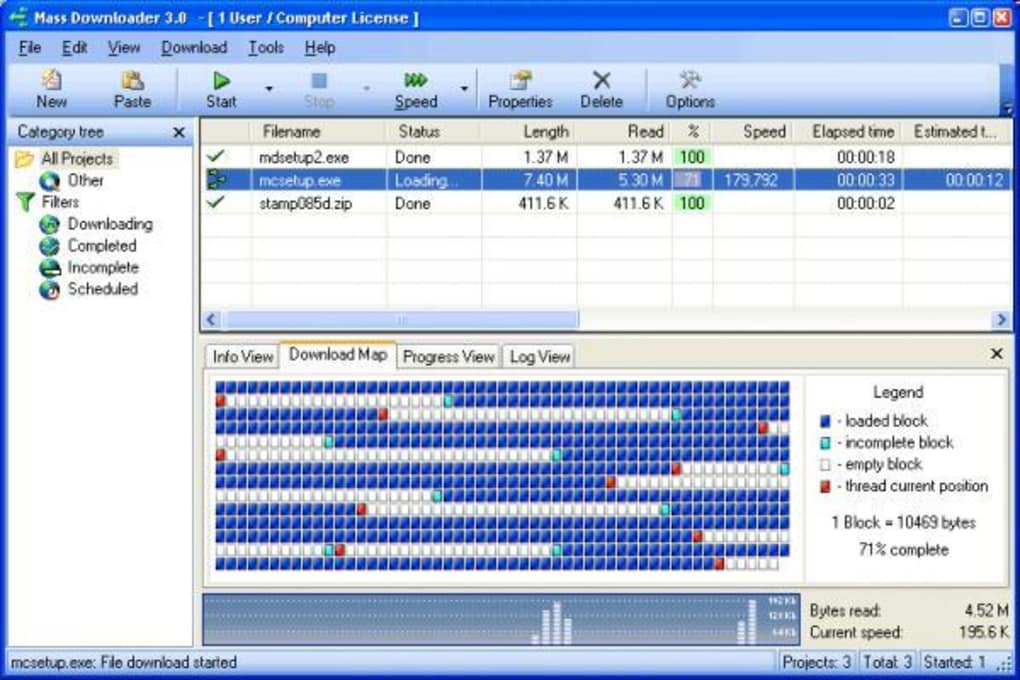
Beyond its speed optimization, Mass Downloader offers a user-friendly interface inspired by the classic Internet Explorer layout. This familiarity ensures a smoother learning curve for users already accustomed to this style of navigation. The software provides the capability to download specific files based on their filenames, offering users a degree of control and precision. This feature is particularly advantageous when dealing with large archives or websites containing numerous files. Unlike some download managers that focus on downloading entire websites, Mass Downloader provides the selective download option, allowing users to target specific files within a larger context, enhancing efficiency. Furthermore, the application includes support for browsing ZIP archives before initiating a download. This allows users to preview the contents of the archive and select only the necessary files for download, eliminating the need to download unwanted or duplicate files, conserving bandwidth and storage space. The ability to resume interrupted downloads is another essential feature, ensuring that downloads are not lost due to connectivity issues or system interruptions.

Performance and Efficiency
The efficacy of Mass Downloader hinges on its ability to accelerate download speeds, a claim supported by its use of multi-channel technology. This technique allows it to download multiple segments of a file simultaneously, effectively increasing the overall throughput. While the actual speed improvement depends on various factors, including internet connection speed and server capabilities, users have generally reported noticeable improvements in download times compared to using a standard web browser. This enhanced speed makes it particularly useful for downloading larger files, such as videos, software installers, or extensive datasets. The software’s inherent support for resuming interrupted downloads significantly mitigates the frustration associated with dropped connections or unexpected system shutdowns.
The compatibility with various protocols – HTTP, HTTPS, FTP, Real Media, and Microsoft Media – enhances the software’s applicability to a wider range of online resources. This compatibility ensures that users can download content from diverse sources without encountering compatibility issues. The integration of ZIP archive browsing functionality contributes to the overall efficiency by reducing unnecessary downloads and conserving storage space. This minimizes the storage footprint and speeds up the overall download and management process.
User Interface and Experience
Mass Downloader opts for a familiar and intuitive interface reminiscent of the classic Internet Explorer layout, a design choice that prioritizes ease of use and minimizes the learning curve. This straightforward approach avoids unnecessary complexity, making the software accessible to both novice and experienced users. The clear and organized layout allows users to quickly navigate between features and manage their downloads without encountering confusing or cluttered elements. The software’s focus on functionality over aesthetics results in an interface that prioritizes usability and efficiency. The absence of unnecessary visual embellishments aids in a streamlined user experience.

The ability to download files by filename offers granular control over the download process, allowing users to target specific files within larger archives or websites. This feature is particularly beneficial when navigating complex websites or when specific files are required rather than an entire collection. The feature of previewing ZIP archives before initiating downloads allows for more informed decision-making and prevents users from downloading unnecessary files. This feature contributes significantly to a more organized and efficient download management experience.
Comparison with Alternative Download Managers
Several alternative download managers exist in the market, each with its own strengths and weaknesses. Comparing Mass Downloader to popular choices like Internet Download Manager (IDM) and Free Download Manager (FDM) reveals a distinct focus on simplicity and functionality. While IDM and FDM offer more advanced features such as download scheduling and integrated video download capabilities, Mass Downloader excels in its straightforward interface and robust support for various protocols. This streamlined approach makes Mass Downloader an attractive choice for users who prioritize ease of use and reliable performance over extensive feature sets.
Microsoft’s Download Manager, while a solid option, lacks the multi-channel download technology found in Mass Downloader, potentially resulting in slower download speeds for larger files. Other alternatives like HiDownload and FlashGet Portable offer similar functionalities, but Mass Downloader’s combination of speed, broad protocol support, and user-friendly interface makes it a compelling contender in the download manager landscape. The selection of the most suitable download manager often depends on the user’s specific needs and preferences. Users prioritizing speed and a simple interface will find Mass Downloader a worthwhile option.
Conclusion
Mass Downloader presents itself as a capable and user-friendly download manager for Windows users. Its strength lies in its ability to accelerate download speeds through multi-channel technology, support for various protocols, and a straightforward, intuitive interface. While it may lack some of the advanced features found in other more feature-rich download managers, its focus on simplicity and reliability makes it a solid choice for users who value speed, efficiency, and ease of use. The inclusion of features such as ZIP archive browsing and download resumption significantly enhances the overall user experience and contributes to a more efficient download management process. For users seeking a robust, reliable, and easy-to-use download manager without unnecessary complexities, Mass Downloader is a worthy consideration.
File Information
- License: “Trial version”
- Version: “3.8.850”
- Latest update: “February 13, 2019”
- Platform: “Windows”
- OS: “Windows 2000”
- Language: “English”
- Downloads: “28.4K”
- Size: “3.30 MB”


