
MassTube is a freeware application designed to download YouTube videos and convert them into various formats. While offering a straightforward approach to offline viewing of YouTube content, its functionality is limited compared to more advanced competitors. This review delves into the program’s strengths and weaknesses, exploring its user interface, features, performance, and overall user experience. We’ll also consider alternative options available to users seeking similar capabilities.
User Interface and Functionality
MassTube presents a simple and uncluttered interface. The primary function—adding YouTube video URLs—is achieved through a dedicated “Add” button. Conveniently, if you’re already on a YouTube page, the URL is automatically populated. This streamlined approach is beneficial for users prioritizing ease of use over advanced features. Once the desired videos are added, initiating the download process is equally straightforward with a single “Download” button. This simplicity makes MassTube accessible to users with minimal technical expertise.
The program’s core strength lies in its ease of use. The lack of unnecessary complexities allows users to quickly and efficiently download their chosen videos. However, this simplicity comes at the cost of features found in more comprehensive downloaders. There’s no integrated search functionality, meaning users must locate their desired videos independently on YouTube and then paste the URLs into MassTube. This requires an extra step and might prove inconvenient for users searching for specific content within the application itself.
MassTube’s automatic conversion feature is a noteworthy aspect of its functionality. It automatically converts downloaded FLV files (the standard format for many older YouTube videos) into the user’s preferred format. While this simplifies the post-download process, the range of supported output formats might be limited compared to more versatile downloaders that offer a wider array of options and codecs. This limitation could be a deciding factor for users requiring specific output formats for compatibility with particular devices or editing software.
Performance and Download Speed
MassTube’s download speed is inherently dependent on the user’s internet connection speed and YouTube’s server performance. The program itself does not employ any unique acceleration techniques. While downloads typically proceed without significant issues, users with slower internet connections might experience extended download times. The lack of any sophisticated download management features, such as pausing, resuming, or scheduling downloads, further restricts its flexibility. This means that interrupted downloads require restarting the entire process, which can be inconvenient, especially for larger video files.
The absence of a queuing system prevents batch downloading of multiple videos simultaneously. This sequential download process can be time-consuming, particularly when downloading numerous videos. While the program handles single downloads effectively, its performance suffers when dealing with multiple videos, making it less efficient for users who frequently download multiple videos at once. More advanced download managers often include download scheduling and queuing options for improved efficiency and user control.
Supported Formats and HD Video Support
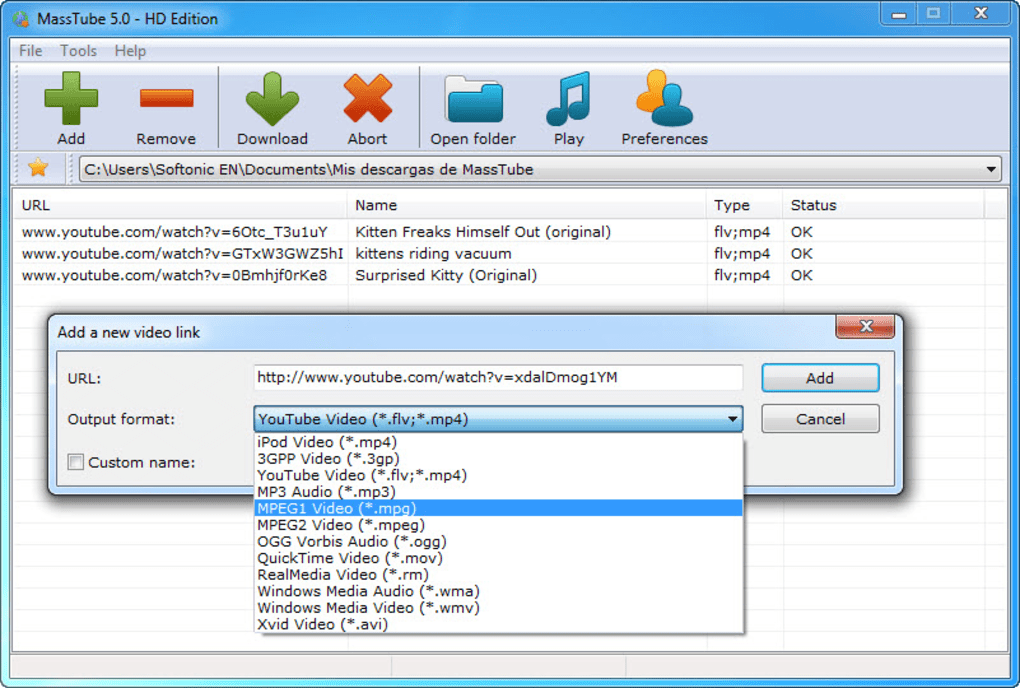
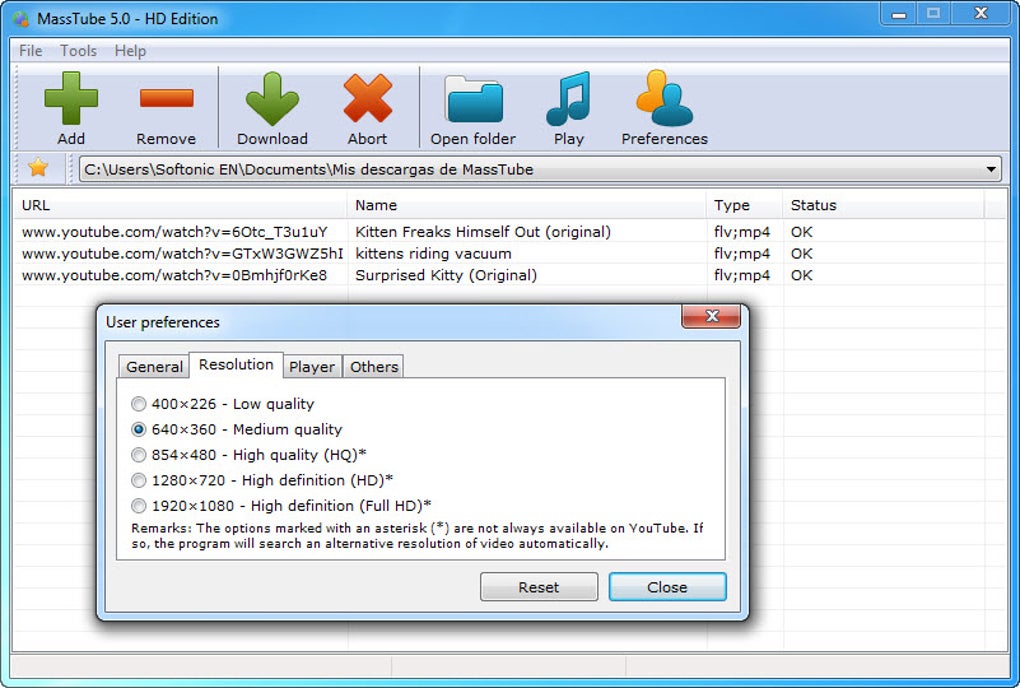
A significant advantage of MassTube is its support for HD videos. This capability is crucial for users who prioritize high-resolution video quality for offline viewing. However, the range of supported formats remains a potential limitation. While the automatic conversion feature is helpful, the lack of a comprehensive list of output formats might restrict users from selecting their preferred video or audio codecs. This could affect compatibility with various devices and media players, potentially necessitating additional conversion steps using separate software.
The program’s focus on YouTube as its sole source of video content also limits its applicability. Users seeking a versatile downloader capable of handling videos from other platforms will need to explore alternative options. Many competing downloaders support a broader range of video-hosting sites, offering greater flexibility and convenience. The lack of support for other platforms reduces MassTube’s overall utility and restricts its appeal to a niche user base.
Pros and Cons of MassTube
Pros:
- Simple and intuitive interface: The program is extremely easy to use, making it ideal for beginners.
- Automatic conversion: The automatic conversion from FLV to the user-selected format simplifies the download process.
- HD video support: MassTube handles high-definition videos effectively.
- Freeware: The software is available at no cost.
Cons:
- Limited format support: The range of supported output formats might be insufficient for some users.
- No search functionality: Users must find videos on YouTube separately and then paste the URLs into MassTube.
- No batch downloads: Videos are downloaded sequentially, making the process slow for multiple videos.
- No download management features: There’s no ability to pause, resume, or schedule downloads.
- YouTube-only support: MassTube only works with YouTube, limiting its versatility.
- Potential for malware (based on user reviews): Several user reviews mention malware issues, indicating potential security risks. This is a significant concern requiring careful consideration.
Alternatives to MassTube
Several alternative YouTube downloaders offer more comprehensive features and broader capabilities. These programs often provide enhanced download management tools, support for various video platforms, and a wider range of output formats. Some examples include:
- 4K Video Downloader: A popular and robust downloader offering high-speed downloads, support for various platforms, and a wide range of output formats.
- VDownloader: A lightweight yet powerful downloader supporting various video platforms and offering format conversion capabilities.
- aTube Catcher: Another versatile downloader capable of downloading videos and music from various sources. It also provides conversion and editing features.
- JDownloader: A feature-rich download manager that supports various platforms, offers advanced download management features, and incorporates a built-in search function.
These alternatives address many of MassTube’s limitations, offering features such as batch downloads, download scheduling, integrated search functionality, and support for multiple video platforms. The choice of the best alternative will depend on the user’s specific needs and preferences.
Conclusion
MassTube caters to users seeking a basic and straightforward YouTube video downloader. Its simplicity is its greatest strength, making it accessible to novice users. However, its limitations in features, format support, and download management capabilities significantly restrict its appeal. The potential security risks highlighted in user reviews also raise significant concerns. For users requiring more advanced features, versatile format support, and robust download management, exploring the alternatives mentioned above is highly recommended. While MassTube might suffice for occasional single downloads, it falls short for users with more demanding requirements. The potential security risks should also serve as a significant cautionary factor in considering the program’s use.
File Information
- License: “Free”
- Latest update: “June 2, 2025”
- Platform: “Windows”
- OS: “Windows 2000”
- Language: “English”
- Downloads: “274K”
- Size: “88.52 MB”


