
MCEdit is a powerful and versatile map editor for Minecraft, offering players the ability to create, modify, and explore their worlds in ways previously unimaginable. This comprehensive guide delves into the functionalities, usability, and overall impact of MCEdit on the Minecraft experience. While no longer actively developed, its legacy as a highly influential tool remains. This guide explores its capabilities and provides insights into its strengths and weaknesses based on user experiences and available information.
Understanding MCEdit’s Core Functionality
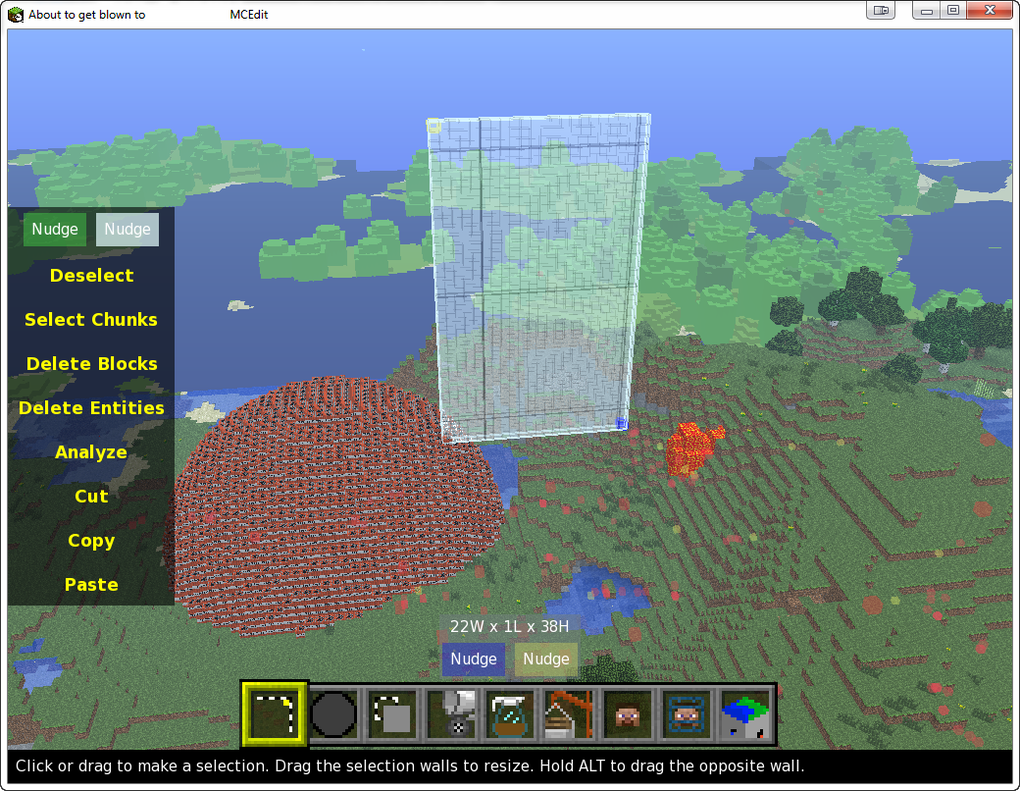
MCEdit functions as a standalone application, independent of the main Minecraft game. This allows for significant map manipulation without the limitations of in-game editing tools. Users begin by loading a saved Minecraft world file into MCEdit. The interface provides a 3D view of the world, allowing for navigation using mouse and keyboard controls. This provides an unparalleled level of control and perspective compared to the standard Minecraft gameplay experience.
The editor’s core features revolve around several key tools:
-
Selection Tools: These tools enable users to select specific areas or regions within the Minecraft world. This selection can be as precise as single blocks or encompass large, complex structures. The selection process forms the basis for most editing operations.
-
Editing Operations: Once an area is selected, users can perform a variety of operations, including:
- Deletion: Removing selected blocks and structures entirely. This is particularly useful for clearing large areas or removing unwanted features.
- Copying and Pasting: Duplicating selected sections of the map, allowing for easy replication of structures or landscapes. This greatly accelerates the building process for large-scale projects.
- Cutting: Removing a selected region and storing it in the application’s clipboard for later pasting elsewhere. This provides a non-destructive method of moving or repositioning map elements.
- Transformations: Rotating, scaling, and mirroring selected sections. This allows for dynamic and creative manipulation of structures, leading to unique and unexpected results.
-
Brush Tool: MCEdit’s brush tool allows users to “paint” blocks onto the map. This function significantly speeds up the construction process for large-scale projects, such as creating massive structures or modifying terrain features. Brush size and shape are customizable, allowing for precise control over the application of blocks.
-
Fill and Replace: This powerful feature allows users to replace one type of block with another throughout a selected area. This is invaluable for terraforming, converting materials, or making large-scale thematic changes to a world. Imagine effortlessly changing all sand to stone, or every tree to a specific type of wood.
-
Clone Tool: This feature enables users to quickly duplicate sections of the map, offering a shortcut for replicating structures and patterns without manual rebuilding. This function is particularly useful for symmetrical designs or repetitive elements within a world.
-
Filters: MCEdit incorporates a set of filters that can be applied to selections. These filters automate complex operations, such as replacing blocks based on their properties or identifying and manipulating specific block types. This allows for high-level control and efficient management of large datasets of blocks.
-
Player Manipulation: MCEdit allows users to directly manipulate the player’s position within the world, enabling rapid travel and access to otherwise difficult-to-reach areas. This also extends to setting new spawn points, improving accessibility and streamlining the workflow.
Usability and User Experience
MCEdit’s interface, while powerful, may present a learning curve for novice users. The 3D editing environment necessitates spatial reasoning and understanding of the Minecraft block system. However, many users praise the program’s intuitive layout and comprehensive tooltips, which ease the transition for those with prior experience with Minecraft. The sheer power and flexibility of the tools can be overwhelming at first, but the learning curve is often worth the effort given the tools at disposal.
The software’s primary strength lies in its ability to automate tasks that would be incredibly tedious in standard Minecraft. Building large structures, terraforming vast landscapes, and performing bulk edits become significantly easier. The ability to undo and redo actions also greatly reduces the risk of irreversible mistakes during complex operations.
Strengths and Weaknesses Based on User Feedback
Based on user reviews and available information, MCEdit presents a mixed bag of advantages and disadvantages.
Pros:
- Powerful Editing Capabilities: The core functionalities of selection, manipulation, and automated operations are unparalleled in other Minecraft editors.
- Enhanced Creativity: MCEdit expands the creative possibilities of Minecraft, allowing for the construction of complex and expansive projects beyond the capabilities of in-game tools.
- Time Savings: The automation provided by the brush tool, fill/replace, and filters dramatically reduces the time required for large-scale projects.
- Enhanced Exploration: The ability to freely manipulate the player’s position simplifies exploration and access to remote areas of a world.
- World Modification: Users can fundamentally alter the structure and composition of their worlds, enabling significant changes to terrain, biomes, and structures.
Cons:
- Steep Learning Curve: The 3D interface and the range of features can present a significant challenge for new users. While tooltips and tutorials could assist, a thorough understanding of Minecraft itself is essential.
- Outdated Software: MCEdit is no longer actively maintained, meaning that compatibility issues with newer versions of Minecraft may arise. This may limit its functionality with newer Minecraft features and updates.
- Technical Issues: Some users have reported crashes, instability, or difficulty in loading large world files. This highlights the challenge in maintaining and supporting a large and complex application.
- Potential for Misuse: The power of MCEdit can be misused to create unfair advantages in multiplayer games or to corrupt world files beyond repair. Ethical considerations are paramount when utilizing the software.
- Limited Support: Given the lack of active development, user support is limited and troubleshooting challenges may be encountered.
Conclusion: A Lasting Legacy in Minecraft Modification
Despite no longer receiving updates, MCEdit remains a significant contribution to the Minecraft modding community. Its impact on the way players interact with and modify their worlds is undeniable. Its capabilities continue to inspire creativity and problem-solving in the Minecraft community. While challenges like the steep learning curve and potential for instability exist, the sheer power and flexibility provided by MCEdit outweigh these drawbacks for many experienced Minecraft players seeking to push the boundaries of world creation and manipulation. Its legacy as a foundational tool for Minecraft map editing continues to impact how users approach building and world design within the game. While alternatives exist, MCEdit retains a notable place in Minecraft history.
File Information
- License: “Free”
- Version: “0.1.7.1”
- Latest update: “May 26, 2014”
- Platform: “Windows”
- OS: “Windows XP”
- Language: “English”
- Downloads: “425.5K”
- Size: “9.79 MB”


