
In the digital age, where information flows ceaselessly across networks, verifying the integrity and authenticity of files has become paramount. Whether you’re downloading critical software, transferring sensitive documents, or archiving important data, the silent threat of corruption or malicious tampering always looms. This is where cryptographic hash functions, like MD5 and SHA, come into play, offering a robust mechanism to detect even the slightest alteration in a file. The MD5 & SHA Checksum Utility, developed by Raymond Lin and available through platforms like PhanMemFree, stands out as an indispensable tool for anyone who prioritizes digital security and data integrity. It’s a lightweight, portable, and remarkably easy-to-use application designed to help users generate and verify hash signatures for their files, providing peace of mind in an increasingly uncertain digital landscape.
This comprehensive utility supports a range of popular hash algorithms, including MD5, SHA-1, SHA-256, and SHA-384. By providing these options, it caters to various security requirements, from quick integrity checks to more robust verification processes. Its straightforward interface ensures that even users without extensive technical knowledge can confidently ascertain the authenticity of their files. The true genius of the MD5 & SHA Checksum Utility lies in its simplicity and portability; it requires no installation, allowing users to carry it on a USB drive and utilize it on any Windows machine, making it an ideal companion for IT professionals, developers, and everyday users alike. This article delves into the intricacies of hash functions, the specific features of the PhanMemFree MD5 & SHA Checksum Utility, its practical applications, and why it’s a valuable addition to any digital toolkit.
Understanding Hash Functions: MD5, SHA-1, SHA-256, and SHA-384
At the heart of the MD5 & SHA Checksum Utility’s functionality lies the concept of cryptographic hash functions. A hash function is an algorithm that takes an input (or ‘message’) and returns a fixed-size alphanumeric string of bytes, which is called a ‘hash value’ or ‘checksum’. The key properties that make these functions valuable for file integrity are:
- Determinism: The same input will always produce the same hash output.
- One-way function: It is computationally infeasible to reverse the process—to derive the original input from the hash output.
- Collision resistance: It should be extremely difficult to find two different inputs that produce the same hash output (a ‘collision’).
- Avalanche effect: A tiny change in the input should result in a drastically different hash output.
These properties make hash functions excellent for verifying that a file has not been altered, intentionally or unintentionally, since its hash was generated. If you have a file and its known, trusted hash value, you can re-generate the hash of your copy of the file and compare the two. If they match, the file is identical to the original; if they differ, even by a single bit, the file has been changed. The PhanMemFree MD5 & SHA Checksum Utility supports several prominent hash algorithms, each with its own characteristics and security profile.

MD5 (Message-Digest Algorithm 5)
MD5 is one of the earliest and most widely recognized cryptographic hash functions, producing a 128-bit (16-byte) hash value. Developed in 1991, MD5 was once a cornerstone for digital signatures and file integrity checks. Its speed and efficiency made it a popular choice for verifying the integrity of files after download or transfer. Many older software distribution sites still provide MD5 checksums for their files.
However, over time, significant vulnerabilities have been discovered in MD5, particularly its susceptibility to collision attacks. This means it’s possible, though difficult, to find two different files that produce the exact same MD5 hash. Due to these weaknesses, MD5 is no longer considered secure enough for cryptographic purposes where collision resistance is critical, such as digital certificates or password hashing. Despite this, MD5 remains useful for non-security-critical applications like simple file integrity verification, where the primary concern is accidental data corruption rather than deliberate malicious tampering. For quick checks of downloaded files against a provided checksum, MD5 still serves its purpose effectively.
SHA-1 (Secure Hash Algorithm 1)
SHA-1, a member of the Secure Hash Algorithm family, was designed by the National Security Agency (NSA) and published in 1995. It produces a 160-bit (20-byte) hash value, offering a larger output space and, initially, a higher level of security than MD5. For many years, SHA-1 replaced MD5 as the standard for various security applications, including securing communications and verifying software integrity.
Like MD5, SHA-1 has also been found to have theoretical and practical collision vulnerabilities. Researchers have demonstrated the feasibility of crafting collision attacks against SHA-1, leading major browsers and security organizations to deprecate its use in favor of more robust algorithms. While it still offers a slightly better collision resistance than MD5, SHA-1 is generally advised against for new security-critical implementations. Nonetheless, its inclusion in the PhanMemFree MD5 & SHA Checksum Utility allows users to verify files that were originally signed or provided with SHA-1 checksums, ensuring backward compatibility and a broad utility.
SHA-256 and SHA-384 (Secure Hash Algorithm 2 Family)
The SHA-2 family represents a significant leap forward in cryptographic hash function security. These algorithms, also developed by the NSA, are characterized by larger hash outputs and more complex internal structures, making them far more resistant to collision and pre-image attacks than MD5 or SHA-1. The PhanMemFree utility supports two prominent members of this family:
- SHA-256: This algorithm produces a 256-bit (32-byte) hash value. SHA-256 is currently one of the most widely used and trusted cryptographic hash functions. It is integral to many modern security protocols, including SSL/TLS for secure web browsing, blockchain technologies like Bitcoin, and various government standards. Its strong collision resistance makes it suitable for verifying the integrity of highly sensitive data and software.
- SHA-384: This is a truncated version of SHA-512, producing a 384-bit (48-byte) hash value. While SHA-512 is the underlying algorithm, SHA-384 is often preferred when a longer, even more secure hash is needed but SHA-512’s full 512-bit output is considered excessive. SHA-384 offers an exceptionally high level of security, making it ideal for environments demanding the strongest possible assurances of data integrity and authenticity, often used in government and enterprise-level security applications.
The inclusion of SHA-256 and SHA-384 in the MD5 & SHA Checksum Utility ensures that users have access to modern, robust hashing capabilities. When security and integrity are paramount, these algorithms are the recommended choice, offering a formidable defense against both accidental corruption and malicious manipulation. By supporting a spectrum of hash functions, the PhanMemFree utility provides flexibility, allowing users to choose the appropriate level of security for their specific needs.
The PhanMemFree MD5 & SHA Checksum Utility: Features and Benefits
The MD5 & SHA Checksum Utility distinguishes itself through a combination of powerful functionality and an incredibly user-friendly design. Developed by Raymond Lin, this tool has been refined to offer a seamless experience for anyone needing to verify file integrity. Its core strengths lie in its comprehensive hash function support, intuitive interface, and crucial portability, making it a valuable asset for a wide range of users.
Core Functionality: Generating and Verifying Hashes
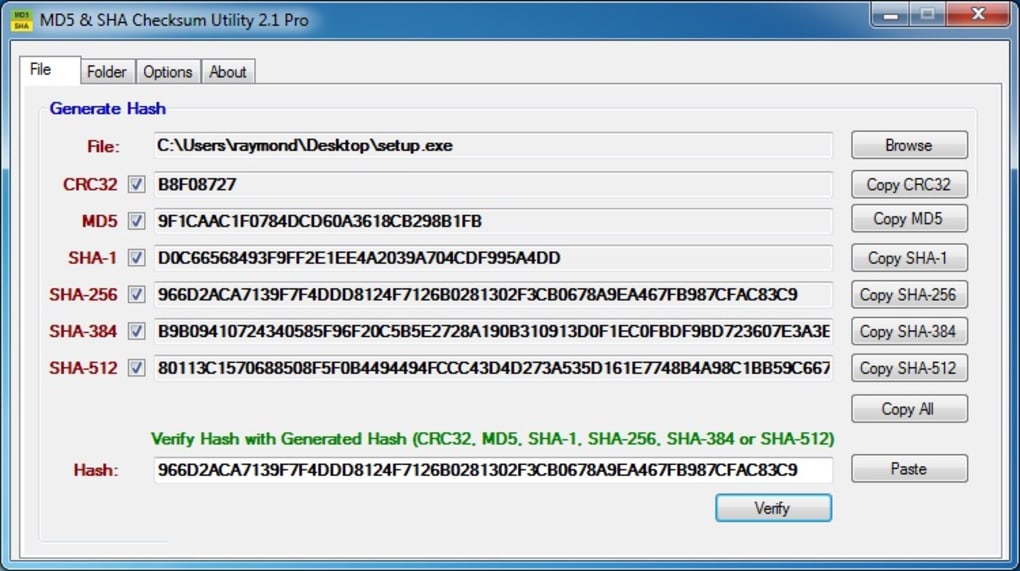
The primary purpose of the MD5 & SHA Checksum Utility is to generate cryptographic hash values for files and to allow users to verify those values against a known standard. The process is remarkably straightforward:
- Input a File: Users simply drag and drop the desired file into the utility’s window or use a file browser to select it.
- Select Hash Type: The utility presents options for MD5, SHA-1, SHA-256, and SHA-384. Users select the specific hash algorithm they wish to use.
- Generate Checksum: With a single click, the utility computes and displays the hash value for the selected file.
Once a hash value is generated, the verification step is equally simple. If you have a reference hash (e.g., provided by a software vendor on their website), you can paste it into the utility. The tool will then compare the newly generated hash with the reference hash, immediately indicating whether they match. This comparison is vital for:
- Verifying Downloaded Software: Ensuring that the software you downloaded from the internet has not been corrupted during the transfer or, more critically, tampered with by an attacker.
- Confirming Data Integrity: Checking that files transferred via USB, email, or network remain identical to their source.
- Validating Backups: Ensuring that your backup files are complete and exact replicas of the originals before you might need to restore them.
The straightforward nature of this generate-and-verify process means that users don’t need to delve into command-line interfaces or complex cryptographic libraries. The utility abstracts away the complexity, presenting a clear and actionable result.
User-Friendly Design and Portability
One of the most praised aspects of the MD5 & SHA Checksum Utility is its simplicity. The reference content specifically highlights its “simple interface” and states, “all you have to do is input the file and click the hash generator that you need.” This minimalist approach minimizes the learning curve, making the tool accessible to individuals of all technical proficiencies. The presence of “help files” further enhances its user-friendliness, offering guidance should any questions arise.
Beyond its ease of use, a standout feature is its complete portability. As the reference notes, “One great thing about the tool is that it is completely portable, which means you can carry it around with you wherever you go.” This means:
- No Installation Required: The utility runs directly from its executable file, leaving no traces on the host system’s registry or file system.
- Run from Anywhere: It can be stored and executed from a USB flash drive, external hard drive, or cloud storage, making it incredibly versatile for on-the-go use.
- Ideal for System Administrators and Technicians: Professionals who work on multiple machines can keep the utility handy, ready to perform quick integrity checks without needing administrative privileges for installation.
- Clean System: For privacy-conscious users, the absence of installation means a cleaner system, without extraneous files or entries.
This combination of a simple interface and complete portability makes the PhanMemFree MD5 & SHA Checksum Utility a prime example of efficient and practical software design.
Comprehensive Hash Support and Accessibility
The utility’s support for MD5, SHA-1, SHA-256, and SHA-384 ensures that users are equipped for a wide array of file integrity scenarios. This comprehensive selection allows users to:
- Handle Legacy Files: Verify older downloads or archives that may only provide MD5 or SHA-1 checksums.
- Meet Modern Security Standards: Utilize SHA-256 or SHA-384 for files where robust security and integrity assurances are critical.
- Flexibility: Adapt to different platforms and vendors that might specify different hash algorithms for their files.
Furthermore, the MD5 & SHA Checksum Utility is offered as a free application. This accessibility democratizes robust file integrity checking, making it available to everyone without a financial barrier. The low system footprint (a mere 83.46 KB file size) and compatibility with Windows (specifically Windows 7 and presumably newer versions) mean it can run efficiently on virtually any modern Windows system, further enhancing its appeal and reach.
While the utility has a minor drawback—it “cannot generate several hash functions at the same time” and “Generating hash functions takes a while”—these are typically minor inconveniences given its free, portable, and user-friendly nature. For most individual file verification tasks, the brief processing time is acceptable, and the need to generate multiple hash types simultaneously for a single file is less common than individual checks. Its strengths far outweigh these minor limitations, firmly establishing it as a highly recommended tool for anyone serious about file integrity.
Practical Applications and Use Cases
The utility of a checksum tool like the PhanMemFree MD5 & SHA Checksum Utility extends across numerous scenarios, touching aspects of everyday computing, professional IT tasks, and even digital forensics. Its ability to quickly and reliably verify file integrity makes it indispensable in a variety of contexts.
Verifying Downloaded Software
One of the most common and crucial applications of a checksum utility is to verify software downloaded from the internet. When you download a program, an operating system image, or an update from a website, there’s always a risk that the file could be corrupted during transfer or, more maliciously, intercepted and altered by an attacker. Many reputable software developers and distributors provide the MD5, SHA-1, or SHA-256 checksums alongside their download links.
With the PhanMemFree MD5 & SHA Checksum Utility, users can download the file, generate its hash, and then compare it to the checksum provided by the source. If the hashes match, you can be confident that the downloaded file is precisely what the developer intended you to receive, free from corruption or tampering. If they don’t match, it’s a clear red flag, indicating that the download should be discarded, and a fresh attempt or an alternative source should be sought. This simple step is a fundamental layer of defense against malware and corrupted installations.
Data Integrity for Backups and Storage
Data loss isn’t just about accidental deletion; it can also stem from silent data corruption, often referred to as “bit rot.” This phenomenon occurs when data on storage devices (hard drives, SSDs, archival tapes) gradually degrades over time due to various factors, leading to minor, undetectable changes in files. When these changes occur, a file might still be readable, but its content is no longer identical to the original, potentially leading to errors in applications or loss of crucial information in documents.
By using the MD5 & SHA Checksum Utility, users can generate checksums for their critical files before backing them up. Later, after the backup is complete or years down the line, these checksums can be re-generated and compared with the stored values. This allows for proactive detection of data corruption on backup drives or archival media, ensuring that when you eventually need to restore a file, it will be in its original, uncorrupted state. For large collections of photos, videos, or important documents, this provides an invaluable method for long-term data preservation.
Digital Forensics and Security Audits
In more specialized fields, such as digital forensics and cybersecurity, checksums are fundamental tools. When investigating a crime scene or a security incident, forensic examiners must ensure that any digital evidence collected remains unaltered from the moment it was seized. Creating a hash of a disk image or a set of files immediately upon acquisition creates a digital fingerprint that can later prove the integrity of the evidence in a court of law. Any subsequent hash generated on the evidence must match the original to confirm its unaltered state.
Similarly, in security audits, administrators might use checksums to monitor critical system files for unauthorized changes. By generating and storing hashes of essential operating system files or application executables, they can periodically re-check these files. Any discrepancy in a hash value would immediately indicate that a file has been modified, potentially by malware, a misconfigured update, or an insider threat, prompting further investigation. While professional forensic tools offer more advanced features, the underlying principle of cryptographic hashing remains the same, and the PhanMemFree utility offers a foundational understanding and capability.
Ensuring Secure File Transfers
Beyond downloads, the utility is also beneficial for verifying the integrity of files transferred over local networks, cloud storage, or even via email. When sharing files between colleagues, sending large attachments, or syncing data to a cloud service, network anomalies or software glitches can sometimes cause partial file transfers or data corruption.
Before and after a critical file transfer, generating and comparing hashes can confirm that the file arrived at its destination perfectly intact. This is particularly useful for sensitive documents or large datasets where even minor corruption could have significant consequences. For instance, a developer sending a code package to a collaborator can send the code along with its SHA-256 hash. The collaborator can then use the PhanMemFree MD5 & SHA Checksum Utility to verify the integrity of the received package, ensuring that they are working with the exact code intended. This simple practice significantly enhances the reliability and security of digital exchanges.
Pros and Cons, and What Makes This Utility Stand Out
Every software tool comes with its own set of advantages and limitations, and the PhanMemFree MD5 & SHA Checksum Utility is no exception. Understanding these aspects helps users make informed decisions about its suitability for their needs.
Advantages:
The utility shines brightly with several key strengths that make it a compelling choice for file integrity checks:
- Easy to Use: This is perhaps its most significant advantage. As noted in the reference, the interface is simple, requiring minimal interaction—just input the file and click the desired hash generator. This low barrier to entry makes it accessible to a wide audience, from casual users to seasoned professionals.
- Comes with Help Files: The inclusion of help documentation is a thoughtful addition. It ensures that users can quickly find answers to their questions and fully understand the utility’s features, contributing to a smoother user experience.
- Can Generate Different Kinds of Hash Functions: Supporting MD5, SHA-1, SHA-256, and SHA-384 provides extensive versatility. Users are not limited to a single algorithm but can choose the appropriate level of security and compatibility required for different files and sources. This comprehensive support caters to both legacy systems and modern security requirements.
- Portable: The complete portability of the utility is a major convenience. It runs directly from an executable, requiring no installation and leaving no footprint on the host system. This feature is invaluable for IT technicians, system administrators, and anyone who needs to perform checks on various machines without affecting their configuration or requiring administrative privileges for installation. It can be carried on a USB drive, making it a truly “go-anywhere” tool.
- Free: As a free-to-use application, the MD5 & SHA Checksum Utility offers robust functionality without any financial investment. This makes it an incredibly cost-effective solution for essential file integrity verification.
Limitations:
While highly effective, the utility does present a couple of minor drawbacks:
- Generating Hash Functions Takes a While: For very large files, computing a hash can consume a noticeable amount of time, especially with more complex algorithms like SHA-256 or SHA-384. This is a common characteristic of hash functions, as they must process every bit of the file. However, for typical software downloads or documents, the wait time is generally manageable.
- Cannot Generate Several Hash Functions at the Same Time: The utility operates on a one-file, one-hash-type basis. This means if you need both MD5 and SHA-256 for a single file, you’ll have to run the process twice. Similarly, it doesn’t support batch processing for multiple files simultaneously. While this might be a minor inconvenience for power users who frequently handle numerous files or need multiple hash types, it aligns with the tool’s philosophy of simplicity and focused functionality.
What Makes This Utility Stand Out?
Despite these minor limitations, the PhanMemFree MD5 & SHA Checksum Utility, listed on Phanmemfree.org, carves out a significant niche for itself through its unparalleled combination of ease of use, portability, and comprehensive hash algorithm support. Many alternatives might offer batch processing or generate multiple hashes simultaneously, but often come with a more complex interface, require installation, or are not free.
For the average user, or even for professionals needing a quick, reliable, and convenient tool, this utility strikes an excellent balance. Its minimalist design means less clutter and fewer distractions, allowing users to focus purely on the task of verifying file integrity. The portability factor is a game-changer, enabling users to carry a powerful security tool in their pocket, ready for any system they encounter. In an ecosystem where digital threats are constant, having a simple, free, and effective tool to ensure the authenticity and integrity of your files is not just a convenience, but a necessity. The PhanMemFree MD5 & SHA Checksum Utility perfectly fulfills this need, making it a highly recommended addition to any digital toolkit.
Conclusion
In an era defined by the rapid flow of digital information, the integrity and security of our files are more critical than ever. Accidental corruption or malicious tampering can lead to data loss, system vulnerabilities, or even severe security breaches. The MD5 & SHA Checksum Utility, a testament to effective and accessible software design by Raymond Lin, offers a powerful yet incredibly simple solution to these pervasive challenges.
By supporting a range of industry-standard cryptographic hash functions—MD5, SHA-1, SHA-256, and SHA-384—this utility equips users with the means to generate unique digital fingerprints for their files. More importantly, it empowers them to verify these fingerprints against trusted sources, ensuring that downloaded software remains untampered, backup files are pristine, and sensitive data transfers arrive exactly as intended. Its intuitive interface removes the complexities often associated with cryptographic tools, making advanced security measures available to everyone.
The standout feature of its complete portability means that this essential tool can accompany you wherever you go, ready to perform integrity checks on any Windows system without installation or leaving a trace. Its lightweight nature and free availability on platforms like Phanmemfree.org further cement its position as an indispensable utility. While it may not offer batch processing or simultaneous generation of multiple hash types, its core strengths—ease of use, comprehensive hash support, and unmatched portability—make it an exceptional choice for anyone prioritizing digital peace of mind.
Ultimately, the PhanMemFree MD5 & SHA Checksum Utility isn’t just a piece of software; it’s a fundamental layer of defense in your digital security strategy. By integrating this simple tool into your routine, you gain a powerful ally in the ongoing battle against data corruption and cyber threats. Download it today from Phanmemfree.org and take control of your file integrity with confidence and ease.
File Information
- License: “Free”
- Version: “1.0”
- Latest update: “February 6, 2019”
- Platform: “Windows”
- OS: “Windows 7”
- Language: “English”
- Downloads: “1.4K”
- Size: “83.46 KB”


