
MecaNet-Collection is a comprehensive typing tutor software designed to help users of all ages and skill levels master keyboard proficiency. More than just a typing program, it offers a multifaceted approach to learning, combining structured lessons with engaging games to create an effective and enjoyable learning experience. This detailed review explores the features, benefits, and drawbacks of MecaNet-Collection, examining its suitability for various users and comparing it to other typing tutor software.
A Traditional Approach with Modern Accessibility
MecaNet-Collection utilizes a traditional teaching method, similar to those employed in typing academies. This method emphasizes repetitive practice of keystrokes and letter combinations, gradually building speed and accuracy. The program’s core strength lies in its systematic progression, beginning with foundational exercises focusing on individual keys and finger placement and progressing to more complex word and text typing exercises. This structured approach ensures that users develop proper typing habits from the start, minimizing the risk of developing inefficient or incorrect techniques.
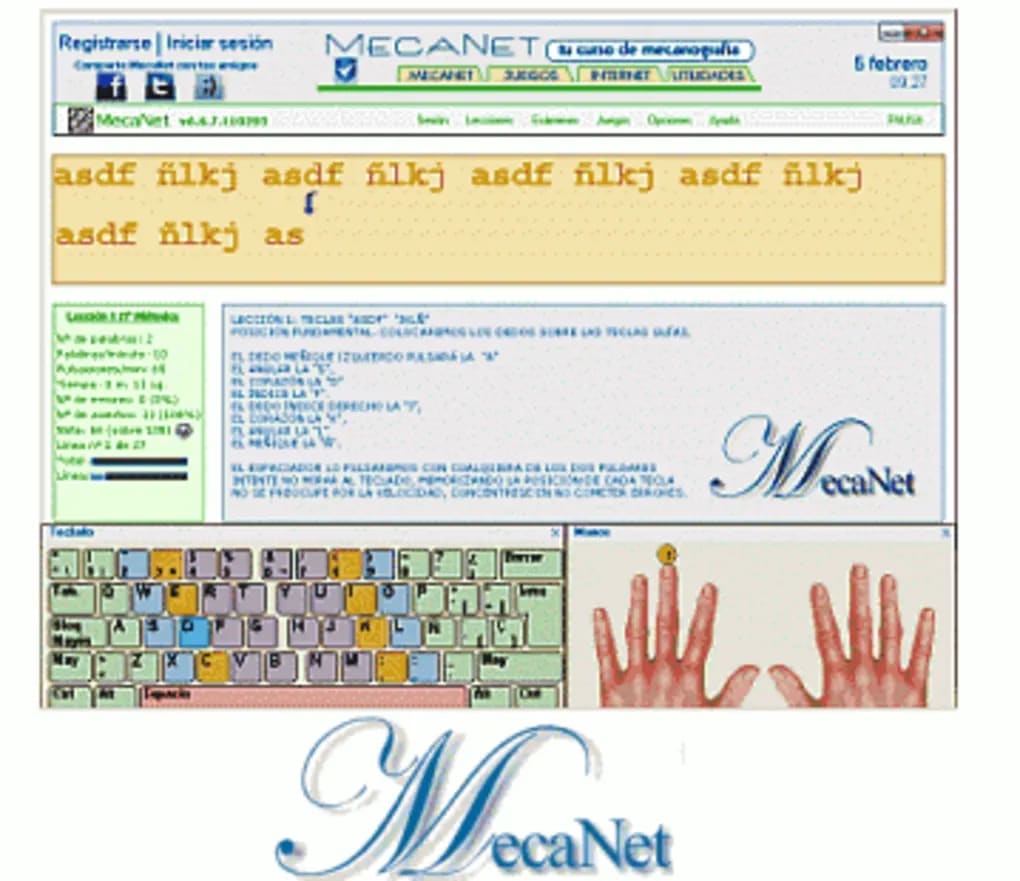
The software employs a color-coded keyboard to aid beginners in learning the correct finger placement for each key. This visual cue simplifies the learning process, making it easier for users to follow the on-screen text and accurately replicate the letter combinations. The program’s intuitive interface and clear instructions guide users through each lesson, ensuring a smooth learning curve, even for those with no prior typing experience.
Comprehensive Lessons and Progressive Difficulty
MecaNet-Collection boasts over 20 typing lessons, each carefully designed to build upon the skills learned in previous lessons. The progressive difficulty ensures that users are consistently challenged but not overwhelmed. The lessons cover various aspects of typing, including:
- Individual key practice: Early lessons focus on mastering individual keys, helping users develop muscle memory and accurate finger placement.
- Coordination and accuracy exercises: As users progress, the lessons introduce exercises designed to improve coordination and accuracy when typing multiple keys and words.
- Word and sentence typing: Intermediate and advanced lessons focus on typing words and sentences, building fluency and speed.
- Numerical keypad practice: MecaNet-Collection also includes dedicated lessons for learning the numerical keypad, a feature often overlooked in other typing tutors.
This comprehensive curriculum ensures that users develop a well-rounded skill set, encompassing both accuracy and speed. The ability to track progress allows users to monitor their improvement and identify areas requiring further attention.
Gamified Learning and Engaging Breaks
Recognizing that consistent practice can sometimes be monotonous, MecaNet-Collection incorporates classic games like Snake and Tetris. These games provide a welcome break from the typing exercises, allowing users to relax and rest their fingers before returning to their lessons. The inclusion of games serves a crucial purpose: it breaks up the intensity of the typing practice, preventing burnout and maintaining motivation. This gamified approach makes the learning process more enjoyable and sustainable.
Features and Functionality: A Detailed Overview
MecaNet-Collection offers a range of features designed to enhance the learning experience:
- User profiles: Users can create profiles to track their progress, including errors, words per minute (WPM), and overall improvement. This feature provides valuable insights into learning patterns and allows users to monitor their progress effectively.
- Timed tests: The program includes timed typing tests to assess speed and accuracy, providing a quantifiable measure of improvement. These tests help users identify areas where they need to focus their efforts.
- Keyboard layout visualization: The clear visual representation of the keyboard, coupled with color-coded keys, greatly assists beginners in understanding proper finger placement.
- Multiple difficulty levels: The lessons are categorized into different difficulty levels, allowing users to tailor their learning experience to their skill level. This ensures that users are challenged appropriately and are not discouraged by excessively difficult exercises.
- Progress tracking: The ability to monitor performance across lessons provides motivation and allows users to focus their practice on areas requiring improvement.
These features combine to create a comprehensive and user-friendly typing learning environment. The design choices reflect a deep understanding of the learning process and the potential challenges faced by users.
Comparison with Other Typing Tutors
While MecaNet-Collection offers a robust and effective approach to learning typing, it’s essential to compare it with other popular typing tutor software. Many competitors offer similar features, but MecaNet-Collection distinguishes itself through:
- Its traditional, structured approach: Some modern typing tutors prioritize gamification over structured lessons, potentially neglecting the development of fundamental typing skills. MecaNet’s focus on traditional methods ensures that users build a solid foundation.
- Its inclusion of a numerical keypad lessons: Many typing tutors omit practice with the numerical keypad, a critical skill for many tasks. MecaNet’s comprehensive coverage ensures users are well-equipped for diverse typing scenarios.
- Its simple and intuitive interface: While some typing tutors feature overly complex interfaces, MecaNet’s clean and user-friendly design makes it accessible to users of all technical skill levels.
However, MecaNet-Collection’s older interface might be considered a drawback compared to some more visually appealing and modern competitors. The lack of a reward system, common in many modern educational software, may also reduce motivation for some users.
Conclusion: A Solid Choice for Typing Proficiency
MecaNet-Collection provides a solid and effective pathway to mastering keyboard skills. Its systematic approach, combining structured lessons with engaging games, creates a balanced and enjoyable learning experience. While its interface may appear dated compared to some modern alternatives, its focus on fundamental typing skills and its comprehensive coverage, including the numerical keypad, make it a strong contender for users seeking to improve their typing speed and accuracy. The progressive difficulty levels cater to users of all skill levels, ensuring a tailored and effective learning journey. While the absence of a reward system might be a minor drawback for some, the software’s effectiveness and comprehensive approach outweigh this limitation for many users. Ultimately, MecaNet-Collection remains a valuable tool for anyone aiming to enhance their typing proficiency.
File Information
- License: “Free”
- Latest update: “June 2, 2025”
- Platform: “Windows”
- OS: “Windows XP”
- Language: “English”
- Downloads: “61.9K”
- Size: “5.04 MB”


