
In an increasingly digital world, where every moment is captured and stored across a multitude of devices, the challenge of managing personal media has grown exponentially. From high-resolution photographs taken on professional cameras to spontaneous video clips recorded on smartphones, the sheer volume and diversity of digital assets can quickly become overwhelming. This is where specialized tools like Media Importer step in, offering a streamlined and efficient solution to bridge the gap between your capturing devices and your computer’s organized storage. Developed by ST Soft, Media Importer for Windows is designed specifically to simplify the process of transferring images and videos, transforming a potentially arduous task into a quick and hassle-free experience.
At its core, Media Importer is a dedicated utility focused on one crucial function: facilitating the secure and organized import of your visual media. It recognizes the inherent need for users to move their precious memories from temporary storage mediums like camera memory cards and USB drives to the more permanent and accessible environment of a personal computer. But it goes beyond a simple copy-paste operation; it introduces a layer of intelligent organization and customization that empowers users to take control of their digital archives from the very first step of the import process. This article will delve into the functionalities, benefits, and overall value proposition of Media Importer, exploring how it serves as an indispensable tool for anyone looking to maintain a tidy and accessible digital media library.
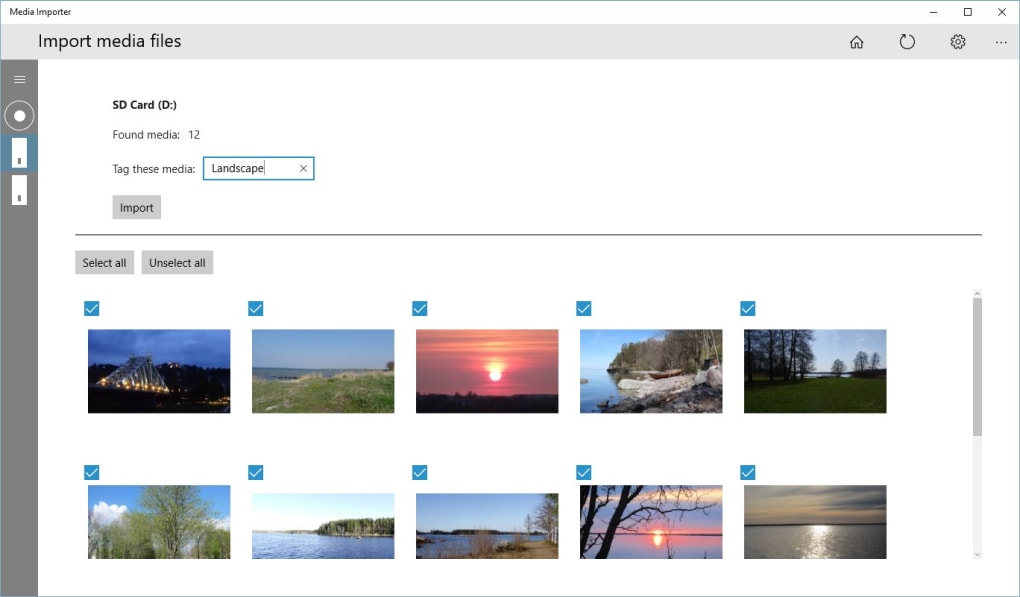
What is Media Importer? Bridging Your Devices to Your PC
Media Importer by ST Soft is a full-version program available for Windows that focuses entirely on the critical task of moving images and videos from various external sources to your computer. In an era where digital cameras, smartphones, and other recording devices generate vast amounts of media, the need for a reliable and efficient import solution is paramount. This application addresses that need directly, providing a robust platform for seamless media transfer.
Core Functionality: Seamless Media Transfer
The primary purpose of Media Importer is to provide a dedicated channel for importing media. When you connect a camera, an SD card, or any other USB storage device containing photos and videos, the application acts as an intelligent intermediary. Instead of forcing users to manually navigate device folders, copy files, and then paste them into a desired location – a process prone to errors, missed files, and disorganization – Media Importer automates and streamlines this workflow. It identifies new media content on the connected device and presents options for importing it to your computer. This focus on import only means that the software is highly optimized for this specific task, ensuring speed, reliability, and data integrity throughout the transfer. For instance, if you have a camera with hundreds or thousands of photos and videos, Media Importer ensures that every file is accounted for and transferred without corruption, which can sometimes be a concern with manual drag-and-drop methods, especially for large batches of data.
Beyond Simple Copy-Paste: Organization at Its Best
One of the standout features of Media Importer, and what truly elevates it beyond a basic file transfer tool, is its emphasis on organization. The application understands that simply moving files from one place to another isn’t enough; they need to be stored in a way that makes them easy to find and manage later. To this end, Media Importer offers comprehensive settings that allow users to dictate the naming conventions of files and the structure of folders where the media will reside.
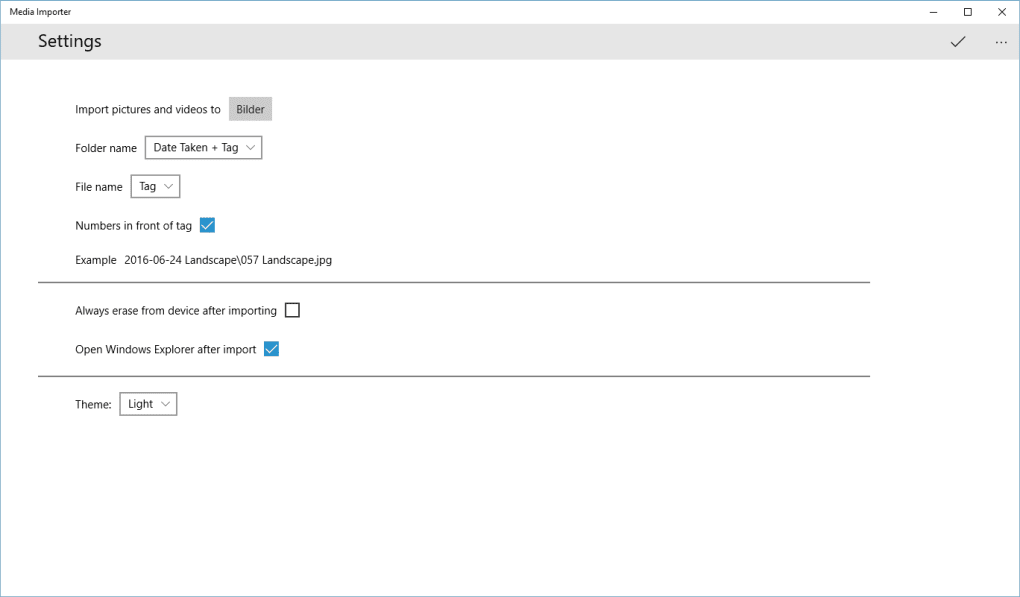
Imagine importing photos from a family vacation. Instead of ending up with a folder full of generic filenames like “IMG_0001.JPG,” “VID_0002.MP4,” and so on, Media Importer allows you to define a naming scheme. You could append the date the photo was taken, add a descriptive prefix like “Vacation_Hawaii,” or even include a sequential number unique to that import session. Similarly, for folder organization, you can configure the application to create new folders based on the import date (e.g., “2023-07-06”), the source device, or a custom event name you provide. This level of foresight in organization is invaluable, as it lays the groundwork for a clean and searchable media library from the moment files land on your PC. It saves countless hours that would otherwise be spent manually renaming and sorting files after the fact, ensuring consistency and reducing the likelihood of misplaced or duplicate content.
Key Features at a Glance
- Direct Import: Effortlessly imports images and videos from digital cameras, SD cards, and USB devices.
- Custom Naming: Allows users to define custom naming conventions for imported files, incorporating dates, custom text, and sequential numbers.
- Intelligent Folder Creation: Supports automatic folder organization based on user-defined rules, such as import date, source, or event.
- Streamlined Workflow: Simplifies the entire media transfer process, from device detection to final organization on the computer.
- Dedicated Focus: Unlike bloated multimedia suites, Media Importer specializes solely in importing, ensuring high performance and reliability for this specific task.
- Full Version Software: Offers complete functionality without limitations, providing a robust solution for regular media management.
User Experience and Interface: Designed for Efficiency
The effectiveness of any utility software hinges significantly on its user experience. Media Importer, despite its specialized function, is crafted to be highly accessible, catering to both seasoned digital media managers and casual users alike. Its interface and workflow prioritize clarity and efficiency, ensuring that the process of importing media is as straightforward as possible, minimizing potential points of confusion or error.
Intuitive Workflow for Every User
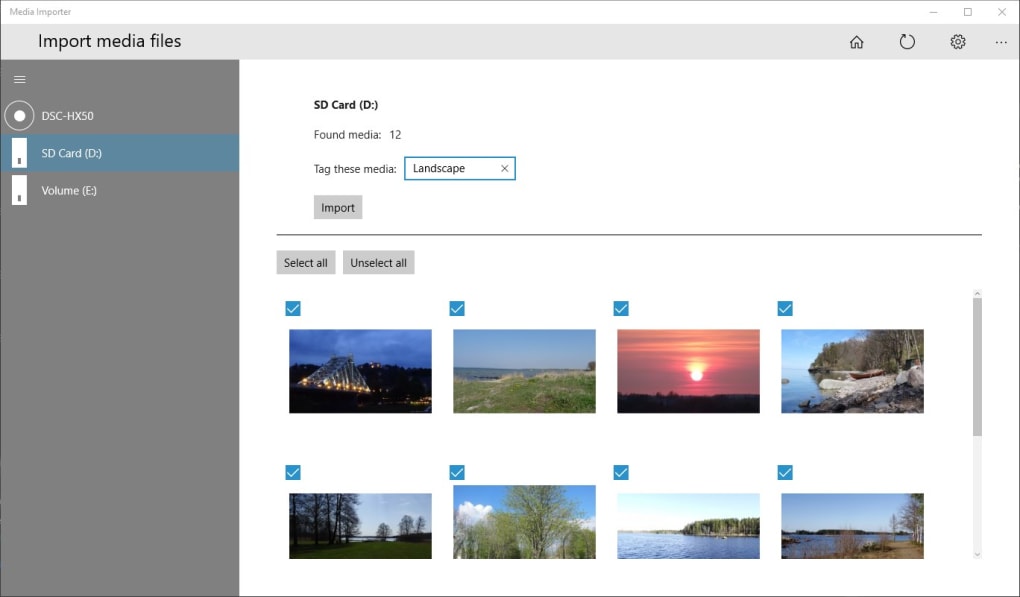
From the moment a compatible device (camera, SD card via a reader, or USB drive) is connected to the Windows PC, Media Importer is designed to guide the user through the necessary steps. The application typically detects the connected media source, presenting the user with a clear path to initiate the import. This intuitive flow often involves a series of prompts or a wizard-like interface that walks you through selecting the source, choosing a destination folder on your computer, and applying any desired organizational settings.
This step-by-step approach ensures that even users who are not tech-savvy can confidently transfer their media. The visual cues and simple language used within the application’s interface help demystify the technical aspects of file transfer, making it approachable. The goal is to make the act of backing up or moving photos and videos from a device to a computer a routine, non-intimidating task, thereby encouraging regular media management and preventing the accumulation of untransferred data on memory cards. The simplicity allows users to focus on what matters most: preserving their memories, rather than wrestling with complex software.
Customization Options for Personalized Management
While simplicity is a core tenet, Media Importer doesn’t shy away from offering powerful customization. The “different settings to facilitate the process” mentioned in the description are key to its flexibility. Users are not locked into a one-size-fits-all approach. Instead, they can tailor the import process to their specific needs and preferences.
For example, when it comes to file naming, users might have distinct preferences. A professional photographer might want files named with a specific client code and date, while a parent might prefer filenames that include the event and child’s name. Media Importer caters to these varied requirements by offering templates or custom fields for naming. Similarly, folder organization can be deeply personalized. Users can choose to create a single main “Imports” folder with subfolders automatically generated by date, or they can opt for event-specific folders, ensuring that all media related to a particular occasion is grouped together. This level of personalization is crucial for maintaining a truly manageable and consistent media library over time, adapting to individual workflows rather than imposing a rigid structure.
Performance and Reliability
Performance and reliability are critical for any software handling valuable personal data. Media Importer is built to be a dependable utility. The underlying mechanisms ensure that files are transferred accurately and without corruption. This means managing potential transfer errors gracefully, and if a large number of files are being moved, ensuring that the process is efficient without unnecessarily bogging down the system.
A significant aspect of its reliability, as highlighted by a user review on PhanMemFree, is its ability to recover data. HappyBigKnows, reviewing on March 19, 2023, stated, “Works every single time. It will even find photos if I accidentally format the card.” This testament speaks volumes about the robustness of the software. The ability to locate and potentially recover files even after an accidental format underscores a sophisticated level of data handling and error recovery built into the application. While it’s not explicitly marketed as a data recovery tool, this user experience suggests that it possesses advanced capabilities to scan and identify media, even in less-than-ideal circumstances. This level of dependability offers immense peace of mind to users, knowing their precious memories are in capable hands during the transfer process.
Why Choose Media Importer? Advantages for Digital Content Creators and Enthusiasts
In a market saturated with generic file management tools and robust, all-encompassing multimedia suites, Media Importer carves out a niche for itself by specializing in one core function: media import and initial organization. This focused approach yields several distinct advantages, particularly for individuals who regularly manage significant volumes of digital images and videos.
Time-Saving Automation
One of the most immediate and tangible benefits of Media Importer is the significant amount of time it saves. Manually importing media involves several repetitive steps: connecting the device, opening multiple file explorer windows, navigating to the correct folders on both the source and destination, dragging and dropping files, and then, often, manually renaming and sorting them. This process is not only tedious but also prone to human error, such as overwriting files, duplicating content, or misplacing files in the wrong folder.
Media Importer automates much of this workflow. Once configured with your preferred naming conventions and folder structures, it can execute these tasks consistently with every import. This means less time spent on administrative file management and more time available for creative endeavors like editing photos, producing videos, or simply enjoying the captured moments. For professionals like photographers, videographers, or even social media managers, this automation translates directly into increased productivity and efficiency, allowing them to focus on their core work rather than on the mechanics of data transfer. The initial setup might take a few minutes, but the cumulative time saved over weeks, months, and years of media management can be substantial.
Protecting Your Precious Memories
Beyond efficiency, Media Importer plays a crucial role in the preservation of digital memories. The act of transferring files from a camera’s memory card or a phone’s internal storage to a computer is often the first step in a broader backup strategy. Memory cards, while convenient, are not infallible and can be lost, corrupted, or accidentally formatted. Relying solely on these temporary storage solutions is a risk.
By providing a reliable and structured import process, Media Importer encourages users to regularly offload their media. The assurance that the software “works every single time” and can even “find photos if I accidentally format the card,” as one PhanMemFree user noted, instills confidence. This reliability minimizes the risk of data loss during transfer and ensures that your photos and videos are safely moved to a more stable storage environment on your PC, where they can then be further backed up to external drives or cloud services. This initial organized transfer is the bedrock of a robust digital archiving system, securing irreplaceable moments for the long term.
The Importance of a Dedicated Importer
In today’s software landscape, there’s often a push towards all-in-one solutions that promise to do everything. While these can be convenient for some, they often come with compromises in terms of performance, specialized features, or a cluttered interface. Media Importer’s strength lies in its dedicated focus. It doesn’t attempt to be an image editor, a video player, or a comprehensive multimedia management suite. Instead, it concentrates solely on the import process.
This specialization allows ST Soft to optimize the application for its specific task, ensuring that it performs exceptionally well and reliably within its defined scope. A dedicated importer avoids the bloat and complexity often associated with larger software packages. It means faster launches, less resource consumption, and a user interface that is purpose-built for media transfer, rather than trying to juggle multiple functionalities. For users who already have preferred editing or viewing software, Media Importer integrates seamlessly into their existing workflow, acting as the perfect first step in their media processing pipeline without adding unnecessary features they won’t use. This streamlined approach often translates to a more stable and efficient tool.
Understanding Its Scope: What Media Importer Is Not
To fully appreciate Media Importer, it’s equally important to understand what the program is not designed to do. The developer, ST Soft, has clearly defined the application’s boundaries, which helps set appropriate user expectations and highlights its specialized nature. Media Importer is a focused tool, and its strength comes from this specificity.
Not an All-in-One Multimedia Suite
Many users might come across the term “media” and instantly think of software that can play videos, edit photos, convert file formats, and manage an entire library of digital assets from a single interface. Media Importer is none of these. It explicitly states that it “is not an image viewer, video player, or format converter.” This distinction is crucial because it informs users that while the software is excellent at getting your media onto your computer in an organized fashion, it will not help you interact with that media beyond the transfer.
This deliberate limitation is a design choice that reflects a commitment to efficiency and specialization. Instead of attempting to be a jack-of-all-trades, Media Importer excels as a master of one. Users requiring editing capabilities, playback features, or format conversions will need to rely on other, purpose-built applications for those functions. This approach ensures that Media Importer remains lightweight, fast, and highly reliable for its intended purpose, without the overhead and potential complications that often come with trying to bundle too many disparate functionalities into a single piece of software. It integrates seamlessly into an ecosystem of specialized tools rather than trying to replace them all.
Focus on Import, Not Editing or Viewing
The phrase “Media Importer is not an image viewer, video player, or format converter” cannot be overstated. Its singular focus is on the acquisition and initial organization of media files from external devices. This means that after you’ve successfully imported your photos and videos using Media Importer, you’ll need to use other programs installed on your Windows system to view them (e.g., Windows Photos app, VLC Media Player), edit them (e.g., Adobe Photoshop, GIMP, DaVinci Resolve), or convert their formats (e.g., HandBrake, FFMPEG).
This specialized scope can be a significant advantage. By not diverting resources into developing and maintaining complex viewing or editing modules, ST Soft can dedicate all its efforts to perfecting the import mechanism. This results in a more stable, faster, and more effective tool for its core function. It also means that users are free to use their preferred tools for post-import tasks, rather than being locked into a particular ecosystem’s bundled viewers or editors, which might not meet their specific needs or professional requirements. For anyone seeking a robust, no-frills solution purely for transferring and organizing media from devices to PC, Media Importer fits the bill perfectly. It acts as the diligent gatekeeper for your digital memories, ensuring they arrive safely and in order, ready for whatever creative or archival tasks you have planned next.
Technical Specifications and Availability
Understanding the technical foundations and accessibility of Media Importer helps users determine its compatibility with their existing systems and provides insight into the developer’s commitment to ongoing support. This section outlines the essential details for prospective users.
System Requirements and Compatibility
Media Importer is designed specifically for the Windows operating system. The provided information specifies “Platform: Windows” and “OS: Windows 10,” suggesting that it is optimized for and fully compatible with the most widely used version of Microsoft’s operating system. While older versions of Windows might theoretically run the software, optimal performance and full feature set are likely guaranteed on Windows 10. The system requirements are generally modest for an application of this type, as its primary function is data transfer rather than intensive processing like video rendering. This means it should run smoothly on a wide range of Windows 10 desktops and laptops without demanding excessive system resources. As a “full version program,” it implies that there are no trial limitations or locked features; users gain access to the complete functionality upon acquisition.
Developer and Licensing
The software is developed by ST Soft. This provides a clear point of contact and responsibility for the application. Knowing the developer is important for support inquiries, updates, and general trustworthiness. The license is categorized as “Full Version” and “Paid.” This indicates that Media Importer is commercial software requiring a purchase to use its full capabilities. While many free alternatives or basic utilities exist for file transfer, the “Paid” model often suggests a higher level of development, ongoing support, and dedication to specialized features like advanced organization and reliability, which might not be present in free tools. The price point, though not specified in the snippet, would typically reflect the value of its time-saving features and robust performance.
User Feedback: A Testament to Reliability
User reviews are invaluable indicators of a software’s real-world performance and user satisfaction. Media Importer holds a rating of “3.3(5)” based on user feedback on PhanMemFree. While this isn’t a perfect 5-star rating, it suggests a generally positive reception. More importantly, the specific review from “HappyBigKnows” on March 19, 2023, is highly illustrative: “Works every single time. It will even find photos if I accidentally format the card.”
This particular piece of feedback highlights several key strengths:
- Consistent Performance: “Works every single time” speaks to the reliability and stability of the application. Users need a tool they can depend on for critical tasks like media transfer.
- Robustness and Error Handling: The ability to “even find photos if I accidentally format the card” points to an exceptional level of data scanning and recovery capability. While not a primary data recovery tool, this feature adds a significant layer of security and peace of mind, suggesting the software can go beyond simple file copying to intelligently identify and retrieve media even from partially corrupted or formatted storage devices. This review underscores the value proposition of Media Importer as a dependable, robust, and potentially life-saving tool for digital media management. The fact that it was last updated on July 6, 2023, also indicates ongoing developer support and commitment to maintaining and improving the software. With 2.3K downloads last month reported on PhanMemFree, it demonstrates a consistent user base actively seeking its specialized capabilities.
How Media Importer Fits into Your Digital Workflow
Integrating Media Importer into your daily or weekly digital routine can significantly enhance efficiency, security, and overall organization of your media assets. Its specialized nature makes it a perfect component in a multi-tool digital workflow, complementing other applications rather than trying to replace them.
For Photographers and Videographers
Professional and serious amateur photographers and videographers are perhaps the primary beneficiaries of a tool like Media Importer. They frequently handle large volumes of high-resolution images and video clips from multiple cameras, drones, and other recording devices. The challenges they face include:
- Massive File Sizes: RAW images and 4K/8K video files quickly consume storage. Efficient transfer is paramount.
- Project-Based Organization: Media needs to be sorted by client, project, date, or event for easy retrieval during editing.
- Data Integrity: Losing a single shoot can be catastrophic. Secure transfer and initial backup are critical.
- Post-Production Workflow: Imports are the first step, feeding into powerful editing suites like Adobe Lightroom, Photoshop, Premiere Pro, DaVinci Resolve, or Final Cut Pro.
Media Importer addresses these directly. By automating filename and folder structuring based on project names, dates, or sequential numbering, it ensures that media is perfectly categorized from the moment it hits the hard drive. This saves valuable post-production time that would otherwise be spent on manual sorting and renaming. Its reliability in finding files, even after a card might seem formatted, adds a layer of protection against accidental data loss, ensuring that every captured frame makes it safely to the computer for further processing. This allows creators to focus on their artistic vision rather than tedious administrative tasks.
For Everyday Users
Beyond professionals, everyday users with smartphones, compact cameras, and action cameras also stand to gain immensely from Media Importer. While they might not be dealing with gigabytes of RAW files daily, the casual capture of family events, vacations, and everyday moments still accumulates rapidly. The common pain points for general users include:
- Disorganization: Photos and videos often end up in a single, undifferentiated folder, making them hard to find later.
- Full Devices: Phone storage fills up, prompting the need to transfer media.
- Lack of Backup: Many users rely solely on their phone or camera, risking permanent loss if the device is damaged or lost.
- Technical Intimidation: Manual file transfer can seem daunting for those less tech-savvy.
Media Importer simplifies this for them. The intuitive interface guides them through the import process, making it less intimidating than manual folder navigation. The automated naming and folder creation help establish an organized archive without requiring any manual effort from the user. For instance, holiday photos can automatically go into a “2023_SummerVacation” folder, with files named “SummerVacation_Day1_001.jpg.” This promotes regular media offloading, preventing devices from filling up and ensuring that precious family memories are safely backed up onto the computer, where they can be enjoyed for years to come. It fosters good digital hygiene without adding complexity.
Enhancing Data Management Practices
Ultimately, Media Importer is a tool that enhances fundamental data management practices. In an age where digital assets are plentiful and valuable, robust systems for handling them are essential.
- Consistency: It enforces consistent naming and organizational standards, which is key to long-term data manageability.
- Redundancy (as part of a strategy): By facilitating easy transfer to a primary storage location, it serves as the crucial first step in creating redundant backups.
- Efficiency: It reduces the time and effort required for media management, freeing users for more productive or enjoyable activities.
- Peace of Mind: Knowing that media is securely and systematically transferred protects against loss and ensures accessibility.
By providing a dedicated, reliable, and customizable solution for importing images and videos, Media Importer by ST Soft proves to be an indispensable asset for anyone serious about managing their digital memories. Its focus on efficiency and organization makes it a powerful utility that smoothly integrates into diverse digital workflows, enabling users to maintain control over their ever-growing collection of visual content.
In conclusion, Media Importer offers a compelling solution for a common digital dilemma. It is not a flashy, feature-rich multimedia suite, nor does it aim to be. Instead, it is a highly specialized and exceptionally reliable tool that excels at its core function: the intelligent and organized transfer of images and videos from capturing devices to your Windows PC. Its customizable settings for file naming and folder creation transform a mundane chore into an efficient, automated process, ensuring that your digital memories are preserved and easily accessible from the moment they are imported. For anyone grappling with growing volumes of digital media, Media Importer stands out as a focused, effective, and indispensable utility from PhanMemFree for maintaining a tidy and secure digital archive.
PhanMemFree in: عربيDeutschEnglishEspañolFrançaisBahasa IndonesiaItaliano日本語한국어NederlandsPolskiPortuguêsРусскийSvenskaภาษาไทยTürkçeTiếng Việt中文
Copyright PHANMEMFREE INTERNATIONAL S.A. © 1997–2025 — All rights reserved. In PhanMemFree we scan all the files hosted on our platform to assess and avoid any potential harm for your device. Our team performs checks each time a new file is uploaded and periodically reviews files to confirm or update their status. This comprehensive process allows us to set a status for any downloadable file. PhanMemFree may receive a referral fee if you click or buy any of the products featured here.
File Information
- License: “Full”
- Version: “varies-with-device”
- Latest update: “July 6, 2023”
- Platform: “Windows”
- OS: “Windows 10”
- Language: “English”
- Downloads: “2.3K”


