
In the vast and ever-evolving landscape of internet utilities, specific tools emerge to address particular needs, often gaining considerable traction within their niche. One such application was MegaUploader, a dedicated download manager designed to streamline the process of acquiring files from the MEGA cloud storage service. Conceived by Andres Soliño, MegaUploader carved out its place as a popular, free software solution exclusively for Windows users, specifically targeting those operating on Windows XP and earlier versions. It exemplified a category of software that, at its peak, was indispensable for efficient online activity: the download manager.
While the modern internet often offers seamless, in-browser downloading experiences, there was a time when dealing with large files, multiple downloads, or unreliable connections made a dedicated tool not just convenient, but essential. MegaUploader stepped into this role, promising a more robust and organized approach to downloading content hosted on MEGA, a service renowned for its secure, encrypted cloud storage and file-sharing capabilities. This article will explore MegaUploader’s features, its historical context, its significance within the broader spectrum of internet and productivity tools, and how it reflects the changing dynamics of online file management.
The Evolution of File Sharing and the Rise of Dedicated Download Managers
The internet’s early days were marked by dial-up connections and often unstable network infrastructures. Downloading anything substantial was an exercise in patience and often frustration. A single dropped connection could mean restarting a several-hour download from scratch. This environment gave birth to the dedicated download manager, a class of software designed to overcome the inherent limitations of standard web browser download functionalities. These managers introduced crucial features like the ability to pause and resume downloads, segment files into smaller chunks for faster concurrent transfers, schedule downloads for off-peak hours, and provide better organization for downloaded content.
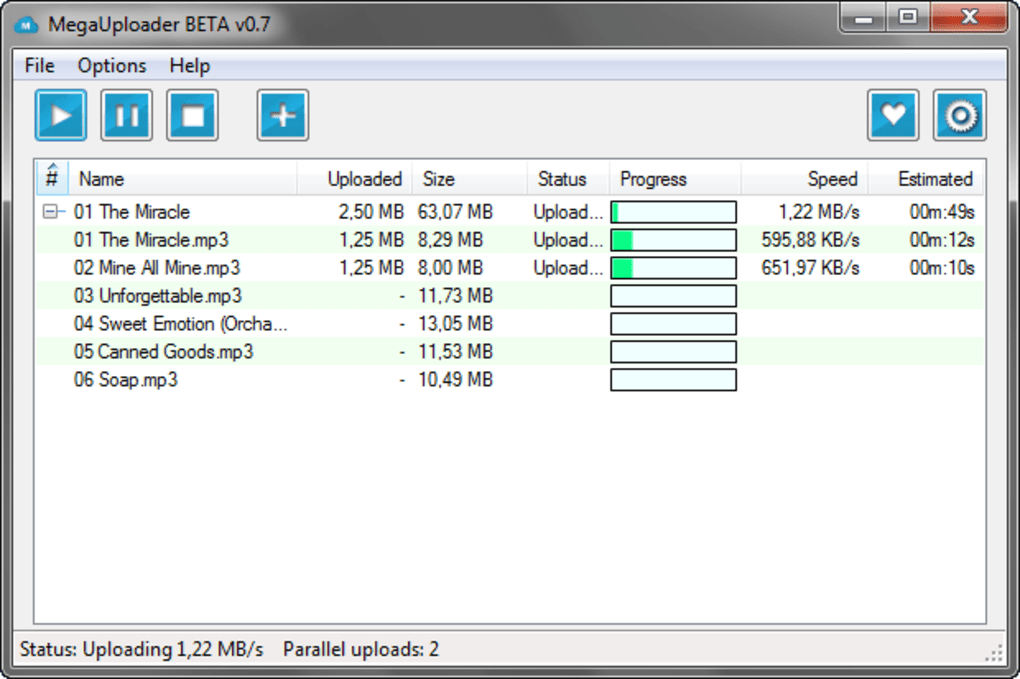
As internet speeds increased and file sizes ballooned with higher quality media and more complex software, the need for efficient download management persisted. Cloud storage services, in particular, became pivotal in how people shared and accessed large amounts of data. MEGA, launched in 2013, quickly became a prominent player, offering generous free storage and a strong emphasis on user privacy through end-to-end encryption. However, while MEGA’s web interface was functional, downloading multiple large files directly through a browser could still be cumbersome, lacking the advanced features that a dedicated download manager offered. This is where MegaUploader found its purpose, acting as a bridge between the robust capabilities of MEGA’s hosting and the user’s desire for an optimized download experience. It aimed to provide the stability and control that browsers typically lacked when dealing with complex or high-volume downloads from a platform like MEGA.
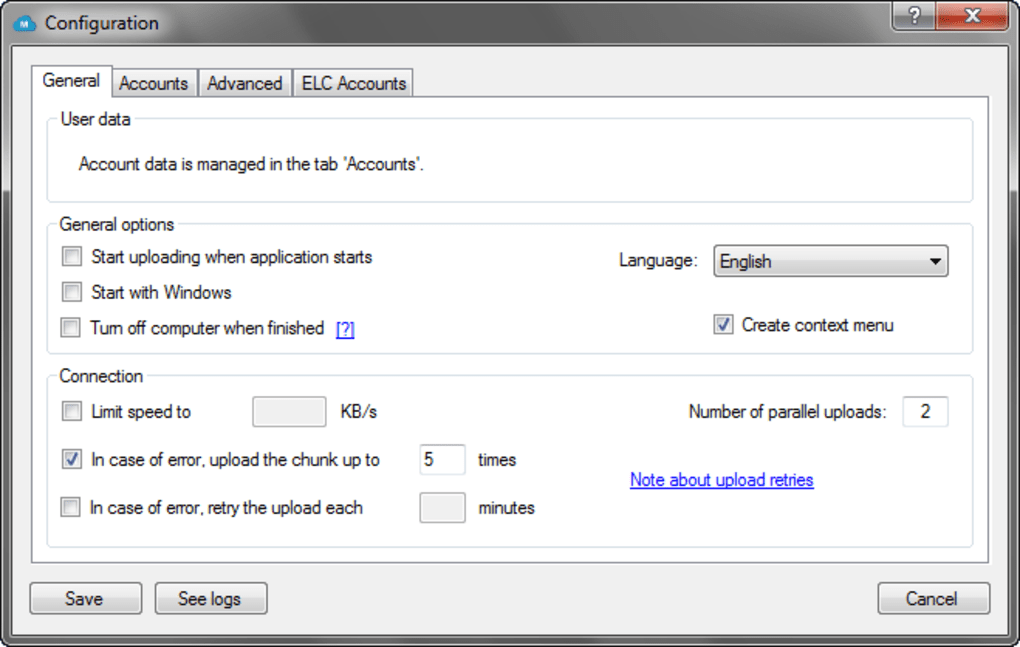
MegaUploader: Features, Specifications, and Its Place in History
MegaUploader, developed by Andres Soliño, represented a focused solution for a particular problem. As a free, lightweight application, it was designed to integrate smoothly with the Windows operating system, offering a specialized pathway to content hosted on MEGA. The application’s core functionality, while not extensively detailed in public records, would have inherently included the standard features expected of a download manager: the ability to queue multiple downloads, pause and resume transfers, and potentially manage file integrity checks. For users who frequently accessed files on MEGA, a tool that could reliably handle large archives or a series of files without constant monitoring was invaluable.
Delving into its technical specifications, MegaUploader reached version 0.7, indicating a relatively early stage of development or a focused feature set. Its last recorded update was on March 9, 2017, suggesting that while it might have been maintained for a period, active development likely ceased around that time. The application was exclusively available for the Windows platform, specifically catering to Windows XP and older versions. This detail is significant, as it positions MegaUploader in an era when Windows XP was still a widely used operating system, despite newer versions being available. Its multilingual support, including English, Spanish, French, and Chinese, demonstrated an ambition for broader international appeal.
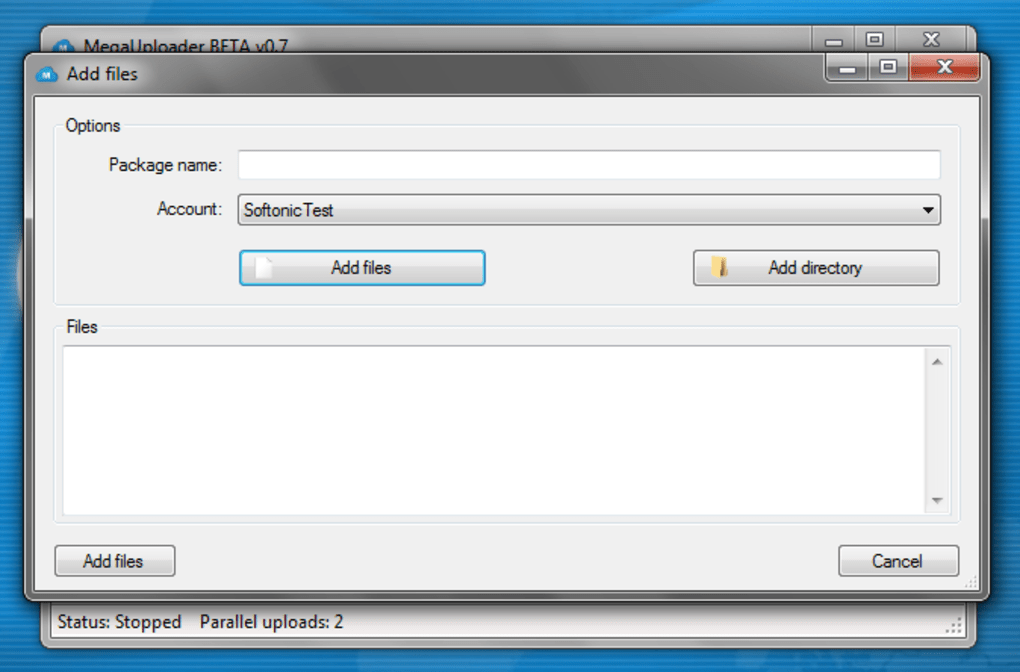
One of MegaUploader’s most notable characteristics was its remarkably small footprint. At just 1.53 MB, it required significantly less storage space compared to many other applications in the downloading software category. This made it an attractive option for users with limited disk space or older systems, aligning with its compatibility for Windows XP. PhanMemFree’s catalog initially added the program in 2013, and while it accumulated 7.1K downloads over its lifetime, the recent download figures (5 last month, 0 last week) paint a picture of an application whose active usage has largely faded, likely due to shifting technological landscapes and the discontinuation of development. Despite its current dormancy, MegaUploader played a specific, valuable role for Windows users interacting with MEGA in its prime.
Internet & Network: The Core of MegaUploader’s Functionality
Within the vast ecosystem of software categories, MegaUploader firmly belongs to the “Internet & Network” domain, specifically nestled under “Download Managers.” This categorization is not merely administrative; it speaks to the fundamental purpose and technical underpinnings of the application. Download managers are designed to enhance and optimize the way data is transferred over the internet. MegaUploader’s specialized focus on MEGA downloads positioned it as a crucial component for users who relied heavily on that particular cloud service for file exchange.
The role of a download manager like MegaUploader extends beyond simply initiating a file transfer. It acts as an intelligent intermediary between the user’s computer and the remote server hosting the files. This intelligence manifests in several ways. Firstly, by leveraging advanced download protocols, these managers can often achieve faster transfer speeds than standard browser downloads. This is commonly done through techniques like file segmentation, where a single file is split into multiple parts and downloaded concurrently, effectively utilizing more of the available bandwidth. Secondly, and perhaps most crucially, download managers provide robustness. In an environment prone to connection interruptions, the ability to pause a download and resume it later from the exact point of interruption prevents the frustrating loss of progress. For large files hosted on MEGA, this feature alone could save users hours of re-downloading.
Comparing MegaUploader to its contemporaries in the “Download Managers for Windows” category, such as Neat Download Manager, Internet Download Manager, and Free Download Manager, reveals a landscape of varied functionalities. While many general-purpose download managers aimed to handle downloads from any source, MegaUploader’s “for MEGA” aspect implied a tailored optimization, possibly understanding specific MEGA API calls or URL structures to enhance efficiency or overcome particular restrictions. In essence, it served as a dedicated conduit, ensuring that files from one of the internet’s largest secure cloud platforms could be accessed on Windows systems with maximum reliability and minimal hassle, making it a valuable utility within the “Internet & Network” tools.
Productivity and Efficiency: Streamlining Your Digital Workflow
In the modern digital age, productivity is paramount. Users constantly seek tools that can optimize their workflows, minimize wasted time, and maximize output. MegaUploader, despite its niche focus, contributed significantly to the productivity of its users by streamlining the often tedious and time-consuming process of downloading files. For anyone frequently interacting with MEGA, this application translated directly into improved efficiency and a smoother digital experience.
One of the most significant ways MegaUploader enhanced productivity was through its ability to handle multiple downloads simultaneously and efficiently. Imagine needing to download a dozen large files from a shared MEGA folder. Attempting this through a standard web browser would likely lead to a chaotic array of tabs, potential browser slowdowns, and the constant need to monitor each individual download’s progress. A dedicated download manager like MegaUploader, however, would allow users to queue all these files, manage their priority, and let the application handle the entire process in the background. This hands-off approach frees up the user to focus on other tasks, effectively multitasking without compromising download integrity.
Furthermore, the ability to pause and resume downloads directly impacts productivity by preventing the loss of progress. If a user’s internet connection falters, or if they need to shut down their computer, the download can be picked up exactly where it left off. This saves not only bandwidth but also the user’s time and patience, preventing the need to restart large downloads from the beginning. For professionals, students, or anyone dealing with significant amounts of data, this feature alone represents a substantial boost in operational efficiency.
Beyond just raw download management, MegaUploader likely contributed to organizational productivity. Download managers often come with features that allow users to categorize files as they are downloaded, or automatically save them to predefined folders based on file type or source. This helps maintain a tidy digital workspace, making it easier to locate downloaded content later. By abstracting the complexities of large file transfers into a simple, queue-based system, MegaUploader allowed users to spend less time managing downloads and more time utilizing the content, thus becoming an important, albeit specialized, tool in their broader productivity suite. It removed friction, turning a potentially frustrating task into a seamless background operation.
Security & Privacy: Navigating the Digital Download Landscape
In an era increasingly defined by cyber threats and data breaches, the security and privacy implications of any software, especially those dealing with internet connections and file transfers, cannot be overstated. When discussing a download manager like MegaUploader, it is crucial to consider how it intersects with the overarching themes of “Security & Privacy.” While the application itself is described as a “free downloading program,” the context of its operation – facilitating downloads from MEGA, a platform lauded for its encryption – naturally brings these concerns to the forefront.
For users, the primary security concern when downloading any file from the internet is malware. A dedicated download manager, if designed responsibly, can actually enhance security by providing more control and transparency over the download process. While MegaUploader’s specific security features are not explicitly detailed, reputable download managers typically focus on ensuring the integrity of the downloaded file. This might involve checks to ensure that the file received is identical to the file sent, preventing tampering during transit. Furthermore, a dedicated application can sometimes offer a more secure connection than a browser, especially if it adheres strictly to secure protocols (like HTTPS) and avoids redirects that could lead to malicious sites.
The mention of “Security Status” in PhanMemFree’s description implies that MegaUploader, like other software listed on the platform, underwent some form of vetting or assessment for common security vulnerabilities. For an older application catering to older operating systems, this aspect is particularly important, as legacy systems are often more susceptible to modern threats if not properly patched or secured.
Privacy is another key consideration. MEGA itself prides itself on end-to-end encryption, meaning that files stored on its servers are encrypted before they leave the user’s device, and only the user holds the key. MegaUploader, as a client-side tool, would ideally respect this privacy model. It would primarily act as a conduit for encrypted data, not as an interceptor. Users would naturally expect that their download manager does not log or transmit information about the files they are downloading or their personal data without explicit consent. In the broader context of “Security & Privacy” tools, while MegaUploader isn’t an antivirus or VPN, it plays a role in the secure handling of data at the application layer, complementing other protective measures like robust antivirus software, firewalls, and VPNs that encrypt all internet traffic. Its small size and focused nature might also mean a smaller attack surface compared to more feature-rich, complex applications, potentially contributing to its reliability for its intended purpose.
MegaUploader within the Windows Ecosystem: A Utility for the OS
MegaUploader’s exclusivity to the Windows operating system is a defining characteristic that firmly places it within the “Utilities & Tools” category relevant to the Windows ecosystem. Developed explicitly for Windows XP and prior versions, it tailored its functionality to the prevailing computing environment of its time. This dedication meant that the application was likely optimized to leverage Windows-specific APIs for file handling, network connections, and user interface elements, providing a native and familiar experience for its target audience.
The fact that MegaUploader was designed for older Windows versions, particularly Windows XP, highlights a specific demographic it aimed to serve. Users of these systems, often with less powerful hardware, benefited greatly from applications that were lightweight and efficient. MegaUploader’s reported size of just 1.53 MB is a testament to this, making it an ideal utility that wouldn’t strain system resources on older machines. For these users, an external download manager wasn’t just a convenience; it was often a necessity to reliably download larger files without bogging down their systems or crashing their browsers.
As a “Utility & Tool,” MegaUploader fit into a broader category of software designed to enhance the core functionality of the operating system. Just as file managers help organize data, and screen capture tools simplify image grabbing, MegaUploader provided a specialized utility for managing downloads. It extended Windows’ native capabilities, offering a more robust and feature-rich method for handling internet file transfers than what the operating system or bundled browsers could natively provide. Its integration into the Windows environment would have been crucial for its adoption, appearing as a natural extension of the user’s desktop experience rather than a cumbersome external application. This made it a valuable addition for Windows users who needed reliable and efficient access to content hosted on MEGA.
Exploring Alternatives and the Evolution of File Management
While MegaUploader served its specific purpose effectively during its prime, the digital landscape is in constant flux. The cessation of active development and its declining download figures reflect significant shifts in how files are managed and downloaded from the internet. The alternatives that exist today, and the evolution of cloud services themselves, offer valuable context for understanding MegaUploader’s historical role and its eventual dormancy.
In the realm of general-purpose download managers, alternatives like Neat Download Manager, Internet Download Manager, and Free Download Manager continue to thrive. These tools have evolved, offering broader compatibility with various platforms and browsers, advanced scheduling, integration with video streaming sites, and often more modern user interfaces. They cater to a wide array of downloading needs, far beyond just a single cloud service.
More significantly, cloud storage providers like MEGA itself have drastically improved their own web interfaces and introduced dedicated desktop synchronization clients. These official clients often provide robust background downloading, file syncing, and integrated file management, making a third-party download manager less necessary for many users. Users can often simply “sync” a folder from the cloud to their local machine, and the client handles all the transfer logistics, including resuming interrupted downloads, more efficiently than a separate utility. Furthermore, modern web browsers have also become far more capable in handling large file downloads, with better support for resuming and more stable connections, diminishing some of the core advantages that dedicated download managers once held.
MegaUploader’s legacy, therefore, is that of a highly specialized and efficient tool from a particular era. It represented a solution to a specific pain point – downloading from MEGA on older Windows systems – that has largely been addressed by advancements in both cloud service offerings and web browser capabilities. Its story is a microcosm of the dynamic nature of software development, where tools emerge to fill gaps, perform admirably, and eventually recede as technology progresses and new solutions emerge.
Conclusion
MegaUploader for MEGA stands as a testament to the specific needs that once characterized the online experience. As a free, lightweight download manager developed by Andres Soliño, it provided a dedicated and efficient solution for Windows XP and earlier users seeking to download files from the MEGA cloud storage service. Its small footprint, multilingual support, and focus on stability made it a valuable utility in its time, streamlining a process that was often cumbersome through standard browser interfaces.
Within the “Internet & Network” category, MegaUploader championed the role of a specialized download manager, enhancing user “Productivity and Efficiency” by offering reliable file transfers, pause-and-resume capabilities, and better organization. While “Security & Privacy” concerns are ever-present in online activities, its “Security Status” and focused functionality within the “Windows Ecosystem” hinted at a responsibly developed tool. However, like many specialized applications, MegaUploader’s active relevance has waned, overshadowed by advancements in cloud services and browser technology. Its journey from a functional, sought-after tool to a historical artifact reflects the continuous evolution of the digital landscape, reminding us how quickly specific utilities can rise to prominence and then gently fade as new, integrated solutions emerge. Yet, its contribution to a specific user base during its operational years remains a notable chapter in the history of internet software tools.
File Information
- License: “Free”
- Version: “0.7”
- Latest update: “March 9, 2017”
- Platform: “Windows”
- OS: “Windows XP”
- Language: “English”
- Downloads: “7.1K”
- Size: “1.53 MB”


