
Meshroom is a powerful, open-source software application that allows users to reconstruct three-dimensional (3D) models from a series of photographs. This process, known as photogrammetry, transforms two-dimensional images into intricate 3D representations, opening up exciting possibilities for various applications, from artistic endeavors to engineering projects. This guide delves into the functionalities, workflow, strengths, and limitations of Meshroom, providing a comprehensive overview for both novice and experienced users.
Understanding Meshroom’s Capabilities
At its core, Meshroom automates the complex process of photogrammetry, taking the user from a collection of overlapping photographs to a complete 3D model. This involves several crucial steps, all handled seamlessly within Meshroom’s intuitive interface. The software excels at processing image data to identify common features between photographs, creating a point cloud that serves as the foundation for the 3D model. This point cloud, a dense collection of three-dimensional points, is then processed to generate a textured mesh, a surface representation of the object that captures both its shape and appearance. The final output is a high-quality 3D model ready for further manipulation, rendering, or 3D printing.
Meshroom’s capabilities extend beyond basic 3D model creation. The software offers various parameters and options for fine-tuning the reconstruction process, allowing users to optimize the final model according to their specific needs. These adjustments can involve controlling the density of the point cloud, the level of detail in the mesh, and the texture mapping process, ensuring the resulting 3D model is both accurate and aesthetically pleasing. This adaptability makes Meshroom suitable for a broad range of applications, catering to different skill levels and project requirements.
The Meshroom Workflow: A Step-by-Step Guide
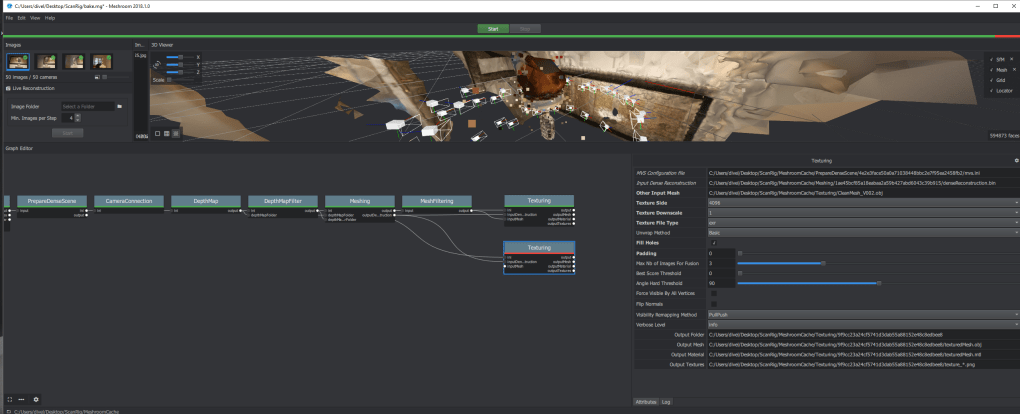
The process of creating a 3D model in Meshroom is surprisingly straightforward, guided by a user-friendly interface designed to simplify the complex photogrammetry workflow. The steps generally involve:
-
Image Acquisition: The foundation of any successful 3D reconstruction is a high-quality set of overlapping photographs. These images should capture the subject from various angles, ensuring sufficient coverage and detail. The optimal number of photographs will depend on the complexity of the object, but generally, 10 to 20 images are a good starting point, with more images providing a richer dataset. It’s crucial to ensure even lighting and avoid motion blur or significant changes in perspective between successive images.
-
Project Creation and Image Import: In Meshroom, users initiate a new project by specifying a project directory. They then import the set of photographs into the project. Meshroom automatically identifies and processes image metadata, laying the groundwork for the subsequent steps.
-
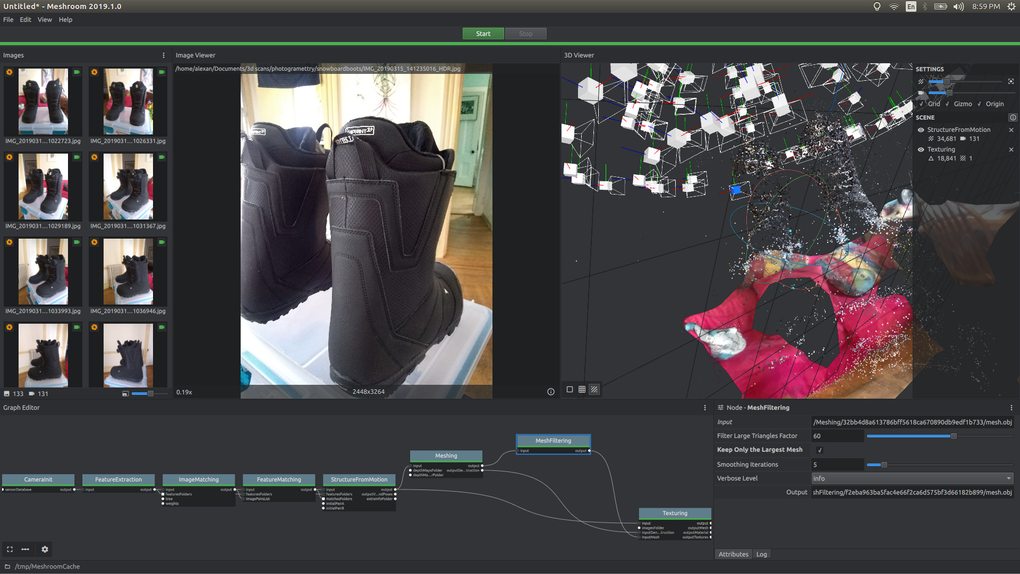
Feature Extraction and Matching: Meshroom uses sophisticated algorithms to extract distinctive features from each image. These features are then compared and matched across different photographs to determine corresponding points in the images. This step is crucial for establishing spatial relationships between images and creating the initial point cloud.
-
Camera Pose Estimation: This stage involves determining the position and orientation of the camera for each photograph. Based on the feature matching, Meshroom calculates the relative positions of the camera for each image, constructing a virtual representation of the camera’s movement during the image acquisition process. Accurate camera pose estimation is essential for correctly aligning the images and producing a realistic 3D model.
-
Depth Map Generation: Meshroom utilizes the camera pose information and matched features to generate depth maps for each image. Depth maps are essentially representations of the distance between the camera and objects in the scene, providing essential information for constructing the three-dimensional point cloud.
-
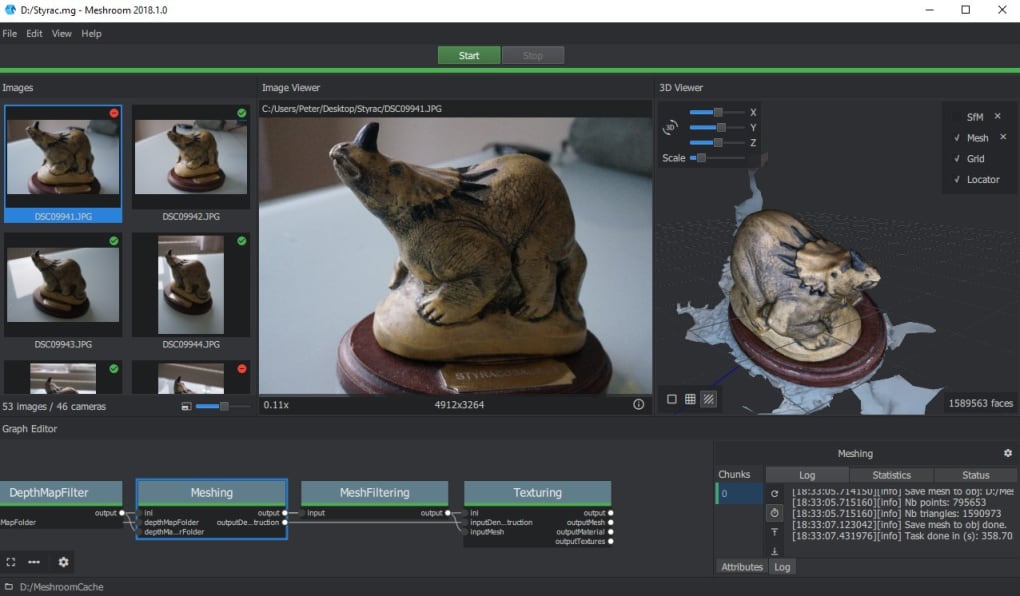
Mesh Reconstruction: Once the depth maps are created, Meshroom constructs a dense point cloud by merging the information from all the images. This point cloud is then converted into a textured mesh representing the surface of the object. This mesh is a collection of interconnected triangles forming a 3D representation of the shape and texture. The software employs algorithms to fill in gaps and smooth the surface, resulting in a clean and visually appealing 3D model.
-
Texture Generation: The final step is texture generation. Meshroom takes the original images and maps the texture onto the mesh, providing the 3D model with realistic color and surface detail. This process involves associating each point on the mesh with corresponding pixels from the original photographs.
-
Model Export: The final 3D model can then be exported in various file formats, such as OBJ, FBX, or PLY, suitable for use in other 3D modeling software packages or 3D printing applications.
Meshroom’s Advantages and Disadvantages
Meshroom offers several advantages compared to other photogrammetry software:
-
Open-source and Free: Meshroom is freely available and open-source, allowing users to modify and adapt the software according to their needs. This fosters community contributions and continuous improvement.
-
User-Friendly Interface: Meshroom boasts an intuitive interface, simplifying the complex process of photogrammetry, making it accessible to users with varied technical backgrounds.
-
Robust Reconstruction Capabilities: The software is capable of producing high-quality 3D models from a relatively small number of input images, providing accurate and detailed representations of objects.
-
Flexibility and Customization: A wide range of parameters allows users to customize the reconstruction process, optimizing results for specific projects and object types.
However, Meshroom also has certain limitations:
-
High-Quality Images Required: The accuracy and quality of the resulting 3D model are highly dependent on the quality of the input images. Poorly lit, blurry, or inconsistently exposed images will lead to inferior results.
-
Metadata Dependence: Meshroom relies on image metadata (EXIF data) for optimal performance. Images lacking sufficient metadata might lead to inaccurate results or processing failures.
-
Processing Time: Processing times can be lengthy, particularly for complex objects or large image datasets. Users may need to wait for several hours, or even longer, depending on the project’s complexity and the computational power of their system.
- Limited Advanced Features: Meshroom may lack some advanced features found in commercial software, such as sophisticated masking tools or specialized algorithms for reconstructing particular types of objects.
Comparing Meshroom to Other Photogrammetry Software
Meshroom competes with several other photogrammetry software packages, both commercial and open-source. Commercial options, such as RealityCapture and Photoscan, often offer more advanced features and a more polished user experience but come at a significant cost. Open-source alternatives, such as MeshLab, provide functionalities similar to Meshroom but may have a steeper learning curve or offer less user-friendly interfaces. The choice of software depends heavily on individual needs, budget, and technical expertise.
The strengths of Meshroom lie in its balance of accessibility and capability. While lacking some of the advanced features of commercial counterparts, Meshroom provides a robust and user-friendly solution for users seeking to generate high-quality 3D models from photographs without incurring significant financial costs.
Conclusion
Meshroom offers a powerful and accessible solution for 3D model reconstruction from photographs. Its open-source nature, intuitive interface, and robust capabilities make it a valuable tool for both professionals and hobbyists. While certain limitations exist, particularly regarding processing time and the dependence on high-quality image data, the advantages of Meshroom’s flexibility and free accessibility far outweigh these drawbacks for many users. Its ease of use and strong performance make it a compelling option for anyone looking to explore the fascinating world of photogrammetry and 3D modeling.
File Information
- License: “Free”
- Latest update: “May 13, 2025”
- Platform: “Windows”
- OS: “Windows 10”
- Language: “English”
- Downloads: “30K”
- Size: “1.49 GB”


