
Metadata, often described as “data about data,” is crucial for organizing, finding, and understanding digital files. It’s the invisible information that describes a file’s content, origin, and properties, acting as a powerful indexing and management tool. This comprehensive guide explores the intricacies of metadata, its various types, its applications, and the tools available for managing it effectively.
Types of Metadata and Their Significance
Metadata exists in various forms, each serving a unique purpose. Understanding these different types is essential for effective metadata management. We can broadly categorize metadata into two primary types: descriptive and structural.
Descriptive Metadata: This type of metadata provides information about the content of a file. It answers questions like: “What is this file about?” “Who created it?” “When was it created?” Descriptive metadata is often used for cataloging, searching, and retrieving information. Several sub-categories exist within descriptive metadata:
-
Dublin Core Metadata: A widely used standard for describing resources, including titles, creators, subjects, descriptions, publishers, and dates. It’s simple and versatile, making it suitable for a broad range of file types.
-
EXIF (Exchangeable Image File Format): Specific to image files, EXIF metadata captures information such as camera settings (aperture, shutter speed, ISO), GPS location, date and time of capture, and even the camera model used. This is invaluable for photographers and anyone working with digital images.
-
IPTC (International Press Telecommunications Council): Used primarily in journalism and publishing, IPTC metadata provides information like headlines, keywords, captions, and copyright details. This helps in efficient organization and management of news and editorial content.
-
XMP (Extensible Metadata Platform): A more flexible and extensible metadata standard that can incorporate data from other schemas, like EXIF and IPTC. XMP is often embedded in image, video, and audio files, offering a comprehensive description.
-
ID3 Tags: Specifically designed for audio files, ID3 tags provide information such as song title, artist, album, year, and genre. They enhance the user experience by providing easily accessible information about the music being played.
Structural Metadata: This type of metadata describes the organization and structure of a file or collection of files. It focuses less on the content itself and more on how the content is arranged and related to other content. Examples include:
-
File Names and Folders: The most basic form of structural metadata. A well-organized file system using descriptive file names and folders is essential for easy navigation and retrieval.
-
Hyperlinks: In web documents and other digital resources, hyperlinks provide structural connections between different parts of a document or to external resources.
-
Table of Contents: In documents and books, a table of contents provides a structural overview, allowing users to quickly navigate to specific sections.
-
XML (Extensible Markup Language): Often used to define the structure of complex documents and data, providing a structured way to represent metadata and relationships between different data elements.
Managing Metadata: Tools and Techniques
Efficient metadata management is critical for maintaining organization and accessibility of digital assets. Several tools and techniques can be employed to achieve this.
Manual Metadata Editing: For small collections of files, manual editing can be sufficient. Many applications allow direct editing of metadata within their interface. For example, image editing software often provides tools to edit EXIF and IPTC data. While simple for smaller tasks, this becomes cumbersome for large numbers of files.
Software Applications: Numerous software applications specialize in metadata management. These applications provide features for editing, viewing, adding, and deleting metadata across a wide range of file types. Features may include batch processing for efficient management of large collections, advanced search capabilities based on metadata, and support for various metadata standards. An example of such software is Metadata++, a comprehensive tool discussed further below.
Metadata Embeddings: Some file formats directly support metadata embedding. This means the metadata is stored directly within the file itself, ensuring that it travels with the file even when copied or moved. This contrasts with sidecar files, which store metadata separately.
Sidecar Files: For file types that don’t natively support embedding extensive metadata, sidecar files provide a solution. A sidecar file is a separate file that contains the metadata for a primary file, typically sharing the same name but with a different extension (e.g., an image file named “image.jpg” might have a sidecar file named “image.xmp”). This approach is common for preserving metadata in formats where embedding isn’t straightforward.
Database Management Systems: For large-scale metadata management, database management systems (DBMS) offer robust solutions. A DBMS allows storing and managing metadata in a structured way, enabling complex queries and relationships between different data elements. This is crucial for organizations handling vast amounts of digital content.
Automation and Scripting: For repetitive tasks, automating metadata management is highly beneficial. Scripting languages like Python can be used to process large collections of files, applying metadata changes consistently and efficiently. This approach allows customized metadata workflows, adapting to specific needs and requirements.
Metadata++: A Case Study in Metadata Management Software
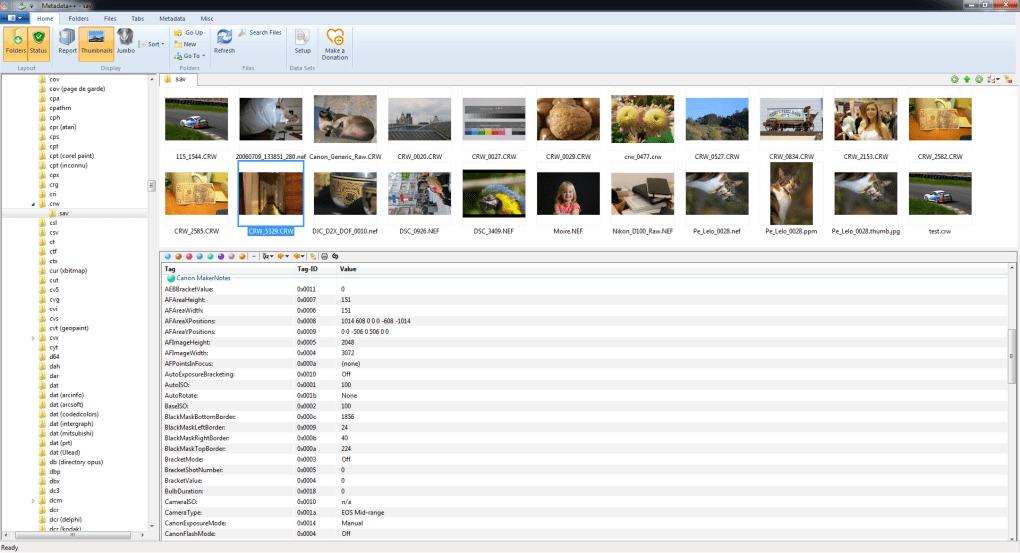
Metadata++ is a free, open-source application specifically designed for comprehensive metadata management. It stands out due to its user-friendly interface, extensive support for various file types and metadata standards, and its ability to create and manage sidecar files.
Key Features of Metadata++:
-
Versatile File Support: Metadata++ handles a wide array of file types, including images, audio, video, and text documents, allowing metadata editing across various formats.
-
Intuitive Interface: The software is designed with user-friendliness in mind, making it accessible to both novice and experienced users. The simple and intuitive layout ensures ease of navigation and efficient workflow.
-
Comprehensive Metadata Management: The application allows for all standard metadata operations: viewing, editing, adding, deleting, and modifying metadata tags.
-
Sidecar File Support: This is a particularly valuable feature. Metadata++ can create and manage sidecar files, allowing metadata management even for file formats that don’t natively support comprehensive metadata embedding.
-
Multilingual Support and UNICODE Display: This expands its accessibility to users worldwide.
Potential Drawbacks of Metadata++:
While Metadata++ offers significant advantages, some potential drawbacks need consideration:
-
Antivirus Flagging: Some antivirus software may flag Metadata++ as malware due to its capabilities to modify file properties. This is often a false positive, but it’s important to be aware of this potential issue. Users should ensure they download the software from a trusted source to mitigate risks.
-
Limited Batch Processing Capabilities (compared to some alternatives): While Metadata++ does offer batch processing, some competing software may provide more advanced and customizable batch processing capabilities.
Despite these minor drawbacks, Metadata++ remains a valuable tool for anyone needing a robust and user-friendly solution for managing file metadata.
The Importance of Metadata in Various Contexts
The applications of metadata extend across diverse fields, impacting how we organize, access, and utilize digital information. Consider the following examples:
-
Digital Libraries and Archives: Metadata is essential for organizing and retrieving information within digital libraries and archives. It allows users to search for resources based on various criteria, improving accessibility and discoverability.
-
Image and Video Management: Photographers, videographers, and other media professionals rely heavily on metadata to organize and manage their digital assets. Metadata embedded in images and videos allows for searching, filtering, and sorting based on various parameters like location, date, and keywords.
-
Data Science and Machine Learning: Metadata plays a vital role in data science and machine learning by providing context and descriptive information about datasets. This information is crucial for data analysis, model training, and improving the accuracy and reliability of machine learning algorithms.
-
Digital Asset Management (DAM): In corporate environments, DAM systems rely on metadata for efficient management of digital assets. Metadata ensures that assets can be easily found, used, and shared across the organization.
Conclusion
Metadata is a fundamental component of digital information management. Understanding its various types, its applications, and the tools available for managing it effectively is crucial for anyone working with digital files. Whether managing personal photo collections or handling large-scale enterprise data, efficient metadata management leads to improved organization, accessibility, and utilization of digital resources. Tools like Metadata++ demonstrate the growing importance of user-friendly software designed to simplify the often-complex task of managing metadata. By leveraging the power of metadata, we can unlock the full potential of our digital assets and transform how we interact with information.
File Information
- License: “Free”
- Latest update: “January 22, 2024”
- Platform: “Windows”
- OS: “Windows XP”
- Language: “English”
- Downloads: “3.6K”
- Size: “12.76 MB”


