
MicroSIP is a free, open-source softphone application designed for making Voice over Internet Protocol (VoIP) calls directly from your computer. Unlike many modern applications boasting sleek interfaces, MicroSIP prioritizes functionality and reliability, offering a straightforward approach to SIP communication. This review delves into the features, strengths, weaknesses, and overall usability of MicroSIP, helping you determine if it’s the right VoIP solution for your needs.
What is MicroSIP and How Does it Work?
In today’s interconnected world, communication transcends geographical boundaries. MicroSIP leverages the power of the internet to provide a simple yet effective way to connect with others globally. As a SIP (Session Initiation Protocol) client, MicroSIP allows users to make and receive VoIP calls using a computer and an internet connection. Its compatibility with virtually any SIP server or VoIP provider eliminates the need for proprietary services, providing users with significant flexibility.

To use MicroSIP, you’ll need a SIP account, which you can obtain from various VoIP providers. Once you have your credentials, simply enter them into MicroSIP’s configuration settings. The application then allows you to make calls to other SIP users, either by manually dialing their numbers or by selecting them from your integrated contact list.
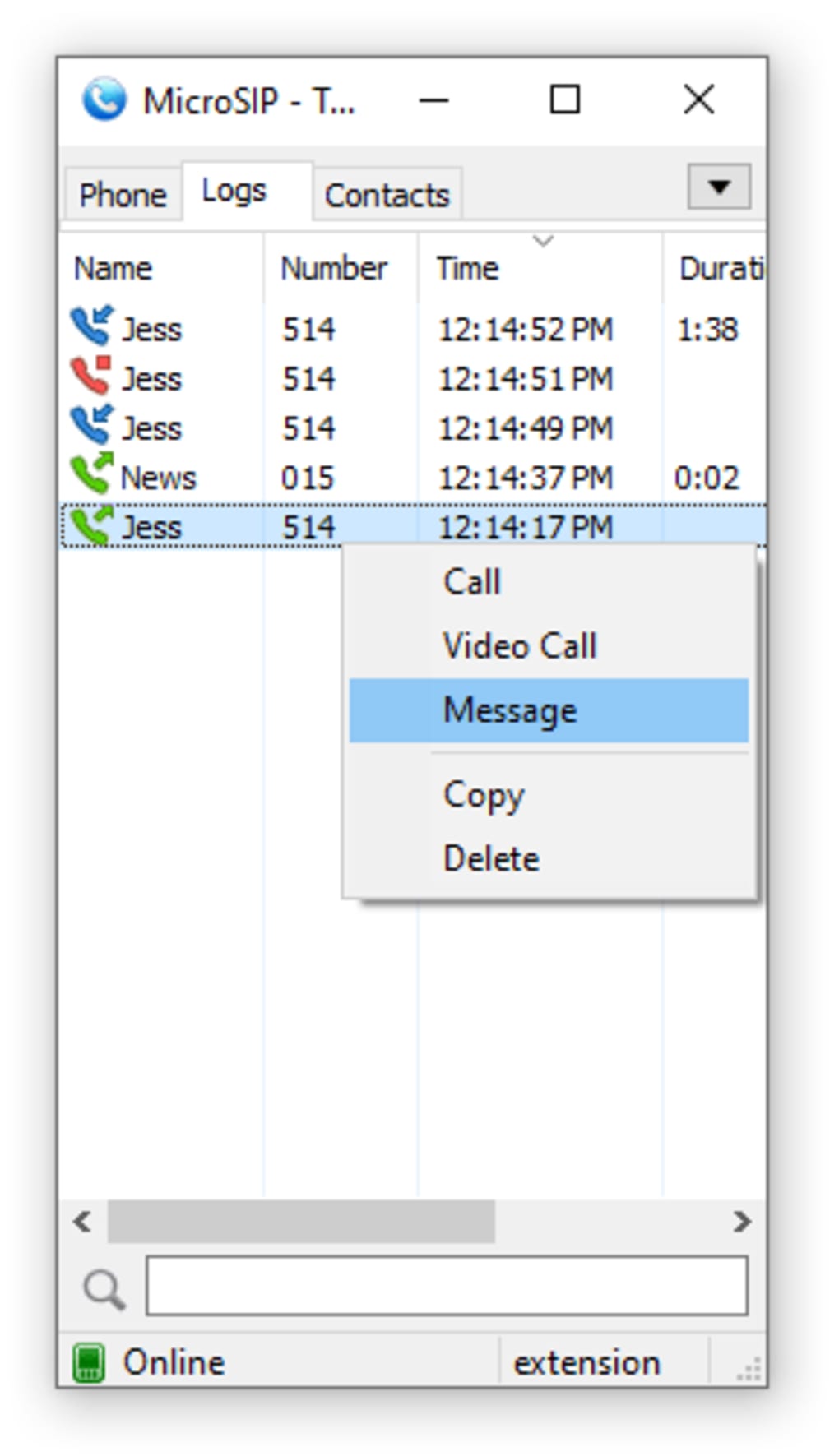
MicroSIP’s interface, while not visually striking, is intuitive and easy to navigate. The main window provides access to key functions: a dialing pad, a call log for reviewing past calls, and a contact book for organizing your contacts. The application excels in its simplicity; there are no complex menus or overwhelming options to obscure its core function: making and receiving calls.
Beyond basic calling, MicroSIP provides several advanced features. Multiple simultaneous calls are supported via a tabbed interface, enabling you to manage multiple conversations concurrently. This functionality makes it suitable for managing various calls at once, which can be a substantial advantage for individuals requiring handling simultaneous calls from different contacts. The ability to switch between calls seamlessly without disconnecting from one while engaging with another significantly enhances its efficiency.
Video calling is also supported, adding another dimension to communication. You can easily switch between voice and video calls, further customizing your communication style. The ability to customize ringtones for individual contacts also adds a degree of personalization. This enhances user experience, allowing for immediate differentiation between callers based on unique audio cues.
Key Features and Functionality of MicroSIP
MicroSIP offers a range of features that contribute to its effectiveness as a VoIP client. These features cater to users requiring a balance between simplicity and functionality in a VoIP solution. Let’s delve into the key aspects:
-
SIP Protocol Support: MicroSIP’s adherence to the SIP standard ensures broad compatibility with various VoIP providers and SIP servers. This flexibility allows users to choose their preferred provider, maximizing choices available to them.
-
Free Local Calls: Local calls made between users on the same SIP network are typically free, providing cost savings for frequent local communication. This feature reduces expenses related to local VoIP usage.
-
International Calling: While call costs to international numbers vary depending on the provider, MicroSIP’s compatibility with diverse providers opens doors for potentially economical international calls. This makes it a viable alternative to traditional methods for international communications.
-
Voice Code Support: The application supports a variety of voice codecs, enhancing the quality and clarity of calls. This allows users to optimize call quality depending on network conditions.
-
Call Encryption: Security is ensured through call encryption, protecting the privacy of conversations. This adds an additional layer of security to communications, ensuring confidentiality.
-
Call Management: The call log, contact book, and customizable features (ringtones, auto-answer, etc.) contribute to efficient call management, streamlining communications.
Pros and Cons of Using MicroSIP
Like any software, MicroSIP has its advantages and disadvantages. A balanced assessment considers both aspects:
Pros:
-
Free and Open-Source: The application is available for free download and use, making it accessible to a broad user base. The open-source nature also allows for community contributions and potential improvements.
-
Simplicity and Ease of Use: The intuitive interface and straightforward design make MicroSIP easy to learn and use, even for individuals with limited technical experience. This contributes to its adoption by users seeking a straightforward VoIP solution.
-
Broad Compatibility: Support for various SIP servers and VoIP providers grants users considerable flexibility in choosing a service that suits their needs.
-
Feature-Rich: Despite its simplicity, MicroSIP offers a range of features, including simultaneous calls, video calling, customizable ringtones, and call encryption.
-
Lightweight and Efficient: MicroSIP is relatively lightweight, not demanding substantial system resources, allowing it to perform efficiently on various devices.
Cons:
-
Outdated Interface: The application’s visual design is dated, lacking the sleek modern aesthetics found in many newer applications. This aesthetic design may not appeal to users accustomed to visually modern software.
-
Limited Advanced Features: Compared to some more modern and feature-rich applications, MicroSIP may lack some advanced features found in paid VoIP clients.
-
Steeper Learning Curve for Advanced Features: While basic functionality is straightforward, mastering advanced features like configuring specific codecs or using advanced SIP settings could require a steeper learning curve for some users. This feature may need additional exploration by more tech-savvy users.
-
Potential for Occasional Bugs: Being open source, MicroSIP might occasionally experience minor bugs or glitches. However, the community-driven nature often leads to timely fixes.
-
Security Considerations: Although the application offers encryption, users should be aware of potential security risks associated with using any VoIP application, especially concerning the security of their SIP account and the chosen VoIP provider’s security measures.
MicroSIP Alternatives and Competitors
Several alternative softphone applications are available, each with its own strengths and weaknesses. A comparison helps determine the best fit based on specific needs:
-
WengoPhone: Provides a relatively intuitive interface with additional features like voicemail and call recording, but may be less widely compatible with different SIP servers.
-
Goober Messenger: Combines instant messaging with VoIP calling, offering a more integrated communication platform, but might be less focused on pure VoIP functionality.
-
Phone Plus: A more comprehensive communication suite that might offer many extra features, but often comes with a price tag.
-
Linphone: A strong competitor, also focusing on open-source and SIP support, but with a somewhat more complex interface. A good option for users who require advanced features.
-
3CX: A business-oriented application offering various features for businesses, including call center capabilities and more sophisticated integration options.
Conclusion: Is MicroSIP Right for You?
MicroSIP presents a compelling option for users seeking a simple, reliable, and free SIP softphone. Its strength lies in its ease of use, broad compatibility, and robust core functionality. While the dated interface might deter some users, those prioritizing functionality over aesthetics will find MicroSIP to be a valuable and efficient communication tool.
The decision of whether to use MicroSIP hinges on your priorities. If you need a lightweight, easy-to-use application for making and receiving SIP calls and value simplicity and open-source nature, MicroSIP is an excellent choice. However, if you prioritize a visually appealing interface, need advanced features, or require extensive integration options, other, potentially commercial options might be better suited to your needs. Therefore, a careful consideration of your communication needs and priorities will ultimately dictate whether MicroSIP aligns with your requirements.
File Information
- License: “Free”
- Latest update: “July 1, 2025”
- Platform: “Windows”
- OS: “Windows 11”
- Language: “English”
- Downloads: “14.4K”


