
Microsoft 365 has evolved from its predecessor, Office 365, seamlessly merging Microsoft’s renowned applications with the power of cloud services. This evolution has resulted in a diverse range of subscription options, enabling users to access essential programs virtually anywhere, anytime. Microsoft has long been a trusted name in productivity and administrative software. The familiarity of applications like Excel, Word, and PowerPoint makes Microsoft 365 a natural fit for businesses, educational institutions, and countless other organizations. Whether you choose the Microsoft 365 download for Mac or Windows, the flexible subscription plans and ubiquitous access to files and programs offer unparalleled convenience and adaptability.
Why Choose Microsoft 365?
The versatility and accessibility of Microsoft 365 make it an ideal solution for managing businesses and organizations of all sizes. Its comprehensive suite of programs addresses nearly every conceivable need. Core applications such as Excel, Word, Outlook, PowerPoint, Publisher, and Access are all included, supplemented by additional features like 60 minutes of Skype per month per user and 1 TB of cloud storage on OneDrive.
Automatic and frequent updates ensure you always have access to the latest features, maximizing productivity. Microsoft 365 boasts compatibility across multiple platforms, including Windows, Mac, iOS, and Android. The Business plan represents the most comprehensive version, offering the broadest array of programs, accessibility, and benefits. However, the Personal and Office Home & Student versions also provide significant value, depending on your specific requirements and the number of users.
The core applications—Excel, Word, PowerPoint, and Outlook—alone provide sufficient functionality for many businesses. However, Microsoft 365’s strength lies in its expansion beyond the basics. For businesses with remote teams or frequent travelers, Microsoft 365 ensures seamless collaboration and access to essential files regardless of location. Applications like OneNote facilitate effective note-taking, while Clipchamp empowers users to create professional-quality videos and screen recordings. Moreover, Copilot, an AI-powered application, streamlines meeting summarization and brainstorming sessions. Additional creative applications such as Forms and Designer further enhance the suite’s capabilities.
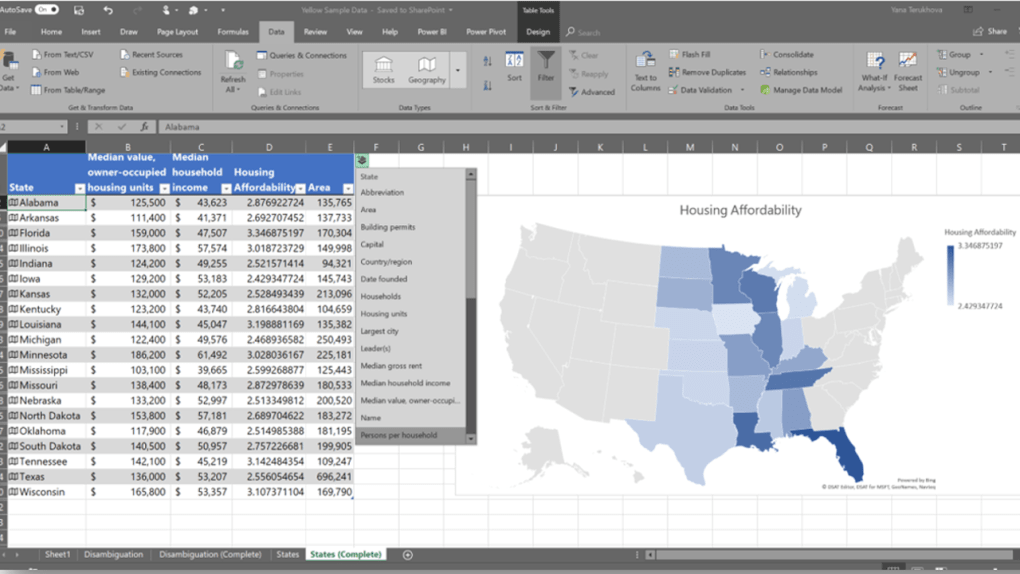
Key Features and Benefits of Microsoft 365
While innovation is a significant draw, users consistently rely on Microsoft Office for its time-tested reliability and familiar functionality. The core applications remain at the heart of Microsoft 365, and the various subscription tiers aim to expand upon these capabilities with additional tools and features. The seamless integration of applications like Outlook and Skype, for example, simplifies scheduling and eliminates the need for multiple programs. The ease of access to programs and files from virtually any location or device is a major time saver and efficiency booster.
Seamless Platform Integration
One of Microsoft 365’s defining advantages is its native application support for almost all major platforms, with the notable exception of Linux. The complete suite functions as a robust desktop application package on Windows and Mac. Free mobile versions are available for iOS and Android, and a web-based version is accessible through any browser, extending functionality to Linux users. Subscription options cater to individual needs, with Personal plans for single users and Family plans accommodating up to six users with up to five devices per user. Business plans offer a tiered approach, ranging from Microsoft 365 Business Basic (providing web and mobile apps without desktop software) to Microsoft 365 Business Premium, which includes a more comprehensive set of features.
Performance and Functionality
Microsoft’s core productivity suite has become indispensable for organizations worldwide, and Microsoft 365 charts the course for its future. Known for its unwavering reliability, Microsoft 365 delivers the expected performance levels while providing unprecedented accessibility.
System Requirements:
- Computer and Processor: PC: 1.6 GHz or faster, 2 cores; Mac: 2 GHz or faster, Intel processor.
- Operating System: Windows 10 or 11, Windows Server 2025, 2022, 2019, or 2016, or a recent macOS version.
- Memory: PC: 4 GB RAM; Mac: 2 GB RAM (32-bit)
Microsoft 365’s comprehensiveness and accessibility, coupled with its flexible subscription tiers, make it suitable for almost any organization. Businesses with expanding teams, frequent travelers, and diverse task requirements will find its capabilities particularly valuable.
Microsoft 365: Meeting Diverse Needs
Beyond the Basics
The data analysis power of Excel and the document sophistication of Word have long been industry standards. Microsoft 365 builds upon this legacy, providing tools that enhance the capabilities of these core applications even further. Features like WordPerfect compatibility enable editing of non-Word documents. Seamless navigation between applications such as Outlook, Excel, and Word enhances workflow efficiency.
Ubiquitous Accessibility
Microsoft 365’s availability across a multitude of platforms and devices ensures users remain connected. Automatic updates maintain peak productivity levels. The extensive range of applications and included storage eliminates location or device limitations, enabling users to work seamlessly from anywhere.

Microsoft 365: Versatility, Connectivity, and Robustness
Whether you’re a student, a family, or a professional, Microsoft 365 offers a subscription plan tailored to your specific needs. It provides a glimpse into the future of productivity, where access to essential tools is readily available and seamless. As workplaces evolve in the digital age, Microsoft 365 adapts and innovates, offering its core applications and a plethora of additional features through various subscription plans, with options for monthly or annual payments. The more limited access of the Personal and Office Home & Student versions is intentional; as needs expand, users can easily upgrade to a more suitable plan without the limitations of perpetual license fees.
Shared functionality and accessibility are paramount in the modern workplace, and Microsoft has prioritized this in the design of its robust and ever-expanding application suite. As productivity needs evolve, Microsoft 365 remains a step ahead. It is an exceptional choice for organizations looking to invest in productivity without constraints. Its high accessibility and generous storage make it a superior solution for a broad spectrum of entities.
Microsoft 365 Copilot: AI-Powered Productivity Boost
Microsoft recently unveiled the groundbreaking Microsoft 365 Copilot, an AI-powered assistant poised to revolutionize how users interact with the Microsoft 365 Office suite. This sophisticated AI assistant offers personalized suggestions, automates routine tasks, and provides valuable insights, ultimately optimizing productivity and improving team collaboration across diverse work environments. Copilot’s seamless integration with Microsoft 365 applications and context-aware assistance simplifies communication and streamlines workflows.
By leveraging cutting-edge AI capabilities such as Smart Compose, task automation, and real-time document collaboration, Copilot accelerates productivity. Furthermore, Copilot prioritizes the security of sensitive information and adapts to user interactions, delivering an increasingly personalized and efficient user experience. Embracing Microsoft 365 Copilot signifies embracing the future of intelligent work and elevating the overall Microsoft 365 experience.


