
Microsoft AutoCollage, released in 2008, promised a revolutionary approach to photo collage creation. This software aimed to simplify the process of transforming a collection of digital photographs into visually appealing collages with minimal user intervention. While innovative for its time, a closer look reveals both the strengths and limitations of this automated collage-making tool. This review delves into the functionality, user experience, and overall impact of Microsoft AutoCollage, considering its capabilities within the context of its release date and comparing it to modern standards.
Ease of Use and Automated Collage Creation
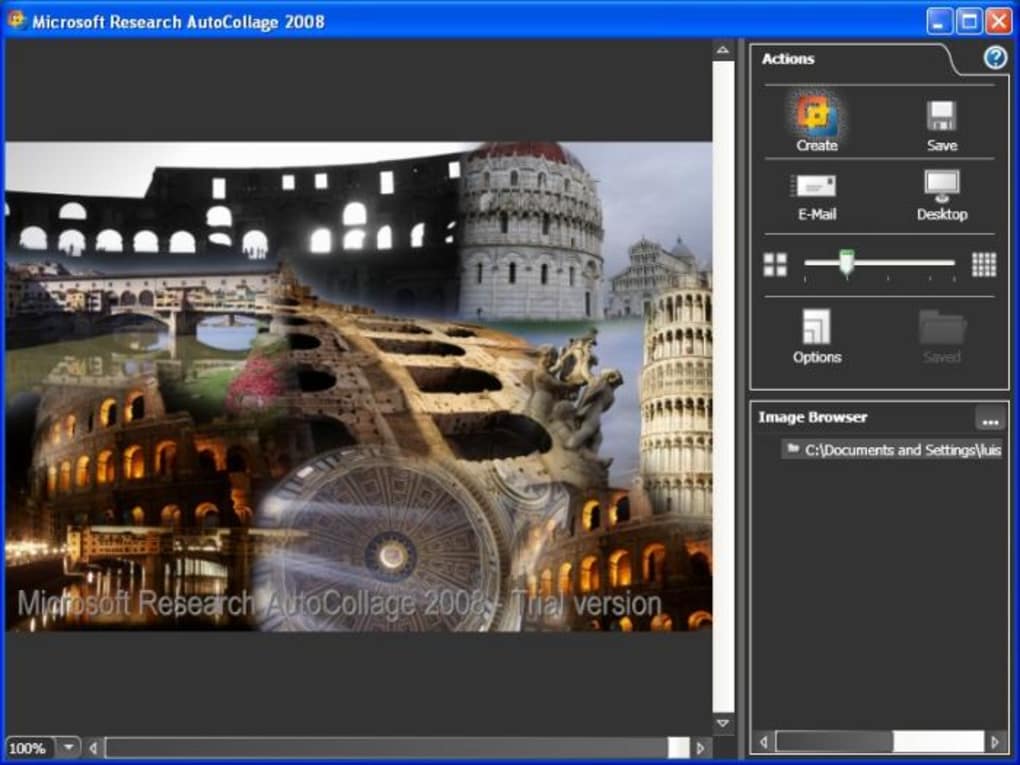
One of Microsoft AutoCollage’s primary selling points was its ease of use. The software boasted a streamlined interface designed for users with varying levels of technical expertise. The process was remarkably simple: users selected a folder containing their photos, specified the desired number of images for inclusion using a slider, and clicked “Create.” AutoCollage then utilized advanced computer vision algorithms to automatically select, arrange, and seamlessly blend the chosen images into a cohesive collage. This level of automation was indeed impressive for 2008, minimizing the manual effort typically associated with creating photo collages. The software’s intuitive design meant that even novice users could quickly generate visually pleasing results. The ability to directly save, email, or set the generated collage as desktop wallpaper further enhanced its user-friendliness.

This automated approach, while convenient, also presented a significant limitation. The lack of granular control over the collage’s composition and elements meant that users had little say in the final product’s aesthetic. The algorithm, while sophisticated for its time, lacked the flexibility to accommodate specific artistic visions or stylistic preferences. This hands-off approach, although initially appealing for its simplicity, ultimately restricted the software’s creative potential.
Impressive Features: Face Detection and Seamless Integration
Despite its limitations in user control, Microsoft AutoCollage incorporated several noteworthy features. The most striking was its advanced face detection technology. The software cleverly identified and highlighted human faces within the selected photos, subtly emphasizing them within the collage layout. This feature was a significant technological achievement for its era and added a unique element to the automated collage generation process. The intelligent placement of faces ensured that the people in the photos remained central to the overall composition, improving the collage’s visual appeal and narrative coherence.
The seamless integration of various output options was another strong point. The ability to directly save the collage in various formats, email it to friends and family, or even instantly set it as desktop wallpaper simplified the workflow considerably. This seamless integration eliminated the need for additional steps, providing a complete and efficient solution for photo collage creation.
Limitations: Lack of Editing Tools and Occasional Bugs
While Microsoft AutoCollage impressed with its automation and face recognition capabilities, several limitations detracted from its overall functionality. The most significant drawback was the absence of advanced image editing tools. Users lacked the ability to refine the collage after its automatic generation. Options for adding text, frames, or adjusting individual image positions were notably absent, preventing users from personalizing the final output beyond simply choosing the number of included photos.
Furthermore, early user reviews reported occasional bugs, particularly when attempting to set the generated collage as desktop wallpaper on Windows XP. These technical glitches highlighted the challenges of balancing automation with robustness and consistency. While these bugs may have been addressed in later updates, they underscore the challenges associated with developing sophisticated image processing software.
User Feedback and Market Reception
User reviews of Microsoft AutoCollage were mixed. While many praised the software’s ease of use and the impressive quality of the automatically generated collages, others criticized the lack of editing capabilities and the occasional software instability. The absence of granular control over image placement and stylistic elements proved to be a major point of contention for some users. Those seeking a more hands-on and customizable approach to photo collage creation found the software too restrictive.
The software’s success in the market was likely influenced by its unique blend of automation and face recognition technology, which catered to users seeking a quick and easy way to create visually appealing collages without extensive technical expertise. However, the limitations in editing capabilities and potential instability likely restricted its appeal to more demanding users who preferred greater creative control.
Comparison to Modern Collage-Making Software
Compared to modern photo collage software, Microsoft AutoCollage’s capabilities appear relatively limited. Current collage-making tools often offer a far wider range of customization options, including advanced editing features, diverse layouts, and a vast library of templates, stickers, and effects. Many modern applications also integrate seamlessly with cloud services and social media platforms, enabling effortless sharing and collaboration. The focus in modern software has shifted towards providing greater user control and creative flexibility, a stark contrast to Microsoft AutoCollage’s primarily automated approach.
The face recognition technology, while innovative for 2008, has become a standard feature in many modern photo editing and organizing applications. Today’s software often utilizes more sophisticated algorithms for object detection and scene understanding, providing even more nuanced and accurate results.
Conclusion: A Legacy of Automation and Innovation
Microsoft AutoCollage 2008 represented a significant step forward in automated photo collage creation. Its ease of use, coupled with its innovative face detection technology, made it a compelling option for users seeking a simple and efficient way to create visually engaging collages. However, its limitations in terms of editing capabilities and occasional software instability highlight the complexities of balancing automation with user control and robustness.
While the software might appear simplistic compared to today’s advanced collage-making tools, it played a crucial role in demonstrating the potential of automated image processing and computer vision. Microsoft AutoCollage’s legacy lies not just in its functionality, but also in its contribution to the evolution of photo editing and collage-making software. It paved the way for more sophisticated applications that combine the ease of automation with the creative freedom users demand. The software serves as a valuable reminder of the technological advancements that have shaped the landscape of digital photography and image editing in the years since its release.
File Information
- License: “Trial version”
- Version: “1.1”
- Latest update: “October 7, 2021”
- Platform: “Windows”
- OS: “Windows XP”
- Language: “English”
- Downloads: “145.7K”
- Size: “7.17 MB”


