
Microsoft Clipchamp has emerged as a powerful and versatile video editing software, catering to a broad spectrum of users on Windows platforms. From amateur video enthusiasts and educators to professional video creators, Clipchamp offers a comprehensive suite of features designed to simplify and enhance the video creation process. Its intuitive interface, coupled with a robust collection of tools and readily available assets, makes it an accessible yet potent option for users of all skill levels. This in-depth review will explore Clipchamp’s key features, strengths, and limitations, providing a comprehensive overview of its capabilities.
User-Friendly Interface and Seamless Integration
One of Clipchamp’s most significant strengths lies in its user-friendly interface. The software boasts an intuitive design that minimizes the learning curve, enabling even novice users to quickly grasp its functionalities. The clean and uncluttered layout presents tools and options in a logical and accessible manner, allowing users to focus on their creative process rather than navigating a complex interface. This ease of use is particularly beneficial for those new to video editing, making Clipchamp an excellent entry point into the world of video creation.
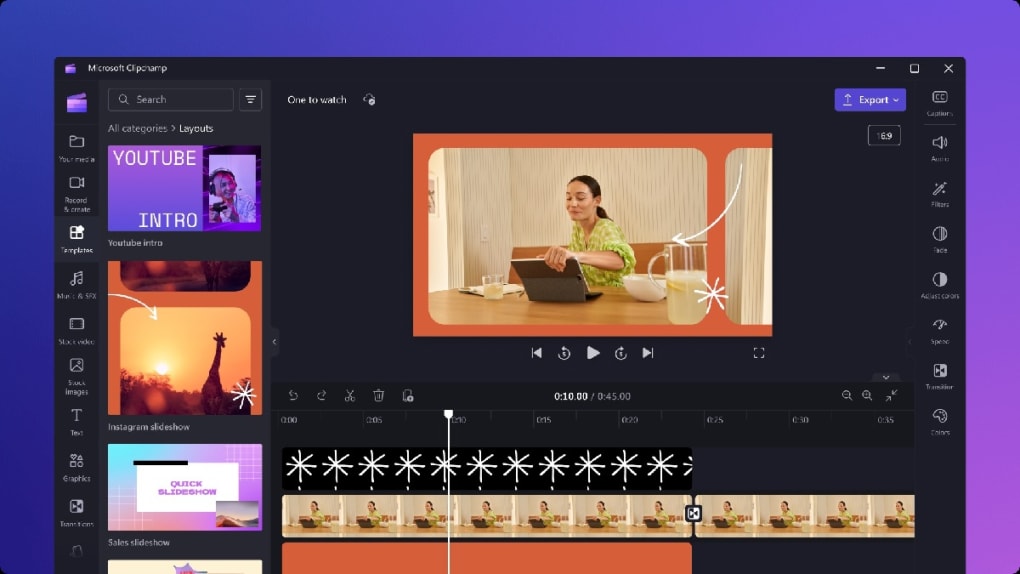
Furthermore, Clipchamp seamlessly integrates with the broader Microsoft ecosystem. This integration enhances its utility for users already immersed in the Microsoft environment. The smooth workflow between Clipchamp and other Microsoft applications streamlines the video editing process, eliminating the need for cumbersome file transfers and format conversions. This seamless integration fosters a more efficient and streamlined workflow, making Clipchamp a natural choice for users heavily reliant on Microsoft products.
A Rich Array of Editing Tools and Effects
Clipchamp offers a comprehensive range of video editing tools, catering to various creative needs. The software provides a solid foundation of basic editing capabilities, including trimming, cutting, and cropping videos. These fundamental tools are essential for shaping and refining video footage, ensuring the final product is polished and professional. Beyond the basics, Clipchamp provides access to a wealth of advanced features that elevate the editing experience. Users can apply sophisticated filters and overlays to enhance the visual appeal of their videos, adding stylistic flair and visual interest.
A standout feature is Clipchamp’s robust support for green screen technology. This allows users to replace the background of their videos with a variety of images or videos, opening up creative possibilities for storytelling and visual effects. The implementation of green screen functionality is particularly user-friendly, making it accessible to a wider range of users who might not possess extensive experience with video editing software.
Clipchamp also incorporates AI-powered features to further enhance the user experience. The AI-powered voiceover function allows users to easily generate voiceovers in over 80 languages, greatly improving accessibility and expanding creative options for multilingual projects. The automatic subtitle generation feature complements the voiceover capabilities, ensuring that videos are accessible to a broader audience, regardless of their native language. These AI-powered features are designed to streamline the workflow and provide users with powerful capabilities without requiring extensive technical expertise.
Extensive Library of Royalty-Free Content
One of the most significant advantages of using Microsoft Clipchamp is its access to an extensive library of royalty-free stock assets. This library contains over one million royalty-free videos, images, and audio clips, providing users with an immense selection of resources for enhancing their video projects. Access to this vast library eliminates the need for users to source their own assets, saving valuable time and effort. The royalty-free nature of the content ensures that users avoid any copyright infringement issues, simplifying the process of creating legally compliant videos. This is a substantial benefit, particularly for those who lack the time or resources to locate and acquire their own suitable media.
Clipchamp’s integration with Windows Media Player also adds to its versatility. This integration allows users to seamlessly refine their videos for various platforms, ensuring compatibility across diverse devices and applications. The ability to optimize videos for different platforms simplifies the distribution and sharing of video content, ensuring that videos appear appropriately on various screens and devices.
Premium Features and the Freemium Model
Clipchamp operates on a freemium model, providing both free and premium options. The free version offers a robust set of features, including access to the basic editing tools, a selection of royalty-free assets, and the ability to export videos. However, the free version does impose certain limitations. For instance, exported videos will include a watermark, and access to some advanced features is restricted.
The premium plan removes these restrictions. Users subscribing to the premium plan can export videos without watermarks and in higher resolutions, including stunning 4K. This allows for significantly improved video quality, ideal for professional applications and sharing on platforms that prioritize high-resolution content. Premium subscribers also gain access to a more extensive collection of stock assets, exclusive filters and effects, and a brand kit designed to maintain consistent branding across their video projects.
The freemium model offers flexibility to users. The free version provides a valuable introduction to the software and its capabilities, allowing users to experiment and assess its suitability before committing to a paid subscription. The premium plan provides enhanced features and capabilities for those who require more advanced functionality and professional-grade output.
Microsoft Clipchamp: Strengths and Weaknesses
Microsoft Clipchamp is a compelling video editing software with numerous strengths. Its user-friendly interface makes it accessible to users of all skill levels, while its comprehensive features, including basic editing tools, advanced effects, and an extensive royalty-free asset library, cater to a wide range of creative needs. Seamless integration with the Microsoft ecosystem enhances its convenience for users within that environment. The inclusion of AI-powered tools further streamlines the workflow and broadens creative possibilities.
However, the freemium model’s limitations are noteworthy. While the free version provides sufficient functionality for many casual users, the restrictions on resolution, watermarks, and access to advanced features may discourage more serious users or professionals. The reliance on a subscription model also represents a potential ongoing cost consideration for users. Despite these limitations, the free version remains a highly functional and valuable tool for many, providing an accessible gateway to video editing.
Conclusion: A Powerful Tool for Video Creation
In conclusion, Microsoft Clipchamp presents a compelling option for video editing on Windows platforms. Its user-friendly interface, comprehensive features, and substantial royalty-free asset library make it a valuable tool for users of all skill levels, from beginners to professionals. While the freemium model presents some limitations, the overall functionality and accessibility of Clipchamp make it a powerful and versatile addition to the video editing landscape. Its seamless integration within the Microsoft ecosystem and incorporation of AI-powered tools further enhance its appeal, solidifying its position as a strong contender in the market. The balance between free and paid features allows users to explore its capabilities and gradually upgrade to a premium subscription as their needs and expertise evolve.
File Information
- License: “Free”
- Version: “varies-with-device”
- Latest update: “March 26, 2024”
- Platform: “Windows”
- OS: “Windows 10”
- Language: “English”
- Downloads: “12.3K”


