
Microsoft Excel 2016, now seamlessly integrated into the Microsoft 365 suite, remains a leading spreadsheet application for efficient data organization and analysis. This powerful tool, accessible from virtually any device, offers real-time collaboration features, ensuring seamless teamwork regardless of location or operating system. This guide delves into the key features, benefits, and system requirements of Microsoft Excel 2016, highlighting its enduring relevance in both personal and professional settings.
Key Features and Capabilities of Microsoft Excel 2016
Excel 2016’s strength lies in its multifaceted capabilities, designed to cater to both novice and expert users. Its intuitive interface, coupled with robust analytical tools, makes data management and interpretation remarkably efficient. Let’s explore some of its standout features:
1. Intelligent Data Visualization: Excel 2016 goes beyond basic spreadsheet functionality by intelligently suggesting charts and tables based on your input data. This automated feature simplifies the process of transforming raw data into dynamic visuals, accelerating the analytical process for both beginners and experienced users. The program’s capacity to quickly generate appropriate visualizations saves significant time and effort, enabling users to focus on data interpretation rather than chart construction. This intuitive design fosters data literacy, making complex datasets more accessible and understandable.
2. Real-Time Collaboration: Seamlessly integrated with Microsoft 365, Excel 2016 facilitates real-time collaboration via OneDrive. This cloud-based platform allows multiple users to simultaneously work on the same spreadsheet, regardless of their location or the device they are using (Windows, macOS, iOS, Android). This feature significantly enhances team productivity, streamlining workflows for projects involving multiple contributors. This real-time interaction promotes efficient communication and ensures everyone is working with the most up-to-date version of the document. The seamless integration with other Microsoft 365 applications, such as Microsoft Teams and Outlook, further streamlines communication and workflow.

3. Robust Data Analysis Tools: Excel 2016 is equipped with a comprehensive suite of data analysis tools designed to simplify the process of extracting insights from complex datasets. From pivot tables to advanced charting capabilities and trend highlighting features, users can effortlessly present data in a clear, concise, and insightful manner. The application’s built-in formulas further automate data extraction, calculation, and compilation, eliminating manual processes and reducing the risk of human error. This streamlined approach allows users to focus on interpreting the data and deriving meaningful conclusions.
4. Cross-Platform Compatibility: Data sharing is a fundamental aspect of modern collaboration. Excel 2016 ensures complete compatibility across various devices and operating systems. Whether your colleagues are accessing the spreadsheet from a Windows desktop, a Mac, an iPhone, or an Android device, the functionality remains consistent and uninterrupted. Real-time updates ensure all users are working with the most current version, fostering efficient collaboration and eliminating the confusion that can arise from outdated versions. This feature is especially critical in today’s diverse and geographically dispersed work environments.
5. User Familiarity and Industry Standard: Microsoft Excel enjoys widespread adoption across various industries and professional settings. Its user-friendly interface and extensive feature set make it a highly sought-after skill. Familiarity with Excel is often a key requirement in many job descriptions, making it a valuable asset in today’s job market. The program’s consistent presence in educational institutions ensures a continuous influx of users well-versed in its functionalities. This widespread adoption strengthens Excel’s position as the industry standard for spreadsheet applications.
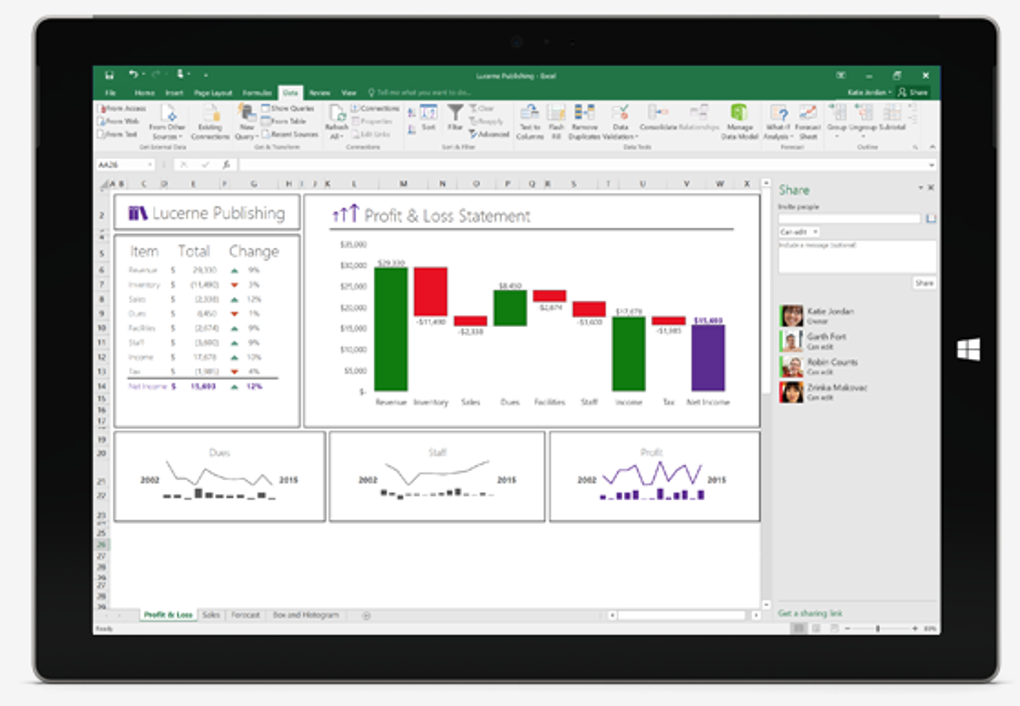
Microsoft Excel 2016 within the Microsoft 365 Ecosystem
Microsoft Excel 2016 is not a standalone application; it’s an integral part of the Microsoft 365 suite. This integration provides several significant advantages:
-
Free Download (with subscription): While Excel 2016 can be downloaded, its full functionality requires a Microsoft 365 subscription. Many educational institutions and businesses provide such subscriptions to students and employees, making access widely available.
-
Comprehensive Productivity Suite: Microsoft 365 provides access to other powerful applications like PowerPoint, Word, Outlook, and more. This comprehensive suite addresses a wide range of productivity needs, from document creation and presentation design to email management and communication. This integration simplifies workflows by providing a cohesive ecosystem of interconnected tools.
- Enhanced Collaboration: The integration of Excel 2016 within Microsoft 365 enhances collaboration capabilities. The real-time co-authoring features, combined with communication tools like Microsoft Teams, make collaborative projects significantly more efficient and productive. The central cloud storage via OneDrive ensures that everyone has access to the latest version, preventing confusion and improving overall workflow.
System Requirements and Installation
To install and use Microsoft Excel 2016 via Microsoft 365 on a Windows device, you need:
-
Operating System: Windows 7 or later. While it may function on older systems, Microsoft recommends Windows 7 or a more recent version for optimal performance and compatibility.
-
Microsoft 365 Subscription: Access to a Microsoft 365 subscription is mandatory to utilize the full functionalities of Excel 2016. This subscription grants access to a wide range of other Microsoft services and applications.
-
Sufficient Storage: Ensure your computer has enough available storage space to download and run the software. The installation size is substantial, so check your available storage capacity before initiating the download.
-
Internet Connection: A reliable internet connection is required to access Microsoft 365 services and to utilize the cloud-based features of Excel 2016, such as real-time co-authoring and cloud storage.
Conclusion: The Enduring Power of Microsoft Excel 2016
Microsoft Excel 2016, integrated within Microsoft 365, continues to be a vital tool for data management and analysis. Its user-friendly interface, combined with powerful features like real-time collaboration and sophisticated data visualization tools, makes it an indispensable application for both personal and professional use. The seamless integration with the Microsoft 365 ecosystem enhances productivity, fosters collaboration, and strengthens its position as an industry-standard application. As remote work continues to grow, the capabilities of Excel 2016 for real-time collaboration are invaluable, ensuring its relevance in the evolving digital landscape. Whether you are a student, a professional, or simply someone managing personal finances, the versatility and efficiency of Microsoft Excel 2016 make it an asset worth exploring and mastering.


