
Microsoft InfoPath 2010, a powerful yet now-discontinued application within the Microsoft Office suite, provided a robust platform for designing and creating various forms without requiring extensive coding knowledge. While no longer directly available for trial or purchase, its capabilities remain relevant, offering insights into the evolution of form creation software. This article delves into the features, functionality, pros and cons, and alternatives to Microsoft InfoPath 2010.
Understanding InfoPath 2010’s Core Functionality
InfoPath 2010 distinguished itself through its dual-application approach: InfoPath Designer and InfoPath Filler. This design catered to both form creators and those filling out the created forms.
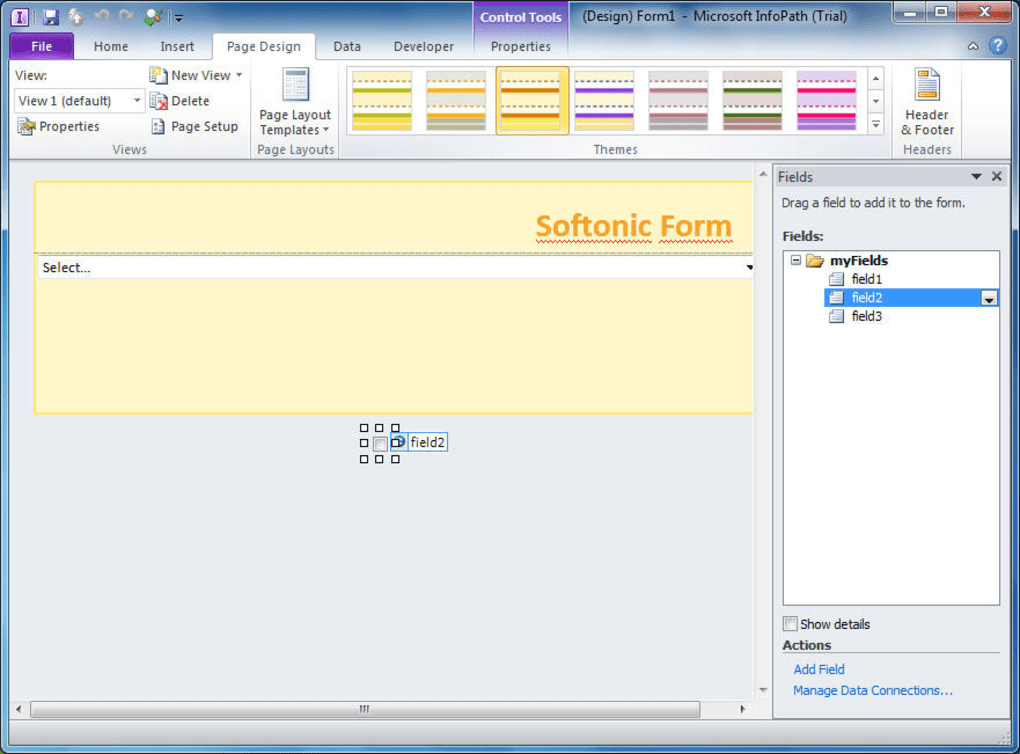
InfoPath Designer: This served as the primary tool for crafting forms. Users leveraged a user-friendly interface incorporating familiar Microsoft Office tools, drastically simplifying the form design process. A significant advantage was the inclusion of numerous pre-built templates, providing a head start for users and accelerating development. Beyond basic form elements, InfoPath Designer facilitated the integration of data connections to external databases, enabling dynamic data population and manipulation within forms. This capability extended to XML (Extensible Markup Language) data handling, enabling seamless data exchange and integration with other applications. The sophisticated features of InfoPath Designer empowered users to build complex, data-driven forms that could be deployed across various platforms.
InfoPath Filler: This component offered a streamlined experience for those tasked with filling out the forms created in InfoPath Designer. It provided a clean and intuitive interface, minimizing distractions and focusing solely on data input. This separation of design and filling functionalities made form completion straightforward, even for users with limited technical skills. The design of InfoPath Filler emphasized efficiency, ensuring users could rapidly complete their tasks without navigating complex design elements. This application played a vital role in enhancing user experience, particularly for those who did not require the advanced capabilities of InfoPath Designer.
The integration with Microsoft SharePoint 2010 was a key differentiator for InfoPath 2010. This integration enabled users to readily publish and share their created forms through SharePoint, simplifying collaboration and dissemination. Furthermore, it allowed the creation of sophisticated, modular, and extensible SharePoint applications, expanding the scope and power of SharePoint functionalities. The integration facilitated the development of rich web forms, enhancing the user experience with improved interactivity and presentation. This feature provided a significant boost to collaboration and enhanced the productivity of teams using SharePoint as their central platform.
Target Audience and Required Skills
While InfoPath 2010 simplified form creation, it was not intended for complete beginners. A fundamental understanding of database management, XML, and coding practices was often beneficial, though not strictly mandatory. This requirement stemmed from the software’s ability to handle complex data structures and integrations. Users comfortable navigating XML schemas and data connections could leverage InfoPath 2010’s extensive capabilities more effectively. Those familiar with database concepts could more readily manage the data sources connected to their forms. While the visual interface minimized the need for direct coding, an understanding of these concepts ensured users could more effectively use advanced features and troubleshoot any arising issues. Therefore, the ideal user profile included professionals or individuals with some prior experience in database management, XML handling, or a general understanding of coding fundamentals.
Advantages and Disadvantages of Using InfoPath 2010
Like any software application, InfoPath 2010 presented both advantages and disadvantages.
Pros:
- Intuitive Design and Familiar Interface: Its design borrowed heavily from the Microsoft Office suite, making navigation easy for users already acquainted with Word, Excel, or PowerPoint. The user-friendly interface significantly reduced the learning curve associated with form creation.
- Dual-Application Approach: The separate Designer and Filler applications optimized the workflow for both form creators and end-users. The distinct functionalities enhanced both user experiences, providing a tailored approach for each.
- Extensive Template Library: The pre-built templates accelerated the process, offering a variety of form structures ready for customization and immediate use. This minimized the initial setup time and allowed rapid form development.
- Robust Data Handling Capabilities: Its capabilities extended far beyond simple data entry. InfoPath 2010 permitted complex data management, including integration with external databases and XML-based data handling. This flexibility enabled seamless data exchange and manipulation across various platforms and systems.
- Seamless SharePoint Integration: The integration with SharePoint 2010 streamlined form publication, sharing, and collaboration. The synergy between the two platforms enhanced workflow and facilitated teamwork.
- Comprehensive Documentation: Microsoft provided detailed documentation and support for InfoPath 2010, assisting users in navigating its functionalities and resolving issues. This comprehensive resource assisted users of all skill levels in learning and utilizing the software.
Cons:
- Steeper Learning Curve for Beginners: Despite its user-friendly interface, users lacking basic database, XML, and coding knowledge might struggle to fully leverage its advanced capabilities. The sophisticated features, while powerful, added complexity for those without the necessary background.
- Discontinuation by Microsoft: Microsoft no longer supports or updates InfoPath 2010, limiting access to technical support and updates. This discontinuation represents a significant drawback, as users are left without official support or bug fixes.
- Limited Cross-Platform Compatibility: InfoPath 2010 primarily ran on Windows, limiting its applicability across different operating systems. The platform-specific nature restricted its use in multi-platform environments.
- Requirement for Filler Application: The need for the separate InfoPath Filler application for form completion added an extra layer of complexity for users and deployment. This requirement increased the administrative overhead for managing and deploying the application.
Alternatives to Microsoft InfoPath 2010
Given the discontinuation of InfoPath 2010, exploring alternative solutions is essential. Several alternatives, offering varying levels of functionality and complexity, exist:
- Microsoft Forms: A cloud-based solution, Microsoft Forms offers a simpler, more streamlined approach to form creation. It lacks the advanced capabilities of InfoPath 2010, but its ease of use and cloud integration make it a suitable replacement for simpler form needs.
- Microsoft Power Apps: This low-code platform provides a more powerful alternative for creating custom business applications, including sophisticated forms. While it requires a degree of familiarity with its design tools, it offers far greater flexibility and integration possibilities than Microsoft Forms.
- Google Forms: A popular and readily accessible option, Google Forms simplifies form creation and shares similar functionality to Microsoft Forms. Its seamless integration with other Google services is a key advantage.
- Typeform: This platform focuses on creating visually appealing and engaging forms, ideal for applications demanding a high level of user experience. Its focus on user experience provides an advantage when dealing with user-facing forms and surveys.
- Jotform: A versatile form builder with a wide range of features and integrations, Jotform caters to both simple and complex form requirements. It offers a balanced approach between ease of use and robust functionality.
The choice of an alternative depends largely on the complexity of the forms required and the technical expertise of the users. For basic forms, Microsoft Forms or Google Forms may suffice. For more complex applications, Microsoft Power Apps or other professional form builders may be necessary.
Conclusion
Microsoft InfoPath 2010, despite its discontinuation, holds a significant place in the history of form creation software. Its intuitive interface, powerful features, and seamless SharePoint integration simplified the development and deployment of complex forms. However, its legacy is challenged by modern alternatives better suited to current needs and technological landscapes. The best option depends entirely on the specific needs and technical skills of the users. While the advanced capabilities of InfoPath 2010 are not readily replicated in many simple alternatives, the overall ease of use and deployment offered by current tools outweigh the complexities presented by this older software.
File Information
- License: “Full”
- Version: “2010”
- Latest update: “October 8, 2014”
- Platform: “Windows”
- OS: “Windows XP”
- Language: “English”
- Downloads: “49.7K”
- Size: “344.62 MB”


