
Microsoft Mathematics, a powerful calculator application for Windows, once offered users a robust platform for tackling complex mathematical problems. While the application itself is no longer available for download, its legacy persists, highlighting the significant features it provided and paving the way for successor applications that continue to build upon its foundation. This article explores the functionalities of Microsoft Mathematics, examines its strengths and weaknesses, and discusses available alternatives for users seeking similar capabilities.
The Functionality of Microsoft Mathematics
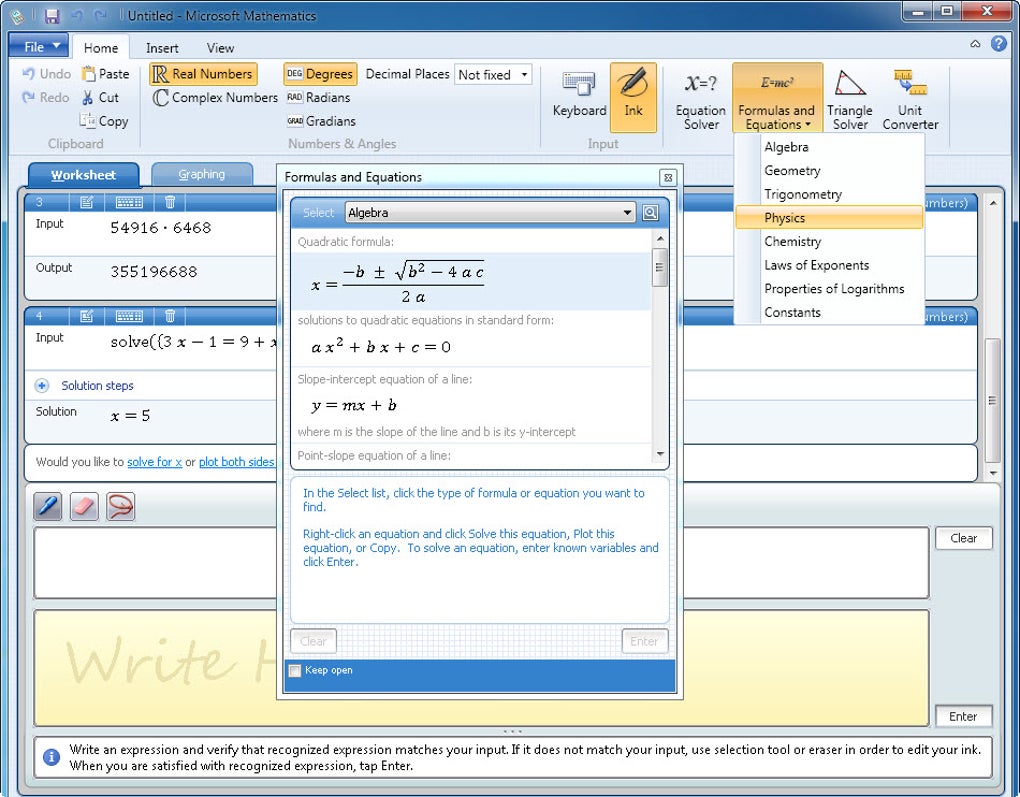
Microsoft Mathematics transcended the capabilities of a basic calculator, providing a comprehensive suite of tools aimed at streamlining mathematical calculations and problem-solving. Its intuitive interface, designed for ease of use, allowed users to input data using a variety of methods, including a mouse, keyboard, or stylus. This versatility made the software accessible to a broad range of users, from students to professionals.
The core functionality centered around a sophisticated calculator capable of handling a wide array of mathematical operations, from simple arithmetic to complex symbolic calculations. This functionality extended far beyond basic addition, subtraction, multiplication, and division, incorporating capabilities to handle advanced mathematical concepts such as:
-
Algebra: Solving algebraic equations, simplifying expressions, and manipulating polynomials were all within the capabilities of Microsoft Mathematics. The software was particularly useful in tackling intricate algebraic problems that would otherwise require significant manual calculation.
-
Trigonometry: The application efficiently handled trigonometric functions, including sine, cosine, tangent, and their inverses, facilitating the solving of problems involving angles, triangles, and related geometric concepts. The ability to work with both degrees and radians further enhanced its versatility.
-
Calculus: While the extent of its calculus capabilities isn’t explicitly detailed in available information, the overall sophistication of the software suggests a capacity to handle at least basic differentiation and integration, areas crucial for advanced mathematical applications.
-
Geometry: Microsoft Mathematics incorporated tools for solving geometric problems, including those involving triangles. A dedicated triangle solver allowed users to determine unknown sides or angles based on known parameters.
- Equation Solving: A built-in equation solver allowed users to input equations and obtain solutions quickly and efficiently, reducing the time and effort needed to solve complex systems of equations manually.
Beyond its core calculation capabilities, Microsoft Mathematics included additional features that expanded its utility:
-
Unit Converter: This integrated tool enabled seamless conversion between different units of measurement, eliminating the need for separate conversion utilities. This was particularly helpful in scientific and engineering applications where consistent unit handling is critical.
-
Formula and Equation Library: The software contained a comprehensive library of formulas and equations commonly used across various scientific disciplines, including algebra, geometry, trigonometry, physics, and chemistry. This readily available reference material further enhanced the application’s problem-solving capabilities.
-
Graphing Capabilities: Microsoft Mathematics offered graphing capabilities, enabling users to visualize mathematical functions and equations in two or three dimensions. This visualization tool proved invaluable for understanding the relationships between variables and interpreting mathematical results.
-
Customizable Interface: Users could personalize the application’s appearance through customizable color schemes and calculator skins. This customization feature enhanced the software’s user-friendliness by allowing users to tailor the interface to their preferences.
Strengths and Weaknesses of Microsoft Mathematics
While Microsoft Mathematics offered significant advantages over traditional calculators, it also had some limitations. Its strengths included its comprehensive functionality, intuitive interface, and ease of use. The incorporation of a wide range of mathematical tools and functions into a single, streamlined application made it an efficient solution for numerous mathematical tasks. Its user-friendly design made it accessible to users with varying levels of mathematical expertise.
However, a primary weakness stemmed from its proprietary file format. This limited interoperability with other applications and software, potentially hindering data exchange and workflow integration. The dependence on a specific format could restrict its use in situations where collaboration or data sharing with other applications was essential.
Furthermore, although it addressed many advanced mathematical needs, there might have been limitations in dealing with highly specialized mathematical functions or advanced symbolic manipulation that could be handled by more specialized software. The available documentation doesn’t explicitly highlight these specific limitations, but the complexity of some mathematical operations suggests a possibility for such gaps.
Another potential area of improvement concerned user feedback and communication with the developers. User reviews suggest difficulty in conveying issues or suggestions directly to Microsoft, a shortcoming that could impact the evolution and improvement of the software.
Alternatives to Microsoft Mathematics
The discontinuation of Microsoft Mathematics leaves users searching for comparable alternatives. Several software applications offer similar functionalities, each with its own strengths and weaknesses:
- Microsoft Math: This successor application is mentioned as an alternative and seemingly aims to fill the gap left by the original Microsoft Mathematics. It likely provides an updated interface and potentially enhanced features, but specific details require further investigation. A trial version is available, allowing users to evaluate its suitability before committing to full usage.
-
Math Solver: This application is described as an excellent scientific calculator with plotting capabilities, suggesting a strong overlap in functionality with Microsoft Mathematics. Its free availability is an added advantage for users seeking a budget-friendly alternative.
-
Formula Calculator: This application specifically focuses on equation solving, offering a tool to input formulas with variables and obtain results. While less comprehensive than Microsoft Mathematics, it provides a specialized solution for users primarily concerned with equation solving.
These alternatives provide various options for users looking to replace the functionalities provided by Microsoft Mathematics. Choosing the best alternative depends on individual requirements and preferences, considering factors such as specific features, cost, and ease of use.
Conclusion: A Lasting Impact
Despite its discontinuation, Microsoft Mathematics left a lasting impact on the landscape of mathematical software. Its comprehensive suite of tools, coupled with its user-friendly interface, made it a valuable asset for a broad range of users. While the software itself is no longer available, its influence is evident in the development of successor applications that continue to evolve and expand upon its core functionalities. The availability of alternatives ensures that users can still find suitable software to meet their mathematical computation needs. The legacy of Microsoft Mathematics lies not just in its own capabilities, but also in its contribution to the ongoing development of robust and accessible mathematical tools for users worldwide.
File Information
- License: “Free”
- Latest update: “May 24, 2023”
- Platform: “Windows”
- OS: “Windows 7”
- Language: “English”
- Downloads: “220.3K”
- Size: “18.45 MB”


