
Microsoft Mouse Mischief is a free add-in for Microsoft PowerPoint designed to transform static presentations into engaging, interactive learning experiences. This tool, primarily aimed at educators, offers a simple yet effective way to boost student participation and comprehension during classroom discussions and lessons. Its intuitive interface and diverse interactive elements make it an accessible and valuable resource for teachers of all levels, injecting dynamism into traditionally passive learning environments. While no longer officially supported, its legacy continues to resonate with users who appreciate its straightforward approach to interactive learning.
Enhancing Classroom Engagement Through Interactivity
One of the most significant challenges educators face is maintaining student engagement during classroom discussions and presentations. Passive listening often leads to decreased comprehension and a lack of active participation. Microsoft Mouse Mischief directly addresses this challenge by offering a means to create interactive PowerPoint presentations that encourage active learning. By incorporating elements of game-based learning, Mouse Mischief transforms ordinary slideshows into dynamic, responsive tools that capture students’ attention and stimulate their participation. This shift from a one-way transmission of information to a two-way, interactive dialogue significantly improves the learning experience.
The tool’s impact extends beyond mere entertainment; it fosters a more collaborative and stimulating learning atmosphere. Interactive elements encourage students to actively participate, respond to questions, and engage with the material on a deeper level. This active involvement leads to better knowledge retention and a more profound understanding of the presented concepts. The gamified nature of the activities further incentivizes participation, turning learning into an enjoyable and rewarding experience. This positive reinforcement can significantly improve student attitudes towards learning and foster a more positive classroom environment overall.
Navigating the Mouse Mischief Interface and Functionality
Microsoft Mouse Mischief integrates seamlessly into the familiar Microsoft PowerPoint environment. Upon installation, a new tab labeled “Mouse Mischief” appears in the PowerPoint ribbon, providing easy access to the add-in’s features. This tab houses the tools and options necessary to create interactive slides, distinguishing it from the standard PowerPoint functionality. A key difference to note is the requirement to initiate the slideshow using the “Play Slideshow” button within the Mouse Mischief tab, rather than the standard PowerPoint button. This minor adjustment is a small price to pay for the added interactivity it unlocks.
The core functionality of Mouse Mischief revolves around its ability to create three distinct types of interactive slides:
-
Yes/No Slides: These slides present a question that requires a simple yes or no answer. The “Assign Answer” button allows the teacher to designate the correct response, facilitating immediate feedback for students. This simple format is ideal for quick checks for understanding or reinforcing basic concepts.
-
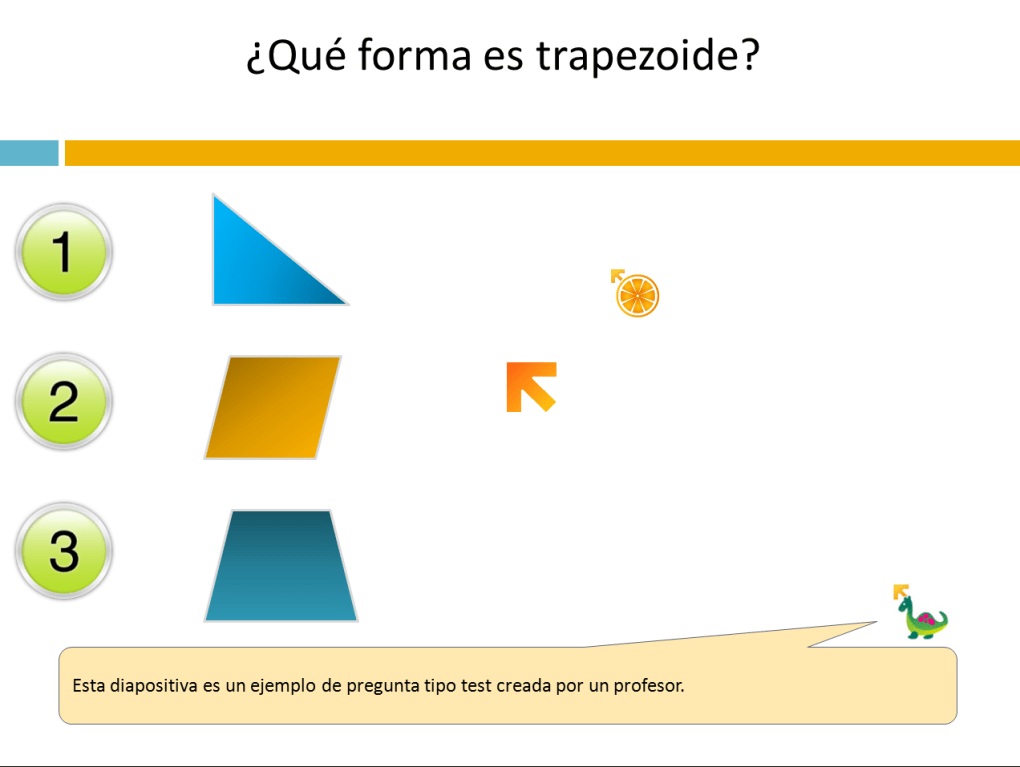
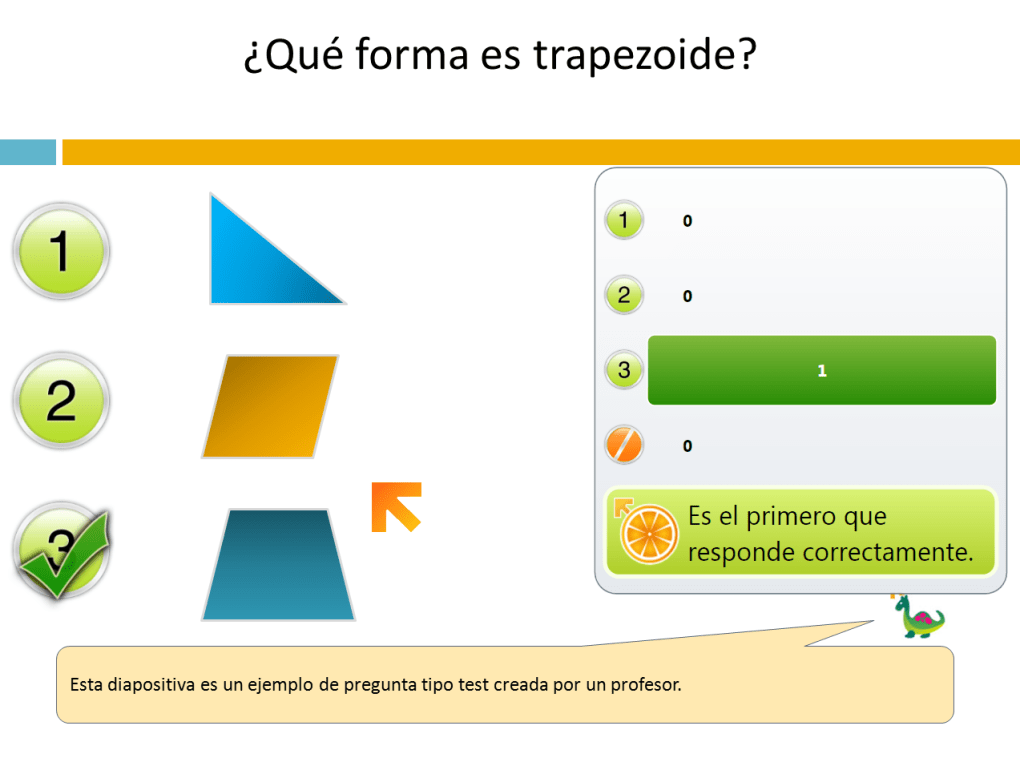
Multiple Choice Slides: These slides offer a more nuanced approach to questioning, allowing teachers to present multiple answer choices for students to select. While the number of choices is limited to ten, this limitation is usually sufficient for most classroom scenarios. The “Assign Answer” button again allows for correct answer designation, and a unique feature highlights the student who correctly answered first, adding a competitive element to the learning process.
-
Drawing Slides: This option provides a blank canvas for students to draw directly onto the slide using their mouse. This open-ended format is particularly useful for encouraging creative problem-solving or allowing students to visually represent their understanding of a concept. While not suitable for straightforward question-and-answer scenarios, it provides a valuable alternative to the more structured question types.
The limitations of Mouse Mischief are primarily centered around its inability to support open-ended text-based questions and its compatibility restrictions. The lack of open-ended questions restricts the range of assessment types available, focusing more on multiple-choice scenarios. Furthermore, the tool’s compatibility is limited, primarily functioning only with older versions of Microsoft PowerPoint (2007 and 2010) and not supporting Windows 10. Despite these limitations, its unique approach to interactive learning makes it a valuable tool for those who can utilize it effectively within its constraints.
Beyond the Basics: Additional Features and Advantages
Mouse Mischief incorporates several additional features that enhance its usability and effectiveness:
-
Cursor Control: The ability to disable the cursor during certain parts of the presentation helps to maintain focus and prevent accidental clicks from disrupting the flow.
-
Timer Functionality: A built-in timer allows teachers to set time limits for questions or activities, managing the pacing of the lesson effectively.
-
First Correct Answer Display: As previously mentioned, this feature showcases the student who first selects the correct answer, introducing a friendly competitive aspect to the learning process.
The overall aesthetic of the application is designed to be appealing and engaging for students, using a simple, cartoony style appropriate for a classroom setting. This visually appealing interface enhances the overall learning experience and makes interaction with the tool more enjoyable for students.
Evaluating the Strengths and Weaknesses of Mouse Mischief
Mouse Mischief offers a compelling blend of features that greatly enhance classroom interactions. The ability to create interactive quizzes and activities is a significant advantage, as it directly addresses the problem of low student engagement. The simple interface and intuitive controls make it easy for both teachers and students to use effectively, minimizing the learning curve associated with new software. The incorporation of features like timers and cursor control further strengthens its usability and allows for a more structured and controlled learning environment.
However, its limitations should also be considered. The primary drawback is the lack of support for open-ended questions and its restricted compatibility with only older versions of PowerPoint and Windows. This compatibility issue limits its accessibility, potentially preventing many educators from utilizing the software. The limited number of choices available in multiple-choice questions is another minor limitation that could hinder the creation of more complex assessments.
Despite these shortcomings, the strengths of Mouse Mischief significantly outweigh its weaknesses, particularly for teachers who can utilize it within its operational constraints. The creation of interactive learning experiences has proven to be a highly effective method of enhancing engagement, and Mouse Mischief provides a simple, accessible way to achieve this.
Conclusion: A Valuable Tool for Interactive Learning (Despite Age)
Microsoft Mouse Mischief, despite its age and limited compatibility, remains a valuable tool for educators seeking to enhance classroom interaction. Its simple yet effective design allows teachers to easily create engaging and interactive PowerPoint presentations that actively involve students in the learning process. While the limitations regarding open-ended questions and compatibility with newer operating systems and PowerPoint versions should be acknowledged, the benefits of increased student engagement and the incorporation of gamified learning experiences make it a worthwhile tool for those who can utilize it. Its legacy as a simple yet effective solution for interactive classroom presentations remains significant, highlighting the lasting impact of a well-designed tool focused on enhancing the educational experience. For those seeking a straightforward way to make their PowerPoint presentations more interactive, Mouse Mischief, despite its age, provides a noteworthy approach to elevating classroom engagement.
File Information
- License: “Free”
- Version: “1.0.1443”
- Latest update: “October 10, 2018”
- Platform: “Windows”
- OS: “Windows Vista”
- Language: “English”
- Downloads: “37.1K”
- Size: “10.51 MB”


