Microsoft Office 2010 for Windows, while a legacy version, remains a noteworthy suite in the history of productivity software. Released in 2010, it offered a robust set of applications designed to streamline various tasks, from document creation and spreadsheet management to email handling and note-taking. Though superseded by numerous subsequent versions, Office 2010 continues to hold relevance for users who appreciate its familiar interface and reliable functionality, particularly in environments where compatibility with older file formats is crucial. This review delves into its key features, advantages, disadvantages, and overall suitability for modern-day users.
Key Features and Applications
Microsoft Office 2010 encompasses a collection of essential applications designed to meet diverse productivity needs:
-
Microsoft Word: The cornerstone of the suite, Word provides a comprehensive word processing environment for creating, editing, and formatting documents of all types. Features include spell check, grammar check, advanced formatting options, image insertion, and various templates for different document styles. While lacking the advanced collaboration features found in later versions, Word 2010 remains capable of handling most typical writing tasks.
-
Microsoft Excel: Excel, the spreadsheet application, allows for data organization, analysis, and visualization. Users can create complex formulas, charts, and graphs to represent numerical data effectively. While lacking the extensive data analysis tools of newer versions, Excel 2010 provides a solid foundation for spreadsheet-based tasks such as budgeting, financial modeling, and data tracking.
-
Microsoft PowerPoint: PowerPoint facilitates the creation of engaging presentations. Users can incorporate text, images, videos, and animations to deliver dynamic presentations. Though the animation and transition effects might seem less sophisticated compared to later versions, PowerPoint 2010 remains a valuable tool for generating presentations for various purposes.
-
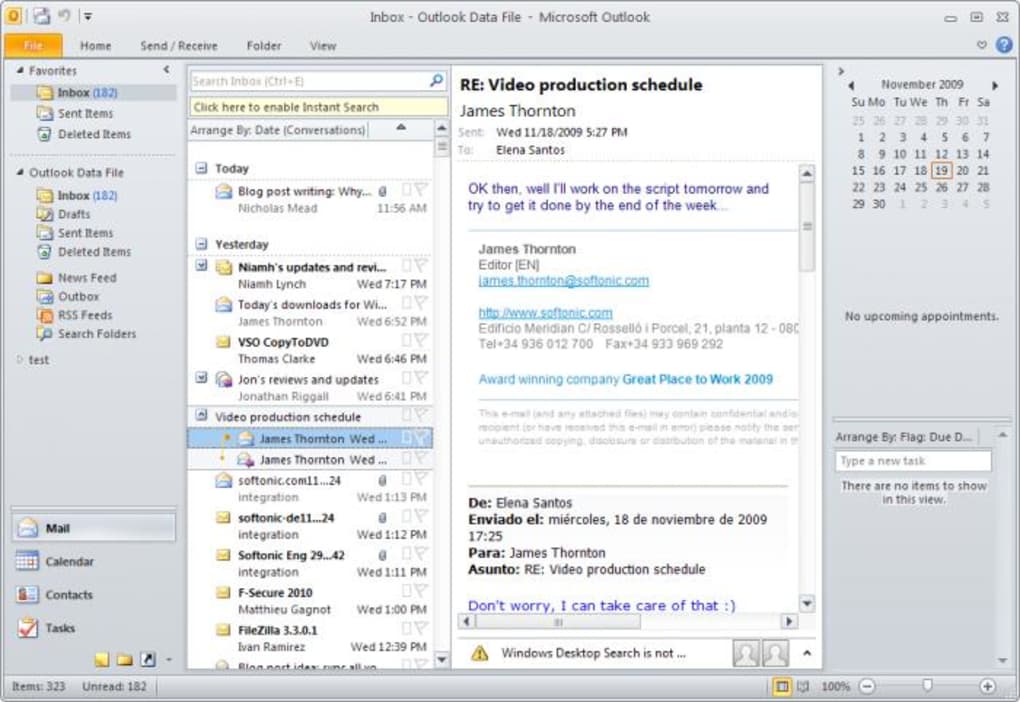
Microsoft Outlook: Outlook serves as a versatile email client, managing emails, calendars, contacts, and tasks. Users can organize their inbox, schedule appointments, and manage their contacts efficiently. While lacking features such as integrated social media connectivity and more advanced calendar functionalities of later versions, Outlook 2010 still offers a robust email management system.
-
Microsoft OneNote: OneNote is a digital note-taking application. Users can jot down notes, create lists, organize information, and embed multimedia elements into their notes. OneNote 2010 provides a basic, yet useful platform for note-taking and organization.
These core applications, along with other components depending on the specific edition (Home and Student, Home and Business, Professional), form the foundation of Microsoft Office 2010’s productivity capabilities.
Advantages of Microsoft Office 2010
Despite its age, Microsoft Office 2010 retains several advantages:
-
Familiarity and Ease of Use: The interface is intuitive and consistent with previous versions, making it easy for users already familiar with older Microsoft Office suites to transition seamlessly. The classic ribbon interface, while less feature-rich than later iterations, remains straightforward for many users.
-
Stable and Reliable Performance: Office 2010 is known for its stability and reliability. It generally runs smoothly on systems meeting the minimum requirements and offers a consistent performance without the frequent updates and potential compatibility issues of newer versions. This makes it a suitable choice for users prioritizing stability over the latest features.
-
Offline Functionality: Office 2010 applications function fully offline. This is a significant advantage for users in areas with limited or unreliable internet access or those who prefer to work without a constant online connection. The ability to work autonomously is a key benefit for users in various settings.
-
Perpetual License: Office 2010 typically comes with a perpetual license, meaning that once purchased, users retain access to the software indefinitely without ongoing subscription fees, unlike Microsoft 365. This cost structure is appealing to users who prefer a one-time purchase model.
-
Compatibility with Older File Formats: Office 2010 maintains compatibility with various file formats, including those from earlier Microsoft Office versions. This is a crucial advantage for businesses or individuals who still need to work with older documents or collaborate with users employing older software versions. This backward compatibility minimizes the risk of file format issues and data loss.
Disadvantages of Microsoft Office 2010
While Office 2010 offers several advantages, it also has some drawbacks compared to modern versions:
-
Lack of Modern Features: Office 2010 lacks many of the advanced features introduced in subsequent versions, such as enhanced collaboration tools, cloud integration, real-time co-authoring, and improved data analysis capabilities. These omissions limit its functionality compared to contemporary productivity suites.
-
Security Vulnerabilities: As an older software, Office 2010 may be vulnerable to security threats and exploits that have been addressed in more recent versions. While Microsoft might provide security patches for a period, it’s crucial to be aware of the potential security risks and regularly update the operating system.
-
Limited Cloud Integration: Integration with cloud services is limited compared to Microsoft 365 and later Office versions. While it allowed for saving documents to Windows Live, it lacks the seamless cloud integration and collaboration features seen in newer versions.
-
Compatibility Issues with Modern File Formats: While it offers backward compatibility, Office 2010 may experience compatibility issues with newer file formats generated by later Office versions. This limitation may create challenges when collaborating with users utilizing more recent software.
-
Lack of Support: Microsoft’s official support for Office 2010 has likely ended. This means users are unlikely to receive technical assistance or updates directly from Microsoft.
System Requirements and Installation
The minimum system requirements for Microsoft Office 2010 on Windows are:
- Processor: 500 MHz processor (minimum)
- Memory: 512 MB RAM (recommended), 56 MB (minimum)
- Hard Disk Space: 3.0 GB available disk space (minimum)
- Display: 1024 x 768 screen resolution (minimum)
- Operating System: Windows XP SP3 (32-bit only), Windows Vista SP1, Windows Server 2003 R2 with MSXML 6.0, Windows 7, Windows Server 2008, and later 32-bit and 64-bit operating systems.
- Graphics: DirectX 9.0c graphics card with 64 MB video memory or higher.
Installation usually involved a product key and a download process. While the original download links might be outdated, users might find installation files through other reliable sources, although caution should be exercised to avoid malicious software.
Conclusion: Is Microsoft Office 2010 Still Relevant?
Microsoft Office 2010 serves as a historical landmark in productivity software. Its enduring legacy is testament to its once-groundbreaking features and user-friendly design. While significantly surpassed by newer iterations in terms of functionality and security, it remains a viable option under specific circumstances.
Users who prioritize stability, offline functionality, and a familiar interface, and whose work does not require the cutting-edge features of newer versions, might find Office 2010 a suitable choice. However, for users seeking the latest features, enhanced collaboration capabilities, seamless cloud integration, and robust security, transitioning to a more recent version of Microsoft Office or a competing productivity suite is recommended. The decision depends on individual needs and priorities. Users should carefully weigh the advantages and disadvantages before deciding whether Office 2010 meets their requirements.