
Microsoft Outlook is a widely recognized and highly versatile personal information manager (PIM) and email client. Far beyond simply sending and receiving emails, Outlook seamlessly integrates email management with calendar scheduling, contact organization, task management, and note-taking, making it a powerful productivity tool for both personal and professional use. This comprehensive guide delves into the features, capabilities, system requirements, and integration possibilities of Microsoft Outlook for Windows.
Core Features and Functionality of Microsoft Outlook
At its heart, Outlook provides a robust email client experience, allowing users to send, receive, organize, and archive emails efficiently. However, its capabilities extend far beyond basic email management, encompassing a suite of integrated tools designed to streamline various aspects of personal and professional life.
Email Management: The fundamental function of Outlook remains its email management capabilities. Users can manage multiple email accounts, filter incoming messages, create folders for organization, utilize powerful search functionality to locate specific emails quickly, and employ rules to automate email processing. This includes the ability to prioritize important emails, flag messages for later review, and easily manage attachments. The intuitive interface simplifies even complex email management tasks.
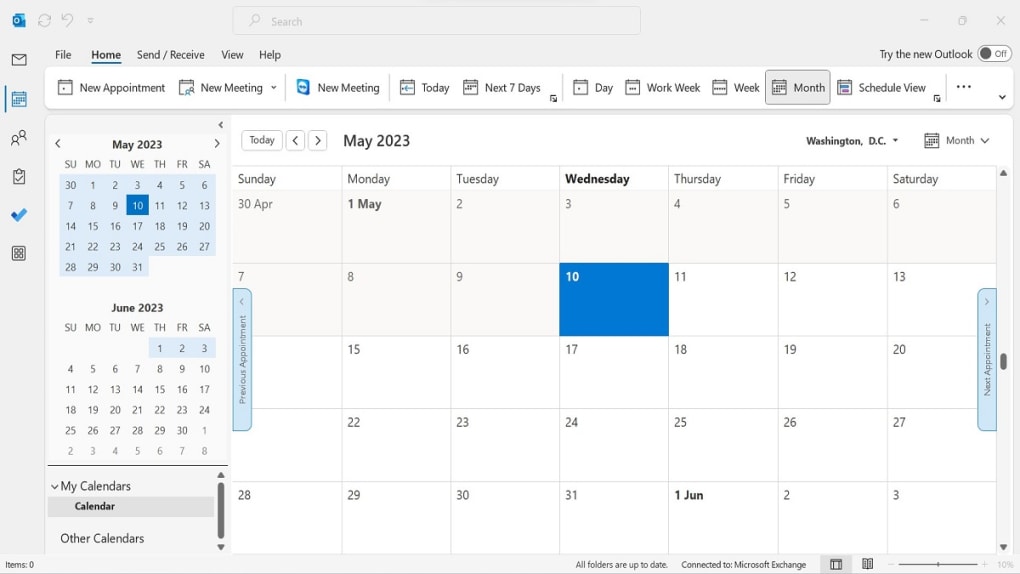
Calendar and Scheduling: Outlook’s calendar function is a central feature, allowing users to schedule appointments, meetings, and events. This extends to setting reminders, creating recurring events, and sharing calendars with colleagues or family members for seamless scheduling coordination. The calendar integration with other features, such as email, ensures that meeting requests, confirmations, and updates are all centralized in one location. The ability to view multiple calendars simultaneously provides a clear overview of individual and shared schedules.
Contact Management: Beyond email and calendar functionality, Outlook offers a robust contact management system. Users can store extensive contact details, including names, phone numbers, email addresses, physical addresses, and company affiliations. The built-in search capabilities simplify finding specific contacts, and the ability to group contacts into custom categories further enhances organization. Contact information is easily accessible from within emails and calendar entries, streamlining communication and task management.
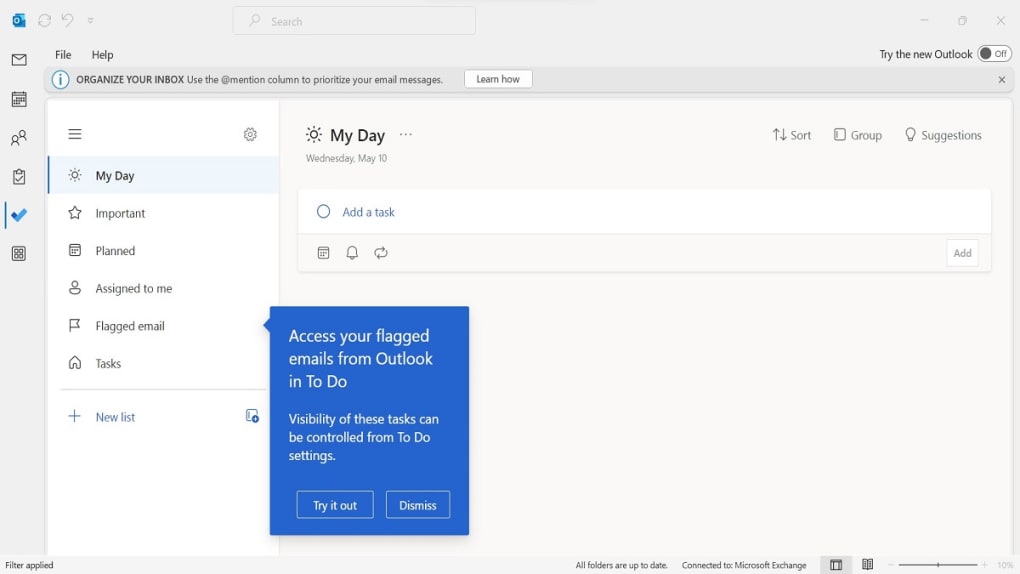
Task Management: Outlook provides a task management system that integrates seamlessly with email and calendar functionality. Users can create tasks, set deadlines, assign priorities, and track progress. Tasks can be linked to specific contacts or calendar events, enabling effective task management within a broader context. The flexible nature of the task management system allows users to tailor it to their specific needs and workflow.
Note-Taking and Journaling: For those who appreciate a centralized location for information, Outlook offers built-in note-taking and journaling capabilities. These features allow users to create notes, jot down ideas, and record daily activities. This functionality can be valuable for project management, brainstorming sessions, and personal record-keeping. The integration with other Outlook features allows users to link notes to emails, calendar entries, or tasks, creating a comprehensive and connected information management system.
Advanced Features Enhancing Productivity
Beyond the core functionalities, Outlook boasts a collection of advanced features designed to optimize workflow and increase productivity:
Email Scheduling: This feature allows users to compose emails in advance and schedule their delivery for a later time or date. This is especially helpful for time-sensitive communications or when wishing to send emails during specific time zones.
Quick Parts: For frequently used phrases or email snippets, Quick Parts allow users to store and reuse pre-written text blocks, significantly speeding up the email composition process. This is particularly useful for standardized responses or frequently sent email templates.
New Item Alerts: Users receive immediate notifications of new emails, calendar updates, or other important events. These alerts, which can be customized, help ensure that important information isn’t missed.
File Attachment Reminders: This feature proactively alerts users if they mention the word “attachment” in an email but haven’t included one. This prevents the omission of crucial documents from emails.
Ignore Messages: This feature allows users to filter conversations directly to the deleted items folder, preventing unnecessary clutter in the inbox.
Clean Up Conversation: With a single click, this feature removes all read messages from a conversation, leaving only unread messages for review.
Automatic Calendar Updates: Outlook can automatically add flight, hotel, or car rental reservations directly to the calendar based on email confirmations. This ensures that travel plans are seamlessly integrated into the user’s schedule.
Integration with Other Office Apps: Outlook works seamlessly with other Microsoft Office applications, such as Word and Excel. Users can attach documents, spreadsheets, and presentations to emails effortlessly and access information from other Office apps within Outlook.
System Requirements and Availability
Microsoft Outlook for Windows operates effectively on Windows 10 and later versions. To run Outlook smoothly, the following system requirements are recommended:
- Processor: 1.6 GHz or faster, 2-core
- RAM: 4 GB for 64-bit, 2 GB for 32-bit
- Storage: 4 GB available hard drive space
- Display: 1024 x 768 resolution
Microsoft Outlook is now primarily available through a Microsoft 365 subscription, which offers access to a suite of applications, including Word, Excel, and PowerPoint. While a standalone version might be available in some instances, a Microsoft 365 subscription provides the most comprehensive and up-to-date version of the software with continuous updates and enhanced features.
Microsoft Outlook and Microsoft 365: Enhanced Collaboration
The integration of Outlook with Microsoft 365 significantly enhances its capabilities, primarily through improved collaboration features. Sharing calendars, co-authoring documents, and utilizing integrated communication tools within the Microsoft 365 ecosystem makes teamwork simpler and more efficient.
The benefits of using Outlook within the Microsoft 365 environment include:
- Improved Search Functionality: The search capabilities within Microsoft 365-integrated Outlook are more sophisticated and deliver faster results.
- Accessibility Tools: Enhanced accessibility tools ensure compliance with accessibility standards and provide inclusive features for users with disabilities.
- Advanced Meeting Creation Options: Microsoft 365 offers advanced options for creating and managing meetings, including improved scheduling and attendee management tools.
- Email Reactions: The ability to respond to emails with quick reactions (similar to emojis) simplifies quick acknowledgments and feedback.
Why Choose Microsoft Outlook?
Microsoft Outlook remains a leading choice for email and personal information management due to several key advantages:
- Seamless Integration with Microsoft 365: The powerful synergy with the Microsoft 365 suite enhances productivity and collaboration.
- Comprehensive Collaboration Tools: Facilitates seamless teamwork through shared calendars, integrated communication features, and co-authoring capabilities.
- Integrated Email and Calendar: Combines email management and calendar scheduling into a unified platform for optimal efficiency.
- Extensive Productivity Tools: Offers a diverse range of productivity tools, including journaling, task management, and note-taking.
- Robust Security Features: Microsoft incorporates robust security measures to protect user data and prevent unauthorized access.
- Powerful Search Functionality: The sophisticated search function simplifies the process of locating specific emails, calendar events, and contacts.
In conclusion, Microsoft Outlook is much more than simply an email client; it’s a comprehensive personal information management system designed to enhance productivity and streamline various aspects of personal and professional life. Its seamless integration with Microsoft 365 and robust feature set make it a powerful tool for individuals and businesses alike. The continuous evolution of its features ensures that Outlook remains a leading contender in the world of email and productivity software.
File Information
- License: “Full”
- Latest update: “December 4, 2024”
- Platform: “Windows”
- OS: “Windows 11”
- Language: “English”
- Downloads: “2.2M”


